вступ
The Mars Gaming MPB650SI is a 650W ATX power supply designed for desktop computers. It features an advanced cooling system with an SI fan, FDB bearings, and AI2-RPM smart control for optimal balance between silence and cooling efficiency. This power supply also incorporates DC-DC and SMD technologies for enhanced durability and energy efficiency, holding an 80 Plus Bronze 230V EU certification. This manual provides essential information for the proper installation, operation, maintenance, and troubleshooting of your MPB650SI power supply.
Інформація про безпеку
Please read all safety instructions before installing or operating the power supply. Failure to do so may result in damage to the unit, other components, or personal injury.
- Перед встановленням або технічним обслуговуванням переконайтеся, що джерело живлення відключено від розетки змінного струму.
- Не відкривайте блок живлення casinг. Високий об'ємtagВсередині присутні деталі, і немає деталей, які може обслуговувати користувач.
- Встановлюйте блок живлення в добре провітрюваному приміщенні, подалі від джерел тепла та вологи.
- Використовуйте лише кабелі, що постачаються з блоком живлення.
- Ensure all connectors are securely attached to prevent electrical shorts or damage.
Вміст упаковки
Перевірте наявність усіх елементів в упаковці:
- Mars Gaming MPB650SI 650W ATX Power Supply
- Шнур живлення змінного струму
- Монтажні гвинти
- Посібник користувача (цей документ)
Налаштування та встановлення
Follow these steps to install your Mars Gaming MPB650SI power supply:
- Підготуйте свою систему: Переконайтеся, що ваш комп'ютер повністю вимкнено та від'єднано від розетки. Відкрийте корпус комп'ютера.
- Видаліть старий блок живлення (якщо є): Від’єднайте всі кабелі від старого блоку живлення до материнської плати, відеокарти, дисків та інших компонентів. Відкрутіть гвинти та вийміть старий блок живлення з корпусу.
- Встановлення нового блоку живлення: Carefully place the MPB650SI power supply into the designated power supply bay in your computer case. Ensure the fan is oriented correctly for optimal airflow (typically facing downwards if there's a bottom vent, or upwards if not). Secure the power supply with the provided mounting screws.

малюнок 1: The SI fan with copper core, designed for extreme silence and efficient cooling. Ensure proper fan orientation during installation.
- Підключення основних кабелів живлення:
- Connect the 24-pin ATX motherboard power cable to the corresponding port on your motherboard.
- Connect the 4+4-pin EPS +12V CPU power cable to the CPU power port on your motherboard.

малюнок 2: закінченоview of available connectors: 1x ATX MB 24 PIN, 1x EPS +12V 4+4 PIN, 2x PCIe 6+2 PIN, 5x SATA, 3x Molex 4 PIN.
- Підключення живлення відеокарти: If your graphics card requires external power, connect the 6+2-pin PCIe power cables from the power supply to your graphics card. The MPB650SI provides two 6+2-pin PCIe connectors.
- Підключення периферійного живлення: Connect SATA power cables to your SSDs, HDDs, and optical drives. Use Molex connectors for any other peripherals that require them.
- Управління кабелем: Акуратно прокладіть кабелі, щоб покращити потік повітря та покращити естетику вашого корпусу.
- Закрийте корпус та підключіть живлення змінного струму: Close your computer case. Connect the AC power cord to the power supply's AC inlet and then plug it into a wall outlet. Ensure the power switch on the power supply is in the OFF position before plugging it in.
Інструкція з експлуатації
Operating the Mars Gaming MPB650SI power supply is straightforward:
- Увімкнення: After all connections are secure and the AC power cord is plugged in, flip the power switch on the back of the power supply to the ON (I) position.
- Запуск системи: Press the power button on your computer case to start your system. The power supply will provide stable power to all connected components.
- AI2-RPM Smart Control: The integrated AI2-RPM technology will automatically adjust the fan speed based on the system's load and temperature. This ensures optimal cooling while maintaining low noise levels.

малюнок 3: The MPB650SI incorporates AI2-RPM for intelligent fan control, alongside DC-DC and SMD technologies for efficiency and durability.
- Вимкнення живлення: To shut down your system, use the operating system's shutdown procedure. Once the system is off, you can flip the power switch on the power supply to the OFF (O) position for complete power disconnection.
Технічне обслуговування
Правильне обслуговування забезпечує довговічність та оптимальну роботу вашого блоку живлення:
- Очищення від пилу: Periodically (every 3-6 months, depending on environment) disconnect the power supply from the AC outlet and use compressed air to clean dust from the fan and ventilation grilles. Dust accumulation can hinder cooling and reduce efficiency.
- Забезпечте належний потік повітря: Make sure there are no obstructions blocking the air intake or exhaust vents of the power supply. Good airflow is crucial for heat dissipation.
- Перевірка кабелю: Періодично перевіряйте всі кабелі живлення, щоб переконатися, що вони надійно підключені та не пошкоджені.
Усунення несправностей
If you encounter issues with your MPB650SI power supply, refer to the following common problems and solutions:
| проблема | Можлива причина | Рішення |
|---|---|---|
| Система не вмикається. |
|
|
| Система вмикається, але одразу вимикається. |
|
|
| Вентилятор шумить або не обертається. |
|
|
If the problem persists after attempting these solutions, please contact Mars Gaming customer support.
Технічні характеристики
Key technical specifications for the Mars Gaming MPB650SI power supply:
| Особливість | Деталь |
|---|---|
| Назва моделі | MPB650SI |
| Бренд | Марс Геймінг |
| Вихідна ватtage | 650 Вт |
| Форм-фактор | ATX |
| Сертифікація ефективності | 80 Plus Bronze 230V EU (90% efficiency) |
| Спосіб охолодження | Air (SI Extreme Silence Fan with Copper Core, FDB bearings, AI2-RPM) |
| Технології | DC-DC, SMD |
| Системи захисту | OPP, OVP, UVP, SCP, OCP |
| Вхідний об'ємtage | 230 вольт (перемінний струм) |
| Розміри (Д x Ш x В) | 5.91 x 5.71 x 3.35 дюйма (150 x 145 x 85 мм) |
| вага | 1.5 кілограма |
| Роз'єми |
|

малюнок 4: Power supply label detailing 650W total power and DC output voltagес.
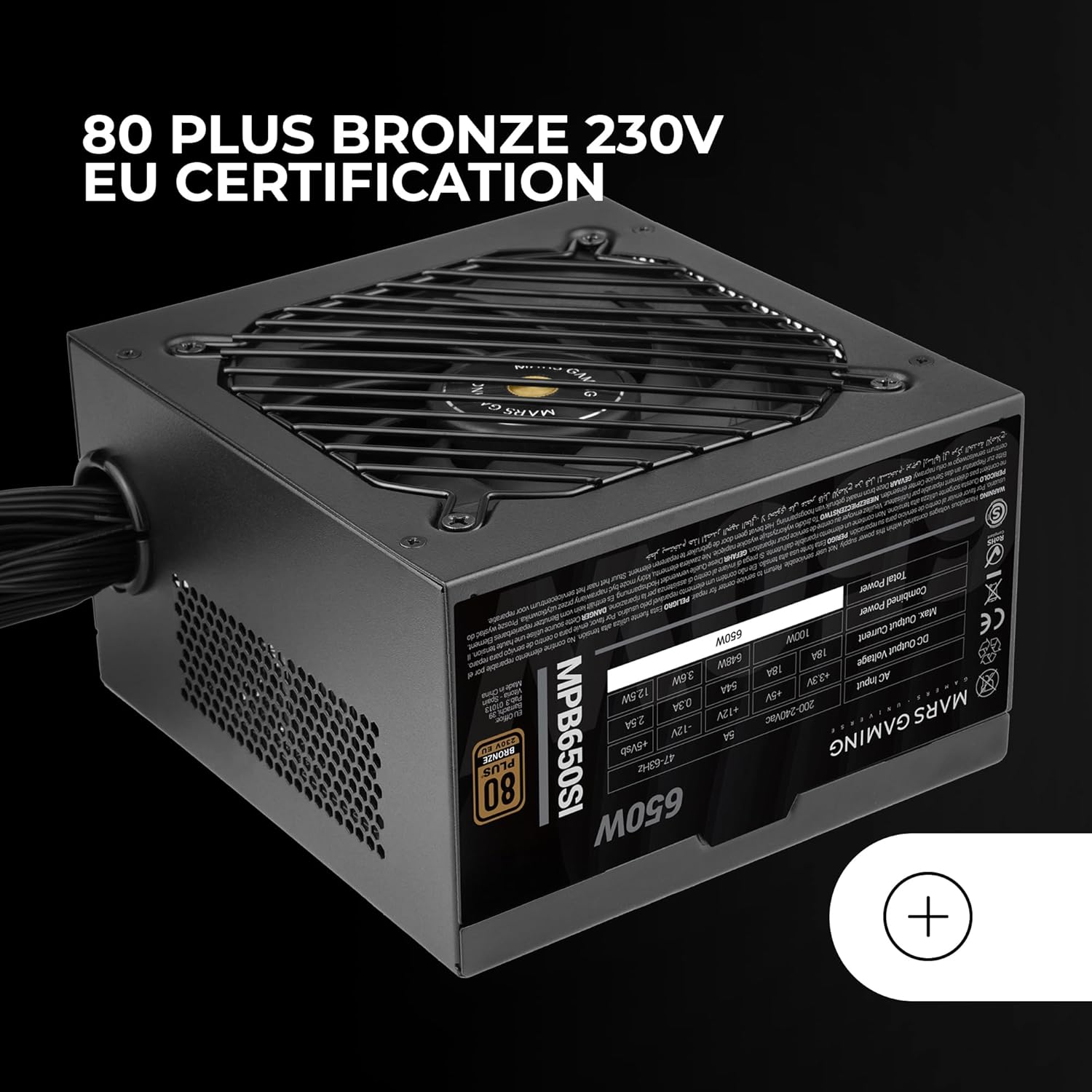
малюнок 5: The 80 Plus Bronze 230V EU certification logo, indicating high energy efficiency.
Гарантія та підтримка
Інформація про гарантію
The Mars Gaming MPB650SI power supply comes with an extended Гарантія 7 рік from the date of purchase. This warranty covers defects in materials and workmanship under normal use. It does not cover damage caused by improper installation, accident, abuse, misuse, natural disaster, or unauthorized modification.
For warranty claims, please retain your proof of purchase. The warranty is subject to the terms and conditions specified by Mars Gaming.
Підтримка клієнтів
If you have any questions, require technical assistance, or need to initiate a warranty claim, please contact Mars Gaming customer support through their official website or the retailer where you purchased the product. Please have your product model (MPB650SI) and proof of purchase ready when contacting support.
For the most up-to-date support information, visit the official Mars Gaming webсайт: www.marsgaming.eu


