1. Вступ і даліview
The Fantech MK875 V2 Atom81 Hot Swappable Mechanical Gaming Keyboard is designed for gamers and typists seeking a versatile and high-performance input device. This manual provides detailed instructions for setting up, operating, maintaining, and troubleshooting your keyboard to ensure optimal performance and longevity.
Key features include an 81-key layout for space efficiency, 3-pin hot-swappable switches for customization, 26 anti-ghosting keys for precise input, 17 dynamic RGB lighting modes, a unique three-color keycap combination, and a convenient volume knob for media control. The keyboard utilizes durable double-injection keycaps and offers adjustable feet for ergonomic comfort. It connects via a reliable Type-C wired connection and is compatible with both Windows and Mac operating systems.

Image 1.1: The Fantech MK875 V2 Mechanical Gaming Keyboard, showcasing its compact 81-key layout and vibrant keycap design.
2. Посібник із налаштування
2.1 Вміст упаковки
- Fantech MK875 V2 Mechanical Gaming Keyboard
- Кабель USB типу C
- Keycap Puller (usually included for hot-swappable keyboards)
- Switch Puller (usually included for hot-swappable keyboards)
- Посібник користувача (цей документ)
2.2 Підключення клавіатури
- Locate the Type-C port on the back or side of the Fantech MK875 V2 keyboard.
- Connect one end of the provided Type-C USB cable to the keyboard's Type-C port.
- Підключіть інший кінець USB-кабелю до вільного USB-порту на вашому комп’ютері (ПК з Windows або Mac).
- Клавіатуру буде автоматично розпізнано вашою операційною системою. Для базової функціональності зазвичай не потрібні додаткові драйвери.
2.3 Регулювання висоти клавіатури
For optimal ergonomic comfort, the MK875 V2 features adjustable feet. Gently flip out the feet located on the underside of the keyboard to raise the typing angle. Adjust to your preferred height.

Зображення 2.1: Крупний план view of the adjustable feet on the Fantech MK875 V2 keyboard, allowing users to customize the typing angle for ergonomic comfort.
3. Інструкція з експлуатації
3.1 Комутатори з можливістю гарячої заміни
The Fantech MK875 V2 supports 3-pin hot-swappable mechanical switches, allowing you to easily change switches without soldering. This feature enables customization of your typing feel and sound.
- Видалення перемикача: Use the provided switch puller. Align the prongs of the puller with the two clips on the top and bottom of the switch. Squeeze the puller gently and pull the switch straight up.
- Встановлення комутатора: Ensure the new 3-pin switch's pins are straight. Align the pins with the holes on the PCB (Printed Circuit Board). Gently push the switch straight down until it clicks into place. Do not force the switch if it doesn't go in easily, as bent pins can damage the PCB.

Image 3.1: Demonstration of the 3-pin hot-swappable feature, showing switches being removed and installed on the keyboard's PCB.
3.2 Клавіші захисту від фантомного використання
The keyboard features 26 anti-ghosting keys, ensuring that multiple simultaneous key presses are registered accurately. This is crucial for fast-paced gaming where complex key combinations are common.

Image 3.2: Visual representation of the 26-key rollover (anti-ghosting) capability, highlighting the keyboard's ability to register multiple simultaneous key presses.
3.3 режими освітлення
The MK875 V2 is equipped with 17 dynamic spectrum lighting effects. Specific key combinations (often Fn + a designated key like Fn + Ins, Fn + Home, etc.) are used to cycle through these modes or adjust brightness and speed. Refer to the quick start guide or on-keyboard legends for exact key combinations.

Image 3.3: The Fantech MK875 V2 keyboard displaying one of its 17 vibrant RGB lighting effects, enhancing the aesthetic appeal.
3.4 Регулятор гучності
A dedicated volume knob is located on the top right of the keyboard for quick and convenient media control. Rotate the knob clockwise to increase volume, counter-clockwise to decrease volume. Press the knob to mute/unmute audio.
3.5 Keycap Design and Switches
The keyboard features durable double-injection keycaps with a unique three-color combination, ensuring legends remain clear and fade-resistant over time. This model comes with Red Switches, which are linear and provide a smooth keystroke, ideal for fast-paced gaming and comfortable typing.
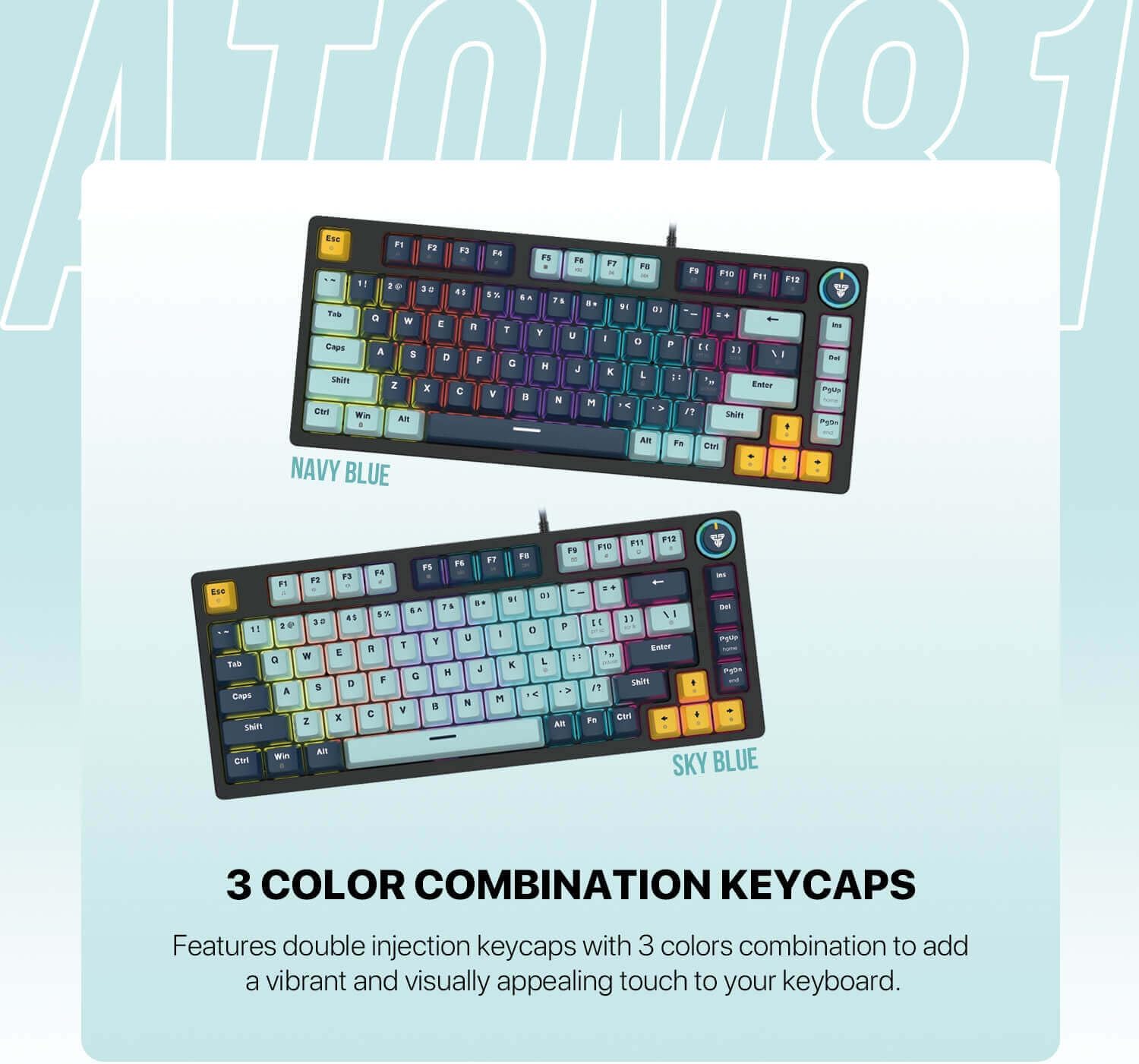
Image 3.4: The Fantech MK875 V2 keyboard showcasing its three-color combination keycaps, available in Navy Blue and Sky Blue variants.

Image 3.5: Comparison of Red (linear) and Blue (clicky) mechanical switches, illustrating the type of switch used in this keyboard model (Red Switch).
4. Технічне обслуговування
4.1 Очищення клавіатури
- Генеральне прибирання: Злегка протріть м’якою тканиною без ворсу dampпротріть клавіші та рамку клавіатури водою або м’яким миючим розчином. Уникайте надмірної вологи.
- Видалення пилу: Використовуйте стиснене повітря, щоб здути пил та сміття між клавішами.
- Глибоке очищення (ковпачки клавіш): Для ретельного очищення можна зняти ковпачки клавіш за допомогою спеціального знімача. Вимийте ковпачки клавіш м’яким милом і водою, ретельно промийте та переконайтеся, що вони повністю висохли, перш ніж знову встановлювати їх.
4.2 Технічне обслуговування комутатора
While hot-swappable switches allow for easy replacement, regular maintenance is generally not required. If a switch feels inconsistent, you may try removing it, inspecting for debris, and reinserting it. If issues persist, consider replacing the switch.
5. Вирішення проблем
| проблема | Можлива причина | Рішення |
|---|---|---|
| Клавіатура не відповідає | Loose cable connection; USB port issue; Driver conflict |
|
| Клавіші не реєструються або друкуються двічі | Debris under keycap/switch; Faulty switch |
|
| Lighting not working or incorrect | Lighting mode setting; Software conflict |
|
6. Технічні характеристики
| Особливість | Деталь |
|---|---|
| Модель | Fantech MK875 V2 Atom81 |
| Бренд | Fantech |
| Розкладка ключів | 81 ключі |
| Тип перемикача | Mechanical (Red Switch - Linear) |
| Гаряча заміна | Yes, 3-pin compatible |
| Anti-Ghosting | 26 Keys Rollover |
| Освітлення | 17 Spectrum Lighting Modes |
| Клавіатури | Double-Injection, 3-Color Combination |
| Підключення | Дротовий тип C |
| Сумісність | Windows, Mac |
| Особливості | Volume Knob, Adjustable Feet |
| Розміри (прибл.) | 34.6 х 17.4 х 4.2 см |
| Вага (прибл.) | 760 г |
7. Гарантія та підтримка
The Fantech MK875 V2 Mechanical Gaming Keyboard comes with a standard manufacturer's warranty. Please refer to the warranty card included in your product packaging for specific terms and conditions, including warranty period and coverage details.
For technical support, troubleshooting assistance, or warranty claims, please visit the official Fantech webсайт або зверніться до їхнього відділу обслуговування клієнтів. Зберігайте чек про покупку для підтвердження гарантії.
Official Fantech Webсайт: www.fantechworld.com