1. Вступ
This manual provides detailed instructions for setting up, operating, and maintaining your Mercusys MR27BE BE3600 Dual-Band Wi-Fi 7 Router. The MR27BE is designed to deliver high-speed wireless connectivity with Wi-Fi 7 technology, featuring dual-band operation and multiple high-speed Ethernet ports for a robust home or small office network.
2. Вміст упаковки
Переконайтеся, що ваш пакет містить такі елементи:
- Mercusys MR27BE Wi-Fi 7 Router
- Адаптер живлення
- Кабель Ethernet
- Посібник із швидкого встановлення

This image displays the retail packaging for the Mercusys MR27BE BE3600 Dual Band Wi-Fi 7 Router, highlighting key features and branding.
3. Фізичний overview
3.1 Задня панель
The rear panel of the MR27BE router features various ports and buttons for connectivity and control.
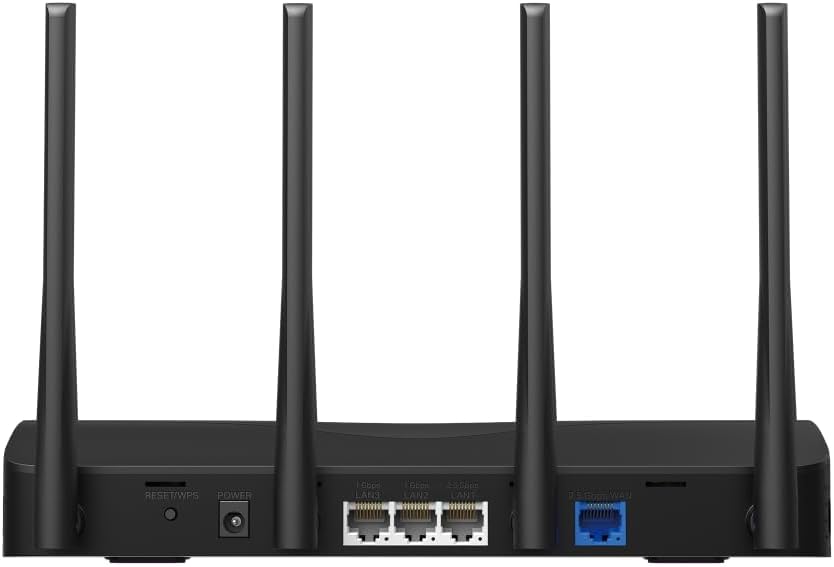
This image displays the rear panel of the MR27BE router, highlighting the 2.5 Gbps WAN port (blue), 2.5 Gbps LAN port, two 1 Gbps LAN ports, the Reset/WPS button, and the power input.
- Порт живлення: Підключіть сюди наданий адаптер живлення.
- Кнопка скидання/WPS: Press and hold for 1 second to activate WPS. Press and hold for more than 5 seconds to factory reset the router.
- Порти локальної мережі (1 Гбіт/с): Two Gigabit Ethernet ports for connecting wired devices.
- LAN Port (2.5 Gbps): One 2.5 Gigabit Ethernet port for high-speed wired connections.
- WAN Port (2.5 Gbps): One 2.5 Gigabit Ethernet port for connecting to your modem or internet service provider's (ISP) network.
3.2 Основні характеристики
The MR27BE router incorporates advanced features for enhanced network performance.

This graphic illustrates key features of the MR27BE, including its Wi-Fi 7 capabilities, the presence of 2x 2.5 Gbps ports and 2x Gigabit ports, four omni-directional high-gain antennas, EasyMesh compatibility, and easy app control.

This image demonstrates the speed performance of the MR27BE router, indicating up to 2880 Mbps on the 5 GHz band and 688 Mbps on the 2.4 GHz band, showcasing its Wi-Fi 7 capabilities.
4. Налаштування
4.1 Підключення обладнання
- Вимкнення живлення: Disconnect the power from your modem (if applicable).
- Підключення WAN-порту: Connect one end of the Ethernet cable to your modem's Ethernet port and the other end to the blue 2.5 Gbps WAN port on your MR27BE router.
- Підключіть живлення: Connect the power adapter to the router's Power port and plug it into an electrical outlet.
- Увімкнення: Wait for the router to power on completely. The LED indicator should turn solid green.
- Підключення пристроїв (необов'язково): For wired devices, connect an Ethernet cable from your computer or other device to one of the yellow LAN ports on the router.

This image shows the 2.5 Gbps ports of the MR27BE router in use, illustrating connections for 2.5 Gbps wired devices and multi-gig internet access, emphasizing high-performance networking.
4.2 Початкова конфігурація
You can configure your router using the MERCUSYS app or a web браузер.
Using the MERCUSYS App:
- Download the MERCUSYS app from the App Store or Google Play.
- Connect your smartphone to the router's default Wi-Fi network (SSID and password are on the label at the bottom of the router).
- Open the MERCUSYS app and follow the on-screen instructions to complete the setup.
Використовуючи a Web Браузер:
- Connect your computer to the router via an Ethernet cable or the default Wi-Fi network.
- Відкрийте a web браузер і введіть
mwlogin.netor192.168.1.1в адресний рядок. - Створіть пароль для входу, коли буде запропоновано.
- Follow the Quick Setup wizard to configure your internet connection and Wi-Fi settings.
5. Експлуатація маршрутизатора
5.1 Підключення пристроїв
- Бездротові пристрої: шукати your Wi-Fi network name (SSID) on your device and enter the Wi-Fi password you set during setup.
- Дротові пристрої: Підключіть кабель Ethernet від вашого пристрою до будь-якого вільного порту LAN на маршрутизаторі.
5.2 Сумісність з EasyMesh
The MR27BE router supports EasyMesh, allowing you to create a seamless whole-home Wi-Fi network by adding compatible EasyMesh range extenders or other routers.

This diagram visually explains how the EasyMesh system, compatible with the MR27BE router, can expand Wi-Fi coverage throughout an entire home, ensuring seamless connections.
To set up an EasyMesh network, refer to the instructions provided with your EasyMesh compatible devices or the MERCUSYS app.
5.3 Advanced Settings (via Web Інтерфейс)
Доступ до web інтерфейс (mwlogin.net) для налаштування розширених параметрів, таких як:
- Гостьова мережа: Створіть окрему мережу Wi-Fi для гостей.
- Батьківський контроль: Manage internet access for specific devices.
- Безпека мережі: Configure firewall rules and access control.
- Режим роботи: Switch between Router, Access Point, or Range Extender modes.
6. Технічне обслуговування
6.1 Оновлення мікропрограми
Regularly updating the router's firmware ensures optimal performance and security. You can check for updates via the MERCUSYS app or the web interface under System Tools > Firmware Upgrade.
6.2 Перезапуск маршрутизатора
If you experience network issues, a simple restart can often resolve them. You can restart the router via the MERCUSYS app, the web interface, or by unplugging and replugging the power adapter.
6.3 Скидання до заводських налаштувань
A factory reset will restore the router to its default settings. This can be done by pressing and holding the Reset/WPS button on the rear panel for more than 5 seconds until the LED blinks rapidly, or via the web interface under System Tools > Factory Defaults.
7. Вирішення проблем
7.1 Немає доступу до Інтернету
- Check all cable connections, especially the WAN port connection to your modem.
- Переконайтеся, що ваш модем працює належним чином.
- Перезавантажте і модем, і маршрутизатор.
- Перевірте налаштування інтернету в роутері web інтерфейс.
7.2 Проблеми із сигналом Wi-Fi
- Ensure the router is placed in a central location, away from obstructions and interference sources (e.g., microwaves, cordless phones).
- Налаштуйте антени маршрутизатора для оптимального покриття.
- Consider using EasyMesh compatible devices to extend coverage in larger homes.
7.3 Forgotten Wi-Fi Password or Login Password
- Пароль Wi-Fi за замовчуванням знаходиться на етикетці внизу роутера.
- If you changed it and forgot, you will need to perform a factory reset to restore default settings, then reconfigure the router.
8. Технічні характеристики
| Назва моделі | MR27BE |
| Бездротовий стандарт | 802.11be (Wi-Fi 7) |
| Клас діапазону частот | Дводіапазонний |
| Порт WAN | 1 порт WAN 2.5 Гбіт/с |
| Порти LAN | 1x 2.5 Gbps LAN Port, 2x 1 Gbps LAN Ports |
| Особливість | Сумісність з EasyMesh |
| Розміри продукту | 7.87 x 5.91 x 3.94 дюймів |
| Вага товару | 2.23 фунта |
| Включені компоненти | MR27BE, Power Adapter, instruction manual |
9. Підтримка
For technical support, warranty information, or further assistance, please visit the official Mercusys website or contact Mercusys customer support.
- Офіційний представник Mercusys Webсайт: www.mercusys.com
- Refer to the Quick Installation Guide for initial setup and contact details.


