вступ
Thank you for choosing the YESWELDER MIG-205DS PRO Multi-Process Welder. This machine is designed for versatility, offering 5-in-1 welding capabilities including Gas MIG, Flux Core MIG, Spool Gun MIG, Lift TIG, and Stick welding. This manual provides essential information for the safe and efficient operation, setup, maintenance, and troubleshooting of your welding machine. Please read this manual thoroughly before operation to ensure proper use and to prevent injury or damage.
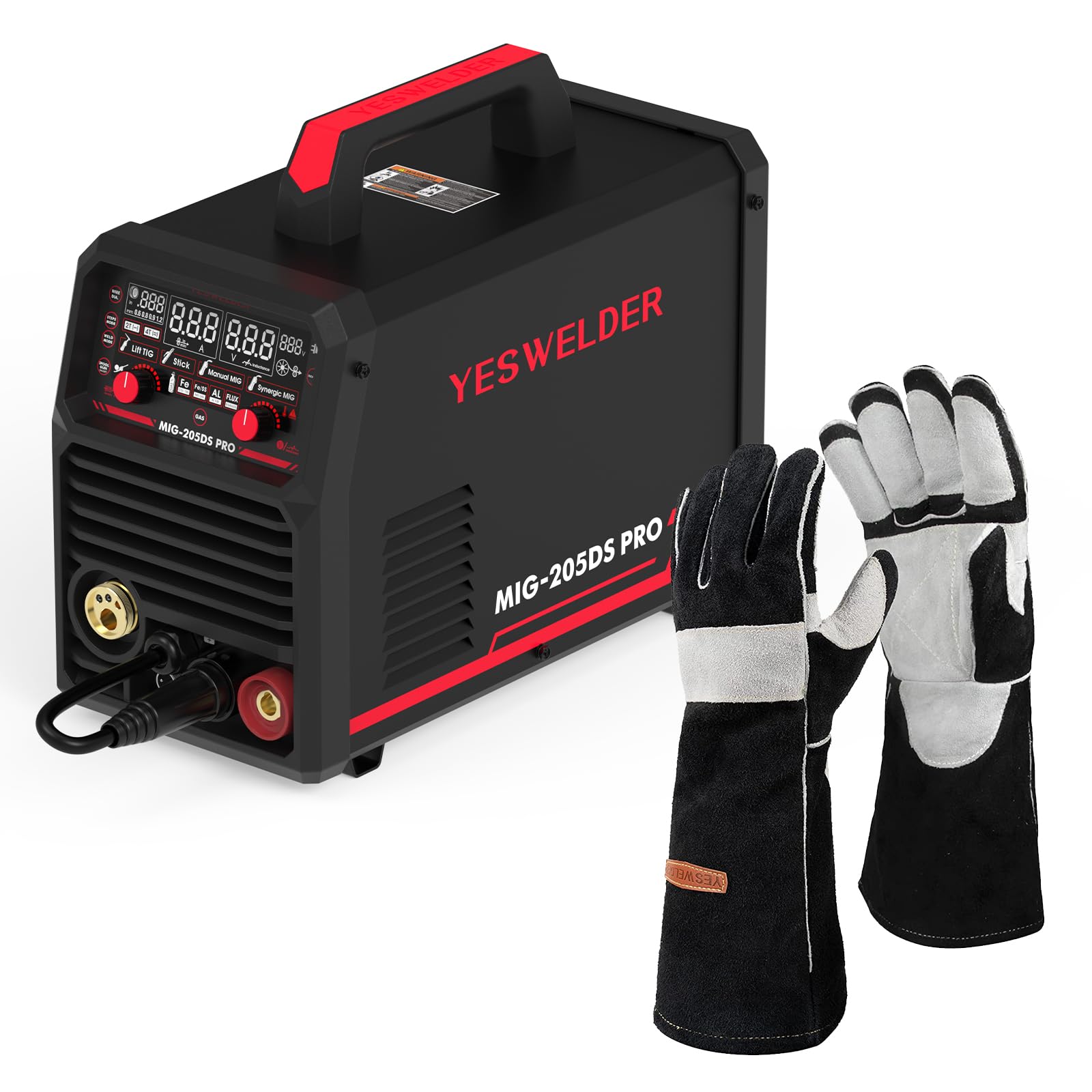
Image: The YESWELDER MIG-205DS PRO Multi-Process Welder, showcasing its compact design and various connection points for different welding processes, along with included accessories like the MIG torch, ground clamp, та тримач електрода.
Інформація про безпеку
Welding can be dangerous. It is crucial to follow all safety precautions to prevent serious injury or death. Always wear appropriate personal protective equipment (PPE) including a welding helmet with proper shade, welding gloves, protective clothing, and safety shoes. Ensure adequate ventilation to avoid inhaling welding fumes. Keep a fire extinguisher nearby. Disconnect power before performing any maintenance or service.
- Ураження електричним струмом: Can kill. Do not touch live electrical parts. Wear dry insulating gloves and clothing.
- Дими та гази: Може бути небезпечним для вашого здоров'я. Тримайте голову подалі від парів. Використовуйте достатню вентиляцію або витяжку біля дуги, щоб пари та гази не потрапляли в зону дихання.
- Промені дуги: Can burn eyes and skin. Wear a welding helmet with a proper shade filter. Wear protective clothing to protect your skin.
- Пожежа та вибух: Іскри від зварювання можуть спричинити пожежу або вибух. Тримайте легкозаймисті матеріали подалі від зони зварювання. Майте під рукою вогнегасник.
- Гарячі частини: Can cause severe burns. Do not touch hot parts with bare hands.

Image: A pair of black and gray YESWELDER MIG welding gloves, designed for hand protection during welding operations. These gloves feature a durable leather construction with reinforced palms and fingers.

Image: A diagram illustrating the dimensions of the YESWELDER MIG welding gloves, showing a total length of 16 inches, a palm width of 6.7 inches, and a finger length of 7.5 inches, indicating their extended coverage and fit.
Продукт закінченийview
The MIG-205DS PRO is a versatile welding machine featuring advanced IGBT inverter technology for stable performance. It includes a large digital display for clear parameter adjustments and monitoring. The machine supports multiple welding processes, making it suitable for various applications.
Ключові характеристики:
- 5-in-1 Multi-Process: Gas MIG, Flux Core MIG, Spool Gun MIG, Lift TIG, Stick.
- Dual Voltage Input: 110V/220V automatic detection.
- Advanced Digital Display: Enhanced clarity for settings.
- IGBT Inverter Technology: For reliable and stable arc performance.
- Synergic Control: Simplifies parameter setup for MIG welding.

Зображення: Крупний план view of the YESWELDER MIG-205DS PRO's upgraded large LED digital display, showing various welding parameters and mode selections such as Lift TIG, Stick, Manual MIG, and Synergic MIG, along with material and gas settings.

Image: A visual representation of the five welding processes supported by the YESWELDER MIG-205DS PRO: Spool Gun Welding, Gas MIG Welding, Flux Core Welding, Stick Welding, and Lift TIG Welding, each depicted with an example of the welding process.
Налаштування
1. Розпакування та перевірка
- Обережно вийміть зварювальний апарат та всі аксесуари з упаковки.
- Перевірте на наявність пошкоджень під час доставки. У разі виявлення пошкоджень негайно зверніться до постачальника.
- Перевірте наявність усіх компонентів, перелічених у пакувальному листі.
2. Підключення живлення
- The MIG-205DS PRO automatically detects input voltage (110 В або 220 В).
- Connect the power cord to a suitable grounded power outlet. Ensure the circuit breaker rating is appropriate for welding current.
- For 220V operation, ensure the correct plug adapter is used if necessary.
3. Наземний Clamp Підключення
- Підключіть заземлення клamp cable to the appropriate terminal on the front panel (usually the negative (-) terminal for MIG/Stick, or positive (+) for Lift TIG).
- Надійно закріпіть заземлювальний блокamp до заготовки, забезпечуючи хороший електричний контакт.
4. Газове підключення (для газового MIG)
- Connect the gas hose from your shielding gas cylinder (e.g., Argon/CO2 mix for MIG, 100% Argon for TIG) to the gas inlet on the rear of the machine.
- Переконайтеся, що всі з'єднання герметичні, щоб запобігти витоку газу.
- Set the gas regulator to the recommended flow rate (typically 15-25 CFH for MIG).
5. Wire Installation (MIG/Flux Core)
- Відкрийте відсік механізму подачі дроту.
- Install the wire spool onto the spindle, ensuring it rotates freely.
- Протягніть зварювальний дріт через напрямну трубку та введіть його в приводні ролики.
- Відрегулюйте натяг приводного ролика, щоб запобігти зісковзуванню або здавлюванню дроту.
- Select the correct drive roller groove size for your wire diameter.
- Пропускайте дріт через підводку пальника MIG, доки він не вийде з контактного наконечника.
6. Spool Gun Connection (Optional)
- Connect the spool gun cable to the dedicated spool gun port on the front panel.
- Ensure the spool gun is loaded with the appropriate wire (e.g., aluminum wire for aluminum welding).
7. Lift TIG Torch Connection (Optional, not included)
- Connect the Lift TIG torch to the appropriate terminal (usually the negative (-) terminal for DC TIG).
- Connect the gas hose from the TIG torch to the gas outlet on the machine or directly to the gas cylinder with a separate regulator.
- Ensure a tungsten electrode is properly installed in the torch.
8. Stick Electrode Holder Connection
- Підключіть кабель тримача електродів до позитивного (+) полюса на передній панелі.
- Insert the desired stick electrode into the holder.
Режими роботи
The MIG-205DS PRO offers multiple welding processes. Select the desired mode using the control panel.
1. Digital Display and Control Panel
The large digital display shows welding parameters such as current (Ampс), томtage (Volts), and wire feed speed. Use the control knobs to adjust these parameters. The display also indicates the selected welding mode and material type.
Зображення: Детальний view of the YESWELDER MIG-205DS PRO's control panel and digital display, highlighting the clear readouts for current, voltage, and wire feed speed, along with indicators for selected welding modes and material types (Fe, Fe/Ss, AL, Flux).
2. Gas MIG Welding
- налаштування: Ensure gas cylinder is connected and flowing, correct wire is installed, and ground clamp є безпечним.
- Вибір режиму: Select "Gas MIG" on the control panel.
- Налаштування параметрів: Use the synergic function for automatic parameter setting based on wire diameter and material, or adjust manually.
- Операція: Position the torch, press the trigger to start the arc and wire feed. Maintain a consistent travel speed and arc length.
3. Flux Core MIG Welding
- налаштування: Install flux core wire. No shielding gas is required. Ensure polarity is set correctly (usually DCEN - electrode negative).
- Вибір режиму: Select "Flux Core MIG" on the control panel.
- Налаштування параметрів: Adjust current and wire feed speed according to wire manufacturer recommendations.
- Операція: Similar to Gas MIG, but the flux in the wire provides shielding.
4. Spool Gun MIG Welding
- налаштування: Connect the spool gun with appropriate wire (e.g., aluminum). Ensure shielding gas (100% Argon for aluminum) is connected.
- Вибір режиму: Select "Spool Gun MIG" on the control panel.
- Налаштування параметрів: Adjust settings for aluminum welding, typically higher wire feed speed and AC balance if available (this machine is DC only for TIG, so MIG will be DC).
- Операція: The spool gun feeds wire directly, ideal for softer wires like aluminum.
5. Зварювання TIG з підйомником
- налаштування: Connect Lift TIG torch, gas, and ground clamp. Ensure tungsten electrode is sharpened.
- Вибір режиму: Select "Lift TIG" on the control panel.
- Налаштування параметрів: Встановити бажане ampепоха.
- Операція: Touch the tungsten to the workpiece, then lift slightly to initiate the arc. This method minimizes tungsten contamination.
6. Stick Welding (SMAW)
- налаштування: Connect electrode holder to positive (+) and ground clamp to negative (-) for DCEP (most common), or vice-versa for DCEN. Insert appropriate electrode.
- Вибір режиму: Select "Stick" on the control panel.
- Налаштування параметрів: встановити amperage based on electrode type and diameter.
- Операція: Strike the arc by lightly scratching the electrode on the workpiece. Maintain a consistent arc length and travel speed.

Image: A welder wearing a helmet and protective gear, operating the YESWELDER MIG-205DS PRO machine. The image emphasizes the smooth operation and quality results achievable with the welder, showing sparks during a welding process.
Технічне обслуговування
Regular maintenance ensures the longevity and optimal performance of your welding machine. Always disconnect power before performing any maintenance.
1. Генеральне прибирання
- Періодично очищуйте зовнішню частину машини сухою м’якою тканиною.
- Use compressed air to blow out dust and debris from the cooling vents. Ensure the air is dry and oil-free.
- Keep the control panel clean and free from grease or dirt.
2. Заміна витратних матеріалів
- Факел MIG: Regularly inspect and replace worn contact tips, nozzles, and diffusers. Ensure the liner is clean and free of kinks.
- Пальник TIG: Inspect and replace tungsten electrodes as needed. Ensure the collet and collet body are clean.
- Stick Electrode Holder: Check for wear on the jaws and cable connections.
3. Wire Feeder Maintenance
- Clean the drive rollers and wire guide tubes to prevent wire feeding issues.
- Check drive roller tension and adjust as necessary.
- Inspect the wire spool spindle for smooth rotation.
4. Перевірка кабелів та з'єднань
- Regularly inspect all welding cables (MIG torch, ground clamp, electrode holder) for cuts, abrasions, or loose connections.
- Ensure power cord and plug are in good condition.
Усунення несправностей
У цьому розділі наведено рішення поширених проблем, з якими ви можете зіткнутися. Якщо у вас проблеми, яких тут немає, зверніться до служби підтримки клієнтів.
| проблема | Можлива причина | Рішення |
|---|---|---|
| Немає живлення | Power switch off, circuit breaker tripped, loose power cord. | Turn on power switch. Reset circuit breaker. Check power cord connection. |
| Немає дуги | Poor ground connection, incorrect welding mode, wrong parameters, faulty torch/electrode holder. | Забезпечте заземленняamp is secure. Select correct mode. Adjust parameters. Inspect and replace torch/holder if damaged. |
| Poor Wire Feed (MIG) | Incorrect drive roller tension, wrong drive roller size, clogged liner, wire tangled. | Adjust drive roller tension. Use correct roller groove. Clean or replace liner. Untangle wire spool. |
| Porosity in Weld (MIG) | Insufficient shielding gas, gas leak, contaminated workpiece, incorrect gas type. | Check gas cylinder level and flow rate. Inspect gas hose for leaks. Clean workpiece thoroughly. Use correct shielding gas. |
| Захист від перегріву | Перевищено робочий цикл, заблоковано вентиляційні отвори для охолодження. | Allow machine to cool down. Ensure cooling vents are clear. Reduce welding time or current. |
Технічні характеристики
| Особливість | Деталь |
|---|---|
| Модель | МІГ-205ДС ПРО |
| Зварювальні процеси | Gas MIG, Flux Core MIG, Spool Gun MIG, Lift TIG, Stick |
| Вхідний об'ємtage | 110 В/220 В Dual Voltage (Automatic Detection) |
| Діапазон вихідного струму | 30-205 Amps (макс.) |
| технології | IGBT інвертор |
| Дисплей | Advanced Digital Display |
| Аксесуари в комплекті | MIG Torch, Ground Clamp, Electrode Holder, Welding Gloves |
Гарантія та підтримка
Щоб отримати інформацію про гарантію, технічну підтримку або запити щодо обслуговування, зверніться до гарантійного талона, що додається до вашого продукту, або відвідайте офіційний веб-сайт YESWELDER. webсайт. Зберігайте чек про покупку як підтвердження покупки.
Інтернет-ресурси: Для отримання додаткової підтримки, відповіді на поширені запитання та реєстрації продукту, будь ласка, відвідайте www.yeswelder.com.


