вступ
Thank you for choosing the Ourlife Mini Drone. This drone is equipped with dual 4K cameras, offering high-quality photo and video capture, and can be controlled via a smartphone app for real-time viewing. Designed for ease of use, it features one-button takeoff/landing, altitude hold, headless mode, and gesture control, making it suitable for beginners and enthusiasts alike. Its compact, foldable design ensures portability for all your adventures. Please read this manual carefully before operation to ensure safe and optimal performance.
Правила безпеки
Always prioritize safety when operating your drone. Failure to follow these guidelines may result in injury, damage to property, or legal issues.
- Прочитайте інструкцію: Fully understand all instructions and warnings before first flight.
- Відкритий простір: Always fly in open, unobstructed areas, away from people, animals, buildings, and power lines. Avoid flying in strong winds.
- Пряма видимість: Завжди підтримуйте візуальну лінію видимості з дроном.
- Безпека батареї: Use only original batteries and charging cables. Do not overcharge or short-circuit batteries. Discontinue use if batteries are damaged or swollen.
- Безпека пропелера: Keep fingers, hair, and loose clothing away from rotating propellers. Always turn off the drone before handling propellers.
- Обмеження за віком: Цей продукт рекомендований для користувачів віком від 14 років.
- Відповідність законодавству: Be aware of and comply with local laws and regulations regarding drone operation.
Вміст упаковки
Перевірте наявність усіх предметів у вашій упаковці:

Image: Contents of the Ourlife Mini Drone package, showing the drone, remote control, two rechargeable batteries, a screwdriver, four protective frames, four main propellers, a USB charging cable, and an instruction manual.
- Ourlife Mini Drone x 1
- Пульт дистанційного керування x 1
- Rechargeable Drone Battery x 2
- Викрутка х 1
- Protective Frame x 4
- Main Propeller x 4 (spare)
- Зарядний кабель USB x 1
- Інструкція з експлуатації x 1
Note: The remote control requires 3 AAA batteries, which are not included.
Продукт закінченийview
Ознайомтеся з компонентами дрона та пульта дистанційного керування.

Зображення: The Ourlife Mini Drone in its unfolded state, alongside its remote control, two drone batteries, and the drone in its folded, compact form.
Компоненти дронів
- Складані підлокітники: Для компактного зберігання та портативності.
- Вібратори: Four main propellers for flight.
- Подвійні камери: Front 4K camera (120° adjustable) and bottom optical flow lens for stable flight and diverse shooting angles.
- Батарейний відсік: Розташований у задній частині дрона.
- Світлодіодні ліхтарі: Indicate drone status and orientation.

Зображення: Крупний план view of the Ourlife Mini Drone's dual camera system, highlighting the adjustable front camera and the lower lens for stable flight. The front camera can be adjusted by 120 degrees.
Макет пульта дистанційного керування
- Лівий джойстик: Керує висотою (вгору/вниз) та обертанням (вліво/вправо).
- Правий джойстик: Керує рухом вперед/назад та вліво/вправо.
- Одноклавішна кнопка зльоту/посадки: Ініціює автоматичний зліт або посадку.
- Кнопка безголового режиму: Активує/деактивує режим без камери.
- Кнопка перемикання швидкості: Toggles between different flight speeds (low, medium, high).
- Кнопка повороту на 360°: Executes a 360-degree flip.
- Тримач телефону: For mounting your smartphone to view FPV feed.
Налаштування
1. Заряджання акумулятора дрона
- Підключіть USB-кабель для заряджання до акумулятора дрона.
- Plug the USB end into a 5V/1A USB adapter (not included) or a computer USB port.
- The indicator light on the cable will show charging status. It will turn off or change color when fully charged.
2. Встановлення акумулятора дрона
- Переконайтеся, що дрон вимкнено.
- Insert the charged battery into the battery compartment at the rear of the drone until it clicks into place.
3. Встановлення батарейок пульта дистанційного керування
- Відкрийте батарейний відсік на задній панелі пульта дистанційного керування.
- Вставте 3 батарейки типу AAA (не входять до комплекту) відповідно до позначеної полярності.
- Надійно закрийте кришку батарейного відсіку.
4. Кріплення захисних кожухів пропелера
- Carefully attach the four protective frames to each motor arm of the drone.
- Ensure they are securely fastened to prevent detachment during flight.
5. App Installation (KY UFO)
- Scan the QR code provided in the manual or search for "KY UFO" in your smartphone's app store (App Store for iOS, Google Play for Android).
- Завантажте та встановіть програму.
- Turn on the drone, then go to your phone's Wi-Fi settings and connect to the drone's Wi-Fi network (usually named "KY-UFO-XXXXXX").
- Open the KY UFO app to access the real-time FPV feed and advanced controls.
Інструкція з експлуатації
1. Сполучення дрона та пульта дистанційного керування
- Покладіть дрон на рівну рівну поверхню.
- Увімкніть живлення дрона. Індикатори дрона блиматимуть.
- Увімкніть пульт дистанційного керування.
- Push the left joystick all the way up, then pull it all the way down. The drone's lights will stop flashing and remain solid, indicating successful pairing.
2. Основні елементи керування польотом
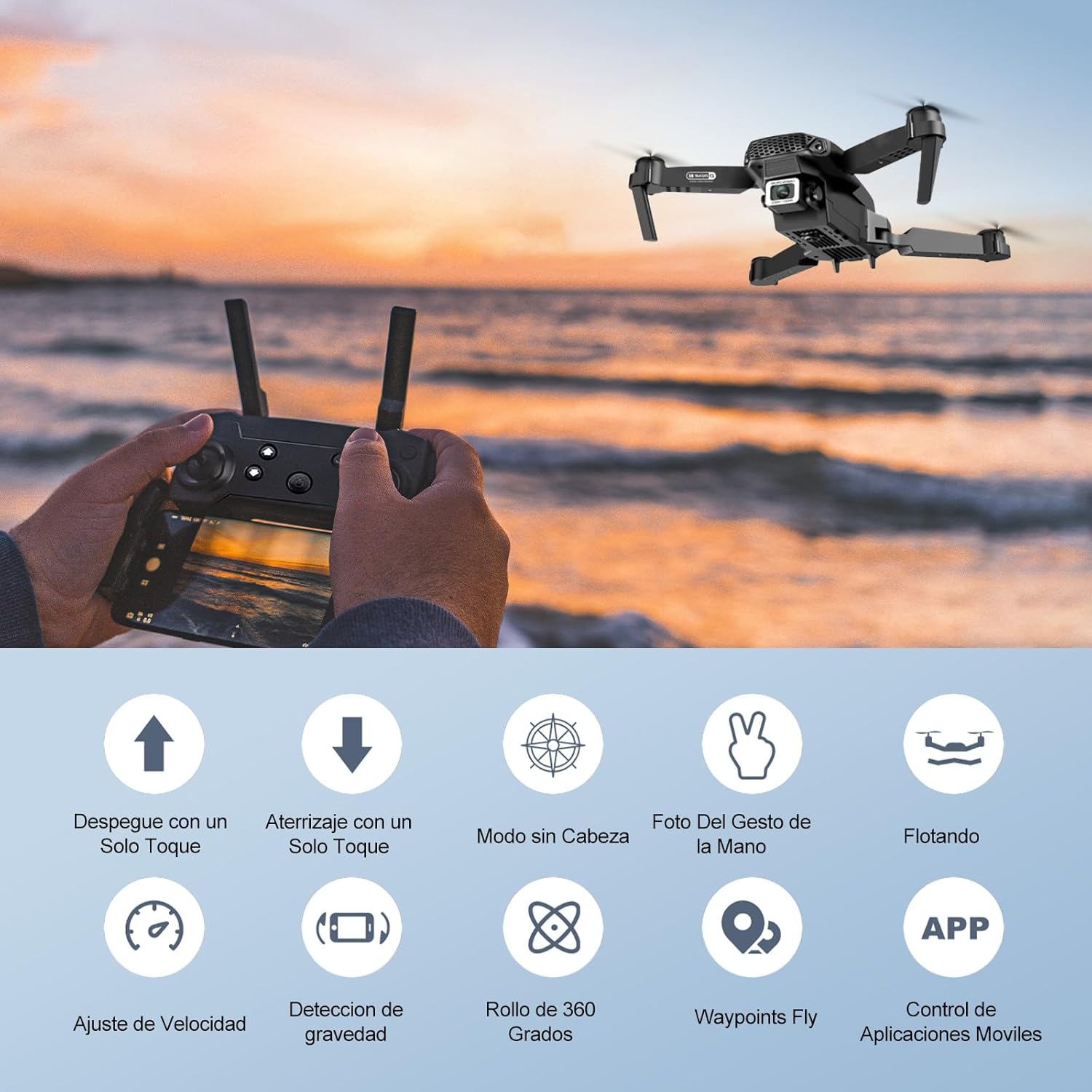
Image: Icons representing various flight features: One-touch takeoff, One-touch landing, Headless Mode, Hand Gesture Photo, Floating (Altitude Hold), Speed Adjustment, Gravity Detection, 360 Degree Roll, Waypoints Fly, and APP Control.
- Зліт одним натисканням кнопки: Натисніть Зліт/посадка однією клавішею button. The drone will automatically ascend and hover at a certain altitude.
- Посадка одним ключем: Натисніть Зліт/посадка однією клавішею button again. The drone will automatically descend and land.
- Утримання висоти: The drone maintains its current altitude automatically, allowing for stable hovering.
- Лівий джойстик (дросель/рискання):
- Push up/down: Increase/decrease altitude.
- Push left/right: Rotate drone left/right.
- Right Joystick (Forward/Backward/Sideways):
- Push up/down: Fly forward/backward.
- Push left/right: Fly left/right (strafe).

Зображення: The Ourlife Mini Drone taking off or landing with a single button press, illustrating the ease of use for beginners.
3. Розширені функції польоту
- Безголовий режим: Натисніть Безголовий режим button. In this mode, the drone's orientation is relative to the pilot, regardless of the drone's actual front. This simplifies control, especially for beginners.
- Переворот на 360°: Fly the drone to a height of at least 2 meters. Press the Перевернути на 360 ° button, then push the right joystick in any direction to perform a flip in that direction.
- Gesture Control (Photos/Videos): With the KY UFO app open, make specific hand gestures in front of the drone's camera to trigger photo or video recording.
- "V" Gesture: Triggers photo capture.
- Жест долонею: Triggers video recording.
- Політ з точки маршруту: In the KY UFO app, draw a desired flight path on your smartphone screen. The drone will automatically follow this path.
- Регулювання швидкості: Натисніть Перемикач швидкості button to cycle through low, medium, and high-speed modes. Adjust according to your skill level and environmental conditions.
- Передача даних з FPV у режимі реального часу: Connect your smartphone to the drone's Wi-Fi. Open the KY UFO app to view live video feed from the drone's camera on your phone screen.
- Гравітаційна індукція: In the KY UFO app, activate gravity induction mode. You can then control the drone's movement by tilting your smartphone.

Зображення: The Ourlife Mini Drone performing a 360-degree flip in the air and demonstrating the Waypoints Fly feature, where the drone follows a pre-drawn path.

Image: Demonstrates 1080P FPV Real-Time Transmission, showing a live view from the drone. Also illustrates gesture control for taking photos (V-sign) and recording videos (palm gesture), and the 120-degree adjustable camera angle.
Технічне обслуговування
- Прибирання: Використовуйте м’яку суху тканину для очищення дрона та пульта дистанційного керування. Не використовуйте агресивні хімікати або розчинники.
- Заміна гвинта: If propellers are damaged, replace them with spare ones provided. Ensure correct propeller (A or B) is installed on the corresponding motor.
- Догляд за акумулятором: Зберігайте акумулятори в прохолодному, сухому місці. Не зберігайте повністю заряджені або повністю розряджені акумулятори протягом тривалого часу. Для тривалого зберігання зарядіть їх приблизно до 50%.
- Зберігання: When not in use, store the drone and its accessories in a safe, dry place, away from direct sunlight and extreme temperatures.
Усунення несправностей
| проблема | Можлива причина | Рішення |
|---|---|---|
| Дрон не реагує на пульт дистанційного керування. | Not paired; low battery (drone/remote); interference. | Re-pair drone and remote. Charge batteries. Move to an area with less interference. |
| Дрон дрейфує під час польоту. | Not calibrated; uneven surface at takeoff; wind. | Calibrate the gyroscope (refer to app instructions). Take off from a flat surface. Avoid flying in windy conditions. |
| Camera feed is not showing in app. | Немає підключення до Wi-Fi дрона; проблема з додатком. | Ensure phone is connected to the drone's Wi-Fi network. Restart the app and drone. |
| Короткий час польоту. | Акумулятор не повністю заряджений; старий акумулятор. | Ensure battery is fully charged before flight. Consider replacing old batteries. |
| Drone crashes easily. | Lack of experience; strong wind; damaged propellers. | Practice in open areas. Avoid strong winds. Replace damaged propellers. |
Технічні характеристики

Image: Diagram showing the dimensions of the Ourlife Mini Drone (unfolded and folded) and its remote control in inches.
| Особливість | Деталь |
|---|---|
| Бренд | Ourlякщо |
| Номер моделі | AF-E88-BK |
| Вага продукту | 430 г (приблизно 0.95 фунта) |
| Розміри виробу (розгорнуті) | 28 x 22 x 5 см (приблизно 11 x 8.7 x 2 дюймів) |
| Розміри продукту (у складеному вигляді) | 12.5 x 8.1 x 5.3 см (приблизно 4.9 x 3.2 x 2.1 дюймів) |
| Тип батареї | Літій-іонний (2 в комплекті) |
| Роздільна здатність захоплення відео | 4K (Dual Cameras) |
| Технологія підключення | Wi-Fi |
| Спосіб контролю | Remote Control, Smartphone App |
| Колір | чорний |
Гарантія та підтримка
Ourlife provides post-sale warranty support for this product. If you encounter any issues with the drone, remote control, or the KY UFO application during flight or operation, please do not hesitate to contact the seller directly for assistance.
For optimal performance and to minimize potential issues, it is recommended to conduct initial flight tests in an open space, especially when using the propeller protectors. Please note that wind interference may occur when operating outdoors.


