1. Вступ
This manual provides detailed instructions for the HOU Keyboard Case designed for the iPad Pro 13-inch M5/M4 models. Please read this manual carefully before use to ensure proper operation and to maximize the product's lifespan.
1.1 Сумісність
Цей чохол для клавіатури спеціально розроблений для iPad Pro 13-inch M5/M4 (2025 models). Compatible iPad models include: А2925, А2926, А3007.
Important: This case is NOT compatible with iPad Air 13 (M2) 2024 (models A2898, A2899, A2900) or iPad Pro 12.9-inch (2017-2022) (6th/5th/4th/3rd/2nd/1st generation).
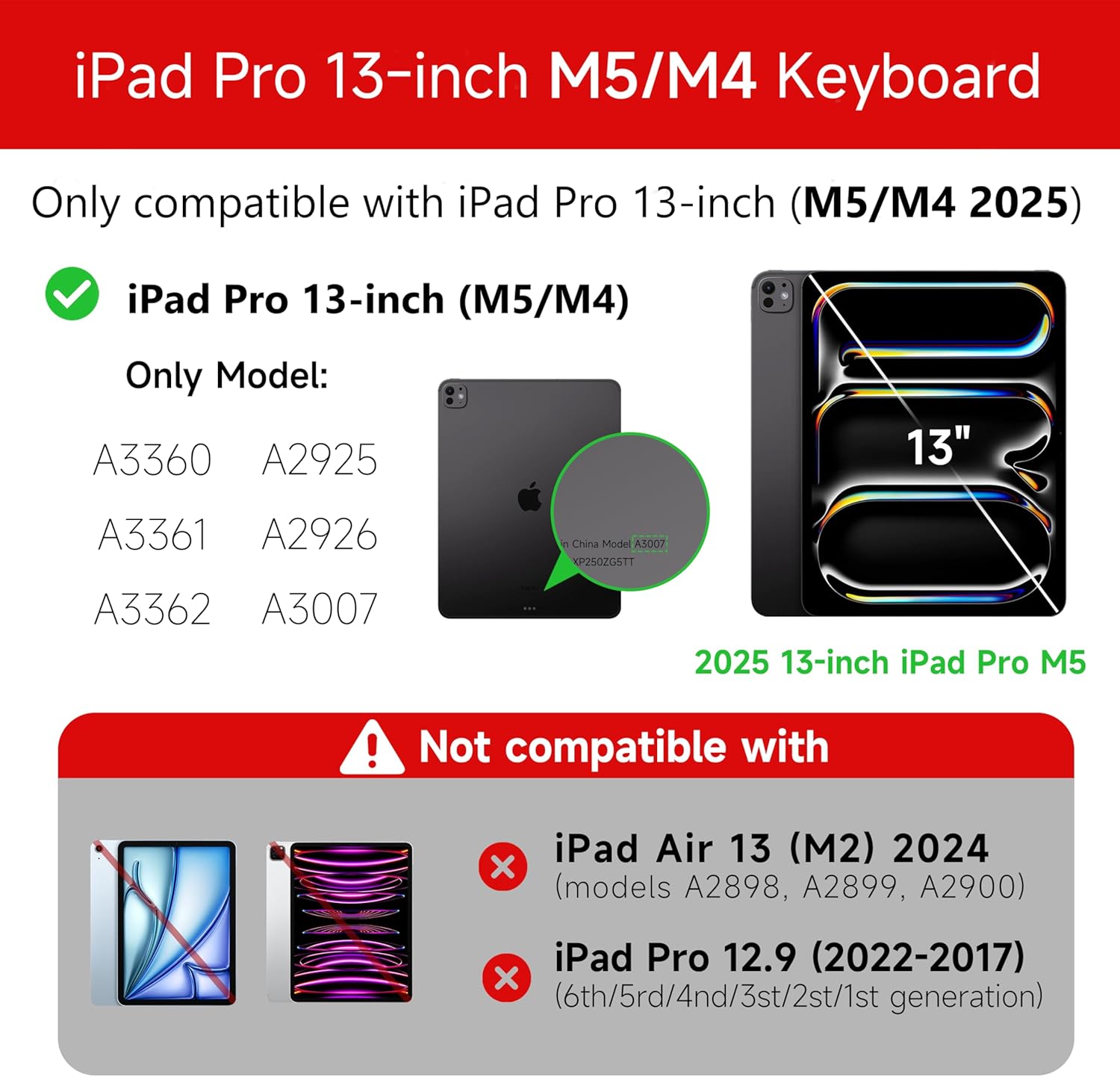
Figure 1: Compatibility details for the HOU iPad Pro 13-inch Keyboard Case.
2. Налаштування
2.1 Заряджання клавіатури
Before initial use, fully charge the keyboard. Connect the provided USB-C cable to the charging port on the keyboard and to a power source. The charging indicator light will show the charging status.
- Порт зарядки: Тип-C
- Час зарядки: Approximately <2 hours
- Ємність батареї: 500 мАг
2.2 Attaching Your iPad Pro
The keyboard case features a magnetic design for secure attachment. Align your iPad Pro 13-inch with the magnetic back panel of the case. The strong magnets will securely hold your iPad in place, providing stability.

Figure 2: Magnetic attachment for secure iPad placement.
2.3 Підключення Bluetooth
To connect the keyboard to your iPad Pro via Bluetooth:
- Переконайтеся, що клавіатура заряджена та увімкнена.
- На вашому iPad перейдіть до Налаштування > Bluetooth та увімкніть Bluetooth.
- На клавіатурі натисніть і утримуйте Fn + Control + R протягом 3 секунд, доки індикатор не почне блимати, що вказує на режим сполучення.
- On your iPad, select the keyboard from the list of available devices (e.g., "HOU Keyboard").
- Once connected, the indicator light on the keyboard will stop flashing.
After the initial connection, the keyboard should automatically reconnect to your iPad when both devices are powered on and Bluetooth is enabled.
3. Інструкція з експлуатації
3.1 Регульована Viewкути нахилу
The keyboard case features a floating design that allows for angle adjustment up to 135 degrees. The keyboard base opens at a 45-degree angle, providing enhanced stability for various viewпосади з написання тексту та набору тексту.
Рисунок 3: Регульований viewкут нахилу до 135 градусів.
3.2 Функція підсвічування
The keyboard features an adaptive backlight with 7 different colors and 3 adjustable brightness levels. This allows for comfortable typing in various lighting conditions, including low-light environments.

Figure 4: Keyboard backlight in use for typing at night.
3.3 Мультисенсорний трекпад
The integrated multi-touch trackpad supports full-area press and various swipe gestures, transforming your iPad into a laptop-like experience. It provides responsive controls for scrolling, dragging, input, and media control.
Adjusting Trackpad Sensitivity: You can adjust the trackpad sensitivity directly from your iPad's settings to match your personal preference.
- Перейти до Налаштування на вашому iPad.
- Перейдіть до Доступність.
- Find and adjust Відстеження чутливості.

Figure 5: Multi-touch trackpad functionality and sensitivity adjustment.
3.4 комбінацій клавіш
The keyboard includes a series of shortcut keys to boost productivity. Refer to the keyboard layout for specific functions.
4. Технічне обслуговування
The exterior of the keyboard case is made from a semi-silicone material, which is wear-resistant and designed to resist fingerprints and stains, making it easy to clean.
- To clean, gently wipe the surface with a soft, damp тканина.
- Уникайте використання агресивних хімікатів або абразивних матеріалів, оскільки вони можуть пошкодити покриття.
- Ensure the charging port and keys are free from dust and debris.
5. Вирішення проблем
5.1 Клавіатура не підключається через Bluetooth
- Переконайтеся, що клавіатура повністю заряджена.
- Переконайтеся, що на вашому iPad увімкнено Bluetooth.
- Re-enter pairing mode on the keyboard by pressing and holding Fn + Control + R протягом 3 секунд.
- Forget the device in your iPad's Bluetooth settings and attempt to pair again.
- Перезавантажте і iPad, і клавіатуру.
5.2 Trackpad Lag or Unresponsiveness
- This can sometimes occur due to Bluetooth connectivity. Try turning the keyboard off and then back on.
- Ensure there are no obstructions between the keyboard and the iPad that might interfere with the Bluetooth signal.
- Check for any available iPadOS updates, as software improvements can sometimes resolve connectivity issues.
5.3 Підсвічування не працює
- Переконайтеся, що клавіатура має достатній заряд батареї.
- Check the keyboard's function keys for backlight control (usually a dedicated key or Fn combination).
6. Технічні характеристики
| Особливість | Деталь |
|---|---|
| Бренд | HOU |
| Сумісні пристрої | 2025 (M4/M5) iPad Pro 13-inch (A2925/A2926/A3007) |
| Технологія підключення | Bluetooth 5.2 |
| Опис клавіатури | Multi-functional with Trackpad |
| Рекомендоване використання | Особисті |
| Особливості | Trackpad, Backlit, Hot Keys & Media Keys, Rechargeable, Lightweight |
| Колір | Білий |
| Кольори підсвічування | 7 кольорів RGB |
| Розміри продукту (Д x Ш x В) | 32 х 24.2 х 2.7 см |
| матеріал | Aluminum, Metal, ABS, Polyurethane (PU), Semi-silicone |
| Вага товару | 1.1 кілограма |
| Джерело живлення | Працює від батареї |
| Ємність акумулятора | ~500 мАг |
| Робочий струм | <10 мА |
| Час очікування | ≥ 30 днів |
| Відстань дії | ≤10м |
7. Підтримка
For any questions or further assistance, please contact the seller directly through your Amazon account:
- Увійдіть у свій обліковий запис Amazon.
- Go to "Order History".
- Locate your order for the HOU iPad Pro 13-inch Keyboard Case.
- Натисніть кнопку «Зв’язатися з продавцем».


