вступ
This manual provides detailed instructions for the setup, operation, and maintenance of your EasySMX M15 Modified Mobile Gaming Controller. Designed for a wide range of Android devices and the iPhone 15 series, this controller enhances your mobile gaming experience with advanced features and broad compatibility.
Особливості продукту
- Advanced Mechanical Buttons: Features macha-tactile D-pad and shoulder buttons for faster actuation and tactile feedback. ABXY buttons utilize micro switches for precision and responsiveness.
- Палички ефекту Холла: Ensures precise and responsive control, eliminating drift for consistent performance and reliability.
- 6-Level Adjustable Vibration: Customize your sensory experience with five levels of adjustable vibration for immersive gameplay.
- 2 Mappable Back Buttons: Personalize gaming commands by programming up to 21 custom actions for complex combos and efficient gameplay.
- Adaptive Type-C Connector: Direct connection for compatible devices.
- Enlarged Stretchable Dimension: Accommodates devices from 102 mm to 176 mm (4 to 6.9 inches) without the retainer, and up to 330 mm (13 inches) with the retainer.
- Laser Engraved Anti-slip Texture: Provides enhanced grip and comfort during extended gaming sessions.
- 4-level Turbo Support: Offers rapid input for certain game actions.
Налаштування
Підключення пристрою
- Ensure your mobile device (Android 9.0+ or iPhone 15 series) has a Type-C port.
- Gently extend the controller to fit your device.
- Align the Type-C connector on the controller with your device's Type-C port and firmly insert it. The controller should automatically connect.
Using the Retainer for Device Compatibility
The EasySMX M15 controller includes a retainer to support a wider range of device sizes, particularly for smaller phones or larger tablets. The retainer ensures a secure fit and optimal gaming experience.

Image: EasySMX M15 Controller illustrating device compatibility with and without the retainer. With the retainer, it supports devices from 4 inches (12 cm) up to 10.23 inches (26 cm). Without the retainer, it supports devices from 10.23 inches (26 cm) up to 13 inches (33 cm).

Зображення: Верх view of the EasySMX M15 Controller with the retainer securely attached to the central rail.

Image: Close-up of the retainer component, highlighting its design for securing devices.
Video: Demonstrates how to attach and adjust the retainer to the EasySMX M15 controller, showcasing its flexibility for different device sizes. It also illustrates connecting a tablet and playing a game.
- To use the retainer, slide it onto the central rail of the controller.
- Adjust the retainer's position by rotating the screw to secure your device firmly.
- For devices between 4 inches (102 mm) and 10.23 inches (260 mm), use the retainer.
- For devices between 10.23 inches (260 mm) and 13 inches (330 mm), the retainer is not required.
Інструкція з експлуатації
Регулювання вібрації
The controller features a micromotor with 6 levels of adjustable vibration. Refer to your game's settings or the controller's specific instructions (if available) to customize vibration intensity for a more immersive experience.
Customizing Back Buttons
Utilize the two mappable back buttons to program up to 21 custom actions. This allows for complex combos and swift, efficient gameplay. Consult the controller's advanced settings or accompanying software (if applicable) for detailed mapping instructions.
Activating Turbo Function
The controller supports 4-level Turbo functionality for rapid input. This feature can be activated for specific buttons to provide a continuous press effect. Refer to the controller's specific instructions for activating and configuring Turbo mode.
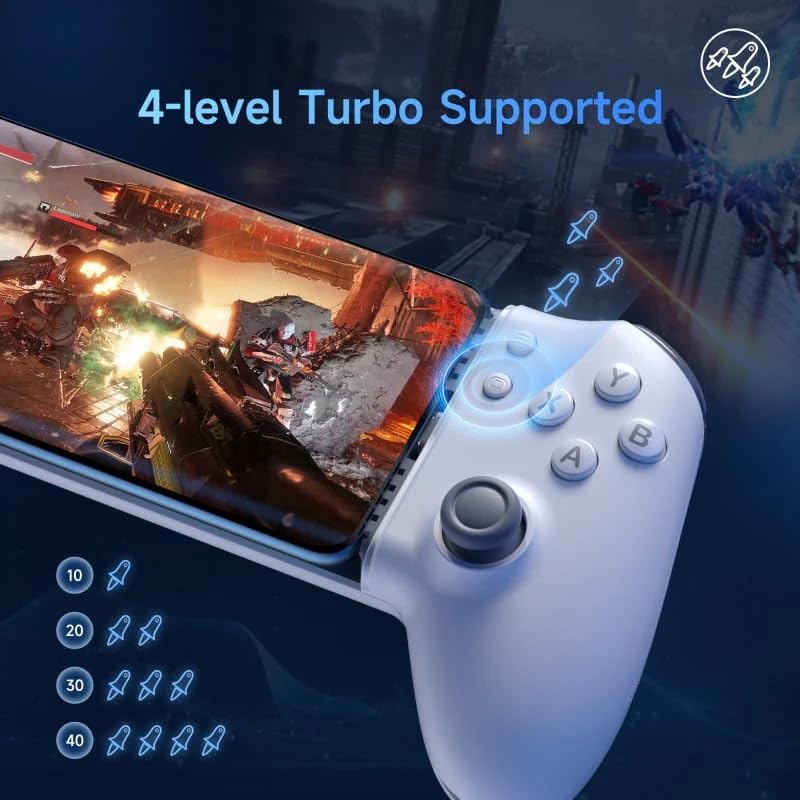
Image: EasySMX M15 Controller highlighting the 4-level Turbo support feature, indicating different speed settings.
Gaming with Various Devices
The EasySMX M15 is compatible with a wide range of devices, from smartphones to large tablets, thanks to its adjustable design and optional retainer. Ensure your device is securely connected via the Type-C port.
Streaming Games (Moonlight App)
For an enhanced gaming experience, you can stream games from your PC or PlayStation to your tablet using applications like Moonlight. This allows you to play high-fidelity games on your mobile device with the EasySMX M15 controller. Ensure both your gaming PC/console and tablet are on the same network for optimal performance.
Технічні характеристики
| Особливість | Деталь |
|---|---|
| Спосіб підключення | Прямий роз'єм |
| Сумісні моделі | Android 9.0 (Pie) and later, iPhone 15 series |
| Інтерфейс | Тип С |
| Вага нетто | 195г |
| Controller Dimensions (folded) | 21.75 x 10.40 x 5.10 см (приблизно 8.56 x 4.09 x 2.01 дюймів) |
| Stretchable Dimension (without retainer) | From 10.23 inches (26 cm) up to 13 inches (33 cm) |
| Stretchable Dimension (with retainer) | From 4 inches (12 cm) up to 10.23 inches (26 cm) |
| кнопки | Mechanical (D-pad, Shoulder, ABXY) |
| палички | Ефект Холла |
Усунення несправностей
- Контролер не підключається: Ensure your device's Type-C port is clean and the controller is fully inserted. Verify your device is compatible (Android 9.0+ or iPhone 15 series).
- Кнопки не відповідають: Check for any physical obstructions. Restart your device and reconnect the controller.
- Вібрація не працює: Confirm vibration settings are enabled in your game and on the controller.
- Device Not Fitting Securely: Adjust the controller's stretchable mechanism. If your device is smaller, ensure the retainer is correctly installed and tightened.
Гарантія та підтримка
For warranty information, please refer to the product packaging or contact the retailer where you purchased the EasySMX M15 Modified Mobile Gaming Controller. For technical support, troubleshooting assistance, or further inquiries, please reach out to the manufacturer's customer service or visit their official webсайт.


