1. Вступ
Thank you for choosing the EvoFox Ronin Wired Mechanical Gaming Keyboard. This manual provides detailed instructions for setting up, operating, and maintaining your keyboard to ensure optimal performance and longevity. The EvoFox Ronin is designed for a superior typing and gaming experience, featuring advanced sound dampening, customizable switches, and dynamic RGB lighting.

Image 1.1: EvoFox Ronin Wired Mechanical Gaming Keyboard (Black)
Ключові характеристики:
- 9-Layer Gasket Structure: Advanced design for reduced noise, improved stability, and enhanced tactile feedback.
- Hot-Swappable Outemu Red Silent Switches: Customizable, durable, and smooth typing experience with included switch puller.
- Per-Key RGB Backlighting: 21 effects and Audio Sync Mode for personalized and immersive lighting.
- Dedicated Volume Knob: Convenient control over audio levels.
- Powerful Windows Software: Program keys, create macros, control backlighting, and manage profiles with onboard memory.
- Кросплатформна сумісність: Easily switch between Windows and Mac modes.
- Detachable Braided USB-C Cable: Robust 1.5m cable with EMI ring for reliable connection and portability.
2. Вміст упаковки
Будь ласка, перевірте наявність усіх предметів у вашій упаковці:
- 1 x EvoFox Ronin Mechanical Gaming Keyboard
- 1 х знімач ковпачка клавіш
- 4 x Outemu Red Switches (Spare)
- 1 х посібник користувача
3. Продукт закінчивсяview
3.1 Gasket Structure
The EvoFox Ronin features an advanced 9-layer gasket structure. This design incorporates silicone gaskets, a mounting plate, and multiple layers of vibration and sound dampening materials to provide a stable, quiet, and comfortable typing experience by minimizing unwanted noise and resonance.
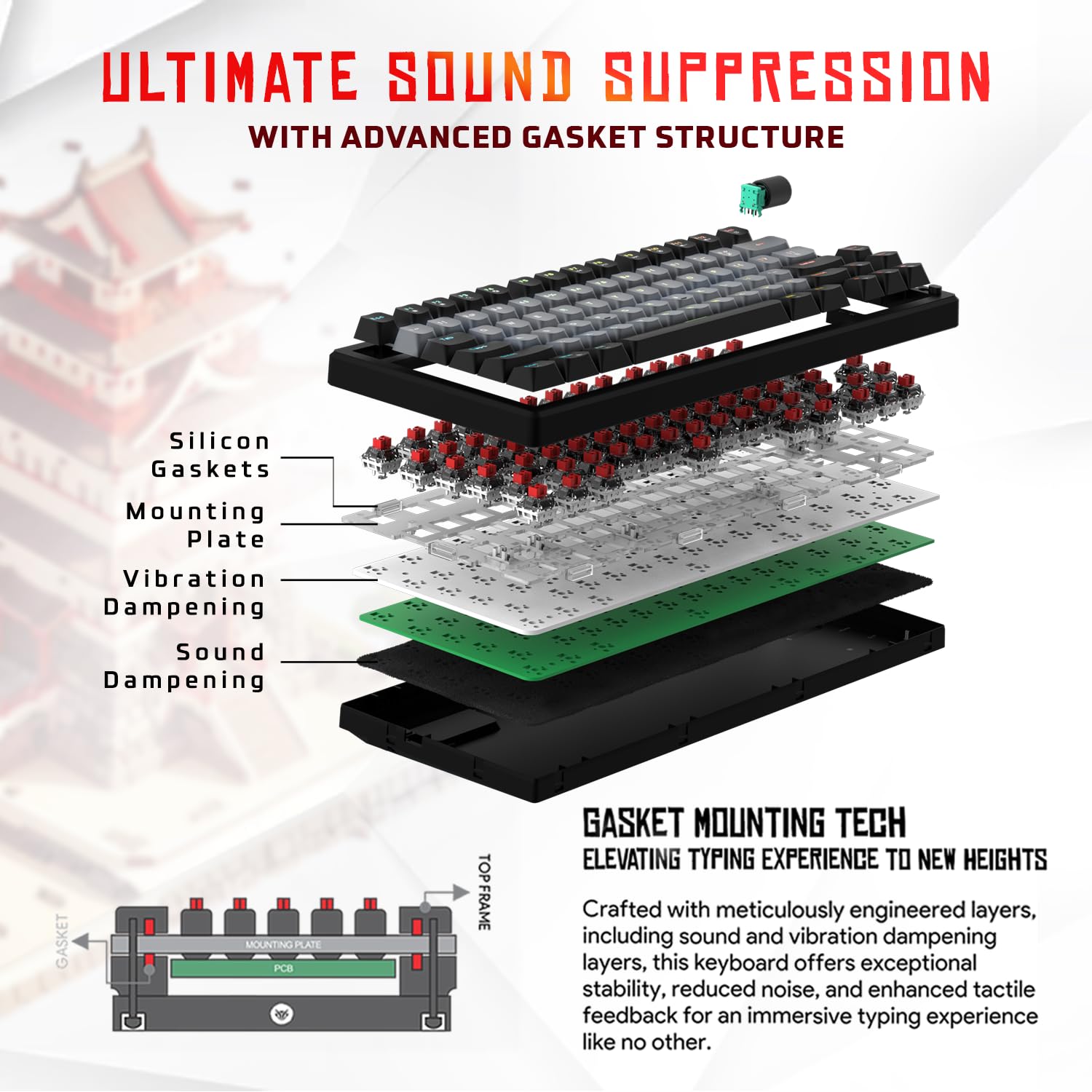
Зображення 3.1: Розгорнуто view of the 9-layer gasket structure, showing silicone gaskets, mounting plate, and dampзаливні шари.
3.2 Outemu Red Silent Switches
The keyboard is equipped with Outemu Red Dust Proof Switches, known for their linear and silent operation. These switches are hot-swappable, allowing users to easily replace them with other compatible 3-pin mechanical switches without soldering, enabling full customization of the typing feel.

Image 3.2: Close-up of Outemu Red switches and the included switch puller, demonstrating hot-swappable functionality.
3.3 Per-Key RGB Backlighting
Each key on the EvoFox Ronin features individual RGB backlighting, offering 16 million colors and 21 pre-set lighting effects. The lighting can be customized directly on the keyboard or through the dedicated software, including an Audio Sync Mode that reacts to sound.

Image 3.3: The EvoFox Ronin keyboard showcasing його налаштоване RGB-підсвічування для кожної клавіші.
3.4 Dedicated Volume Knob
A metal volume knob is integrated into the keyboard for quick and precise audio adjustments. Rotate to change volume, and press to mute/unmute.
3.5 Знімний кабель USB-C
The keyboard connects via a robust 1.5-meter braided USB-C cable, which is detachable for easy portability and storage. The cable includes an EMI ring to minimize signal interference.

Image 3.4: Features of the EvoFox Ronin, including the volume knob, detachable USB-C cable, and double-height adjustable legs.
4. Інструкції з налаштування
Follow these steps to set up your EvoFox Ronin keyboard:
- Розпакуйте клавіатуру: Обережно вийміть клавіатуру та всі аксесуари з упаковки.
- Підключіть кабель USB-C: Insert the USB-C end of the provided cable into the port on the back of the keyboard.
- Підключення до комп'ютера: Plug the USB-A end of the cable into an available USB port on your computer (PC or Mac).
- Встановлення драйвера: Клавіатура є plug-and-play. Ваша операційна система повинна автоматично виявити та встановити необхідні драйвери.
- Встановлення програмного забезпечення (додатково): For advanced customization, download the dedicated Windows software from the official EvoFox webсайт.
5. Інструкція з експлуатації
5.1 Основні функції клавіш
The EvoFox Ronin functions as a standard TKL (Tenkeyless) keyboard. All keys perform their labeled functions. The keyboard supports N-Key Rollover, ensuring every key press is registered accurately, even during rapid input.
5.2 Мультимедійні та функціональні клавіші
Access multimedia and additional functions by pressing the Fn key in combination with the designated F-keys or other keys. Refer to the keycap legends for specific functions (e.g., Fn + F1 for media player, Fn + F2 for volume down).
5.3 Керування RGB-підсвічуванням
You can control the RGB lighting directly from the keyboard:
- Ефекти зміни: використання Fn + \| щоб перемикатися між 21 різними світловими ефектами.
- Налаштувати яскравість: використання Fn + стрілка вгору для збільшення яскравості та Fn + стрілка вниз щоб зменшити яскравість.
- Налаштувати швидкість: використання Fn + стрілка вліво to decrease effect speed and Fn + стрілка вправо щоб збільшити швидкість ефекту.
- Audio Sync Mode: Activate specific modes that react to audio input.
5.4 Налаштування програмного забезпечення
The dedicated Windows software allows for comprehensive customization:
- Програмування ключів: Remap any key to a different function.
- Створення макросів: Записуйте та призначайте складні послідовності клавіш одній клавіші.
- Backlighting Effects: Fine-tune RGB colors, effects, brightness, and speed.
- Profile Управління: Створення та збереження кількох професіоналівfileдля різних програм або ігор.
- Швидкість опитування: Adjust the polling rate up to 1000Hz.

Image 5.1: Screenshot of the EvoFox Ronin's dedicated software, showing options for light settings, button settings, and macro management.
5.5 Cross-Platform Compatibility
The keyboard supports both Windows and Mac operating systems. Use the designated key combination (typically Fn + Win or similar, refer to keycap legends) to switch between modes, ensuring correct key mapping for your OS.
6. Технічне обслуговування
6.1 Очищення клавіатури
Щоб зберегти зовнішній вигляд та функціональність клавіатури:
- Від’єднайте клавіатуру від комп’ютера перед чищенням.
- Використовуйте балончик зі стисненим повітрям, щоб видалити пил та сміття між клавішами.
- Протріть клавіші та поверхню клавіатури м’якою, злегка змоченою ганчіркоюamp тканиною. Уникайте надмірного зволоження.
- Не використовуйте агресивні хімікати або абразивні миючі засоби.
6.2 Заміна перемикачів
The EvoFox Ronin features hot-swappable switches, allowing for easy replacement without soldering:
- Від’єднайте клавіатуру від комп’ютера.
- Використовуйте знімач для ковпачків клавіш, що входить до комплекту, щоб обережно зняти потрібний ковпачок.
- Use the included switch puller to carefully grip the top and bottom clips of the switch and pull it straight up.
- Align the pins of the new switch with the holes on the PCB and gently press it down until it clicks into place. Ensure the pins are not bent.
- Замініть ковпачок клавіші.

Image 6.1: A keycap being removed from the keyboard using a keycap puller.
7. Вирішення проблем
If you encounter issues with your EvoFox Ronin keyboard, refer to the following common solutions:
- Клавіатура не реагує:
- Переконайтеся, що кабель USB-C надійно підключено як до клавіатури, так і до комп’ютера.
- Спробуйте підключити клавіатуру до іншого USB-порту на комп'ютері.
- Перевірте клавіатуру на іншому комп'ютері, щоб виключити проблему, пов'язану з певним комп'ютером.
- Перезавантажте комп'ютер.
- RGB-підсвічування не працює/неправильно:
- Check the on-board lighting controls (Fn key combinations) to ensure brightness is not set to zero or an effect is not disabled.
- Якщо ви використовуєте програмне забезпечення, переконайтеся, що воно працює, і встановлені правильніfile є активним.
- Reinstall the keyboard software if issues persist.
- Ключі не реєструються:
- Переконайтеся, що під клавішею або перемикачем немає сміття.
- If a specific key is not working, try replacing its switch (refer to Section 6.2).
- Check for bent pins on the switch if you recently replaced one.
- Software Issues (e.g., Antivirus Flagging):
- Ensure you download the software from the official EvoFox website to avoid unofficial versions.
- If your antivirus flags the software, you may need to add an exception for the software's executable file. Proceed with caution and only if you trust the source.
- Contact EvoFox support for the latest software version or assistance.
8. Технічні характеристики
| Особливість | Деталь |
|---|---|
| Бренд | ЕвоФокс |
| Назва моделі | EvoFox Ronin TKL Wired |
| Опис клавіатури | Механічний |
| Технологія підключення | USB-C (дротовий) |
| Перемикачі | Outemu Red Silent Dust Proof Switches (Hot-Swappable) |
| Підсвічування | Per-Key RGB (16 Million Colors, 21 Effects, Audio Sync Mode) |
| Швидкість опитування | До 1000 Гц |
| Перехід ключа | N-Key Rollover (All Anti-Ghosting Keys) |
| Особливості | Advanced Gasket Structure, Compact TKL Design, Multimedia Keys, Pro Mod Hotswap Module, Powerful Windows Software, Dedicated Volume Controller |
| Сумісні пристрої | Ноутбук, ПК |
| Апаратна платформа | PC/Mac/Linux/Unix |
| Довжина кабелю | 1.5m Detachable Braided Type-C with EMI Ring |
| матеріал | пластик |
| Розміри продукту | 32 х 13.5 х 2.6 см |
| Вага товару | 640 г |
| Країна походження | Китай |
9. Гарантія та підтримка
The EvoFox Ronin Mechanical Gaming Keyboard comes with a standard manufacturer's warranty. Please refer to the warranty card included in your package for specific terms and conditions, including warranty period and coverage details.
For technical support, troubleshooting assistance, or warranty claims, please contact EvoFox customer support. You can find contact information on the official EvoFox website or through the manufacturer, Allied Electronics & Magnetics Private Limited.
Виробник: Allied Electronics & Magnetics Private Limited
Адреса: C-64/4, Okhla Phase - 2, New Delhi - 110020


