1. Вступ
This manual provides detailed instructions for the installation, operation, and maintenance of your darkFlash DS900 ATX Mid-Tower PC Case. The DS900 is designed to accommodate ATX, M-ATX, and ITX motherboards, featuring a panoramic dual tempered glass design for an unobstructed view of internal components. It includes advanced cooling support and convenient I/O options.
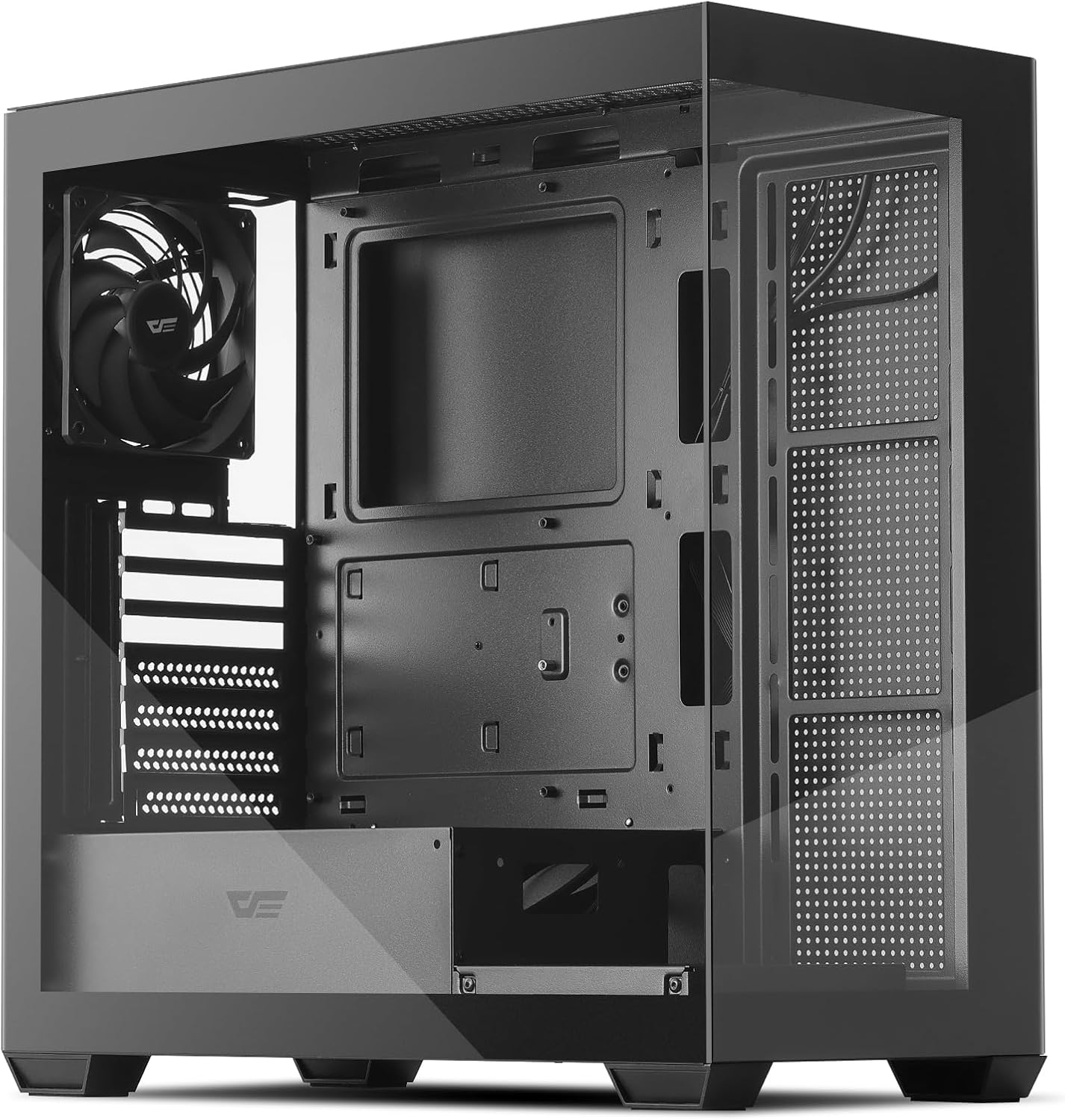
Figure 1: darkFlash DS900 ATX Mid-Tower PC Case
2. Ключові характеристики
- Panoramic Dual Tempered Glass: Offers a 270° unobstructed view of your PC hardware and lighting.
- Високошвидкісна панель вводу/виводу: Equipped with USB 3.0, USB 2.0, and Type-C ports for versatile connectivity.
- Advanced Cooling Support: Supports up to 10 fans and a 360mm water cooling radiator for efficient heat dissipation. Includes one pre-installed non-LED PWM fan.
- Оптимізований потік повітря: Designed with multiple airflow channels to maintain optimal component temperatures.
- Магнітні пилові фільтри: Features magnetic dust filters on the top and bottom for easy cleaning and component protection.
- Зручний дизайн: Facilitates easy installation and cable management with tool-free access to panels.
- Сумісність материнської плати: Supports ATX, M-ATX, and ITX motherboard form factors.
3. Технічні характеристики
| Особливість | Специфікація |
|---|---|
| Тип корпусу | Середній вежі |
| Сумісність материнської плати | ATX, M-ATX, ITX |
| матеріал | Метал, Загартоване скло |
| Розміри (ДxШxВ) | 8.6 x 17.8 x 17 дюйма (218 x 452 x 432 мм) |
| Вага товару | 14 фунта (6.35 кг) |
| Максимальна довжина GPU | 425 мм |
| Максимальна висота процесорного кулера | 170 мм |
| Опора радіатора | До 360 мм |
| Підтримка фанів | Up to 10 fans (1x 120mm PWM fan pre-installed) |
| Привідні відсіки | 2 жорсткі диски 3.5 дюйма, 2 твердотільні накопичувачі 2.5 дюйма |
| Слоти розширення | 7 |
| Передні порти вводу-виводу | 1x USB 3.0, 1x USB 2.0, 1x Type-C, HD Audio, Mic, Power, Reset, LED Control |
4. Налаштування та встановлення
4.1 Розпакування
Carefully remove the PC case from its packaging. Inspect for any damage during transit. Keep all packaging materials for future transport or warranty claims.
4.2 Зняття панелі
The darkFlash DS900 features tool-free disassembly on three sides for easy access to components. The tempered glass side panel and the metal side panel are secured with thumb screws at the rear. The top panel can also be removed for fan or radiator installation.

Figure 2: Panel Removal and Upgraded Design
4.3 Встановлення материнської плати
- Ensure the correct standoffs are installed for your motherboard form factor (ATX, M-ATX, ITX).
- Align your motherboard with the standoffs and gently place it into position.
- Закріпіть материнську плату за допомогою наданих гвинтів.
4.4 Встановлення приводу
The case supports 2x 3.5" HDDs and 2x 2.5" SSDs. Refer to the included manual for specific mounting locations and procedures for each drive type.
4.5 Встановлення системи охолодження
The DS900 supports extensive cooling configurations, including up to a 360mm radiator and up to 10 fans. One 120mm non-LED PWM fan is pre-installed at the rear.

Figure 3: Cooling Support Layout
Radiators can be mounted at the top or side. Fans can be installed at the front, top, rear, and bottom. Ensure proper airflow direction for optimal cooling performance.

Figure 4: High-Airflow Performance
4.6 Організація кабелів
The case is designed with ample space behind the motherboard tray and cable routing cutouts to facilitate clean cable management. Utilize the included zip ties to secure cables and maintain an organized interior.
4.7 Роз'єми вводу/виводу на передній панелі
Connect the front I/O panel cables to the corresponding headers on your motherboard. The I/O panel includes:
- Кнопка живлення
- Кнопка скидання
- Світлодіодна кнопка керування
- Порт USB 3.0
- Порт USB 2.0
- Порт Type-C
- HD Audio Jack
- Мікрофонний роз'єм
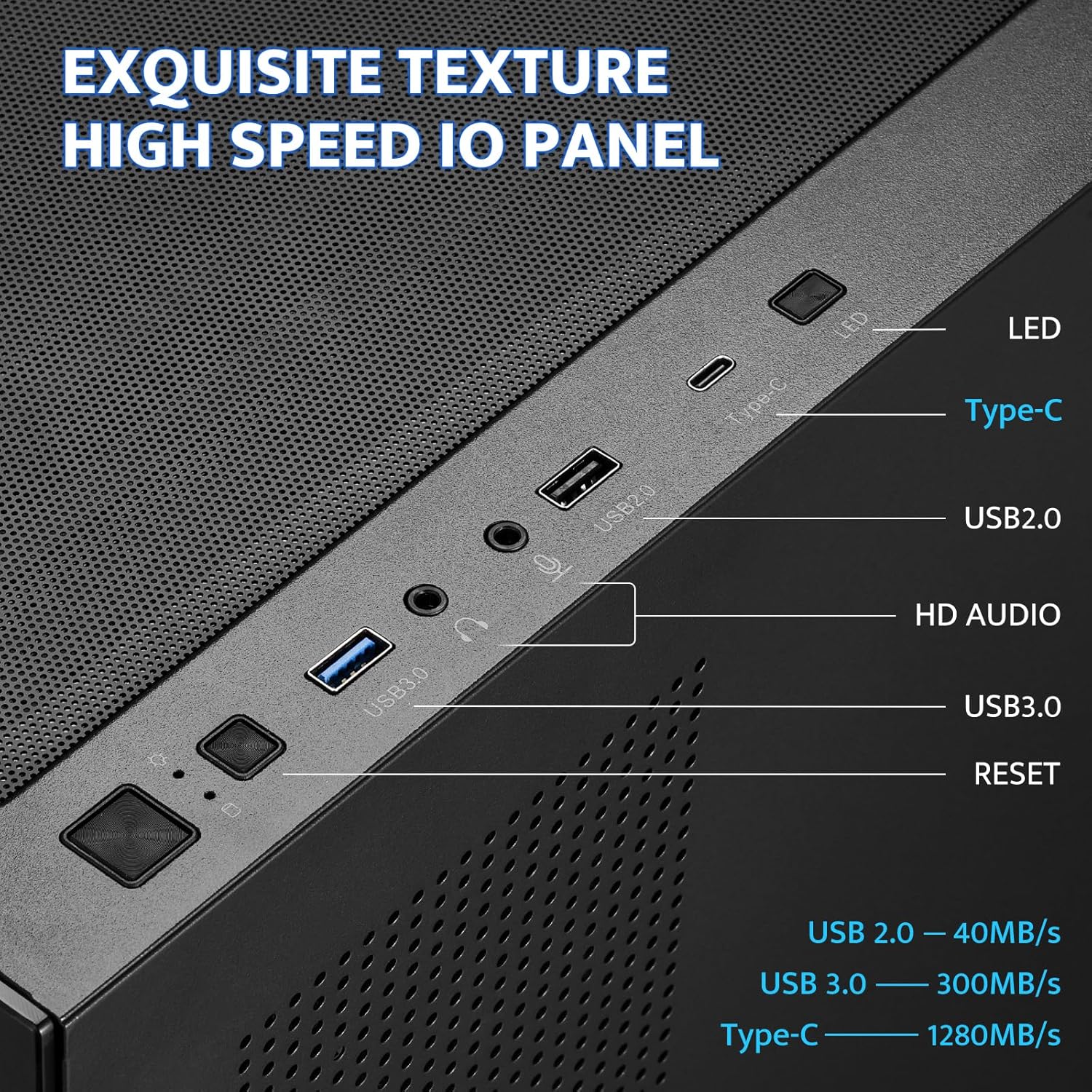
Figure 5: Front I/O Panel
5. Інструкція з експлуатації
Once all components are installed and connected, ensure all panels are securely reattached. Connect your power supply to a wall outlet and turn on the PC using the power button on the front I/O panel. Use the LED control button to cycle through any available lighting modes for compatible fans or accessories.
6. Технічне обслуговування
Regular maintenance helps ensure optimal performance and longevity of your PC components. The darkFlash DS900 features magnetic dust filters for easy cleaning.
6.1 Очищення пилових фільтрів
- Gently pull the magnetic dust filters located on the top and bottom of the case to remove them.
- Очистіть фільтри за допомогою стисненого повітря, м’якої щітки або промийте водою (переконайтеся, що вони повністю сухі, перш ніж встановлювати їх знову).
- Reattach the magnetic filters to their respective positions.

Рисунок 6: Магнітний пиловий фільтр
6.2 Cleaning Tempered Glass Panels
Use a microfiber cloth and a non-abrasive glass cleaner to clean the tempered glass panels. Avoid harsh chemicals that may damage the glass or coatings.
7. Вирішення проблем
If you encounter issues with your PC build, consider the following general troubleshooting steps:
- Немає живлення: Double-check all power connections from the power supply to the motherboard, CPU, and graphics card. Ensure the power button cable is correctly connected to the motherboard header.
- Fans Not Spinning/Lights Off: Verify fan and LED connections to the motherboard or fan controller. Check motherboard BIOS settings for fan control.
- Проблеми з відображенням: Ensure your graphics card is properly seated in its PCIe slot and all power cables are connected. Verify monitor cables are securely attached to the graphics card.
- Перегрів: Confirm all fans are spinning in the correct direction for optimal airflow. Ensure CPU cooler and GPU fans are functioning. Check for proper thermal paste application on the CPU.
- Послаблені з'єднання: Re-seat all components (RAM, GPU, storage drives) and re-check all cable connections.
For specific component-related issues, refer to the instruction manuals provided with those components.
8. Гарантія та підтримка
Щоб отримати інформацію про гарантію та технічну підтримку, зверніться до офіційного веб-сайту darkFlash. webсайт або зверніться до служби підтримки клієнтів. Зберігайте чек про покупку для будь-яких гарантійних претензій.


