вступ
This manual provides comprehensive instructions for the setup, operation, maintenance, and troubleshooting of your OnePlus Nord N30 5G smartphone. Please read this manual carefully to ensure proper use and to maximize the device's capabilities.

Зображення: Спереду та ззаду view of the OnePlus Nord N30 5G smartphone, showcasinйого дизайн та модуль камери.
Налаштування
1. Розпакування та первинна перевірка
Обережно вийміть усі компоненти з упаковки. Перевірте наявність наступних елементів:
- Смартфон OnePlus Nord N30 5G
- Зарядний пристрій на 50 Вт
- USB кабель
- Інструмент для витягування SIM-карти
- Короткий посібник користувача (якщо включено)
2. Встановлення SIM-картки та картки MicroSD
The device supports a single SIM card and a microSDXC card for expandable storage. Locate the SIM tray on the side of the device. Use the provided SIM ejector tool to open the tray. Insert your Nano-SIM card and microSD card into the designated slots, ensuring correct orientation. Close the tray securely.
3. Початкове увімкнення та налаштування
Press and hold the Power button located on the side of the device until the OnePlus logo appears. Follow the on-screen prompts to complete the initial setup process, which includes selecting your language, connecting to a Wi-Fi network, and signing in to your Google account.
4. Зарядка пристрою
Connect the 50W charger to the USB-C port at the bottom of the phone. Plug the charger into a power outlet. The device features 67W SUPERVOOC fast charging, allowing for rapid battery replenishment.

Зображення: Внутрішнє view of the OnePlus Nord N30 5G, highlighting the 5000mAh battery and the charging connection point.
Інструкція з експлуатації
1. Дисплей та навігація
The OnePlus Nord N30 5G features a 6.72-inch LCD display with a 120Hz adaptive refresh rate, providing smooth scrolling and visual experience. Navigate the interface using touch gestures: tap to select, swipe to scroll, pinch to zoom.

Image: Close-up of the OnePlus Nord N30 5G display, emphasizing its large screen size and high refresh rate capabilities.
2. Використання камери
The device is equipped with a triple rear camera system, featuring a 108 MP main sensor with f/1.7 aperture, a 2 MP macro lens, and a 2 MP depth sensor. The front camera is 16 MP. Open the Camera application to capture photos and videos. Utilize the 9-in-1 pixel binning technology for brighter and more colorful images, especially in challenging lighting conditions.

Зображення: Детальне view of the OnePlus Nord N30 5G's rear camera setup, highlighting the 108MP main sensor.
3. Аудіофункції
The OnePlus Nord N30 5G includes dual stereo speakers for an enhanced audio experience. It also retains a 3.5mm audio jack for wired headphone connectivity. The device supports a 200% Ultra Volume Mode for increased audio output.

Image: A user holding the OnePlus Nord N30 5G, illustrating the device's use for audio consumption and its dual speaker capability.
4. Продуктивність та ігри
Powered by the Qualcomm Snapdragon 695 processor and 8GB of RAM (with up to 8GB of expandable virtual RAM), the device is designed for smooth multitasking and gaming. OxygenOS based on Android 13 includes gamer-friendly features such as Quick Start, Game Tools, Game Focus Mode, and GPA Frame Stabilizer.

Image: A person engaged in mobile gaming on the OnePlus Nord N30 5G, demonstrating its performance capabilities for entertainment.

Image: Visual representation of the OnePlus Nord N30 5G's internal components, highlighting the Snapdragon processor and RAM for enhanced speed.
5. Підключення
The OnePlus Nord N30 5G supports 5G connectivity for North and South American networks (n2/n5/n12/n25/n66/n71/n41/n77/n78) and global 4G LTE bands. It also features Bluetooth 5.1 for wireless accessory connections.
Технічне обслуговування
1. Догляд за акумулятором
To prolong battery life, avoid exposing the device to extreme temperatures. Use only the provided 50W charger. For optimal performance, keep the battery charge between 20% and 80% when possible.
2. Оновлення програмного забезпечення
Regularly check for and install software updates to ensure your device has the latest features, security patches, and performance improvements. Updates are typically found in the device's Settings menu under "System" or "About phone."
3. Очищення пристрою
Use a soft, lint-free cloth to clean the screen and body of the phone. Avoid using harsh chemicals or abrasive materials that could damage the finish or display.
4. Управління зберіганням
The device comes with 128GB of internal storage. To manage storage, regularly clear cache, uninstall unused applications, and transfer large files (photos, videos) to cloud storage or the microSD card.
Усунення несправностей
1. Проблеми з підключенням до мережі
If you experience issues with network connectivity (calls, data), ensure your SIM card is properly inserted and your mobile data is enabled. Verify that your carrier supports the device's network bands. Some users have reported specific compatibility considerations with certain carriers like T-Mobile or MetroPCS; ensure your carrier's requirements are met for unlocked devices.
2. Швидка розрядка акумулятора
High screen brightness, extensive use of demanding applications, and continuous background processes can lead to faster battery drain. Adjust screen brightness, close unused apps, and review battery usage in settings to identify power-consuming applications.
3. Device Performance Slowdown
If the device becomes slow or unresponsive, try restarting it. Clear app caches and ensure sufficient free storage space. If issues persist, consider a factory reset (back up your data first).
Технічні характеристики
| Особливість | Деталь |
|---|---|
| Дисплей | 6.72-inch LCD, 120Hz Refresh Rate, 1080x2400 (FHD+), 391 PPI |
| Процесор | Восьмиядерний Qualcomm Snapdragon 695 |
| ОЗУ | 8GB (expandable virtual RAM) |
| Внутрішня пам'ять | 128 ГБ (з можливістю розширення за допомогою microSDXC) |
| Задня камера | 108 МП (ширококутний), 2 МП (макро), 2 МП (глибина) |
| Фронтальна камера | 16 Мп |
| Акумулятор | 5000mAh, 50W SUPERVOOC Fast Charging |
| Операційна система | OxygenOS на базі Android 13 |
| Підключення | 5G (North & South America bands), 4G LTE, Bluetooth 5.1 |
| Аудіороз'єм | 3.5 мм |
| Розміри | 6 x 4 x 4 дюймів |
| вага | 1.1 фунта |
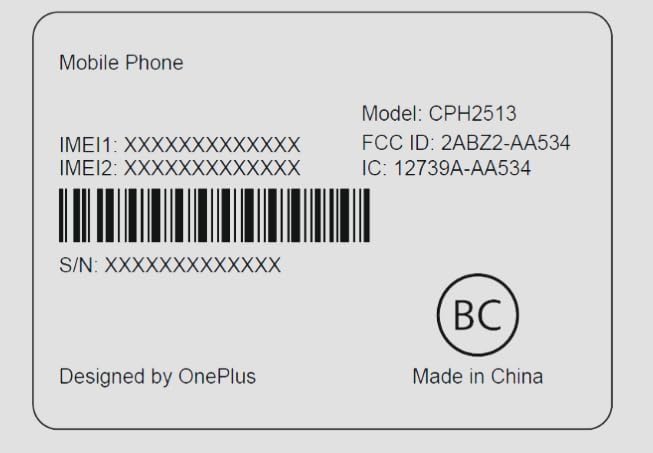
Image: Regulatory label for the OnePlus Nord N30 5G, showing model number CPH2513 and FCC ID: 2ABZ2-AA534.
Гарантія та підтримка
Please note that for the discontinued T-Mobile Unlocked Model, there is no manufacturer's warranty. For general support inquiries or further assistance, please refer to the official OnePlus support webсайт або зверніться до служби підтримки клієнтів. Зберігайте чек про покупку для будь-яких потенційних потреб у обслуговуванні.


