1. Вступ
This manual provides comprehensive instructions for the installation, operation, and maintenance of your Antec CX700 ATX Mid Tower Gaming Case. Designed for PC enthusiasts, this case features a sleek, modern design with a tempered glass side panel and pre-installed ARGB fans to enhance visual appeal and ensure optimal airflow. Please read this manual thoroughly before beginning assembly to ensure proper setup and safe operation.
2. Технічні характеристики
| Особливість | Деталь |
|---|---|
| Бренд | Antec |
| Номер моделі | CX700 |
| Тип корпусу | Середній вежі |
| Сумісність материнської плати | ATX |
| Колір | чорний |
| матеріал | Легована сталь, пластик |
| Вага товару | 5.5 кілограмів (12.1 фунти) |
| Спосіб охолодження | повітря |
| Pre-installed ARGB Fans | 3 (Front-mounted) |
| Підтримка вентилятора (макс.) | Front: 3x120mm, Top: 3x120mm, Rear: 1x120mm, Bottom: 3x120mm |
| Порти USB 3.0 | 2 |
| Порти USB Type-C | 1 |
| Аудіо порти | Headphone, Microphone |
| Роздільна здатність графічного процесора (макс.) | 410 мм (16.14 дюйма) |
| Підтримка жорстких дисків | 3.5 дюймів |
| SSD Support | 2.5 дюймів |
| Довжина блоку живлення (макс.) | 225 мм |
3. Вміст упаковки
- Antec CX700 ATX Mid Tower Gaming Case
- Pre-installed ARGB Fans (3 fans, typically front-mounted as per product title)
- Accessory Box (Screws, cable ties, user manual)
- Бічна панель із загартованого скла
4. Інструкції з налаштування
4.1 Розпакування та перевірка
Carefully remove the case from its packaging. Inspect for any signs of damage during transit. The tempered glass panel is fragile; handle with care.
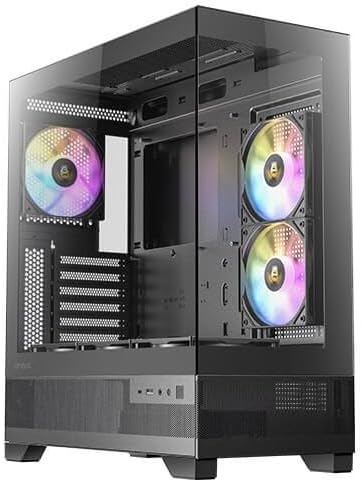
Малюнок 1: спереду та збоку view of the Antec CX700 case, showcasing the tempered glass panel and pre-installed fans.
4.2 Зняття бічних панелей
To access the interior for component installation, remove the tempered glass side panel and the solid rear side panel.
- Locate the thumbscrews on the rear of the case securing the tempered glass panel.
- Carefully unscrew these thumbscrews.
- Gently pull the tempered glass panel away from the chassis. Lay it flat on a soft, clean surface to prevent scratches or damage.
- Repeat the process for the solid rear side panel if necessary for cable management access.

Малюнок 2: Задня частина view of the Antec CX700 case, showing the rear fan and expansion slots. The side panel is removed for internal access.
4.3 Встановлення материнської плати
Install your ATX motherboard into the designated area. Ensure all standoffs are correctly aligned and secured.
4.4 Встановлення компонентів
Install your CPU, RAM, GPU (up to 410mm length), storage drives (3.5" HDD, 2.5" SSD), and power supply unit (PSU, up to 225mm length) according to their respective manuals and the case's layout.

Малюнок 3: Верх view of the Antec CX700 case, highlighting the pre-installed fans and internal layout for component placement.
4.5 Організація кабелів
Використовуйте вирізи для прокладання кабелів та точки кріплення за лотком материнської плати для ефективного розташування кабелів. Це покращує потік повітря та естетику.
4.6 Підключення вводу/виводу на передній панелі
Connect the front panel I/O cables (USB 3.0, USB Type-C, HD Audio, Power, Reset, LED) to the corresponding headers on your motherboard.
- Кнопка живлення: Initiates system power.
- Кнопка скидання: Перезавантажує систему.
- Порти USB 3.0 (x2): Для високошвидкісної передачі даних.
- Порт USB Type-C (x1): For modern device connectivity.
- Роз'єм для навушників: Аудіовихід.
- Роз'єм для мікрофона: Аудіовхід.
5. Інструкція з експлуатації
Once all components are installed and connected, replace the side panels. Connect your peripherals, monitor, and power cable. Press the power button on the top panel to start your system. The pre-installed ARGB fans will illuminate, providing customizable lighting effects.
6. Технічне обслуговування
Регулярне технічне обслуговування забезпечує оптимальну продуктивність та довговічність корпусу та компонентів вашого ПК.
- Пилові фільтри: The case includes magnetic dust filters (e.g., on the top panel) that can be easily removed and cleaned with water or a soft brush. Clean these regularly to maintain airflow and prevent dust buildup inside the case.
- Прибирання салону: Periodically open the side panels and use compressed air to remove dust from internal components and fans. Ensure the system is powered off and unplugged before cleaning.
- Загартоване скло: Clean the tempered glass panel with a microfiber cloth and a non-abrasive glass cleaner. Avoid harsh chemicals.
7. Вирішення проблем
Якщо у вас виникли проблеми, зверніться до наступних поширених кроків усунення несправностей:
- Система не вмикається:
- Переконайтеся, що блок живлення правильно підключено до розетки, а перемикач блоку живлення знаходиться в положенні «УВІМК.».
- Verify all power cables (24-pin ATX, 8-pin CPU, PCIe for GPU) are securely connected to the motherboard and components.
- Перевірте, чи кабель кнопки живлення на передній панелі правильно підключений до роз'єму на передній панелі материнської плати.
- Вентилятори не обертаються / ARGB не світиться:
- Confirm that the fan power cables and ARGB cables are correctly connected to the motherboard or a dedicated ARGB controller.
- Refer to your motherboard manual for proper ARGB header connections and software control.
- Немає виводу на дисплей:
- Ensure your monitor cable is connected to the graphics card (GPU) output, not the motherboard's integrated graphics ports (unless using integrated graphics).
- Перевстановіть відеокарту в слот PCIe.
8. Гарантія та підтримка
The Antec CX700 ATX Mid Tower Gaming Case comes with a standard manufacturer's warranty. For specific warranty terms, duration, and to register your product, please visit the official Antec webсайт або зверніться до служби підтримки клієнтів. Зберігайте чек про покупку для гарантійних випадків.
For further technical assistance or support, please refer to the Antec support resources available online.


