1. Вступ
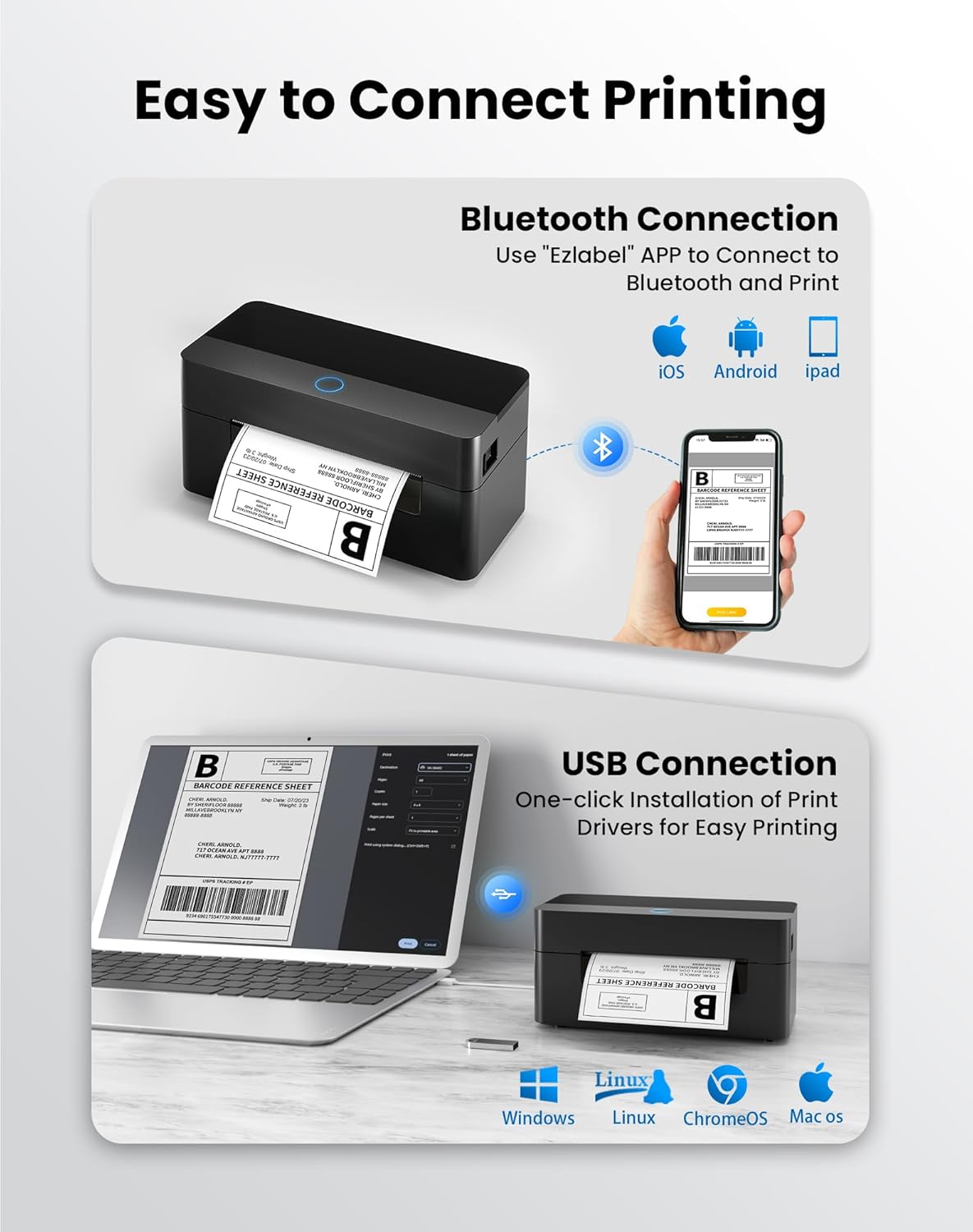
This manual provides detailed instructions for the setup, operation, and maintenance of your BPXX Bluetooth Thermal Shipping Label Printer, Model D463B. This printer is designed for efficient and clear printing of various thermal labels, including 4x6 inch shipping labels, with a resolution of 203 DPI. It supports both Bluetooth connectivity via the 'Ezlabel' mobile application and USB connection to computers.
2. Пакувальний лист
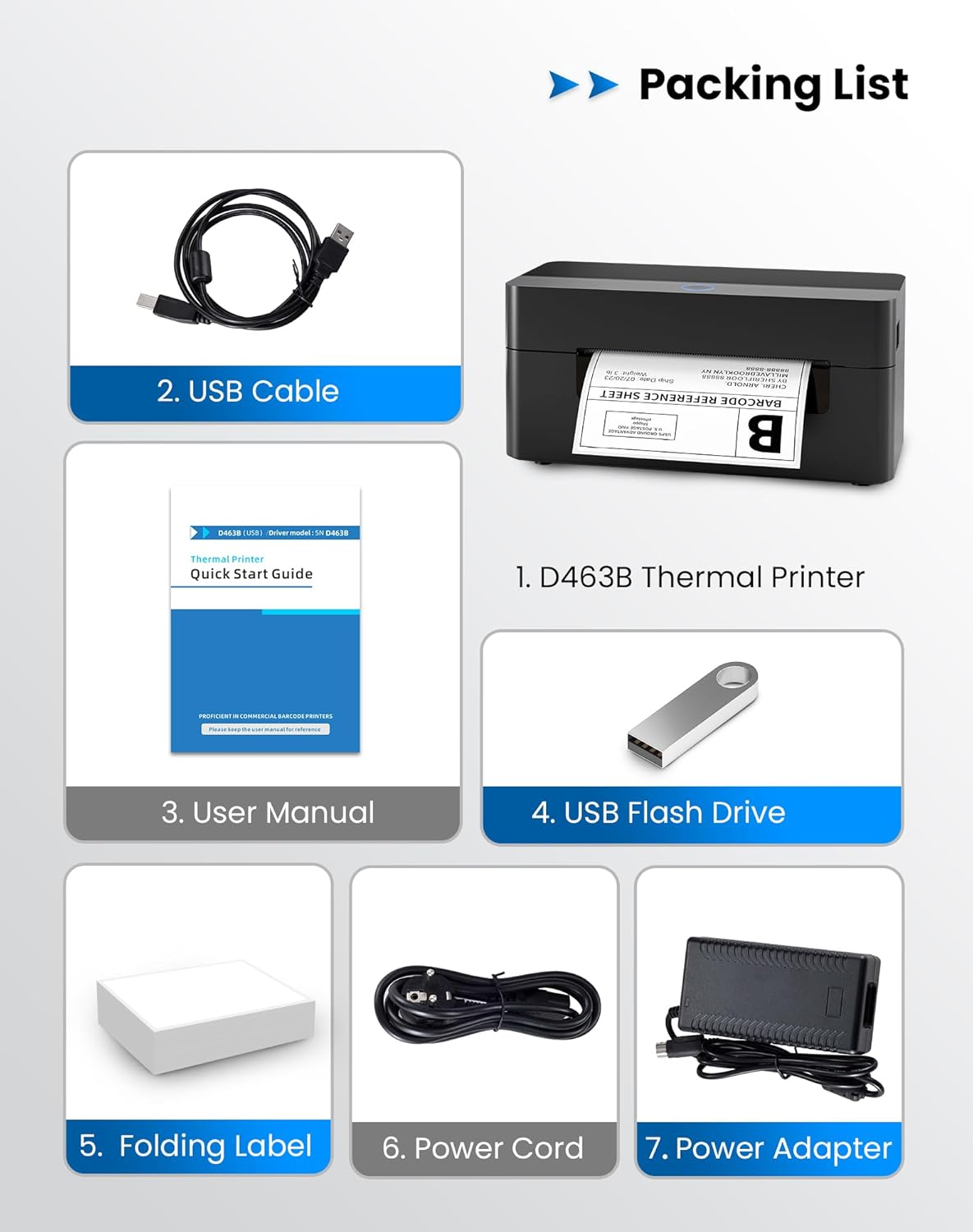
Будь ласка, перевірте, чи всі перелічені нижче предмети входять до вашої упаковки:
- 1 x BPXX D463B Thermal Printer
- 1 x USB кабель
- 1 х посібник користувача
- 1 x USB Flash Drive (containing drivers)
- 1 x Folding Label (sample roll)
- 1 x шнур живлення
- 1 x адаптер живлення
3. Посібник із налаштування
3.1 Підключення обладнання
- Connect the power adapter to the printer's power port and plug the power cord into an electrical outlet.
- Open the printer cover and load the thermal labels. Ensure the labels are facing the correct direction for printing and are properly aligned within the guide rails.
- Надійно закрийте кришку принтера.

3.2 Встановлення програмного забезпечення та драйверів
3.2.1 Mobile App (Bluetooth Connection)
For mobile printing, download the 'Ezlabel' application from your device's app store (available for iOS and Android).
- шукати 'Ezlabel' in the App Store (iOS) or Google Play Store (Android).
- Завантажте та встановіть програму.
- Увімкніть Bluetooth на своєму мобільному пристрої.
- Open the 'Ezlabel' app and follow the in-app instructions to connect to your BPXX D463B printer via Bluetooth.
3.2.2 Computer Driver (USB Connection)
For computer printing, install the appropriate drivers for your operating system (Windows, Mac OS, Linux, ChromeOS). Drivers are provided on the included USB flash drive or can be downloaded from the official webсайт.
- Insert the provided USB flash drive into your computer.
- Locate and run the installer for your operating system.
- Дотримуйтеся вказівок на екрані, щоб завершити встановлення драйвера.
- Alternatively, download drivers from: BPXX Driver Download
4. Інструкція з експлуатації
4.1 Завантаження етикеток
Ensure the thermal labels are loaded correctly for optimal printing. The printer supports thermal labels with widths ranging from 1 to 4.5 inches, including standard 4x6 inch shipping labels.
- Відкрийте верхню кришку принтера.
- Place the roll of thermal labels into the label compartment, ensuring the printable side faces upwards.
- Feed the first label through the printer's output slot until it is slightly extended.
- Adjust the label guides to fit the width of your labels snugly, without being too tight.
- Close the top cover. The printer will automatically detect the label size and calibrate.

4.2 Printing via Bluetooth (Mobile App)
- Ensure the printer is powered on and connected to the 'Ezlabel' app via Bluetooth.
- Open the 'Ezlabel' app on your mobile device.
- Select or create your desired label design. The app includes preset templates for various label sizes.
- Confirm print settings such as label size and quantity.
- Ініціюйте команду друку з програми.
4.3 Printing via USB (Computer)
- Підключіть принтер до комп’ютера за допомогою USB-кабелю, що входить до комплекту.
- Ensure the printer drivers are correctly installed.
- Open the document or application from which you wish to print (e.g., a PDF viewer, shipping software).
- Select the BPXX D463B printer from your printer options.
- Adjust print settings as needed (e.g., paper size to 4x6 inches for shipping labels).
- Send the print command.
4.4 Supported Platforms and Print Quality
The BPXX D463B printer is compatible with major shipping carriers and e-commerce platforms, facilitating the printing of shipping labels, return labels, and postagелектронні етикетки.
- Shipping Carriers: FedEx, UPS, USPS, DHL, EasyPost, etc.
- Платформи електронної комерції: Amazon, Shopify, Etsy, eBay, Walmart, etc.
The printer utilizes a high-quality thermal print head and advanced algorithms to deliver clear and sharp barcodes and text at 203 DPI resolution. It achieves a high-speed output of 152mm/s, capable of printing approximately 72 4x6 inch shipping labels per minute.


5. Технічне обслуговування
Регулярне технічне обслуговування забезпечує оптимальну продуктивність та подовжує термін служби вашого принтера.
- Очищення друкувальної голівки: Use an alcohol swab or a specialized thermal printer cleaning pen to gently wipe the print head. Ensure the printer is off and cooled down before cleaning.
- Очищення зовнішньої частини: Протріть зовнішню частину принтера м’якою,amp тканина. Уникайте використання агресивних хімікатів або абразивних матеріалів.
- Видалення пилу: Periodically use compressed air to clear any dust or paper debris from inside the label compartment.
6. Вирішення проблем
If you encounter issues with your BPXX D463B printer, refer to the following common problems and solutions:
- Принтер не відповідає:
- Ensure the power cord is securely connected and the printer is turned on.
- For Bluetooth connection, verify that Bluetooth is enabled on your device and the printer is paired within the 'Ezlabel' app.
- For USB connection, check the USB cable connection and ensure drivers are correctly installed. Try a different USB port or cable.
- Poor Print Quality (Faint/Streaky Prints):
- Очистіть друкувальну головку, як описано в розділі «Технічне обслуговування».
- Переконайтеся, що ви використовуєте високоякісні термоетикетки.
- Check print density settings in the 'Ezlabel' app or printer preferences on your computer.
- Етикетки не подаються належним чином:
- Verify that labels are loaded correctly and aligned with the guide rails.
- Переконайтеся, що на шляху етикетки немає перешкод.
- Perform a label calibration from the printer settings or app if available.
- Printer Offline Error:
- Перезавантажте принтер і комп’ютер/мобільний пристрій.
- Re-establish the Bluetooth or USB connection.
- Check printer status in your operating system's printer settings.
7. Технічні характеристики продукту
| Назва моделі | D463B |
| Бренд | BPXX |
| Технологія друку | Теплові |
| Технологія підключення | Bluetooth, USB |
| Максимальна роздільна здатність друку | 203 x 203 Dots Per Inch (DPI) |
| Максимальна швидкість друку | 152 mm/s (72 labels per minute) |
| Максимальний розмір носія | 4 x 6 дюймів |
| Підтримувана ширина етикетки | 1 - 4.5 дюймів |
| Сумісні пристрої | ПК (Windows, Mac OS, Linux, ChromeOS), смартфони (iOS, Android) |
| Спосіб контролю | App ('Ezlabel'), USB |
| Розміри продукту | 7.3" Г x 3.3" Ш x 3.3" В |
| Вага товару | 1.6 фунта |
| Включені компоненти | Printer, USB Cable, User Manual, USB Flash Drive, Sample Labels, Power Cord, Power Adapter |
8. Гарантія та підтримка
The BPXX D463B Thermal Shipping Label Printer comes with a limited warranty. For specific warranty terms and conditions, please refer to the documentation included with your product or contact BPXX customer support.
For technical assistance, troubleshooting, or any inquiries regarding your product, please contact BPXX customer support through the official webсайт або контактну інформацію, зазначену на упаковці вашого продукту.


