1. Вступ
Thank you for choosing the Moukey MPA80 PA System. This manual provides essential information for the safe and efficient operation of your new audio system. Please read it thoroughly before use and retain it for future reference.
Інструкції з техніки безпеки
- Перед використанням пристрою уважно прочитайте всі інструкції.
- Тримайте продукт подалі від води, вологи та екстремальних температур.
- Не намагайтеся розбирати або ремонтувати пристрій самостійно. Звертайтеся до кваліфікованого персоналу для проведення будь-яких робіт з обслуговування.
- Забезпечте належну вентиляцію, щоб запобігти перегріву.
- Use only the power adapter and accessories specified by the manufacturer.
- Position the speakers and stands on a stable, level surface to prevent tipping.
2. Що в коробці
Перевірте наявність усіх елементів в упаковці:
- 1 x 8-inch Active PA Speaker
- 1 x 8-inch Passive PA Speaker
- 2 x Tripod Stands
- 1 х дротовий мікрофон
- 1 x Пульт дистанційного керування
- 1 х кабель живлення
- 1 x Speaker Connection Cable (for active to passive speaker)
- 1 x Посібник користувача (цей документ)

Image 2.1: Moukey MPA80 PA System components including two speakers, two tripod stands, a wired microphone, and a remote control.
3. Продукт закінчивсяview
Компоненти динаміка
Each speaker unit features an 8-inch woofer and 1-inch tweeters for balanced audio output.
Control Panel (Active Speaker)
The active speaker houses the main control panel. Refer to the image below for a visual guide to the controls and inputs.
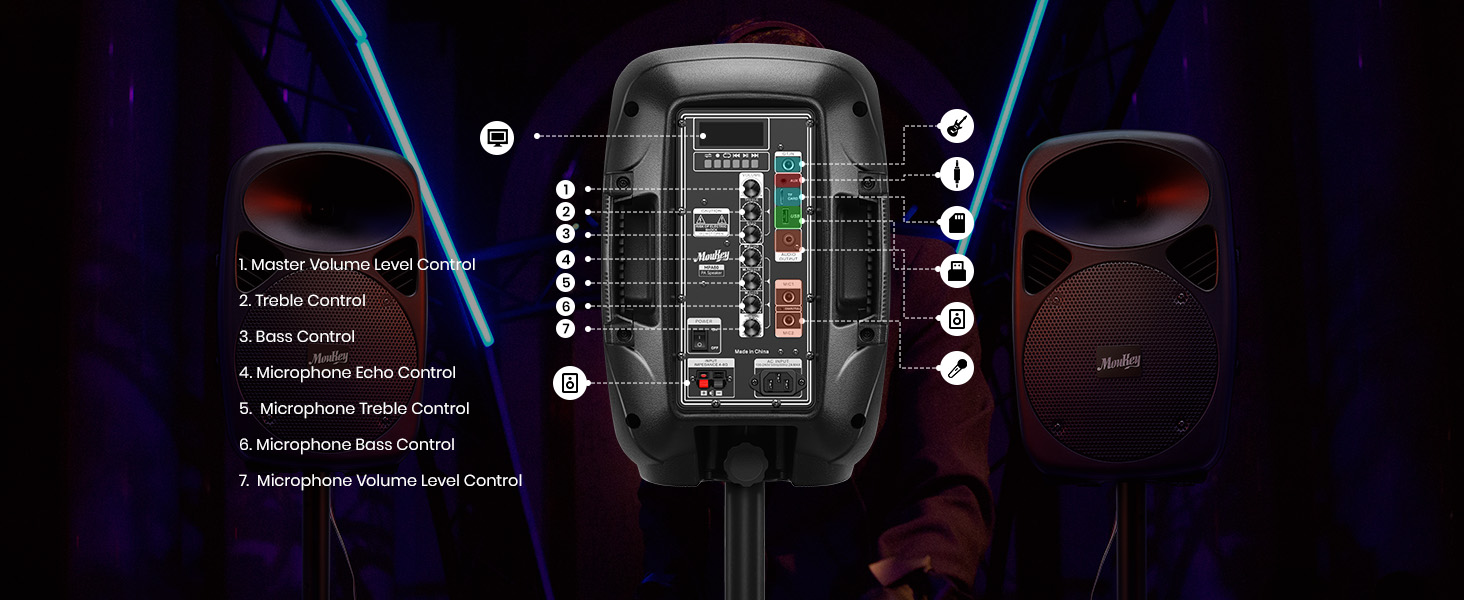
Зображення 3.1: Детальний опис view of the Moukey MPA80 PA System's active speaker control panel with numbered labels for each function.
- Master Volume Level Control: Регулює загальну гучність виводу.
- Контроль високих частот: Регулює високочастотний аудіовихід.
- Регулювання басів: Регулює низькочастотний аудіовихід.
- Контроль луни мікрофона: Налаштовує ефект луни для мікрофонних входів.
- Microphone Treble Control: Adjusts the high-frequency audio for microphone inputs.
- Microphone Bass Control: Adjusts the low-frequency audio for microphone inputs.
- Microphone Volume Level Control: Adjusts the volume of microphone inputs.
- USB/TF Card Slot: For playing audio from USB drives or TF cards.
- Кнопка режиму: Switches between input modes (Bluetooth, USB, TF, FM, AUX).
- Кнопка відтворення/паузи: Controls playback for USB/TF/Bluetooth.
- Кнопки попереднього/наступного треку: Navigates tracks for USB/TF/Bluetooth.
- FM антена: Для покращеного прийому FM-радіо.
- Вхід AUX: 3.5-мм роз'єм для підключення зовнішніх аудіопристроїв.
- Mic Inputs (x2): 1/4-inch jacks for connecting wired microphones.
- Споживана потужність: Для підключення кабелю живлення змінного струму.
- Вимикач живлення: Вмикає або вимикає пристрій.
- Вихід динаміка: Connects to the passive speaker using the provided cable.
4. Налаштування
4.1 Assembling the Tripod Stands
The included tripod stands provide stable support for your speakers. Follow these steps for assembly:
- Розкладіть ніжки штатива, доки вони повністю не витягнуться та не стануть стійкими.
- Adjust the height of the stand using the locking mechanism. Ensure the locking pin is securely engaged.
- Place a speaker onto the top pole of each stand. Ensure the speaker is seated firmly.
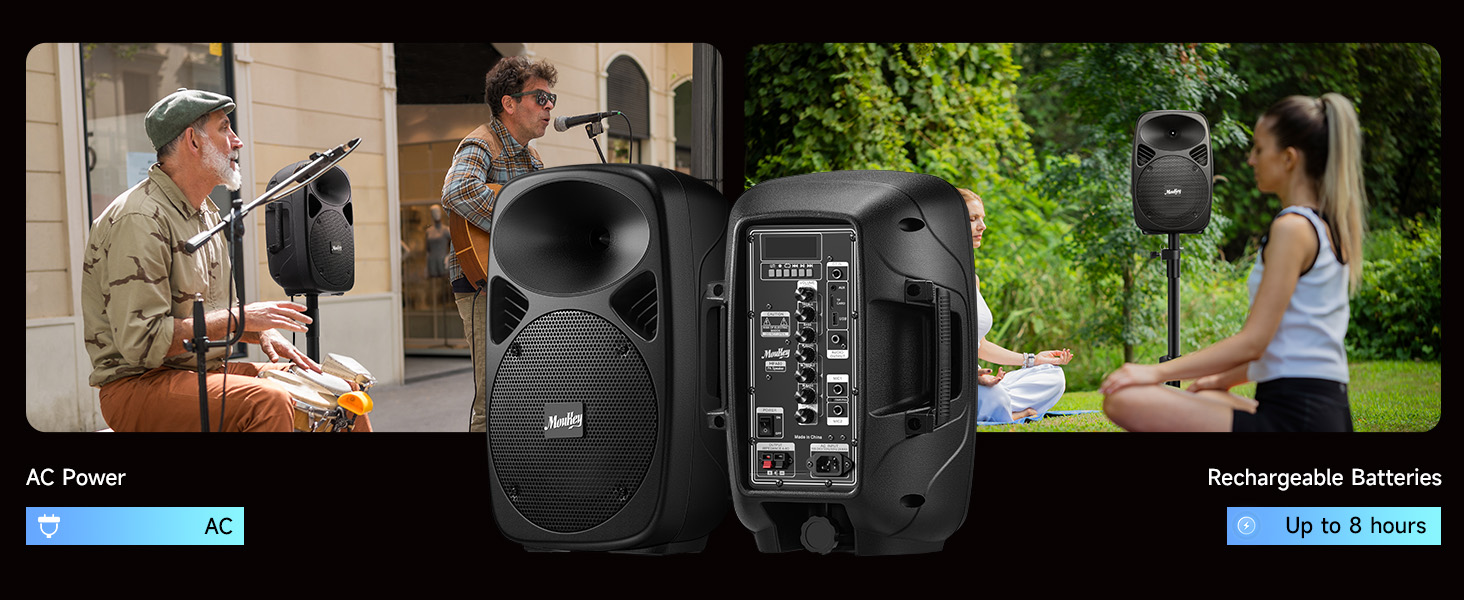
Image 4.1: Diagram showing the steps to assemble the tripod stands and mount the speakers.
4.2 Підключення динаміків
The Moukey MPA80 system includes one active speaker and one passive speaker. The passive speaker must be connected to the active speaker using the provided speaker cable.
- Locate the speaker output terminals on the active speaker and the input terminals on the passive speaker.
- Connect one end of the speaker cable to the active speaker's output.
- Connect the other end of the speaker cable to the passive speaker's input. Ensure a secure connection.
Примітка: The passive speaker does not have its own power source and relies on the active speaker for audio signal and power.
4.3 Powering the System
The system can be powered via AC power or its internal rechargeable battery.
Image 4.2: Illustration of the Moukey MPA80 PA System showing both AC power connection and battery operation for up to 8 hours.
- Живлення змінного струму: Connect the provided power cable to the power input on the active speaker and then to a standard electrical outlet.
- Потужність батареї: The system has a built-in rechargeable battery. Ensure the battery is charged before outdoor or portable use. A full charge can provide up to 8 hours of playtime at 50% volume.
- Flip the Power Switch to the 'ON' position to turn on the system.
5. Інструкція з експлуатації
5.1 Підключення Bluetooth
Connect your device wirelessly via Bluetooth 5.0.
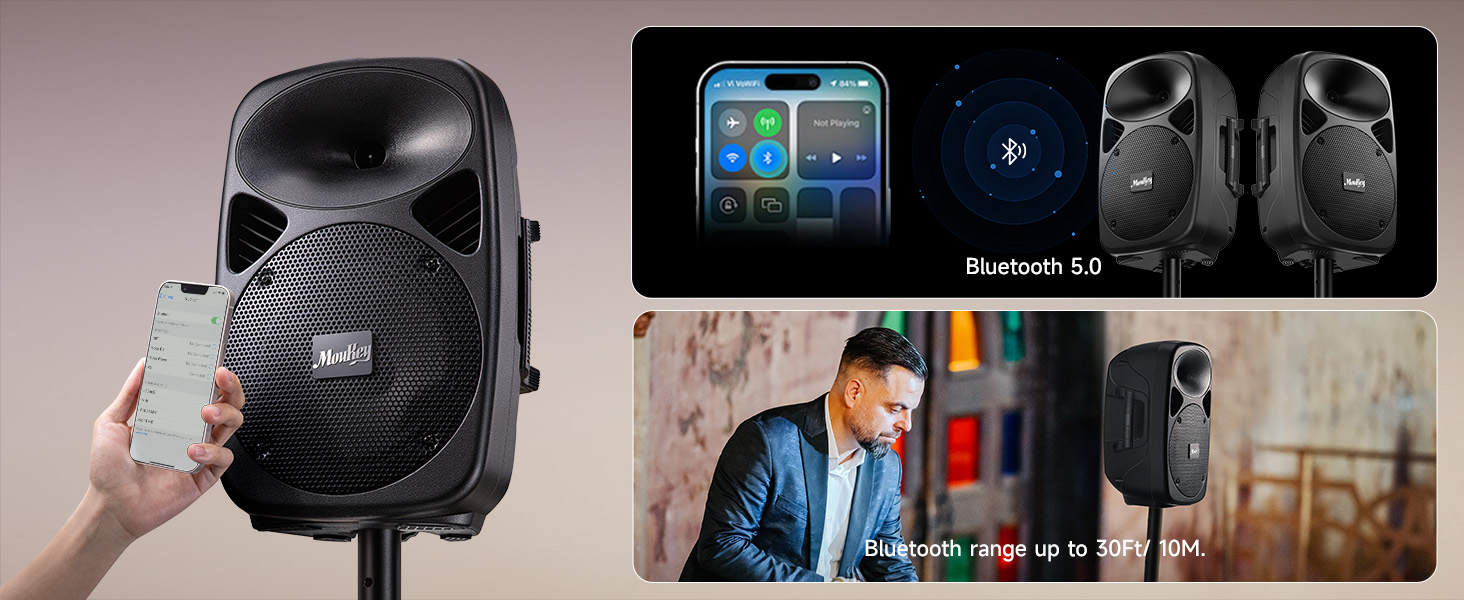
Image 5.1: Image showing a smartphone connecting to the Moukey MPA80 PA System via Bluetooth 5.0, with a Bluetooth range of up to 30 feet.
- Увімкніть систему гучного зв'язку.
- Press the 'Mode' button on the control panel or remote until 'Bluetooth' mode is selected. The display will show 'BLUE' and a pairing indicator will flash.
- На смартфоні, планшеті або іншому пристрої з підтримкою Bluetooth знайдіть доступні пристрої Bluetooth.
- Select 'Moukey MPA80' from the list. Once connected, the pairing indicator will stop flashing.
- You can now play audio from your device through the PA system. The effective Bluetooth range is approximately 30 feet (10 meters).
5.2 Відтворення з USB/TF-картки
Відтворити аудіо files directly from a USB flash drive or TF (MicroSD) card.
- Insert a USB flash drive or TF card into the respective slot on the control panel.
- The system should automatically switch to USB/TF mode and begin playback. If not, press the 'Mode' button to select the correct input.
- Use the 'Play/Pause', 'Previous', and 'Next' buttons on the control panel or remote to manage playback.
5.3 Вхід AUX
Connect external audio sources using a 3.5mm AUX cable.
- Connect one end of a 3.5mm audio cable to the AUX input on the active speaker.
- Connect the other end to the headphone jack or audio output of your external device (e.g., laptop, MP3 player).
- Press the 'Mode' button to select 'AUX' input.
- Adjust the volume on both the PA system and your external device.
5.4 Використання мікрофона
Connect the wired microphone for vocal performances or announcements.
- Plug the wired microphone into one of the 1/4-inch 'Mic In' jacks on the active speaker.
- Adjust the 'Mic Volume Level Control' to set the microphone's volume.
- Use the 'Microphone Echo Control', 'Microphone Treble Control', and 'Microphone Bass Control' to fine-tune the microphone's sound.
5.5 FM-радіо
Слухайте FM-радіостанції.
- Press the 'Mode' button until 'FM' mode is selected.
- Розширте FM-антену для кращого прийому.
- Use the 'Previous' and 'Next' buttons to scan for radio stations.
5.6 Еквалайзер
Customize the sound output to your preference.
- Use the 'Treble Control' knob to increase or decrease high frequencies.
- Use the 'Bass Control' knob to increase or decrease low frequencies.
6. Технічне обслуговування
6.1 Очищення
To maintain the appearance and longevity of your PA system:
- Завжди вимикайте живлення перед чищенням.
- Протріть поверхні м’якою, сухою або злегка змоченою ганчіркоюamp тканина.
- Не використовуйте абразивні засоби для чищення, віск або розчинники.
- Keep liquids away from openings and controls.
6.2 Догляд за акумулятором
The internal lithium-ion battery requires proper care for optimal performance and lifespan:
- Зарядка: Charge the battery fully before first use. Recharge the battery regularly, even if the system is not used frequently, to maintain battery health.
- Зберігання: If storing the system for an extended period, charge the battery to approximately 50-70% and store in a cool, dry place. Avoid storing with a completely depleted or fully charged battery for long durations.
- температура: Avoid exposing the battery to extreme heat or cold, as this can degrade performance and lifespan.
6.3 Зберігання
When not in use, store the PA system in a dry, dust-free environment. If possible, use the original packaging or a protective cover to prevent dust accumulation and damage.
7. Вирішення проблем
If you encounter issues with your Moukey MPA80 PA System, refer to the following common problems and solutions:
| проблема | Можлива причина | Рішення |
|---|---|---|
| Немає живлення | Power cable not connected; Battery depleted; Power switch off | Ensure power cable is securely connected; Charge the battery; Turn power switch to 'ON' |
| Немає звуку | Volume too low; Incorrect input mode; Speaker cable disconnected; External device issue | Increase Master Volume; Select correct input mode (Bluetooth, AUX, USB/TF); Check speaker connection cable; Verify external device audio output |
| Bluetooth не підключається | PA system not in pairing mode; Device too far; Interference; Device already connected to another unit | Ensure PA system is in Bluetooth pairing mode; Move device closer; Reduce interference; Disconnect from other Bluetooth devices |
| Мікрофон не працює | Microphone not plugged in; Mic volume too low; Microphone faulty | Ensure microphone is securely plugged into 'Mic In' jack; Increase 'Mic Volume Level Control'; Test with another microphone if available |
| Поганий прийом FM-радіо | Антена не висунута; слабкий сигнал | Fully extend the FM antenna; Try repositioning the unit for better signal |
If the problem persists after trying these solutions, please contact Moukey customer support for assistance.
8. Технічні характеристики
Key technical specifications for the Moukey MPA80 PA System:
| Особливість | Специфікація |
|---|---|
| Пікова вихідна потужність | 800 Вт |
| Вихідна потужність RMS | 60 Вт |
| Розмір НЧ-динаміка | 8 дюймів |
| Розмір твітера | 1 дюйми |
| Версія Bluetooth | 5.0 |
| Технологія підключення | AUX, Bluetooth, USB |
| Аудіо входи | USB, TF, 2 Mic-in (1/4"), AUX IN (3.5mm) |
| Джерело живлення | AC Power, Rechargeable Battery |
| Тип батареї | Літій-іонний (потрібен 2, входить до комплекту) |
| Час відтворення від батареї | До 8 годин (при гучності 50%) |
| АЧХ | 18 кГц |
| Імпеданс | 8 Ом |
| Розміри виробу (кожен динамік) | 10.2 x 7.9 x 15.4 дюймів |
| Вага товару | 26 фунта (всього за систему) |
| Tripod Stand Height (max) | 37 дюймів |
| Tripod Stand Load Capacity | До 132 фунтів |
9. Гарантія та підтримка
Moukey products are designed and manufactured to high-quality standards. For information regarding warranty coverage, please refer to the warranty card included with your product or visit the official Moukey webсайт.
For technical support, troubleshooting assistance, or inquiries about replacement parts, please contact Moukey customer service through the contact information provided on the official webсайт або ваша платформа для покупок.


