1. Вступ
The APC Smart-UPS SMT750C is an Uninterruptible Power Supply (UPS) designed to provide reliable power and surge protection for critical electronic equipment. This unit offers 750VA/500W of line-interactive pure sine wave power, making it suitable for servers, storage systems, network closets, business VoIP setups, desktop computers, and retail POS systems. It features Automatic VoltagРегулювання (AVR) для корекції об'ємуtage fluctuations and a SmartConnect Ethernet Port for cloud-based remote monitoring. This manual provides essential information for the safe and efficient installation, operation, and maintenance of your SMT750C UPS.
2. Інформація про безпеку
WARNING: Risk of electric shock. Refer to bottom of unit for warnings.
- Уважно прочитайте всі інструкції перед установкою та експлуатацією.
- This UPS contains internal batteries and may present a shock hazard even when disconnected from the AC power source.
- Не відкривайте та не розбирайте ДБЖ. Усередині немає деталей, які може обслуговувати користувач, окрім акумулятора.
- Підключайте ДБЖ лише до заземленої розетки.
- Не використовуйте ДБЖ під прямими сонячними променями, поблизу джерел тепла або в місцях з надмірною вологістю.
- Ensure proper ventilation around the UPS. Do not block any ventilation openings.
3. Вміст упаковки
Переконайтеся, що всі предмети присутні під час розпакування:
- APC Smart-UPS SMT750C Unit
- 16GB USB 3.0 Drive
- Посібник користувача (цей документ)
- Кабель зв'язку USB
- Шнур живлення

Image: Included 16GB USB 3.0 Drive. This USB drive provides additional storage or file можливості передачі.
4. Продукт закінчивсяview
Передня панель
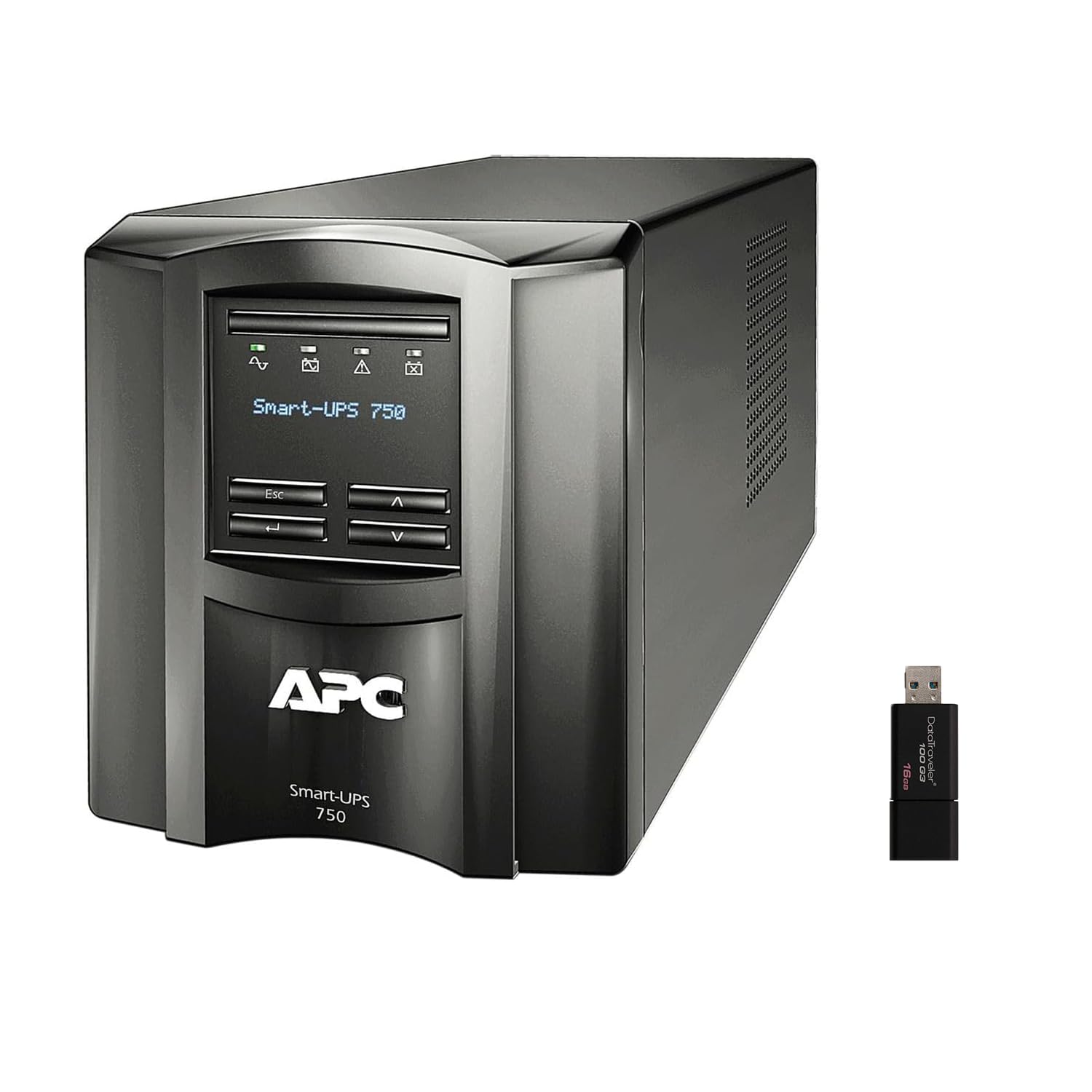
Зображення: Спереду та збоку view of the APC Smart-UPS SMT750C. This image displays the compact tower design of the UPS unit.
- Кнопка живлення: Керує основним живленням ДБЖ.
- РК-дисплей: Provides real-time status information, load levels, battery charge, and estimated runtime.
- Кнопки навігації: Used to scroll through display menus and adjust settings.
Задня панель
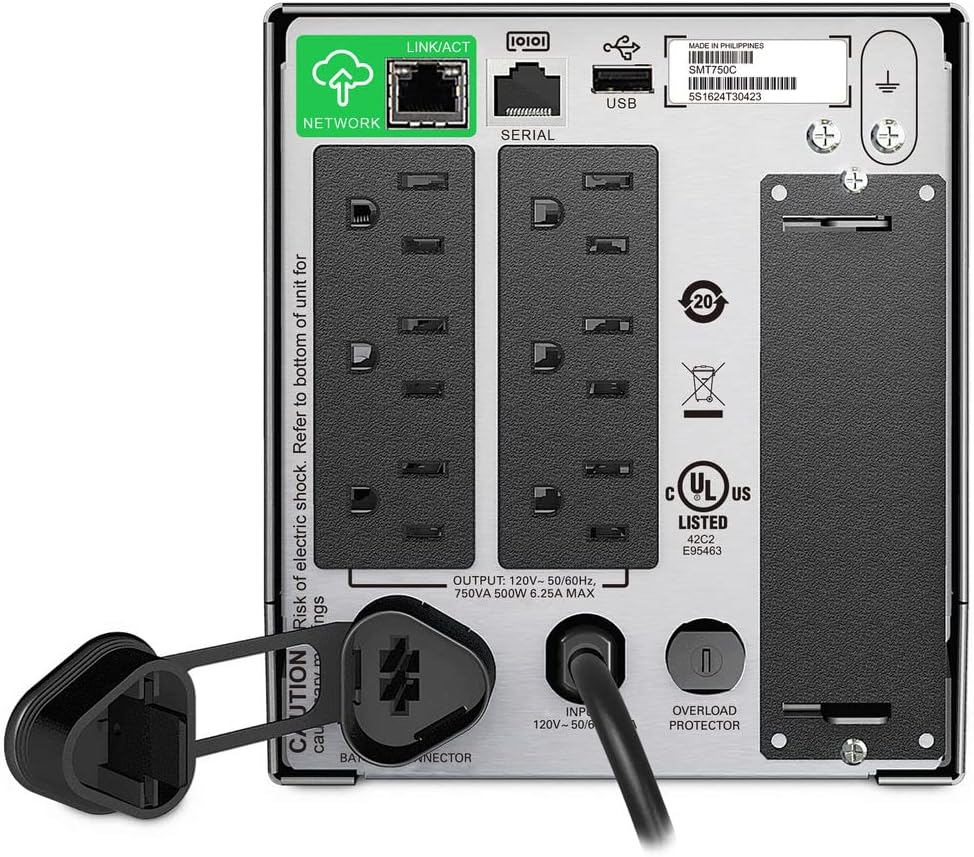
Image: Rear panel of the APC Smart-UPS SMT750C. This view highlights the various input/output ports, including NEMA 5-15R outlets, SmartConnect port, USB, and serial ports.
- NEMA 5-15R Outlets: Six outlets for connecting protected equipment.
- SmartConnect Ethernet Port: For cloud-based remote monitoring and management.
- Порт USB: For communication with a computer for graceful shutdown via PowerChute Serial Shutdown software.
- Послідовний порт: Alternative communication port for graceful shutdown.
- Розумний слот: For optional Network Management Card (sold separately).
- Вхідний шнур живлення: Підключає ДБЖ до мережі електроживлення.
- Захист від перевантаження: Resettable circuit breaker.
5. Налаштування
5.1 Початкове підключення акумулятора
Перед першим використанням необхідно підключити внутрішній акумулятор. Пристрій постачається з відключеним акумулятором для безпеки під час транспортування.
- Розмістіть ДБЖ на стійкій поверхні.
- Locate the battery compartment cover, typically on the bottom or rear of the unit.
- Remove the cover to access the battery.
- Connect the red battery cable to the positive (+) terminal and the black battery cable to the negative (-) terminal. Ensure a secure connection.
- Замініть кришку батарейного відсіку.
5.2 Підключення до електромережі
- Plug the UPS power cord into a grounded 3-prong AC outlet.
- Перед підключенням критично важливого обладнання дайте ДБЖ зарядитися щонайменше 24 години, щоб забезпечити повну ємність акумулятора.
5.3 Підключення обладнання
- Connect your critical equipment (e.g., computer, monitor, network devices) to the NEMA 5-15R outlets on the rear panel.
- For graceful shutdown capabilities, connect the provided USB cable from the UPS to your computer and install the PowerChute Serial Shutdown software (available for download from APC's webсайт).
- For remote monitoring, connect an Ethernet cable to the SmartConnect port and follow the instructions for cloud-based setup.
6. Операція
6.1 Увімкнення/вимкнення
- To power on the UPS, press and hold the power button on the front panel until the unit beeps and the display illuminates.
- To power off the UPS, press and hold the power button until the unit beeps and the display turns off.
6.2 Автоматична випtage Регламент (AVR)
The SMT750C features AVR, which automatically corrects minor voltage fluctuations (sags and surges) without switching to battery power. This protects connected equipment from voltage irregularities and extends battery life.
6.3 Робота від резервного акумулятора
Під час влади оtage, the UPS will automatically switch to battery power, providing continuous power to connected equipment. The LCD display will show the estimated remaining runtime. When utility power returns, the UPS will automatically switch back to utility power and recharge its battery.
6.4 Remote Monitoring (SmartConnect)
The SmartConnect port allows for cloud-based remote monitoring of your UPS. This feature enables IT professionals and network administrators to:
- Monitor UPS status and performance.
- Виконайте оновлення прошивки.
- Проводити дистанційну діагностику.
- Отримуйте проактивні сповіщення електронною поштою з рекомендованими діями.
7. Технічне обслуговування
7.1 Заміна батареї
The internal battery is a user-replaceable component. When the battery reaches the end of its service life, the UPS will indicate a battery fault. To replace the battery:
- Ensure the UPS is powered off and disconnected from utility power.
- Зніміть кришку батарейного відсіку.
- Disconnect the battery cables (red and black).
- Carefully slide out the old battery.
- Insert a genuine APC replacement battery (model RBC154, sold separately).
- Connect the battery cables, ensuring correct polarity (red to positive, black to negative).
- Замініть кришку батарейного відсіку.
- Recycle the old battery responsibly.
7.2 Очищення
Періодично очищуйте зовнішню частину ДБЖ м’якою сухою тканиною. Не використовуйте рідкі або аерозольні засоби для чищення. Переконайтеся, що вентиляційні отвори вільні від пилу та сміття.
8. Вирішення проблем
| проблема | Можлива причина | Рішення |
|---|---|---|
| ДБЖ не вмикається | Акумулятор не підключений або низький заряд | Ensure battery cables are connected. Plug UPS into AC outlet and allow to charge. |
| ДБЖ безперервно пищить | Overload or on battery power | Reduce connected load. Check utility power. |
| Battery symbol blinking | Battery needs to be flipped (initial setup) or is failing | For new units, ensure battery is correctly oriented and connected. For older units, consider battery replacement. |
| Немає електроживлення до розеток | UPS is off, circuit breaker tripped, or utility power lost | Turn on UPS. Reset circuit breaker. Check utility power. |
9. Технічні характеристики
- модель: SMT750C
- Вихідна потужність: 500 Вт / 750 ВА
- Вихідні з'єднання: 6 x NEMA 5-15R
- Вхідні з'єднання: NEMA 5-15P
- Номінальна вхідна обtage: 120 В
- Номінальна вих. Обtage: 120 В
- Тип батареї: свинцева кислота
- Форм-фактор: Вежа
- Розміри (В x Ш x Г): 6.34 дюйма (16.1 см) x 5.43 дюйма (13.8 см) x 14.53 дюймів (36.9 см)
- Вага нетто: 27.56 фунта (12.5 кг)
- колір: чорний
- матеріал: метал
- Аксесуари в комплекті: 16GB USB 3.0 Drive
10. Гарантія та підтримка
APC provides a standard warranty for this product. For specific warranty terms and conditions, please refer to the warranty card included with your product or visit the official APC website. For technical support, product registration, or to purchase replacement parts, please visit www.apc.com або зверніться до служби підтримки клієнтів APC.
Protection plans are available for extended coverage. For example, a 3-Year Protection Plan is available.


