1. Вступ
Thank you for choosing the Antec GSK850 ATX3.1 850W Full Modular Power Supply Unit (PSU). This manual provides essential information for the proper installation, operation, and maintenance of your new power supply. The GSK850 is designed to deliver stable and efficient power to your computer system, featuring ATX3.1 and PCIe 5.1 compatibility, 80 PLUS Gold certification, and a full modular design for optimized cable management.

Figure 1.1: Antec GSK850 850W Full Modular Power Supply Unit
2. Інформація про безпеку
Please read and follow all safety instructions carefully before installing or operating the PSU. Failure to do so may result in personal injury or damage to the product or system components.
- Небезпека ураження електричним струмом: Не відкривайте блок живлення casinг. Високий об'ємtagВсередині присутні вироби, навіть коли пристрій відключено від мережі. Усередині немає деталей, які може обслуговувати користувач.
- Вентиляція: Забезпечте належну вентиляцію навколо блоку живлення. Не блокуйте вентилятор або вентиляційні отвори.
- вологість: Do not expose the PSU to water or excessive humidity.
- температура: Operate the PSU within the specified temperature range. Avoid extreme heat or cold.
- Заземлення: Завжди підключайте блок живлення до заземленої розетки.
- Вимкнення живлення: Always disconnect the AC power cord from the wall outlet before installing, removing, or servicing the PSU or any connected components.
3. Вміст упаковки
Перевірте наявність усіх елементів в упаковці:
- Antec GSK850 ATX3.1 850W Full Modular Power Supply Unit
- Modular Cable Set (see Section 4.2 for details)
- Шнур живлення змінного струму
- Монтажні гвинти
- Посібник користувача (цей документ)
4. Продукт закінчивсяview
4.1 Основні характеристики
- ATX3.1 & PCIe 5.1 Compatible: Designed to meet the latest standards for reliability and power efficiency, ensuring compatibility with modern hardware, including NVIDIA GeForce RTX 40 Series graphics cards.
- Сертифікат 80 PLUS Gold: Achieves high power efficiency, reducing energy consumption and heat generation.
- Повний модульний кабельний менеджмент: Allows users to connect only the necessary cables, improving airflow and reducing clutter inside the PC case.
- Високоякісні японські конденсатори: Ensures tight voltage regulation, minimal ripple and noise, and extended lifespan.
- PhaseWave Design (LLC + DC-DC): Provides stable and efficient power delivery.
- Менеджер з нульовими обертами обертів: The fan remains off at low loads for silent operation, activating only when necessary.
- 120-мм безшумний вентилятор FDB: Features a fluid-dynamic bearing fan for quiet operation and durability.
- CircuitShield Protection Suite: Comprehensive industrial-grade protections including OCP, OVP, UVP, SCP, OPP, OTP, SIP, and NLO for system safety.
4.2 Modular Cable Management and Compatibility
The full modular design of the GSK850 allows for flexible cable management, enabling you to use only the cables required for your system. This reduces cable clutter, improves internal airflow, and simplifies installation.

Figure 4.1: Modular Cable Connectors and ATX 3.1 / PCIe 5.1 Compatibility

Figure 4.2: Detailed Cable and Connector Information
4.3 Internal Components and Design
The GSK850 incorporates high-quality components for reliable performance and longevity.

Figure 4.3: High-Quality Japanese Capacitors for enhanced stability and lifespan.

Figure 4.4: PhaseWave Design (LLC + DC-DC) for superior power delivery efficiency.
4.4 Система охолодження
The PSU features an advanced cooling system to maintain optimal temperatures and quiet operation.
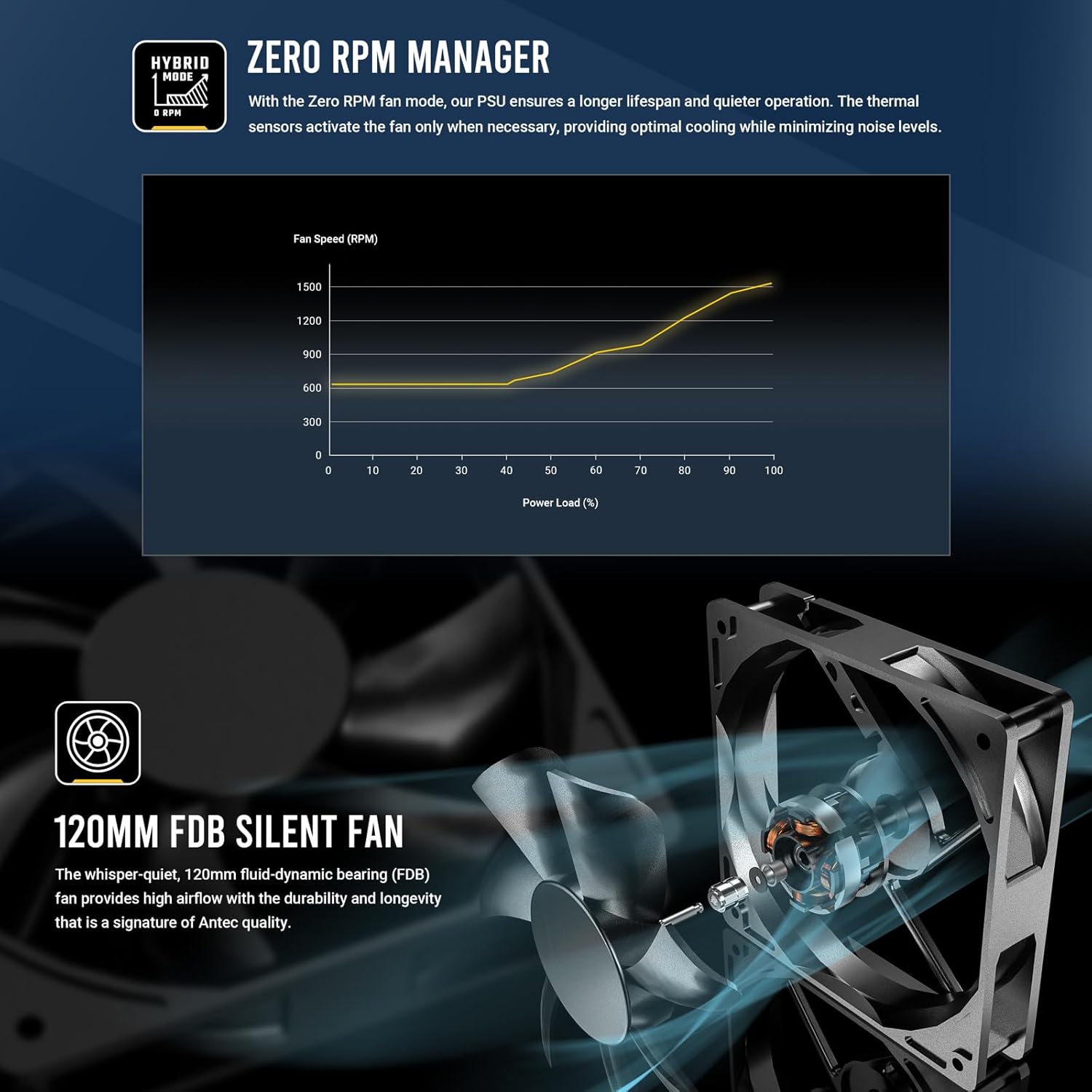
Figure 4.5: Zero RPM Manager fan curve, illustrating silent operation at low loads.

Figure 4.6: The 120mm Fluid-Dynamic Bearing (FDB) fan provides high airflow with low noise.
4.5 Компактний розмір
The GSK850 is designed with a compact form factor, making it suitable for a wide range of PC cases.

Figure 4.7: Compact dimensions of the GSK850 PSU, showing reduced volume compared to larger units.
5. Налаштування та встановлення
Follow these steps to install your Antec GSK850 PSU into your computer system:
- Підготуйте свою систему: Переконайтеся, що ваш комп'ютер повністю вимкнено та від'єднано від розетки. Відкрийте корпус комп'ютера.
- Видаліть старий блок живлення (якщо є): If replacing an existing PSU, disconnect all cables from the old PSU and remove its mounting screws. Carefully slide it out of the case.
- Встановлення нового блоку живлення: Slide the Antec GSK850 into the PSU mounting bay of your computer case. Align the screw holes and secure the PSU with the provided mounting screws.
- Підключення основних кабелів: Refer to Figure 4.2 for cable types and lengths. Connect the necessary modular cables to the PSU first, then to your motherboard and components:
- 24-контактний кабель материнської плати ATX: Підключіть до основного роз'єму живлення материнської плати.
- 8-pin (4+4) CPU Power Cable(s): Підключіть до роз'єму(ів) живлення процесора вашої материнської плати.
- PCIe 5.1 12VHPWR (16-pin) or 8-pin (6+2) PCIe Cables: Connect to your graphics card(s) as required.
- Кабелі живлення SATA: Підключення до SSD, HDD та оптичних приводів.
- Кабелі Molex: Connect to any peripherals requiring Molex power.
- Управління кабелем: Route cables neatly behind the motherboard tray or in designated cable management areas to improve airflow and aesthetics.
- Закрийте корпус та підключіть живлення: Once all connections are secure, close your computer case. Plug the AC power cord into the PSU and then into a grounded wall outlet.
6. Інструкція з експлуатації
Operating the Antec GSK850 PSU is straightforward:
- Увімкнення: After installation, ensure the power switch on the back of the PSU is in the 'ON' (I) position. Then, power on your computer using the case's power button.
- Режим нульових обертів: The PSU's fan will remain off when the power load is low, providing silent operation. As the system load increases, the fan will automatically activate and adjust its speed to maintain optimal temperatures. This is normal operation and indicates the Zero RPM Manager is functioning correctly.
- Вимкнення живлення: To power off your system, use the operating system's shutdown function. For complete power disconnection, switch the PSU's power switch to the 'OFF' (O) position and unplug the AC power cord from the wall outlet.
7. Технічне обслуговування
Proper maintenance ensures the longevity and optimal performance of your PSU:
- Видалення пилу: Periodically clean dust from the PSU's fan grille and ventilation openings using compressed air. Ensure the PSU is powered off and unplugged before cleaning.
- Перевірка кабелю: Періодично перевіряйте всі підключені кабелі на наявність ознак зносу, пошкоджень або нещільних з'єднань.
- Середовище: Ensure the PSU operates in a clean, dry, and well-ventilated environment.
8. Вирішення проблем
If you encounter issues with your Antec GSK850 PSU, refer to the following common troubleshooting steps:
- Немає живлення:
- Переконайтеся, що шнур живлення змінного струму надійно підключений як до блоку живлення, так і до розетки.
- Check that the PSU's power switch on the back is in the 'ON' (I) position.
- Verify all modular cables are securely connected to both the PSU and the components.
- Перевірте розетку за допомогою іншого пристрою, щоб переконатися, що вона має живлення.
- Нестабільність/збої системи:
- Переконайтеся, що ваш блок живленняtage is sufficient for all your system components.
- Перевірте, чи не закріплені кабелі.
- The PSU's CircuitShield protection suite (OCP, OVP, UVP, SCP, OPP, OTP, SIP, NLO) will automatically shut down the PSU in case of an electrical fault to protect your components. If this occurs, disconnect power, check for short circuits or faulty components, and then attempt to restart.

Figure 8.1: CircuitShield Protection Suite
- Вентилятор не обертається:
- The GSK850 features Zero RPM mode. The fan will not spin at low loads. This is normal. The fan will activate when the system load increases.
- If the fan does not spin even under high load, ensure there are no obstructions and contact support if the issue persists.
If the problem persists after following these steps, please contact Antec customer support.
9. Технічні характеристики
| Особливість | Специфікація |
|---|---|
| Назва моделі | GSK850 US |
| Бренд | Antec |
| Вихідна ватtage | 850 Вт |
| Форм-фактор | ATX |
| Сертифікація ефективності | Золото 80 PLUS |
| PFC | Активний PFC |
| Спосіб охолодження | Повітря (120-мм вентилятор FDB) |
| Модульний тип | Повністю модульний |
| Розміри (ДxШxВ) | 5.51 x 3.38 x 5.9 дюйма (140 x 86 x 150 мм) |
| вага | 5.6 фунта |
| Колір | чорний |
| Сумісні пристрої | Персональний комп'ютер |
| Тип роз'єму | ATX |
10. Гарантія та підтримка
The Antec GSK850 ATX3.1 850W Full Modular PSU comes with a Гарантія 7 рік з дати покупки. Ця гарантія поширюється на дефекти матеріалів і виготовлення за нормального використання.
For technical support, warranty claims, or further assistance, please visit the official Antec webсайт або зверніться до їхнього відділу обслуговування клієнтів. Зберігайте чек про покупку для підтвердження гарантії.
Офіційний представник Antec Webсайт: www.antec.com


