вступ
This manual provides instructions for the installation, operation, and maintenance of your Xtreme Smart Wi-Fi Window & Door Sensor. This device is designed to enhance home security by detecting the opening and closing of windows and doors, sending instant notifications to your smartphone.
Інформація про безпеку
- Не піддавайте пристрій впливу екстремальних температур, прямих сонячних променів або вологи.
- Не намагайтеся розбирати або ремонтувати пристрій самостійно. Це призведе до анулювання гарантії.
- Зберігайте батареї в недоступному для дітей місці. При проковтуванні негайно зверніться за медичною допомогою.
- Утилізуйте батарейки відповідно до місцевих правил. Не змішуйте старі та нові батарейки.
- Ensure the installation surface is clean and dry for proper adhesive attachment.
Вміст упаковки
Перевірте наявність усіх предметів у вашій упаковці:
- Xtreme Smart Wi-Fi Window & Door Sensor (Main Unit)
- Xtreme Smart Wi-Fi Window & Door Sensor (Magnetic Contact)
- Посібник користувача (цей документ)

Image: The main sensor unit and the smaller magnetic contact unit.
Посібник із налаштування
1. Встановлення батареї
- Gently slide open the battery cover on the main sensor unit.
- Вставте дві батарейки типу AAA (не входять до комплекту) у відсік, дотримуючись правильної полярності (+/-).
- Надійно закрийте кришку акумулятора.
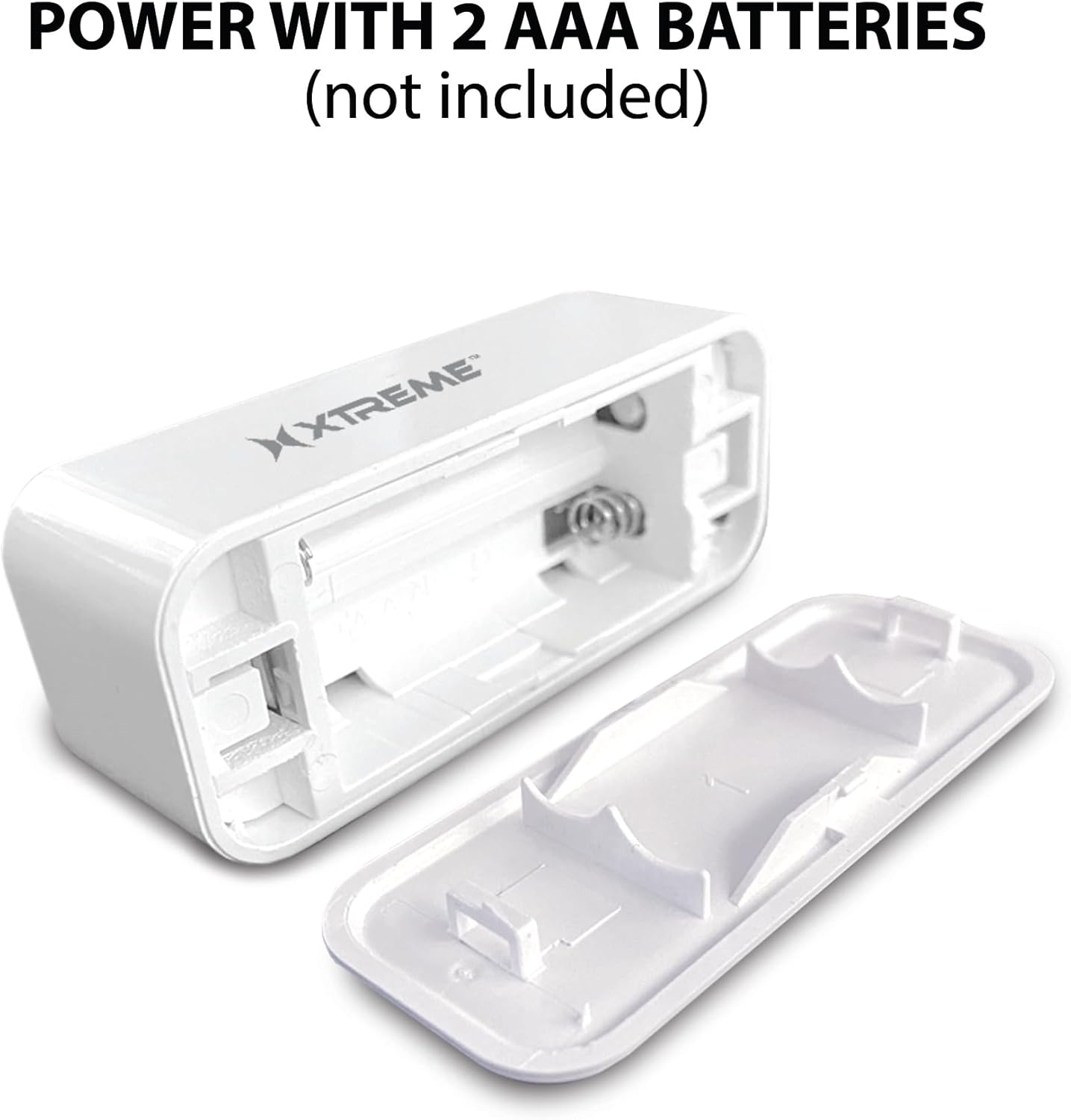
Image: The main sensor unit with its battery compartment open, showing where to insert two AAA batteries.
2. Завантаження програми та створення облікового запису
- Завантажити Xtreme Connect Home App from the Apple App Store (for iOS 11 or higher) or Google Play Store (for Android 7.0 or higher).
- Відкрийте програму та дотримуйтесь інструкцій на екрані, щоб створити новий обліковий запис або увійти, якщо він у вас вже є.

Image: The product box illustrating the Xtreme Connect Home App download options for both iOS and Android devices.
3. Сполучення пристроїв
- Ensure your smartphone is connected to a 2.4GHz Wi-Fi network. The sensor does not support 5GHz networks.
- In the Xtreme Connect Home App, tap the "+" icon to add a new device.
- Select "Sensor" or "Door/Window Sensor" from the device list.
- Follow the app's instructions to put the sensor into pairing mode (usually involves pressing and holding a button on the sensor until an indicator light flashes).
- Confirm the Wi-Fi network and enter the password in the app. The sensor will then connect to your home network.
- Once successfully paired, you can name your sensor within the app (e.g., "Front Door," "Bedroom Window").
4. Фізичне встановлення
The sensor consists of two parts: a main unit and a smaller magnetic contact. These two parts must be installed close to each other (within 1 cm) on a door or window frame.
- Choose a clean, dry, and flat surface on your door or window frame.
- Peel off the protective backing from the adhesive on both the main unit and the magnetic contact.
- Attach the main unit to the fixed part of the door/window frame.
- Attach the magnetic contact to the moving part of the door/window (the door or window itself), aligning it with the main unit so they are no more than 1 cm apart when the door/window is closed.
- Test the installation by opening and closing the door/window. The app should register the change in status.


Image: Left: The sensor installed on a window sill with the window closed. Right: The sensor detecting an open window, with the magnetic contact separated from the main unit.
Операція
Monitoring Door/Window Status
Once installed and paired, the Xtreme Smart Wi-Fi Window & Door Sensor will continuously monitor the open/closed status of your designated entry point. When the magnetic contact separates from the main unit (door/window opens), the sensor will detect this change.
Миттєві сповіщення
Upon detecting an open or close event, the sensor will send an instant notification to your smartphone via the Xtreme Connect Home App. Ensure app notifications are enabled in your phone's settings to receive these alerts.
Віддалений доступ
Ви можете view the current status of your sensor (open or closed) and review event history from anywhere using the Xtreme Connect Home App, provided your smartphone has an internet connection.
Smart Scenes Integration
The Xtreme Connect Home App allows you to create "Smart Scenes" to automate actions based on sensor activity. For exampле:
- "If door opens, then turn on living room lights."
- "If window opens after 10 PM, then send an alert to family members."
Explore the "Smart Scenes" section within the app to customize your home automation.
Технічне обслуговування
Заміна батареї
The sensor is powered by two AAA batteries. When the battery level is low, you may receive a notification via the Xtreme Connect Home App. To replace batteries:
- Gently slide open the battery cover on the main sensor unit.
- Вийміть старі батареї.
- Вставте дві нові лужні батарейки типу AAA, дотримуючись правильної полярності (+/-).
- Надійно закрийте кришку акумулятора.
Note: The sensor is designed for up to four months of battery life under normal usage conditions.
прибирання
Wipe the sensor with a soft, dry cloth. Do not use liquid cleaners or abrasive materials, as these can damage the device.
Усунення несправностей
| проблема | Можлива причина | Рішення |
|---|---|---|
| Sensor not connecting to Wi-Fi. | Incorrect Wi-Fi password; 5GHz network used; sensor too far from router. | Ensure correct 2.4GHz Wi-Fi network and password. Move sensor closer to the router. Re-attempt pairing. |
| Сповіщень не отримано. | App notifications disabled; sensor offline; app not running in background. | Check phone's notification settings for the Xtreme Connect Home App. Verify sensor status in the app. Ensure app is allowed to run in the background. |
| Sensor not detecting open/close. | Sensor parts misaligned; dead batteries. | Ensure the main unit and magnetic contact are within 1 cm when closed. Replace batteries if low. |
| Короткий час автономної роботи. | Frequent activations; poor quality batteries. | Use high-quality alkaline batteries. Reduce unnecessary activations if possible. |
Технічні характеристики
| Особливість | Деталь |
|---|---|
| Номер моделі | XHS7-2001-WHT |
| Джерело живлення | 2 батареї AAA (не входять в комплект) |
| Тип батареї | лужні |
| томtage | 1.5 вольт (постійний струм) |
| Підключення | 2.4GHz 802.11n Wi-Fi, Bluetooth 4.0 (optional) |
| Спосіб контролю | App (Xtreme Connect Home) |
| Сумісна ОС | Android 7.0+, iOS 11+ |
| Тип монтажу | Adhesive / Wall Mount |
| Розміри продукту | 2.7 x 2.4 x 4.6 дюймів |
| Вага товару | 2.39 унції |
| Колір | Білий |
| UPC | 805106232399 |
Гарантія та підтримка
For warranty information and technical support, please refer to the documentation included with your purchase or visit the official Xtreme Digital Lifestyle Accessories website. Do not attempt to return the product to the retailer without first contacting customer support, as per manufacturer guidelines.
Виробник: Xtreme
Бренд: XTREME ЦИФРОВІ АКСЕСУАРИ ДЛЯ СПОСОБУ ЖИТТЯ


