1. Вступ
This manual provides essential instructions for the safe and efficient use of your Meizu Note 21 Pro smartphone. Please read this manual thoroughly before operating the device and retain it for future reference.
2. Що в коробці
- Meizu Note 21 Pro Smartphone
- Адаптер живлення
- (Other accessories such as USB cable, SIM ejector tool, and documentation may vary by region.)
3. Схема пристрою
Familiarize yourself with the physical components of your Meizu Note 21 Pro.
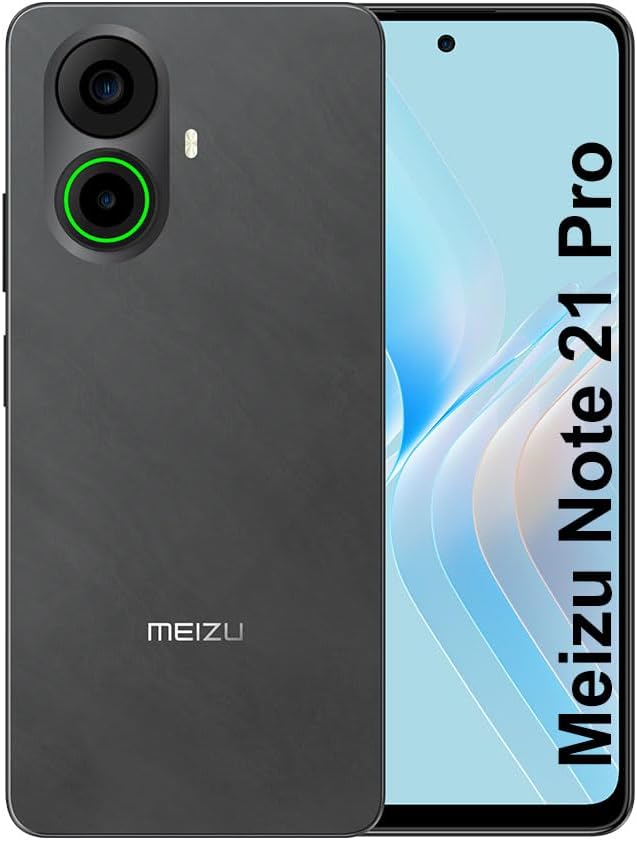
Зображення 3.1: Передня і задня view of the Meizu Note 21 Pro. The front displays the screen with a punch-hole camera. The rear shows the dual camera module with a green accent ring on one lens, a flash, and the "MEIZU" logo at the bottom.
- Фронтальний дисплей: 6.78-inch FHD+ screen with a 120Hz refresh rate.
- Фронтальна камера: Розташований у верхній центральній частині дисплея.
- Задні камери: Dual camera system, including a 64MP main camera.
- Бічний датчик відбитків пальців: Integrated for secure access.
- Порт USB: Для зарядки та передачі даних.
- 3.5 мм аудіороз’єм: Для навушників.
- Лоток для SIM-картки/MicroSD: Supports Dual Nano SIM and MicroSD cards.
4. Налаштування
4.1. Встановлення SIM-карт та карт MicroSD
- Знайдіть лоток для SIM-картки на боковій стороні пристрою.
- Вставте інструмент для вилучення SIM-картки в маленький отвір поруч із лотком і обережно натисніть, доки лоток не вискочить.
- Вставте картку(и) Nano SIM та/або картку MicroSD у відповідні слоти на лотку. Переконайтеся, що золоті контакти спрямовані вниз.
- Обережно вставте лоток назад у пристрій, доки він не зафіксується на місці почувши клацання.
4.2. Початкове увімкнення та налаштування
- Press and hold the Power button until the Meizu logo appears.
- Дотримуйтесь підказок на екрані, щоб вибрати мову, підключитися до мережі Wi-Fi та налаштувати обліковий запис Google.
- During setup, you will be guided to configure security features such as a PIN, pattern, or password.
4.3. Fingerprint Recognition Setup
- Перейдіть до Налаштування > Безпека та конфіденційність > Розблокування відбитком пальця.
- Follow the on-screen instructions to register your fingerprint by repeatedly touching the side-mounted sensor.
- Для оптимальної роботи переконайтеся, що ваш палець покриває всю площу датчика під час реєстрації.
5. Керування пристроєм
5.1. Дисплей та навігація
- The 6.78-inch FHD+ display operates at a 120Hz refresh rate for smooth visuals.
- Navigate the Android 14 operating system using touch gestures: tap, swipe, pinch-to-zoom.
- Access quick settings by swiping down from the top of the screen.
5.2. Функції камери
- Відкрийте програму «Камера» на головному екрані або в панелі програм.
- The rear camera system features a 64MP main sensor for high-resolution photos and a 2MP depth-of-field camera for portrait effects.
- The 13MP front-facing camera is suitable for selfies and video calls.
- Tap on the screen to focus, and use the on-screen shutter button to capture images. Explore various modes like Portrait, Night, and Pro within the camera app.
5.3. Продуктивність та сховище
- The MediaTek G99 Octa Core processor ensures efficient performance for applications and multitasking.
- The device comes with 256GB of internal storage and 8GB of RAM.
- Storage can be expanded using a MicroSD card (sold separately).
5.4. Акумулятор та заряджання
- The Meizu Note 21 Pro is equipped with a 5000mAh battery.
- Use the provided Power Adapter for 30W fast charging.
- To charge, connect the USB cable to the phone's USB port and the power adapter, then plug the adapter into a wall outlet.
5.5. Підключення
- 4G LTE: Supports various LTE FDD and TDD bands for cellular data. Note: This international version works on T-Mobile in the USA and globally with other carriers.
- Wi-Fi 5: Підключіться до бездротових мереж для доступу до Інтернету.
- Bluetooth: Підключається до бездротових аксесуарів, таких як навушники та динаміки.
- NFC: Для безконтактних платежів та швидкого сполучення із сумісними пристроями.
- GPS: Для служб визначення місцезнаходження та навігації.
6. Технічне обслуговування
- Прибирання: Використовуйте м’яку тканину без ворсу для очищення екрана та корпусу пристрою. Уникайте використання агресивних хімікатів або абразивних матеріалів.
- Догляд за акумулятором: Avoid extreme temperatures. Do not fully discharge the battery frequently. For optimal battery longevity, keep the charge between 20% and 80%.
- Оновлення програмного забезпечення: Регулярно перевіряйте наявність та встановлюйте оновлення системи, щоб забезпечити оптимальну продуктивність і безпеку. Перейдіть до Налаштування > система > Оновлення системи.
7. Вирішення проблем
| Випуск | Можливе рішення |
|---|---|
| Пристрій не включається | Ensure the battery is charged. Connect the device to the power adapter and try again. If unresponsive, press and hold the Power button for 10-15 seconds to force a restart. |
| Поганий сигнал мережі | Check if the SIM card is correctly inserted. Move to an area with better network coverage. Restart the device. Verify with your carrier that your plan is active. |
| Програми працюють повільно або аварійно завершують роботу | Закрийте фонові програми. Очистіть кеш програм (Налаштування > програми > виберіть додаток > Пам'ять і кеш > Очистити кеш). Перезавантажте пристрій. Переконайтеся, що достатньо місця для зберігання. |
| Сканер відбитків пальців не працює | Ensure your finger and the sensor are clean and dry. Re-register your fingerprint in settings. |
8. Технічні характеристики
- модель: Meizu Note 21 Pro
- Операційна система: Android 14
- Процесор: MediaTek G99 Octa Core (2.2GHz)
- Дисплей: 6.78 inches FHD+ (1080 x 2160 resolution), 120Hz Refresh Rate
- Оперативна пам'ять: 8 ГБ
- Внутрішня пам'ять: 256 ГБ
- Задня камера: 64 МП основна + 2 МП глибина
- Фронтальна камера: 13 МП
- Батарея: 5000 мАг, швидка зарядка 30 Вт
- Підключення: 4G LTE (FDD:1,2,3,4,5,7,8,12,17,18,19,20,26,28,66; TDD:38,40,41), 3G WCDMA, 2G Quad Band, Wi-Fi 5, Bluetooth, NFC, GPS
- Аудіороз'єм: 3.5 мм
- Розміри: 6.64 x 2.96 x 0.33 дюймів
- вага: 1.1 фунта
9. Гарантія та підтримка
For warranty information and technical support, please refer to the warranty card included with your product or visit the official Meizu webсайт. Зберігайте чек про покупку для гарантійних претензій.
For further assistance, you may contact Meizu customer service through their official channels.


