вступ
Thank you for choosing the HUANUO Electric Standing Desk Frame. This manual provides detailed instructions for the assembly, operation, and maintenance of your new height-adjustable desk frame. Please read this manual thoroughly before installation and use to ensure proper function and safety.
Налаштування та збірка
Before beginning assembly, ensure all parts are present and undamaged. It is recommended to assemble the desk frame on a soft, clean surface to prevent scratches.
- Розпакуйте компоненти: Carefully remove all parts from the packaging. Refer to the parts list in your package for verification.
- Зібрати ніжки та ступні: Attach the desk feet to the bottom of the lifting columns using the provided screws. Ensure they are securely fastened.
- З'єднання поперечних рейок: Attach the crossbars between the two lifting columns. Adjust the length of the crossbars to match your desired desktop size.
- Встановлення двигуна та блоку керування: Secure the motor and control box to the designated locations on the frame. Connect all necessary cables according to the wiring diagram provided in your package.
- Підключіть панель керування: Mount the control panel to the underside of your desktop in an easily accessible location.
- Монтувати робочий стіл: Carefully place your desktop onto the assembled frame. Secure the desktop to the frame using appropriate screws (desktop not included).
- Управління кабелем: Organize all cables using the included cable ties or management solutions to prevent tangling and damage.

Зображення: Оверview of the HUANUO Electric Standing Desk Frame components, including legs, feet, crossbars, and motor assembly, ready for setup.

Image: Close-up illustrating the improved solid construction of the desk frame, highlighting 30% longer plates and 30% thicker columns for enhanced stability and a maximum load capacity of 100kg.
Операція
The HUANUO Electric Standing Desk Frame features an intuitive control panel for easy height adjustment and memory presets.

Image: The desk's control panel, showing the digital height display, up/down adjustment buttons, and four programmable memory preset buttons (1, 2, 3, 4).
Регулювання висоти:
- Натисніть Вгору (^) кнопку, щоб підняти стіл.
- Натисніть Вниз (v) кнопку, щоб опустити стіл.
- Release the button at your desired height. The current height will be displayed on the digital screen.
Налаштування пресетів пам'яті:
- Відрегулюйте висоту столу на потрібну вам висоту за допомогою кнопок «Вгору/Вниз».
- Press one of the memory preset buttons (1, 2, 3 або 4) until you hear a beep or see the display flash, indicating the height has been saved.
- To recall a saved height, simply press the corresponding memory preset button. The desk will automatically move to the stored position.

Image: Illustration of the desk's height adjustment range, showing a user transitioning from a sitting position (72cm) to a standing position (118cm), promoting a better way to work.

Image: Close-up of the desk's high-quality brushless motor, highlighting its durability with 100,000 lift tests and a low noise level of ≤55 dB during operation.
Технічне обслуговування
Regular maintenance ensures the longevity and smooth operation of your HUANUO Electric Standing Desk Frame.
- Прибирання: Протріть каркас столу м’якою ганчіркоюamp тканиною. Уникайте абразивних засобів для чищення або розчинників, які можуть пошкодити покриття.
- Управління кабелем: Periodically check and reorganize cables to prevent pinching or damage.
- Перевірка кріплення: Кожні кілька місяців перевіряйте всі гвинти та болти, щоб переконатися, що вони затягнуті. За потреби підтягуйте.
- Обмеження ваги: Do not exceed the maximum weight capacity of 100 kg (220 lbs) to prevent damage to the motor and frame.
Усунення несправностей
If you encounter any issues with your desk frame, refer to the following common problems and solutions:
| проблема | Можлива причина | Рішення |
|---|---|---|
| Стіл не рухається. | Power cable disconnected, overload, or motor error. | Check power connection. Reduce weight on desk. Perform a reset (refer to specific reset instructions in your package). |
| Uneven movement or shaking. | Loose fasteners, uneven floor, or unbalanced load. | Ensure all screws are tightened. Adjust foot pads for stability. Distribute weight evenly on the desktop. |
| Код помилки на дисплеї. | Specific system error. | Consult the detailed error code list in your package or contact customer support. Often, a power cycle (unplug for 30 seconds, then plug back in) can resolve minor errors. |
Технічні характеристики
Below are the technical specifications for the HUANUO Electric Standing Desk Frame (Model: BSQTECH-DEHNESD0728).
| Особливість | Деталь |
|---|---|
| Бренд | ХУАНУО |
| Номер моделі | BSQTECH-DEHNESD0728 |
| Колір | Білий |
| Розміри продукту | 6.69"D x 42.52"W x 15.94"H (Frame only) |
| Регульований діапазон висоти | від 70 см до 118 см (від 27.5 до 46.5 дюймів) |
| Максимальна вага | 100 кілограмів (220 фунта) |
| Вага товару | 21 кілограмів (46.2 фунта) |
| Потрібна збірка | так |
| Включені компоненти | Гачок для навушників |
| Тип двигуна | Brushless (low noise, high durability) |
| Рівень шуму | ≤55 дБ |
| UPC | 810158829909 |

зображення: View of the desk frame's reinforced double beams, indicating enhanced structural integrity and stability.
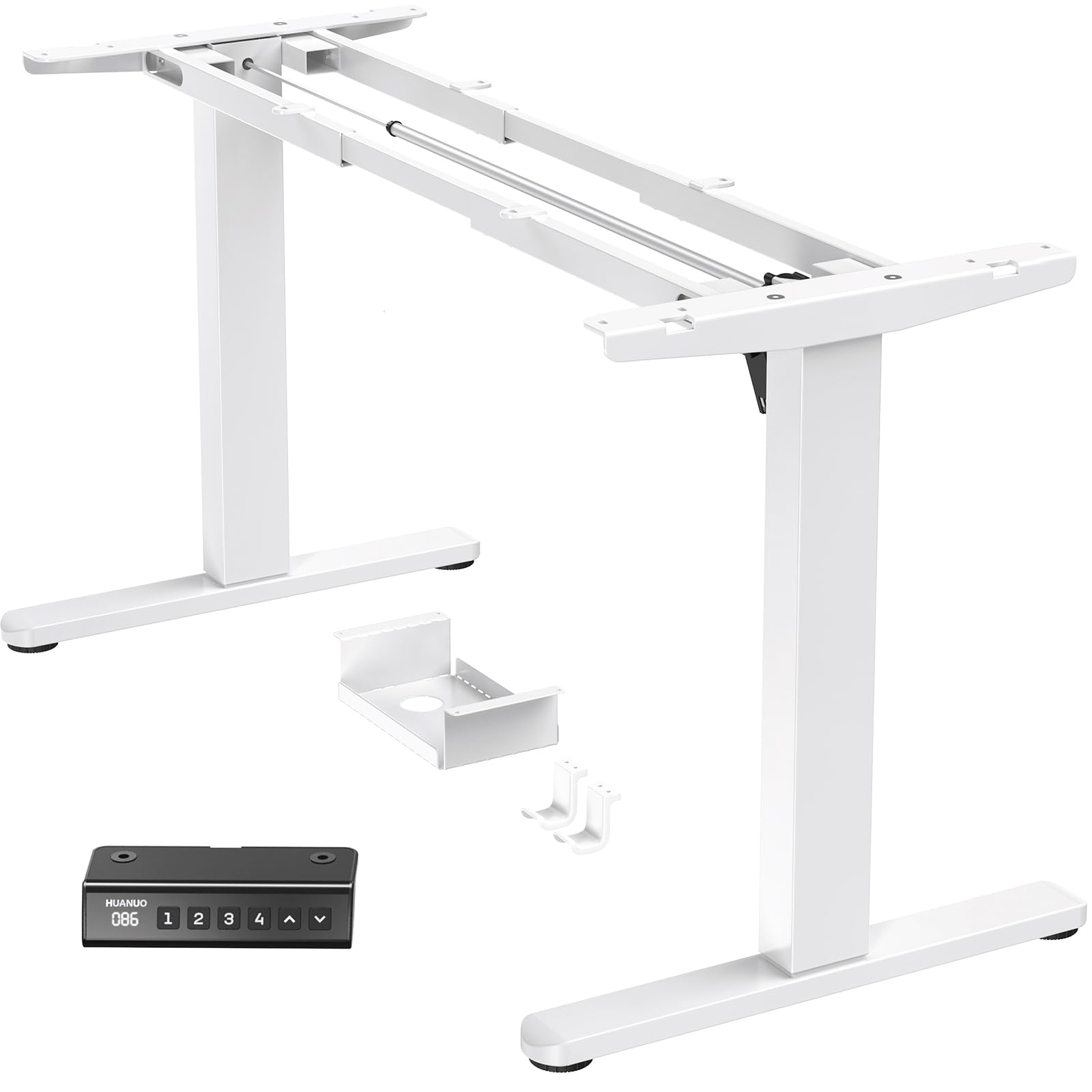
Image: Diagram showing the adjustable width of the desk frame (100-180cm) and height range (72-118cm), along with compatible desktop sizes (e.g., 110cm, 120cm, 140cm, 220cm wide, and 60cm, 70cm, 80cm, 90cm deep).
Гарантія та підтримка
HUANUO provides a limited warranty for this product. For specific warranty terms and conditions, please refer to the warranty card included in your product packaging or visit the official HUANUO webсайт.
If you require technical assistance, have questions about assembly, or need to report a missing/damaged part, please contact HUANUO customer support:
- Інтернет-підтримка: Visit the HUANUO official webсайт із поширеними запитаннями та ресурсами підтримки.
- Електронна пошта: Зверніться до документації до продукту, щоб дізнатися адресу електронної пошти служби підтримки клієнтів.
- телефон: Номер телефону служби підтримки клієнтів дивіться в документації до вашого продукту.
Please have your model number (BSQTECH-DEHNESD0728) and purchase date ready when contacting support.


