1. Важлива інформація з безпеки
Please read all instructions carefully before using the SANSUI ES-24C1 monitor. Keep this manual for future reference.
- Do not expose the monitor to rain or moisture to prevent fire or electric shock hazards.
- Не відкривайте монітор casing. Усередині немає деталей, які може обслуговувати користувач. Звертайтеся до кваліфікованого персоналу з будь-яким обслуговуванням.
- Розмістіть монітор на стійкій, рівній поверхні, щоб запобігти його падінню.
- Забезпечте належну вентиляцію навколо монітора. Не блокуйте вентиляційні отвори.
- Використовуйте лише адаптер живлення, що постачається з монітором.
- Від’єднуйте монітор від розетки під час грози або якщо він не використовується протягом тривалого часу.
2. Вміст упаковки
Перевірте наявність усіх елементів в упаковці:
- SANSUI ES-24C1 24-inch Curved Monitor
- Підставка для монітора (основа та шия)
- Адаптер живлення
- Кабель HDMI
- Посібник користувача
3. Продукт закінчивсяview
The SANSUI ES-24C1 is a 24-inch Full HD (1920x1080) curved monitor featuring a 100Hz refresh rate, 1ms MPRT response time, and built-in speakers. It is designed for both home and office use, offering a 1500R curvature for an immersive viewнабутий досвід.

Зображення: Оверview of the SANSUI ES-24C1 monitor highlighting its key features and curved design.

Image: Summary of the monitor's main features including 100Hz, 1ms MPRT, USB Type-C, HDR, 100% sRGB, 3000:1 contrast, 250 Nits, built-in speakers, and VESA mount.
Порти та елементи керування

Зображення: Крупний план view of the monitor's rear ports, including HDMI, USB Type-C, and Audio Out.
- USB Type-C: 1 port for video input (does not support charging).
- HDMI 1.4: 1 port for video input.
- 3.5 мм аудіороз’єм: Для підключення зовнішніх навушників або динаміків.
- DC IN: Порт введення живлення.
- Five-Way Joystick: Located on the back for OSD menu navigation.
4. Налаштування
4.1 Збірка монітора
Виконайте такі кроки, щоб зібрати підставку для монітора:
- Прикріпіть шийку підставки до панелі монітора.
- Secure the stand base to the neck.
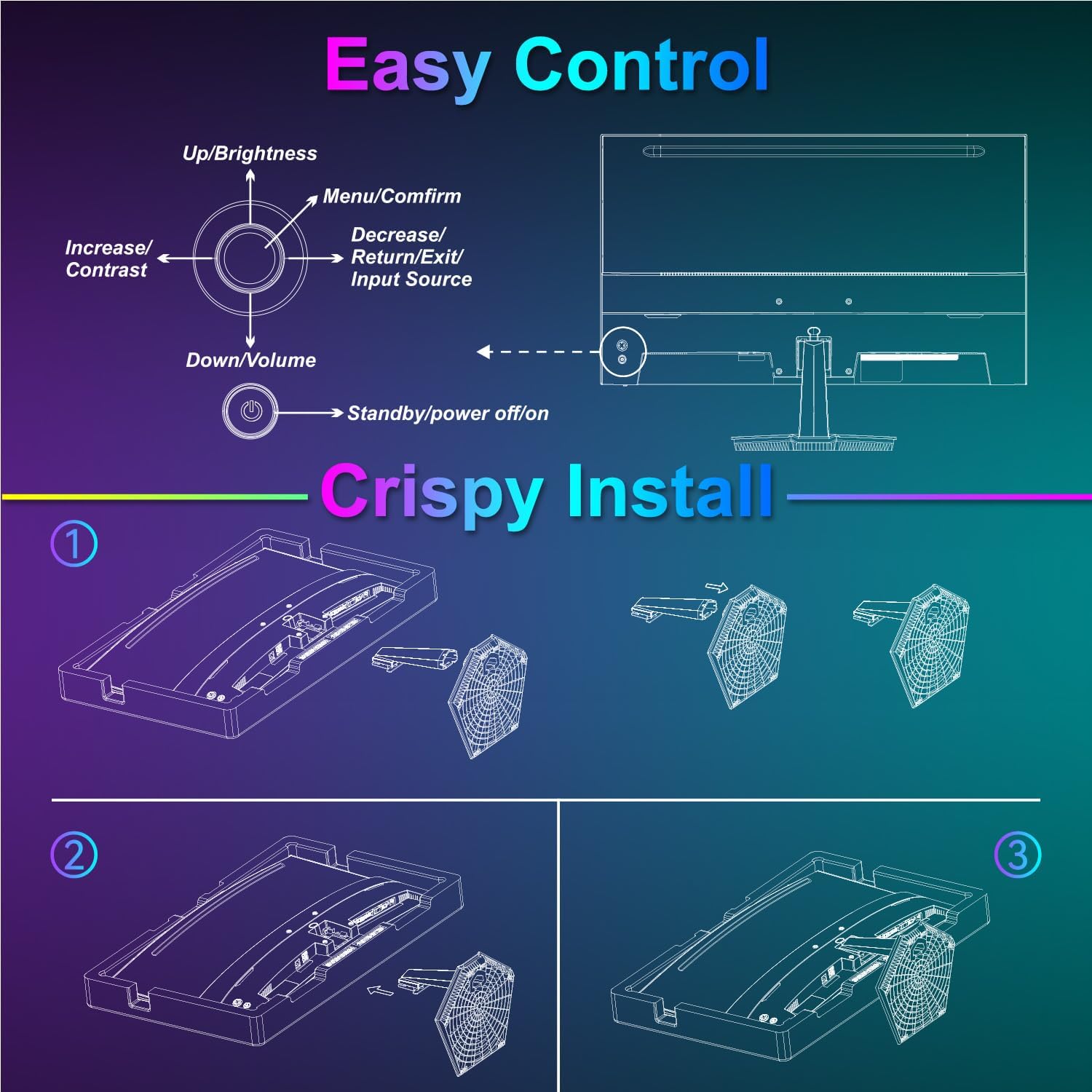
Image: Diagram illustrating the step-by-step assembly of the monitor stand.
4.2 Підключення до пристроїв
Connect your monitor to a computer or other video source using the appropriate cable.
- HDMI: Connect one end of the HDMI cable to the monitor's HDMI port and the other end to your device's HDMI output.
- USB Type-C: Connect one end of the USB Type-C cable to the monitor's USB Type-C port and the other end to your device's compatible USB Type-C output.
- Аудіо: If using external audio devices, connect them to the 3.5mm audio jack.

Image: Visual representation of various devices connecting to the monitor via HDMI and USB Type-C.
4.3 Увімкнення/вимкнення живлення
Connect the power adapter to the monitor's DC IN port and then plug it into a power outlet. Press the power button located on the back of the monitor to turn it on or off.
5. Інструкція з експлуатації
5.1 Навігація по екранному меню
The On-Screen Display (OSD) menu is controlled using the five-way joystick on the back of the monitor. Press the joystick to open the menu, then move it up/down/left/right to navigate and select options.

Image: Diagram showing the five-way joystick and its functions for OSD menu navigation.
5.2 Налаштування дисплея
Налаштуйте різні параметри відображення, щоб оптимізувати viewнабутий досвід.
- Яскравість/Контрастність: Налаштуйте загальний рівень яскравості та контрастності.
- Параметри кольору: Точне налаштування колірної температури, відтінку та насиченості.
- HDR: Увімкніть або вимкніть розширений динамічний діапазон для покращення контрастності та кольору.
- Low Blue Light/Anti-Flicker: Reduce eye strain during prolonged use.
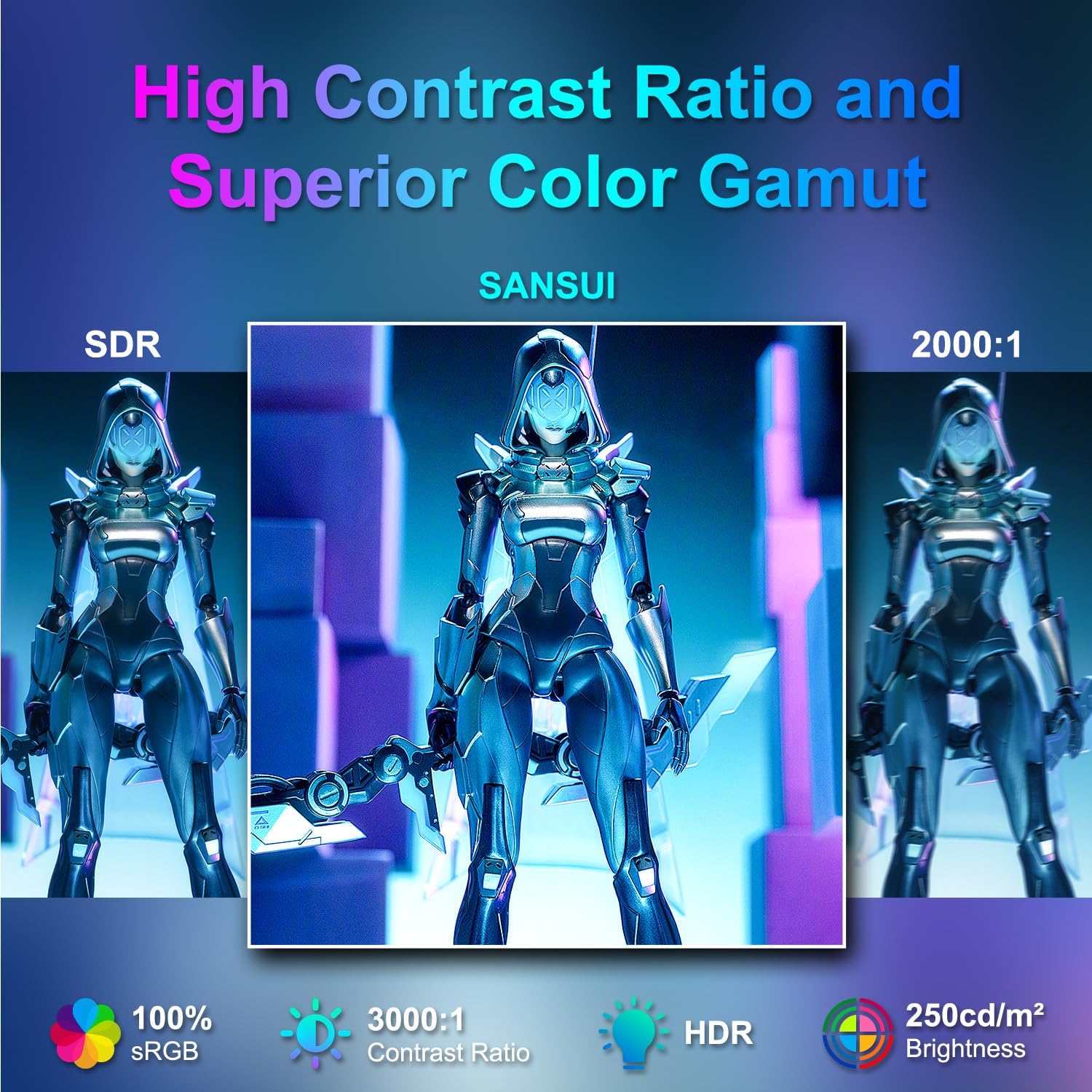
Image: Visual comparison demonstrating high contrast ratio and superior color gamut of the SANSUI monitor.

Image: Highlights of display features like 3000:1 contrast ratio, 100% sRGB, and 250 Nits brightness.

Image: Comparison of display quality with and without HDR enabled.

Image: Illustration of Low Blue Light and Flicker-Free technologies for reduced visual fatigue.
5.3 Ігрові функції
The ES-24C1 monitor includes features optimized for gaming performance.
- Частота оновлення 100 Гц: Забезпечує плавніший рух та зменшену затримку введення.
- Час відгуку MPRT 1 мс: Мінімізує розмиття руху та ореоли.
- Адаптивна синхронізація: Synchronizes the monitor's refresh rate with the GPU's frame rate to eliminate screen tearing and stuttering.
- Режими гри: Pre-set display modes optimized for different game genres (e.g., FPS, RTS, RPG).
- Перехрестя штучного інтелекту: An on-screen crosshair overlay for improved aiming accuracy.
- Таймер гри: Екранний таймер для відстеження подій у грі.

Image: Demonstrates the difference in smoothness between 60Hz, 75Hz, and 100Hz refresh rates, highlighting low blue light and Adaptive FreeSync.

Image: Illustrates the benefits of 100Hz refresh rate and 1ms MPRT response time in reducing screen tearing and improving fluidity.
5.4 Multi-Window Modes (PIP/PBP)
The monitor supports Picture-in-Picture (PIP) and Picture-by-Picture (PBP) modes, allowing you to view content from multiple input sources simultaneously.
- PBP (картинка поруч із картинкою): Divides the screen into two halves, displaying content from two different sources side-by-side.
- PIP (картинка в картинці): Displays content from a secondary source in a smaller window overlaid on the main display.

Зображення: Прamples of Duplicated Mode, Second Screen Mode, and Single Display Screen Mode for enhanced productivity.
6. Технічне обслуговування
6.1 Очищення
- Завжди вимикайте монітор перед чищенням.
- Злегка протріть м’якою тканиною без ворсу dampводою або м’яким неабразивним засобом для чищення, спеціально призначеним для електроніки.
- Не розпилюйте засіб для чищення безпосередньо на екран.
6.2 Догляд
- Уникайте розміщення важких предметів на моніторі або його кабелях.
- Тримайте монітор подалі від прямих сонячних променів, джерел тепла та екстремальних температур.
- Do not expose the monitor to strong magnetic fields.
7. Вирішення проблем
If you encounter issues with your SANSUI ES-24C1 monitor, refer to the following common problems and solutions:
- Немає живлення: Переконайтеся, що адаптер живлення надійно підключено як до монітора, так і до справної розетки. Перевірте, чи світиться індикатор живлення.
- Немає сигналу: Verify that the video cable (HDMI or USB Type-C) is correctly connected to both the monitor and your device. Ensure the correct input source is selected in the OSD menu.
- Мерехтіння екрана: Check the video cable for damage or loose connections. Try a different video cable or port. Ensure your graphics card drivers are up to date.
- Погана якість зображення: Adjust brightness, contrast, and color settings in the OSD menu. Ensure the display resolution and refresh rate are set correctly in your device's display settings.
- Немає звуку з динаміків: Check the volume settings on both the monitor and your connected device. Ensure the audio cable (if used) is properly connected.
8. Технічні характеристики
Detailed technical specifications for the SANSUI ES-24C1 24-inch Curved Monitor:
| Особливість | Специфікація |
|---|---|
| Номер моделі | ES-24C1 |
| Розмір екрана | 24 дюймів |
| Тип панелі | Вигнутий (1500R) |
| роздільна здатність | 1920 x 1080 (FHD) |
| Частота оновлення | 100 Гц |
| Час відгуку | 1 мс (MPRT) |
| Коефіцієнт контрастності | 3000:1 |
| Яскравість | 250 ніт |
| Кольори дисплея | 16.7 мільйонів |
| Колірна гамма | 100% sRGB |
| Viewкут нахилу | 178° (Г/В) |
| Відеовходи | 1x HDMI 1.4, 1x USB Type-C |
| Аудіовихід | 1x 3.5 мм аудіороз’єм |
| Доповідачі | 2x 2W Built-in Speakers |
| Гора VESA | 75 х 75 мм |
| Регулювання нахилу | від -5° до 15° |
| Розміри продукту | 21 x 38 x 49 дюймів |
| Вага товару | 7.78 фунта |

Image: Detailed dimensions and ergonomic features like 178° wide viewing angle and -5°~15° tilt.

Image: Visual representation of the 178° wide viewкут.

Image: Tips for VESA mounting (75x75mm, M4*8mm screw size) and tilt adjustment.

Зображення: Задня частина view of the monitor detailing port locations and key specifications.
9. Гарантія та підтримка
SANSUI provides a limited warranty for this product. For detailed warranty information, please refer to the warranty card included in your package or visit the official SANSUI website. For technical support or service inquiries, please contact SANSUI customer service.
Інтернет-підтримка: Відвідайте магазин SANSUI на Amazon
10. Офіційне відео продукту
Watch the official product video for a visual guide to the SANSUI ES-24C1 monitor's features and benefits.
Video: SANSUI 24" 100Hz Curved Monitor USB C with Speakers. This video provides an overview of the monitor's design, key features, and connectivity options.


