1. Вступ
This manual provides detailed instructions for the safe and effective operation of your VAR TECH V92S Smart Digital Multimeter. The V92S is a True RMS, fully auto-ranging digital multimeter designed for precise measurements across various electrical parameters. Please read this manual thoroughly before use and retain it for future reference.
2. Інформація про безпеку
Always adhere to basic safety precautions when using this multimeter to prevent personal injury or damage to the instrument. Improper use can result in electric shock or fire.
- Не перевищуйте максимальні вхідні значення, зазначені для кожної функції.
- Перед вимірюваннями переконайтеся, що вимірювальні дроти правильно підключені та перебувають у справному стані.
- Do not use the multimeter if it appears damaged or if the battery cover is not securely closed.
- Будьте особливо обережні при роботі з обtagвище 60 В постійного струму або 30 В змінного струму середньоквадратичного значення, оскільки це створює небезпеку ураження електричним струмом.
- Always disconnect power to the circuit under test before measuring resistance, capacitance, or continuity.
- Негайно замінюйте батарейки, коли з'являється індикатор низького заряду батарей, щоб забезпечити точність показань.
- Do not operate the multimeter in explosive atmospheres or near flammable materials.
3. Ключові характеристики
The VAR TECH V92S Smart Digital Multimeter offers a range of advanced features for comprehensive electrical testing:
- Smart Digital Multimeter with Auto Detection TRMS (True Root Mean Square)
- 600 V AC/DC & 10 A AC/DC measurement capabilities
- 6000 Counts HD Display with Primary & Secondary display and Analog bar graph
- Capacitance Test: 6 nF to 60 mF
- Frequency Test: 6 Hz to 10 MHz
- Temperature Test: -40 ºC to 1000 ºC
- Diode & Continuity Test
- NCV (безконтактний випtage) test for live wire detection
- Integrated Torch for illumination in dark environments
- Функція автоматичного вимкнення живлення для економії заряду батареї
- Data Hold function to freeze readings on the display
- Індикатор низького заряду акумулятора
- Jack Prompt for correct test lead insertion
- Burnt Fuse Prompt for safety and easy maintenance
- Resistance measurement: 600 Ω to 60 MΩ

Малюнок 3.1: Спереду view of the VAR TECH V92S Smart Digital Multimeter, showcasinйого дисплей та кнопки керування.

Figure 3.2: The VAR TECH V92S Multimeter held in hand, illustrating its compact and ergonomic design.
4. Компоненти продукту
The VAR TECH V92S Smart Digital Multimeter package includes the following items:
- VAR TECH V92S Digital Multimeter
- Вимірювальні дроти (червоний та чорний)
- Інструкція з експлуатації (цей документ)
- Сумка для перенесення
- 4 батарейки типу AAA (попередньо встановлені або входять до комплекту)

Figure 4.1: Contents of the VAR TECH V92S package, including the multimeter, test leads, manual, and carrying pouch.
5. Налаштування
5.1. Встановлення батареї
The VAR TECH V92S requires 4 AAA batteries for operation. If batteries are not pre-installed, or if replacement is needed:
- Переконайтеся, що мультиметр вимкнено.
- Знайдіть батарейний відсік на задній панелі пристрою.
- За допомогою викрутки відкрийте кришку батарейного відсіку.
- Insert 4 AAA batteries, observing the correct polarity (+/-) as indicated inside the compartment.
- Надійно закрийте кришку відсіку для акумулятора.
5.2. Підключення вимірювальних щупів
Правильне підключення вимірювальних дротів має вирішальне значення для точних і безпечних вимірювань.
- Insert the black test lead into the “COM” (Common) jack.
- Для більшості об'ємівtage, resistance, continuity, capacitance, frequency, and temperature measurements, insert the red test lead into the “INPUT” jack.
- For current measurements (mA/A), insert the red test lead into the “mA/A” jack.

Figure 5.1: The input jack prompt light feature. When turning on or changing ranges, the corresponding input socket light flashes to indicate where to insert the probe.
6. Інструкція з експлуатації
6.1. Увімкнення/вимкнення живлення
Натисніть потужність button (red circle with line) to turn the multimeter on or off.
6.2. Вибір функції
The V92S features an auto-ranging function, automatically detecting the measurement type in “SMART” mode. For specific functions, use the SEL і FUNC кнопки:
- Кнопка SEL (Вибір): Used to switch between different measurement types within a primary mode (e.g., AC Voltage і DC Voltage, or Diode and Continuity).
- FUNC (Function) Buttons: Used to directly select specific measurement functions like Capacitance, Frequency, or Temperature.
6.3. Режими вимірювання
Ensure test leads are correctly inserted for the desired measurement.
6.3.1. ВипtagВимірювання (змінний/постійний струм)
- Insert the red lead into the “INPUT” jack and the black lead into the “COM” jack.
- Turn on the multimeter. It will typically default to auto-ranging voltagе вимірювання.
- Якщо потрібно, натисніть SEL to switch between AC and DC voltage.
- Підключіть вимірювальні щупи паралельно до кола або компонента, що вимірюється.
6.3.2. Вимірювання струму (змінного/постійного струму)
- Insert the red lead into the “mA/A” jack and the black lead into the “COM” jack.
- Turn on the multimeter. The device automatically enters the current measurement function when the probe is inserted into the mA/A socket.
- Якщо потрібно, натисніть SEL для перемикання між змінним та постійним струмом.
- З'єднайте вимірювальні щупи послідовно з вимірюваним колом.
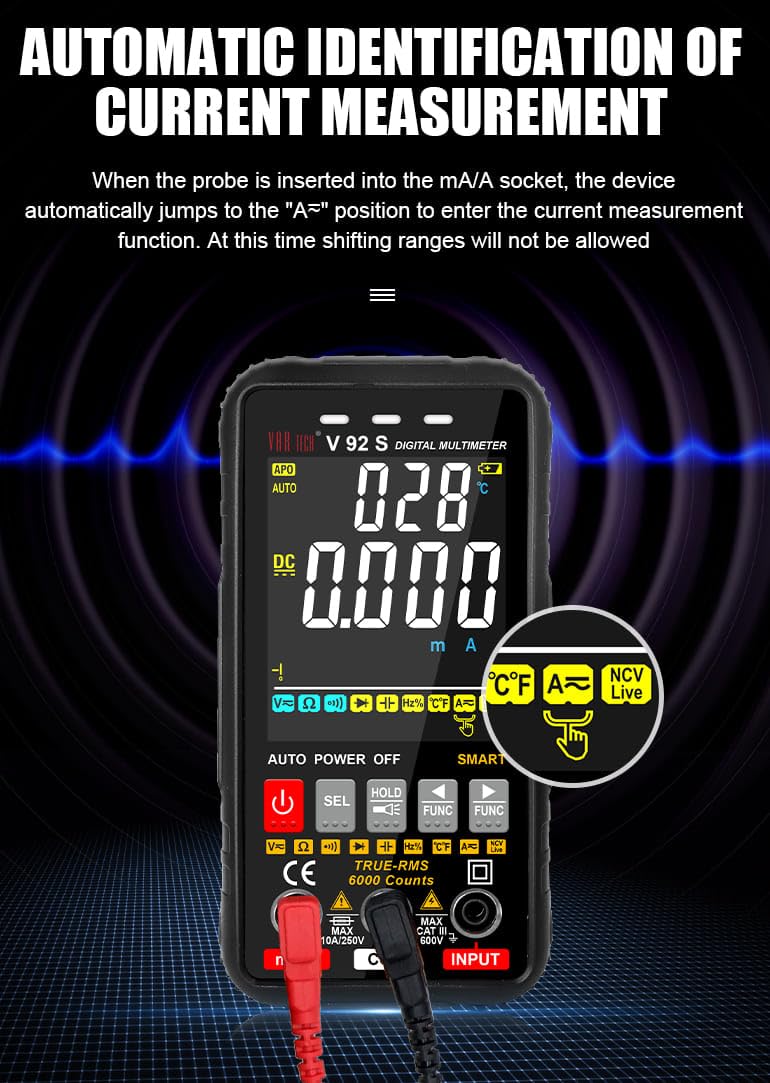
Figure 6.1: Automatic identification of current measurement. The multimeter automatically adjusts to the current measurement function when the probe is inserted into the mA/A socket.
6.3.3. Resistance, Capacitance, Frequency, Temperature, Diode, Continuity
For these measurements, ensure the red lead is in the “INPUT” jack and the black lead in the “COM” jack. Use the SEL or FUNC buttons to select the desired mode. Connect probes to the component or circuit as appropriate for each measurement type.
6.3.4. NCV (безконтактний томtagд) Тест
Функція NCV дозволяє виявляти об'єм змінного струмуtagе без прямого контакту з провідниками.
- Select the NCV function using the appropriate button.
- Bring the top of the multimeter near the conductor or outlet.
- The instrument will emit an audible beep and the alarm indicator light will illuminate when AC signals are detected. A “-H” display indicates a strong signal, while “-L” indicates a weak signal.

Figure 6.2: Auditory and visual alarm during NCV (Non-Contact Voltage) testing, indicating the presence of AC voltage.
6.4. Функція утримання даних
Натисніть ТРИМАТИ кнопку, щоб зафіксувати поточне значення на дисплеї. Натисніть її ще раз, щоб скасувати функцію блокування.
6.5. Функція ліхтарика
The multimeter includes a built-in flashlight for illuminating work areas. Activate the flashlight using the designated button (often integrated with the HOLD button or a separate light icon). Press again to turn it off.

Figure 6.3: The integrated flashlight function, useful for working in dimly lit environments.
7. Технічне обслуговування
7.1. прибирання
Протріть корпус рекламоюamp cloth and mild detergent. Do not use abrasives or solvents. Ensure the multimeter is powered off and disconnected from all circuits before cleaning.
7.2. Заміна батареї
When the low battery indicator appears on the display, replace the batteries as described in Section 5.1.
7.3. Заміна запобіжника
The V92S features an intelligent anti-burn function with a built-in safety fuse to protect the circuit. If the safety fuse burns out, the display screen will show a “FUSE” symbol to prompt replacement.
- Ensure the multimeter is powered off and all test leads are disconnected.
- Відкрийте кришку батарейного відсіку на задній панелі пристрою.
- Carefully locate and remove the blown fuse.
- Replace it with a fuse of the same type and rating (refer to specifications for fuse type).
- Надійно закрийте кришку відсіку для акумулятора.

Figure 7.1: The intelligent anti-burn function prompt, indicating the location of the fuse for replacement.
8. Вирішення проблем
If you encounter issues with your VAR TECH V92S, refer to the following common problems and solutions:
- Немає дисплея: Перевірте встановлення батарейок та переконайтеся, що батарейки не розряджені. За потреби замініть їх.
- Неправильні показання: Verify test lead connections. Ensure the correct measurement function is selected. Check if the fuse is intact for current measurements.
- “OL” or Overload Indication: The measured value exceeds the range of the selected function. Select a higher range if available, or ensure the input is within the multimeter’s capabilities.
- “FUSE” Display: The fuse has blown. Refer to Section 7.3 for fuse replacement.
If the problem persists, contact VAR TECH customer support for assistance.
9. Технічні характеристики
| Параметр | Специфікація |
|---|---|
| Модель | V92S |
| Дисплей | 6000 Counts HD Display |
| Справжня RMS | так |
| DC Voltage | До 600 В |
| AC Voltage | До 600 В |
| Постійний струм | До 10 А |
| Змінного струму | До 10 А |
| опір | 600 Ω to 60 MΩ |
| Ємність | від 6 нФ до 60 мФ |
| Частота | від 6 Гц до 10 МГц |
| температура | від -40 ºC до 1000 ºC |
| Тест безперервності | так |
| Діодний тест | так |
| NCV (безконтактний випtage) | так |
| Джерело живлення | 4 батарейки AAA (входять в комплект) |
| Вага товару | 300 г |
| Розміри продукту (Д x Ш x В) | 14 х 7 х 5 см |
| Рейтинг безпеки | CAT III 600В |
| Сертифікати | CE, ISO 9001 |

Figure 9.1: A comparison table illustrating the features of various VAR TECH multimeter models, including the V92S.
10. Гарантія та підтримка
The VAR TECH V92S Smart Digital Multimeter comes with a 1-year warranty against manufacturing defects. For warranty claims or technical support, please contact VAR TECH directly.
Manufacturer: V A R TECH, www.var-tech.com


