1. Вступ
This manual provides detailed instructions for the BSIDE 2-Channel Handheld Oscilloscope Multimeter Signal Generator. This versatile 4-in-1 device integrates a dual-channel oscilloscope, a 6000-count multimeter, a signal generator, and supports a flexible current clamp for comprehensive electrical testing and analysis. It is designed for both professional and educational applications, offering portability and a wide range of measurement capabilities.
2. Інформація про безпеку
Завжди дотримуйтесь наступних запобіжних заходів, щоб запобігти травмам та пошкодженню інструменту:
- Не використовуйте пристрій, якщо він виглядає пошкодженим або працює неналежним чином.
- Ensure all probes and test leads are properly connected and in good condition before use.
- Не перевищуйте максимальний вхідний об’ємtagномінали, зазначені в технічних характеристиках.
- Avoid contact with live circuits when connecting or disconnecting probes.
- Use caution when working with high voltagес або струми.
- Do not operate the device in wet or explosive environments.
- Refer to the manual for proper fuse replacement if necessary.
3. Вміст упаковки
Перевірте, чи всі перелічені нижче предмети присутні у вашій упаковці:
- BSIDE 2-Channel 25MHz Oscilloscope Multimeter
- Oscilloscope Probe (Quantity: 2)
- Red and Black Crocodile Clip Probe
- Multimeter Test Leads (Pen type)
- Protective Cap (Quantity: 2)
- Color Ring (Quantity: 8)
- Regulating Rod (Quantity: 1)
- High-end EVA Storage Bag
- Інструкція з експлуатації
- USB-кабель для зарядки

Image 3.1: The BSIDE 4-in-1 handheld device shown with its complete set of accessories, including oscilloscope probes, multimeter leads, crocodile clips, charging cable, and the protective EVA storage bag.
4. Продукт закінчивсяview
4.1 Характеристики пристрою
The BSIDE handheld device combines four essential functions into one compact unit:
- Осцилограф: Dual-channel, 25MHz bandwidth for waveform analysis.
- Мультиметр: 6000-count for various electrical measurements.
- Генератор сигналів: Produces 7 types of waveforms for testing.
- Гнучкий струмовий Clamp підтримка: Allows measurement of high AC currents up to 6000A.

Image 4.1: A visual representation highlighting the integrated functions of the device: signal generation, multimeter measurements, and oscilloscope waveform display.
4.2 Елементи керування та дисплей
The device features a 3.98-inch TFT full-view color screen (480*320 IPS) for clear data visualization. Navigation and function selection are performed using the front panel buttons.
- Екран дисплея: Shows waveforms, measurement readings, and menu options.
- CH1/CH2 Inputs: Connect oscilloscope probes for dual-channel input.
- OSC Port (OUT/PUT): Signal generator output.
- Input/COM Terminals: Connect multimeter test leads.
- Кнопка живлення: Вмикає/вимикає пристрій.
- Кнопка МЕНЮ: Доступ до системних налаштувань та опцій.
- Кнопка MODE: Перемикається між режимами осцилографа, мультиметра та генератора сигналів.
- F1-F4 Function Buttons: Context-sensitive buttons for specific operations within each mode.
- Кнопки навігації: Up, Down, Left, Right for menu navigation and parameter adjustment.
- AUTO PEAK Button: Automatic waveform acquisition and scaling in oscilloscope mode.
- Кнопка ЗБЕРЕГТИ: Saves current data or waveform.
- x1/x10 Button: Adjusts probe attenuation setting.
- Кнопка AC/DC: Selects AC or DC coupling.
5. Налаштування
5.1 Заряджання батареї
The device is equipped with a 5000mA rechargeable lithium battery. Before first use, fully charge the device using the provided USB charging cable and a compatible USB power adapter (not included).
- Connect the small end of the USB charging cable to the charging port on the side of the device.
- Connect the standard USB end to a USB power source.
- Індикатор заряджання на екрані показуватиме стан заряджання.

Image 5.1: The device being charged via its USB port, illustrating the battery icon on the display indicating charging status. A full charge provides approximately 10 hours in oscilloscope mode or 20 hours in multimeter mode.
5.2 Початкове ввімкнення
Press and hold the Power button until the screen illuminates. The device will boot into its last used mode or a default mode.
5.3 Підключення зондів та проводів
Always ensure the device is off or in a safe mode before connecting or disconnecting probes and leads.
- Зонди осцилографа: Connect to the CH1 and CH2 BNC inputs. Ensure the probe attenuation setting (x1 or x10) on the probe matches the setting on the device.
- Multimeter Test Leads: Insert the red lead into the 'Input' terminal and the black lead into the 'COM' terminal for voltage, resistance, capacitance, and diode measurements. For current measurements, refer to the specific current input terminals.
- Гнучкий струмовий Clamp: Connect the flexible current clamp to the appropriate input terminals as indicated for high current measurements.
6. Режими роботи
Використовуйте РЕЖИМ button to switch between the primary operating modes: Oscilloscope, Multimeter, and Signal Generator.
6.1 Режим осцилографа
This mode allows for real-time visualization and analysis of electrical waveforms.
- Прес РЕЖИМ to select Oscilloscope mode.
- Connect oscilloscope probes to CH1 and/or CH2 inputs.
- Adjust the probe attenuation (x1/x10) on both the probe and the device to match.
- Use the navigation buttons to adjust vertical sensitivity (V/div) and horizontal time base (s/div).
- Прес AUTO PEAK for automatic waveform scaling and triggering.
- The display shows waveform parameters such as Vpp, Vmax, Vmin, duty cycle, and frequency.
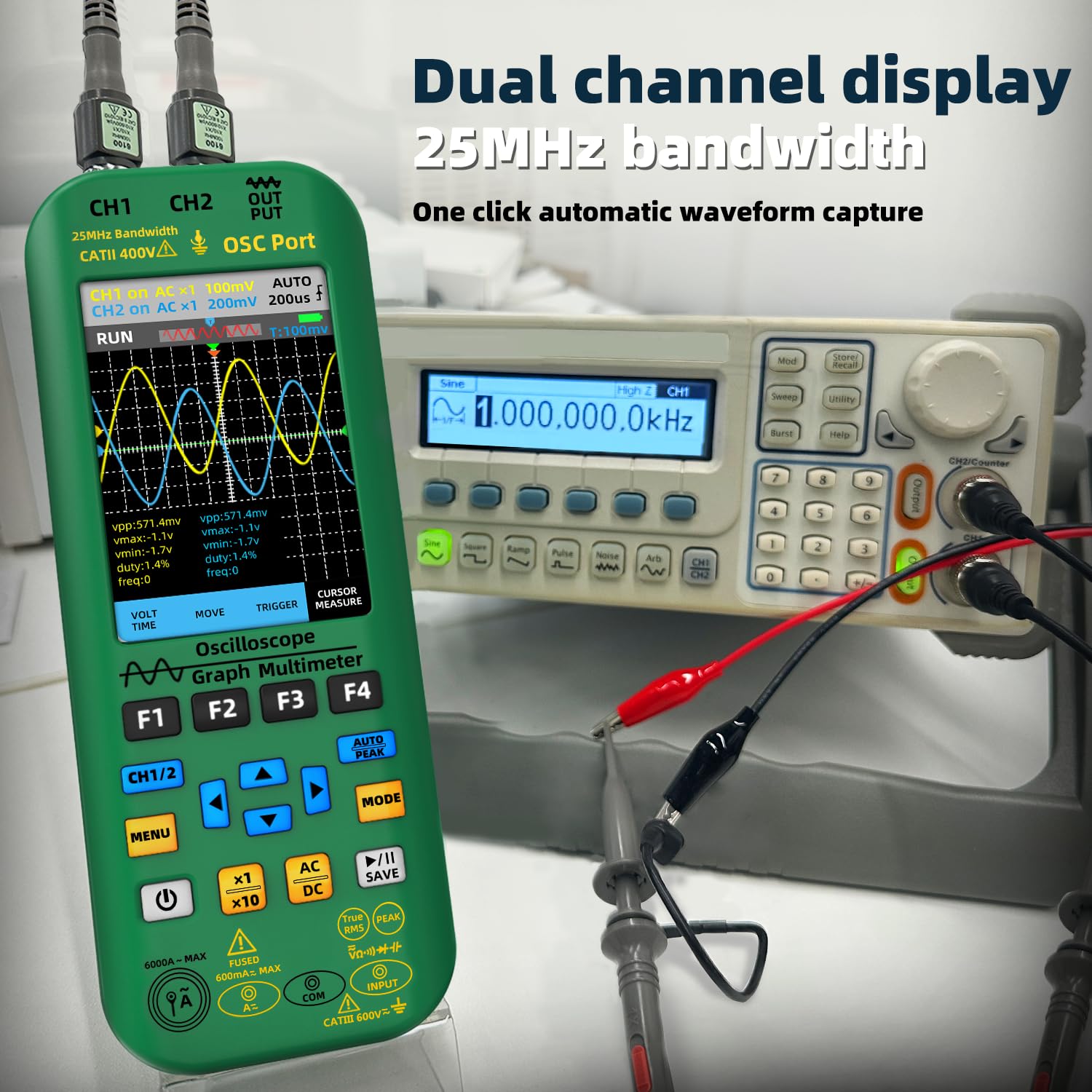
Image 6.1: The oscilloscope displaying dual-channel waveforms (CH1 and CH2) with various measurement parameters such as peak-to-peak voltagе, максимальний обtagе, мінімальний обtage, duty cycle, and frequency.
6.2 Режим мультиметра
The multimeter function provides precise measurements of various electrical quantities.
- Прес РЕЖИМ to select Multimeter mode.
- Connect the multimeter test leads to the appropriate input terminals.
- Use the F1-F4 buttons or navigation to select the desired measurement function (e.g., DC Voltage, AC Voltage, Resistance, Capacitance, Current, Diode, Continuity, Temperature).
- For AC current measurements up to 6000A, connect the flexible current clamp.

Image 6.2: A user performing an AC voltage measurement within an electrical panel using the multimeter function of the BSIDE device. The display shows a reading of 235.6V AC.
6.3 Режим генератора сигналів
The signal generator can output various waveforms for testing electronic circuits.
- Прес РЕЖИМ to select Signal Generator mode.
- Connect a test lead from the OSC Port (OUT/PUT) to the circuit under test.
- Use the F1-F4 buttons or navigation to select the desired waveform type (sine, square, triangle, half, full, sawtooth, DC).
- Налаштуйте вихідний сигнал amplitude (0.1V-3.0V) and frequency (0Hz-2MHz) using the navigation buttons.
- For square waves, the duty cycle can be adjusted from 1% to 99%.
6.4 Керування даними
The device supports data storage, preview, and export functions.
- Натисніть ЗБЕРЕГТИ button to store current waveform data or measurement readings.
- Navigate through saved data for preview.
- Connect the device to a computer via the USB port for high-speed data transmission and export of stored data.

Image 6.3: The BSIDE device connected to a laptop, demonstrating its high-speed data transmission capability. Waveform data saved on the device can be exported and viewed on a computer for further analysis.
7. Технічне обслуговування
7.1 Очищення
Для очищення пристрою використовуйте м’яку, damp тканиною. Не використовуйте абразивні засоби для чищення або розчинники. Перед чищенням переконайтеся, що пристрій вимкнено та від’єднано від джерела живлення.
7.2 Догляд за акумулятором
The integrated 5000mA Li-ion battery provides extended operation. To maximize battery life:
- Recharge the battery when the low battery indicator appears.
- Уникайте частого повного розряджання акумулятора.
- Якщо пристрій зберігатиметься протягом тривалого часу, зарядіть його приблизно до 50% та зберігайте у прохолодному сухому місці.
7.3 Зберігання
When not in use, store the device in its provided high-end EVA storage bag to protect it from dust, moisture, and physical impact. Store in a dry environment away from direct sunlight and extreme temperatures.
8. Вирішення проблем
If you encounter issues with your BSIDE device, refer to the following common problems and solutions:
- Пристрій не вмикається: Переконайтеся, що акумулятор заряджений. Підключіть зарядний кабель і спробуйте ще раз.
- Немає дисплея або дисплей тьмяний: Check battery level. Adjust backlight settings in the menu.
- Неправильні показники в режимі мультиметра: Verify test lead connections. Ensure the correct measurement function is selected. Check for damaged leads.
- No waveform in Oscilloscope mode: Check probe connections to both the device and the circuit. Ensure probe attenuation matches the device setting. Use AUTO PEAK to automatically adjust settings. Verify the circuit under test is active.
- Signal Generator output not working: Ensure the device is in Signal Generator mode and the output is enabled. Check connections from the OSC Port.
- Проблеми з передачею даних: Ensure the USB cable is securely connected to both the device and the computer. Check computer's device manager for proper driver installation.
Якщо проблема не зникає, зверніться до служби підтримки клієнтів для подальшої допомоги.
9. Технічні характеристики
| Особливість | Специфікація |
|---|---|
| Дисплей | 3.98-inch TFT Color Screen, 480*320 IPS, 6000 words |
| Sampлінг -курс | 3 times / second (Multimeter) |
| Пропускна здатність | 25MHz (Dual-channel) |
| С. в режимі реального часуampлінг -курс | 208MSa / с |
| Кількість каналів | 2 канали |
| Вхідний опір | 1 МОм, при 16 пФ |
| Затухання зонда | ×1, ×10 |
| Максимальний вхідний об'ємtage | ×1 range <150V, ×10 range <300V (DC + AC peak) |
| Horizontal SampДіапазон ставок ling | 1.5 Виб/с – 208 МВиб/с |
| Вертикальна чутливість | 20 мВ/поділ - 10 В/поділ |
| Режим відображення | XT, XY, Scroll |
| Час післясвітіння | Min, 500ms, 1s, 10s, Unlimited |
| DC Voltagе (V) | 0.001V - 1000V (0.8%+3) |
| AC Voltagе (V) | 0.001V - 750V (1.0%+3) |
| Струм постійного струму (мА) | 0.01mA - 600.0mA (1.0%+3) |
| Змінний струм (мА) | 0.01mA - 600.0mA (1.2%+5) |
| Гнучкий струмовий Clamp Змінного струму | 0.1A - 6000A (1.0%+5) |
| опір | 0.1Ω - 60.00MΩ (1.0%+3) |
| Ємність | 0.1nF - 99.99mF (4.5%+5) |
| температура | (-20 - 1000)°C / (-4 - 1832)°F (2.5%+5) |
| Signal Generator Waveform Types | Sine, Square, Triangle, Half, Full, Sawtooth, DC |
| Signal Generator Frequency Range | 0 Гц - 2 МГц |
| Вихід генератора сигналів Ampлитуда | 0.1 В - 3.0 В |
| Signal Generator Square Wave Duty Cycle | 1% - 99% |
| Акумулятор | 5000mA Li-ion (2 Lithium Ion batteries included) |
| Розміри | 216.6 x 84.5 x 36.0 мм (8.5 x 3.31 x 1.42 дюймів) |
| вага | 384 г (13.55 унції) |
10. Гарантія та підтримка
For warranty information and technical support, please refer to the documentation included with your purchase or contact BSIDE customer service through their official website or the retailer where the product was purchased. Please have your model number (2 channel handheld oscilloscope) and purchase details ready when contacting support.
11. Інформація про відео
Офіційних відео від продавця для вбудовування в цей посібник не було.


