вступ
This instruction manual provides essential information for the setup, operation, and maintenance of your LOUTOC Replacement Remote Control, model URMT26CND002. This remote is designed as a universal replacement for various Philips Android and Google Smart TV models. Please read this manual thoroughly before use to ensure optimal performance and longevity of your device.
Налаштування
1. Встановлення батареї
Для пульта дистанційного керування потрібні дві (2) батарейки типу AAA (не входять до комплекту). Щоб їх встановити, виконайте такі дії:
- Знайдіть кришку батарейного відсіку на задній панелі пульта дистанційного керування.
- Посуньте кришку вниз, щоб відкрити відсік.
- Вставте дві батарейки типу AAA, переконавшись, що позитивний (+) та негативний (-) полюси правильно збігаються з позначками всередині відсіку.
- Засуньте кришку батарейного відсіку назад на місце, доки вона надійно не клацне.
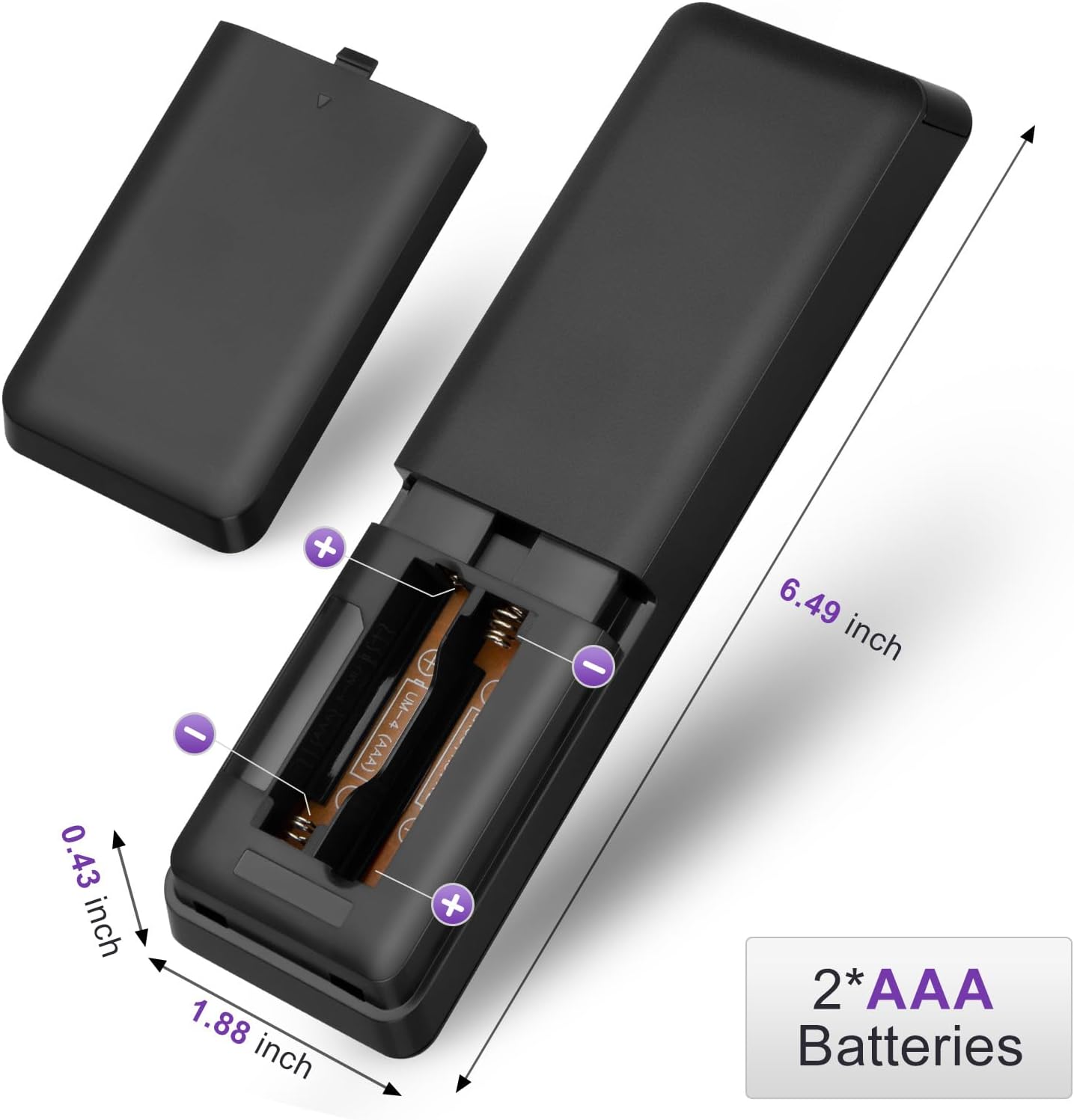
Figure 1: Battery installation for the LOUTOC remote control.
2. Початкове використання
This LOUTOC remote control is pre-programmed and designed to work immediately with compatible Philips Smart TVs. No additional setup or pairing is required. Simply install the batteries, point the remote at your TV, and begin use.

Figure 2: Key features including no setup required and fast response time.
Інструкція з експлуатації
The LOUTOC remote control features a standard layout for easy navigation and control of your Philips Smart TV. Below is a detailed description of each button's function.
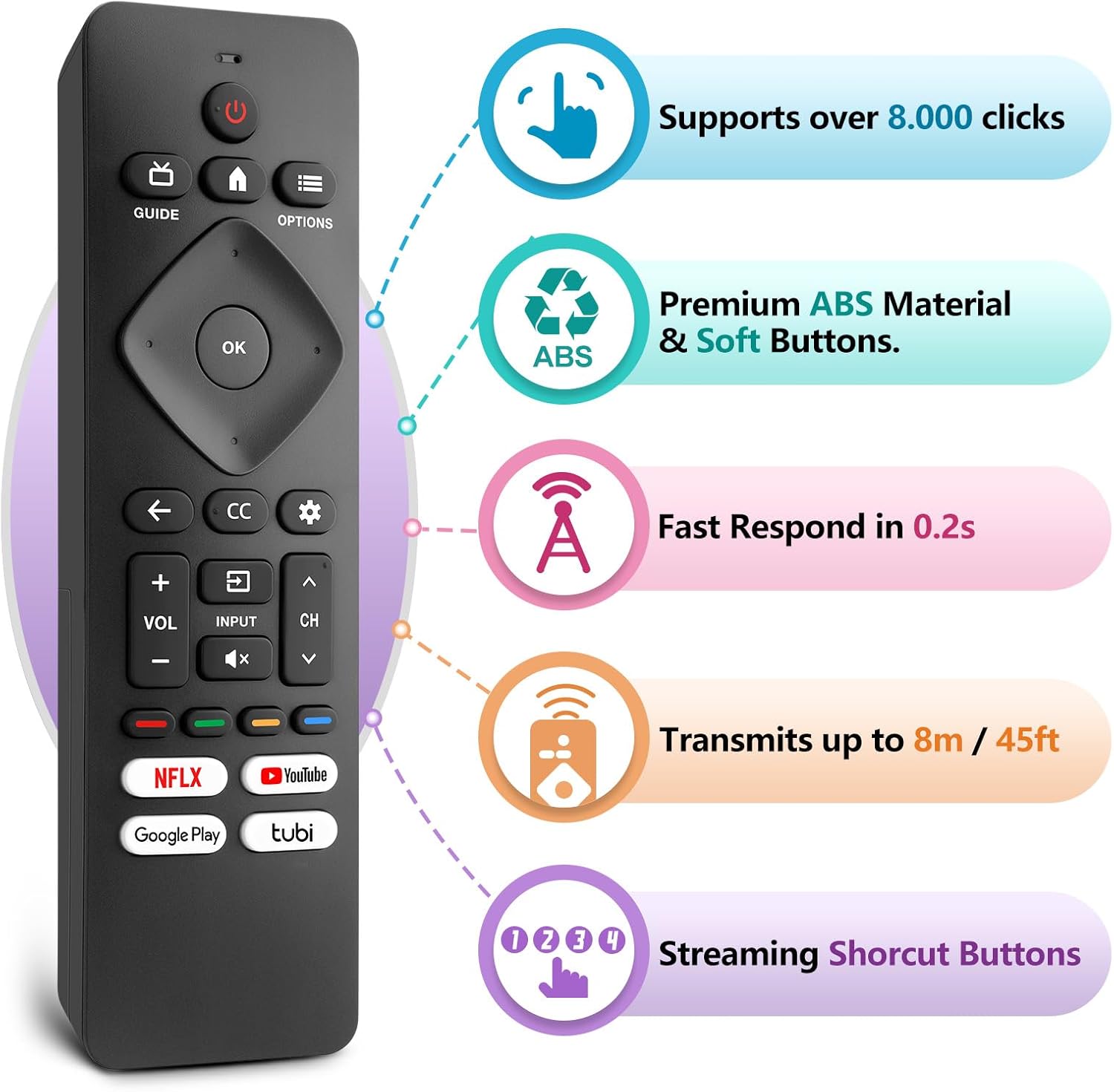
Figure 3: LOUTOC Remote Control Button Layout and Functions.
- ПОТУЖНІСТЬ: Turns the TV on or off. Press for less than 1 second for Quick Start Standby. Hold for 1 second or more for Low Power Standby.
- ПОСІБНИК: Displays the TV program guide (availability may vary by service provider and region).
- ДІМ: Accesses your apps, Live TV, input devices, settings, and the Google Play Store.
- ОПЦІЇ: Provides quick access to TV settings (settings vary depending on active screen).
- CURSOR (Up, Down, Left, Right) & OK: Moves to select an item and confirms selections on the menu.
- НАЗАД: Повернення до попереднього екрана.
- CC (Приховані субтитри): Selects closed caption settings.
- ПРИЛАДОВА ПАНЕЛЬ: Accesses the Google TV dashboard for user settings, notifications, and kids mode.
- ВХІД: Selects the input source for connected devices.
- ВИМКНЕНО: Toggles the sound on and off.
- ГУЧНІСТЬ +/-: регулює рівень гучності.
- СН +/-: Selects the next or previous channel.
- COLOR BUTTONS (Red, Green, Yellow, Blue): Works as direct access to user-specified net apps or functions.
Кнопки швидкого доступу
The remote includes dedicated shortcut buttons for popular streaming services:
- NETFLIX
- YouTube
- Google Play
- Тубі

Figure 4: Dedicated streaming service shortcut buttons.
Сумісність
This LOUTOC remote control is compatible with a wide range of Philips Android and Google Smart TV models. It is designed to replace various original Philips remote controls.
Compatible Philips Google TV Models:
- 70PUL7553/F7, 75PUL7552/F7, 65PUL7552/F7, 55PUL7552/F7, 50PUL7552/F7
- 43PUL7672/F7, 43PUL7652/F7, 65PUL7672/F7, 55PUL7672/F7, 50PUL7672/F7
- Generally compatible with Philips Google TV 7000 and 7600 Series.
Compatible Philips Android TV Models:
- 65PFL5766/F7, 55PFL5766/F7, 50PFL5766/F7, 43PFL5766/F7, 50PFL5806/F7
- 75PFL5604/F7, 75PFL5604/F7A, 75PFL5604/F7E, 75PFL5704/F7A, 75PFL5704/F7
- 32PFL5505/F7, 65PFL5604/F7, 55PFL5604/F7, 50PFL5604/F7, 43PFL5604/F7
- 50PFL5604/F7A, 43PFL5766/F6, 50PFL5766/F6, 65PFL5766/F6, 55PFL5766/F6
- 55PFL5704/F7, 65PFL5704/F7, 50PFL5704/F7, 43PFL5704/F7, 65PFL5504/F7
- 65PFL5604/F7A, 55PFL5604/F7A, 55PFL5766/F7E
- Generally compatible with Philips Android TV 5000, 5500, 5700, 5704, and 5800 Series.

Figure 5: Compatibility with Philips Google TV and Android TV series.
Технічні характеристики
| Особливість | Деталь |
|---|---|
| Номер моделі | URMT26CND002 |
| Розміри | 6 x 1.2 x 0.8 дюйми (15.24 x 3.05 x 2.03 см) |
| Вага товару | 1.76 унцій (50 грам) |
| Потрібні батареї | 2 батареї AAA (не входять в комплект) |
| Відстань передачі | Approximately 6-8 meters (19-26 feet) |
| Час відгуку | Протягом 0.5 секунд |
| матеріал | Premium ABS Material |
| Особливості | Ergonomic, Lightweight, No Programming Required, Pre-Programmed, Universal |
Усунення несправностей
- Пульт не відповідає:
- Переконайтеся, що батарейки вставлені правильно з дотриманням полярності (+/-).
- Замініть старі батарейки новими батарейками типу AAA.
- Check for any obstructions between the remote and the TV's infrared receiver.
- Ensure you are within the effective operating range (6-8 meters) of the TV.
- Певні кнопки не працюють:
- Verify that the button is clean and not stuck.
- Some functions may be specific to certain TV models or require the TV to be in a particular mode (e.g., input selection).
- Без голосового керування:
- This remote control does not support voice control functionality.
Технічне обслуговування
Щоб забезпечити довговічність та належну роботу вашого пульта дистанційного керування, дотримуйтесь цих інструкцій з технічного обслуговування:
- Прибирання: Використовуйте м’яку суху тканину для очищення пульта дистанційного керування. Уникайте використання рідких засобів для чищення або абразивних матеріалів.
- Зберігання: Зберігайте пульт дистанційного керування в прохолодному, сухому місці, подалі від прямих сонячних променів та екстремальних температур.
- Догляд за акумулятором: Вийміть батарейки, якщо пульт дистанційного керування не використовуватиметься протягом тривалого часу, щоб запобігти витіканню.
- Уникайте крапель: Захищайте пульт дистанційного керування від фізичних ударів, оскільки це може пошкодити внутрішні компоненти.
Гарантія та підтримка
LOUTOC offers a 60-day replacement policy for this product. If you encounter any issues or have questions regarding your order, please contact LOUTOC customer support directly. Our team aims to respond within 12 hours during the work week to assist you.
For further assistance, please refer to the contact information provided with your purchase or visit the official LOUTOC store on Amazon: LOUTOC Store