1. Вступ
This manual provides detailed instructions for the installation, operation, and maintenance of your ZUMIMALL ZS-GX2S 3MP Wireless Outdoor Security Camera. Please read this manual thoroughly before using the product to ensure proper functionality and safety.
The ZUMIMALL ZS-GX2S is a solar-powered, wireless outdoor security camera designed for comprehensive surveillance. It features 3MP resolution, 360° pan and tilt capabilities, AI detection, two-way audio, and IP66 weatherproofing, making it suitable for various outdoor environments.
2. Продукт закінчивсяview
2.1 Вміст упаковки
Пакет включає наступні предмети:
- ZUMIMALL ZS-GX2S 3MP Wireless Outdoor Security Camera (2 units)
- Solar Panel (2 units)
- Mounting Bracket for Camera
- Монтажний кронштейн для сонячної панелі
- USB-кабель для зарядки
- Screw Package (screws and wall anchors)
- Інструкція з експлуатації
- Tip Sticker ('Hey! YOU ARE ON CAMERA')
2.2 Компоненти камери
Familiarize yourself with the main parts of the camera:
- Об'єктив камери: Знімає відео footage.
- Біле світло: Забезпечує підсвічування для кольорового нічного бачення.
- Датчик PIR: Виявляє рух.
- Мікрофон: Записує аудіо для двостороннього зв'язку.
- Доповідач: Outputs audio for two-way communication and siren.
- Антена Wi-Fi: Enhances wireless connectivity.
- Індикатор режиму: Показує стан камери.
- Клавіша скидання: Used to reset the camera.
- Ключ живлення: Вмикає/вимикає камеру.
- Слот для SD-карти: For local video storage (supports up to 128GB).
- Порт зарядки Type-C: For connecting the solar panel or charging.

2.3 Основні характеристики
- 3MP Full Color Image: Delivers 2K resolution, 1.5 times sharper than standard 1080p, with 4X digital zoom.
- 360° View: Offers 355° horizontal and 120° vertical rotation for comprehensive coverage.
- Solar Powered & 100% Wireless: Equipped with a high-efficiency solar panel and large-capacity rechargeable battery for continuous operation.
- З’єднання Wi-Fi 2.4G: Features 4dBi dual antennas for stable wireless connection.
- Інтелектуальне виявлення ШІ: Advanced PIR sensor and AI algorithms identify persons, pets, vehicles, and parcels, reducing false alarms.
- Сповіщення в реальному часі: Sends instant notifications to your mobile app upon motion detection.
- Двостороннє аудіо: Дозволяє здійснювати зв'язок у режимі реального часу через камеру.
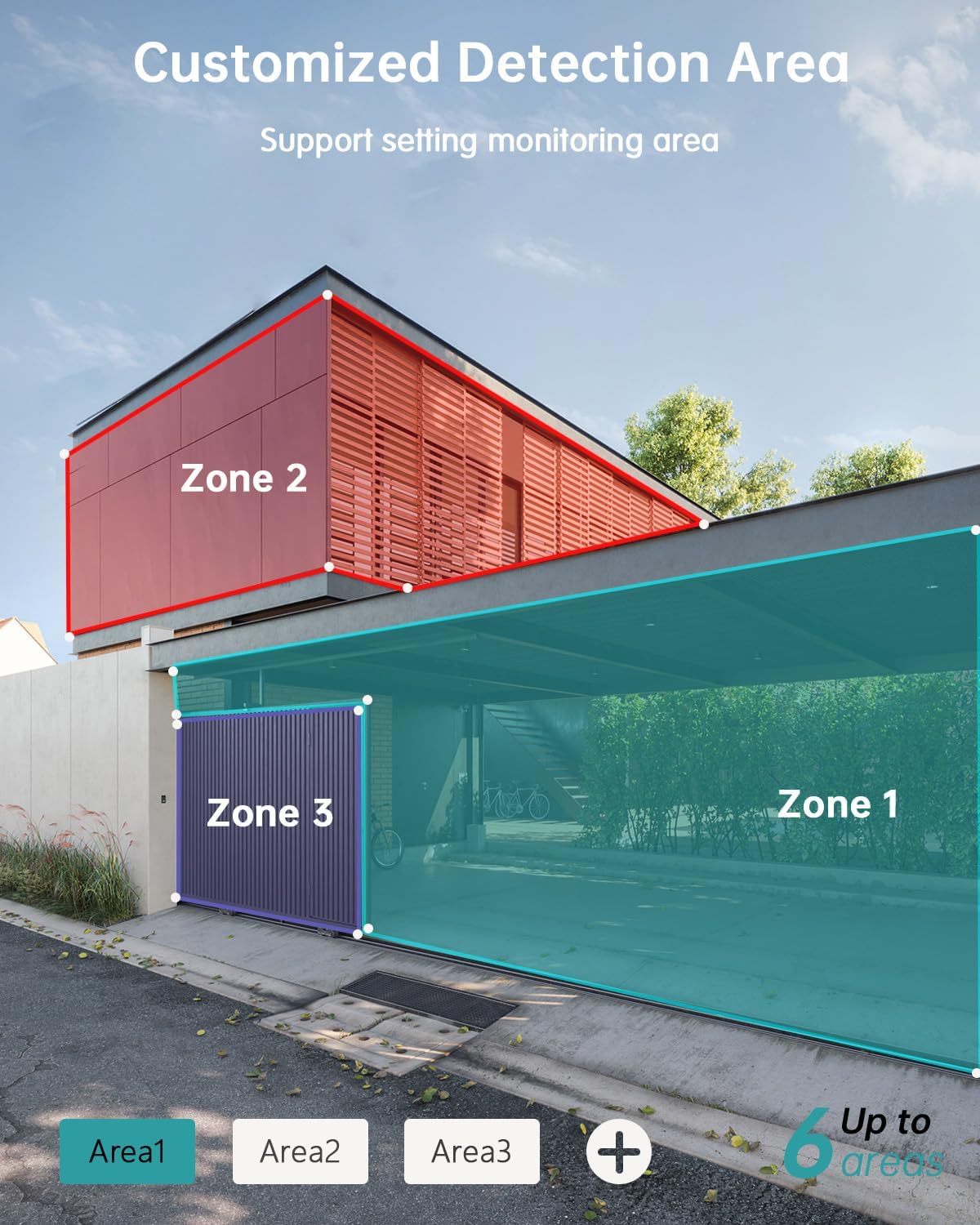
- Customizable Detection Areas: Set specific monitoring zones to focus on critical areas.
- IP66 Захист від атмосферних впливів: Designed to withstand various weather conditions, including rain, wind, and snow.
- Кілька варіантів зберігання: Supports local storage via Micro SD card (up to 128GB) and cloud storage.
- Працює з Alexa: Інтеграція з Amazon Alexa для голосового керування та прямого ефіру view на сумісних пристроях.
3. Налаштування
3.1 Фізичне встановлення
Before permanent installation, ensure the camera has a strong 2.4G Wi-Fi signal in the desired location. The camera can be mounted on various surfaces including wood, drywall, stucco, or even gutters using appropriate fasteners.
- Прикріпіть монтажну основу: Secure the camera's mounting base to your chosen surface using the provided screws and wall anchors.
- Підключіть сонячну панель: Attach the solar panel to its bracket and position it to receive maximum sunlight. Connect the solar panel's Type-C cable to the camera's charging port. Ensure the cable is neatly managed to prevent damage.
- Монтаж камери: Align the camera with the mounting base and slide it down until it locks securely.

3.2 Встановлення та сполучення програм
The ZUMIMALL app is required to operate your camera. Follow these steps to set up the app and pair your camera:
- Завантажте додаток: Scan the QR code provided in the manual or on the product packaging, or search for 'ZUMIMALL' in your device's app store.
- Реєстрація облікового запису: Open the ZUMIMALL app and follow the on-screen instructions to register a new account or log in if you already have one.
- Додати пристрій: In the app, select 'Add Device' or the '+' icon. Follow the prompts to select your camera model.
- Увімкнення камери: Переконайтеся, що ваша камера увімкнена.
- Сканувати QR-код: The app will display a QR code. Hold your camera's lens towards your phone screen to scan the QR code. You will hear a confirmation sound when successful.
- Підключіться до Wi-Fi: Follow the app's instructions to connect the camera to your 2.4G Wi-Fi network.
- Налаштування завершено: Після підключення ви можете назвати свою камеру та почати її використовувати.

4. Операція
4.1 Живий View і Відтворення
Access the live feed and review записаний footage directly from the ZUMIMALL app.
- Жити View: Відкрийте програму та виберіть камеру, щоб view стрічка в режимі реального часу.
- Відтворення: Navigate to the 'History' or 'Cloud' section in the app to review записані події.

4.2 Виявлення руху та сповіщення
The camera's AI detection system identifies specific objects and sends alerts.
- Виявлення AI: The camera can distinguish between persons, pets, vehicles, and parcels.
- Custom Areas: Set specific detection zones within the app to monitor areas of interest and reduce unnecessary alerts.
- Сповіщення в реальному часі: Receive instant alerts on your phone when motion is detected.

4.3 Двосторонній аудіозв'язок
Engage in real-time conversations through the camera using the app's two-way audio feature.
4.4 Керування PTZ
Control the camera's pan (horizontal) and tilt (vertical) movements directly from the app to adjust your viewкут.
- Пан: Обертання по горизонталі на 355°.
- Нахил: Вертикальне обертання на 120°.

4.5 Варіанти зберігання
Ваша камера пропонує гнучкі рішення для зберігання записаних відеоtage.
- Micro SD Card: Вставте карту Micro SD (до 128 ГБ) у призначений слот для локального зберігання.
- Хмарне сховище: ZUMIMALL offers cloud storage services for convenient access and backup of your recordings.
4.6 Інтеграція з Alexa
The ZUMIMALL ZS-GX2S camera is compatible with Amazon Alexa. You can use voice commands to view пряма трансляція на сумісних пристроях з підтримкою Alexa.
5. Технічне обслуговування
5.1 Battery and Solar Charging
The integrated solar panel is designed to keep your camera's battery charged, providing continuous operation.
- Ensure the solar panel is positioned in an area that receives direct sunlight for several hours daily.
- In periods of low sunlight or high usage, the camera's battery may require manual charging via the USB port.
5.2 Очищення
Регулярне очищення допомагає підтримувати оптимальну продуктивність.
- Gently wipe the camera lens and solar panel with a soft, damp тканиною для видалення пилу та сміття.
- Avoid using harsh chemicals or abrasive materials that could damage the camera's surface or lens.
6. Вирішення проблем
If you encounter issues with your ZUMIMALL ZS-GX2S camera, consider the following common solutions:
- Немає живлення: Ensure the solar panel is receiving adequate sunlight or manually charge the camera using the USB cable.
- Проблеми з підключенням Wi-Fi: Verify your Wi-Fi network is 2.4Ghz. Check the camera's proximity to the router and ensure a strong signal. Restart your router and camera if necessary.
- Помилкові тривоги: Adjust the motion detection sensitivity settings in the app. Utilize the custom detection area feature to exclude irrelevant zones.
- Немає записів: Check if the Micro SD card is properly inserted and formatted. Ensure cloud storage is active if you are using that service.
- Погана якість зображення: Очистіть об'єктив камери. Переконайтеся, що в полі зору камери немає перешкод. view.
- Проблеми з двостороннім аудіозв'язком: Check the volume settings on your phone and in the app. Ensure there are no obstructions blocking the camera's microphone or speaker.
For further assistance, please refer to the ZUMIMALL app's help section or contact customer support.
7. Технічні характеристики
| Особливість | Деталь |
|---|---|
| Номер моделі | ZS-GX2S |
| роздільна здатність | 3 Мп (2K) |
| Джерело живлення | Solar Powered (with rechargeable Lithium Ion battery) |
| Підключення | 2.4G Wi-Fi |
| Діапазон повороту/нахилу | 355° по горизонталі, 120° по вертикалі |
| Ширококутний об'єктив | 130° |
| Нічне бачення | 3MP Color Night Vision (with 2 IR and 2 white lights) |
| Цифровий зум | 4X |
| Виявлення ШІ | Person, Pet, Vehicle, Parcel |
| Аудіо | Двостороннє аудіо |
| Зберігання | Карта пам'яті Micro SD (до 128 ГБ), хмарне сховище |
| Стійкість до погодних умов | IP66 |
| Робоча температура | Від -4°F до 120°F (від -20°C до 50°C) |
| Сумісні пристрої | Смартфон, Amazon Alexa |
| Розміри продукту | 13.7 x 7.4 x 5.4 дюймів |
| Вага товару | 4.71 фунта |
8. Гарантія та підтримка
ZUMIMALL is committed to providing high-quality products and customer satisfaction. For warranty information, technical support, or any inquiries regarding your ZS-GX2S camera, please refer to the ZUMIMALL app's support section or visit the official ZUMIMALL website. You can also contact ZUMIMALL customer service directly for assistance.


