1. Вступ
Thank you for choosing the Ebitcam Security Camera. This manual provides detailed instructions on how to set up, operate, and maintain your camera. This 3-megapixel camera offers robust security features, including IP66 weather resistance for both indoor and outdoor environments, two-way audio, and advanced AI-powered detection capabilities. Enjoy peace of mind with 24-hour monitoring and remote access from your smartphone.

The Ebitcam security camera provides high-resolution monitoring for various environments.
2. Вміст упаковки
Будь ласка, перевірте упаковку на наявність наступних предметів:
- Ebitcam Security Camera (Model 8311)
- Адаптер живлення
- Монтажні гвинти та дюбелі
- Посібник користувача
3. Продукт закінчивсяview
Familiarize yourself with the components of your Ebitcam security camera:

The camera features a lens, status LED, microphone, and a durable IP66-rated casing.
- Об'єктив: Знімає відео footage.
- Індикатор стану: Показує стан камери (наприклад, живлення, підключення).
- Мікрофон: Для аудіовходу та двостороннього зв'язку.
- Доповідач: Для виведення звуку та двостороннього зв'язку.
- Слот для SD-карти: Supports up to 512GB microSD card for local storage. Located under the lens.
- Кнопка скидання: Used to reset the camera to factory settings. Located under the lens.
- Порт живлення: Підключається до адаптера живлення.
- Монтажна база: Integrated base for various installation options.
4. Налаштування
4.1 Початкове ввімкнення
- Підключіть адаптер живлення до порту живлення камери та вставте його в розетку.
- Wait for the camera's status LED to indicate it is ready for setup (refer to app instructions for specific LED behavior).
4.2 Завантаження програми та реєстрація облікового запису
- Download the "Ebitcam" app from your smartphone's app store (available for iPhone and Android).
- Відкрийте програму та дотримуйтесь інструкцій на екрані, щоб зареєструвати новий обліковий запис або увійти, якщо у вас вже є обліковий запис.
- Add your camera by scanning the QR code located on the camera body using the app.
4.3 Підключення Wi-Fi
- The camera supports 2.4GHz Wi-Fi networks only. Ensure your smartphone is connected to a 2.4GHz Wi-Fi network during setup.
- Follow the app's prompts to connect the camera to your Wi-Fi network.
- For optimal performance, choose an installation location with a strong Wi-Fi signal.
4.4 Фізичне встановлення
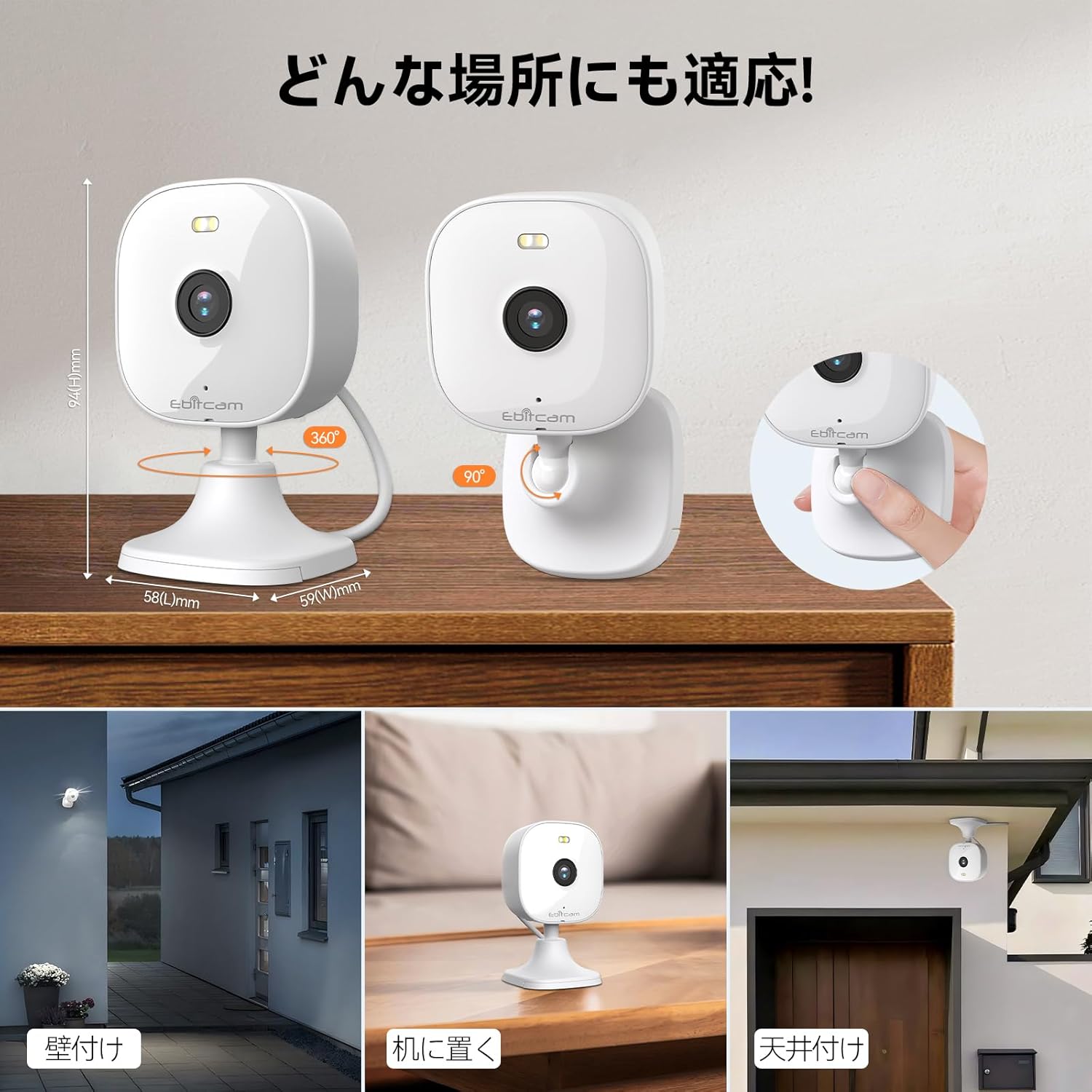
The camera offers versatile mounting options:

The camera can be mounted on walls, ceilings, or placed on a tabletop.
- Розміщення на столі: Simply place the camera on a flat surface. The integrated base allows for stable positioning.
- Настінне/стельове кріплення: The camera's base can be detached by gently pulling the camera from its base. Use the included mounting screws and wall plugs to secure the base to your desired wall or ceiling location. Then, reattach the camera to the mounted base.
Note: The product package includes matching screw mounting tools for installation.
5. Інструкція з експлуатації
5.1 Живий View і Запис
Access the live video feed and manage recordings through the Ebitcam app.

The camera supports 2K (1296p) resolution for clear video capture.
- Жива стрічка: Відкрийте програму та виберіть камеру, щоб view відеопотік у режимі реального часу.
- Безперервне записування: Якщо вставлено SD-карту або активовано хмарне сховище, камера може записувати безперервно 24/7.
- Запис, спричинений подією: Configure settings to automatically start recording when motion, sound, or human presence is detected.
5.2 Двосторонній аудіозв'язок
Communicate with people or pets on the camera's side using the built-in microphone and speaker.
Engage in real-time conversations through the camera's two-way audio feature.
- Tap the microphone icon in the app to speak. Your voice will be transmitted through the camera's speaker.
- The camera's high-sensitivity microphone captures audio from the environment.
5.3 Motion, Sound, and Human Detection & Alerts
The camera utilizes advanced AI to detect specific events and notify you.

AI detection accurately distinguishes between humans and other moving objects.
- Виявлення AI: The camera can differentiate between human movement, general motion, and sound events.
- Mobile Alerts: Receive instant push notifications on your smartphone when an event is detected.
- Automatic Lighting/Alarm: Configure settings to trigger automatic white light illumination or an audible alarm to deter unwanted visitors upon detection.
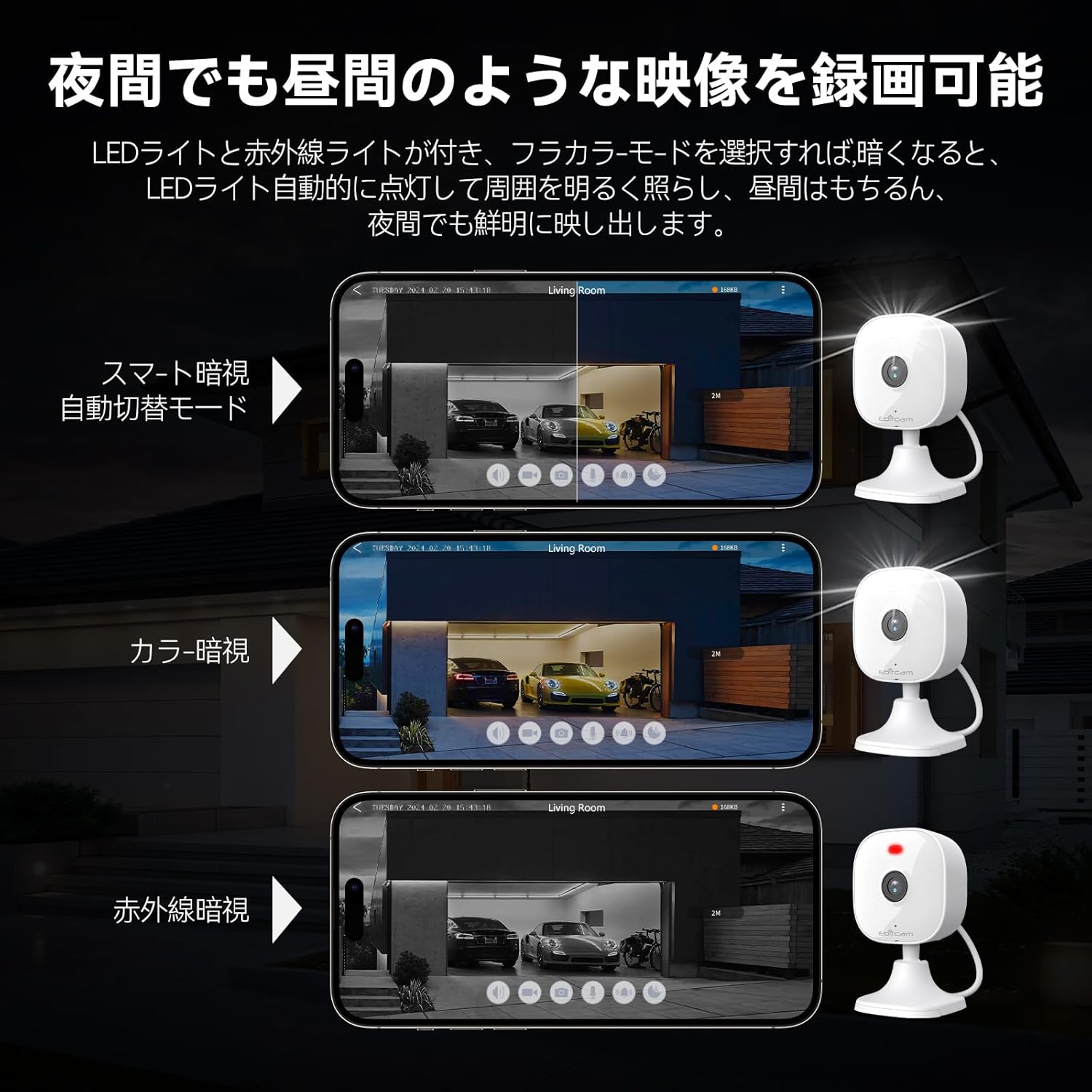
5.4 Режими нічного бачення
The camera provides clear visibility even in low-light or dark conditions.

Choose from various night vision modes for optimal clarity.
- Повнокольорове нічне бачення: Utilizes built-in white lights to provide color video footage in darkness (requires settings).
- Інфрачервоне нічне бачення: Забезпечує чітке чорно-біле відео в повній темряві завдяки інфрачервоним світлодіодам.
- Автоматичне перемикання: The camera can automatically switch between day and night modes based on ambient light.
5.5 Цифровий зум
Zoom in on details within the live view або записаний footage.

The camera supports up to 8x digital zoom.
- Use the pinch-to-zoom gesture on your smartphone screen within the app to digitally zoom in or out.
5.6 Інтеграція з Alexa
Control your Ebitcam camera using voice commands with Amazon Alexa.
Integrate your camera with Alexa for convenient voice control.
- Enable the Ebitcam skill in your Alexa app.
- Use commands like "Alexa, show me the [camera name]" to view the live feed on compatible Alexa devices.
5.7 Сімейний доступ
Share access to your camera with family members or trusted friends.
- Within the Ebitcam app, navigate to the sharing settings for your camera.
- You can share access by generating a QR code for others to scan, allowing them to view канал камери.
6. Технічне обслуговування
6.1 Керування карткою SD
The camera supports up to a 512GB microSD card for local video storage.

Insert a microSD card for local video storage.
- Вставка: Gently insert the microSD card into the slot located under the camera lens until it clicks into place.
- Форматування: It is recommended to format the SD card through the camera settings in the app before first use.
- Видалення: Push the SD card gently to release it, then pull it out.
6.2 Очищення
- Wipe the camera lens with a soft, clean cloth to ensure clear image quality.
- Очистіть корпус камери за допомогою рекламиamp тканина. Не використовуйте агресивні хімікати або абразивні засоби для чищення.
6.3 оновлень мікропрограми
- Periodically check for firmware updates through the Ebitcam app. Updates can improve performance, add new features, and enhance security.
- Follow the app's instructions carefully when performing a firmware update.
7. Вирішення проблем
Ось рішення поширених проблем, з якими ви можете зіткнутися:
- Unstable SD Card Performance: If you experience issues with recording or playback, an unstable SD card may be the cause. Please replace your SD card with a reliable, high-quality one and try again.
- App Not Functioning Correctly / Unstable Network: If the app does not function correctly, it might be due to an unstable network environment. Please ensure you have a stable 2.4GHz Wi-Fi connection.
- Camera Offline / Connection Issues: Ensure the camera is powered on and within range of your 2.4GHz Wi-Fi router. Check your Wi-Fi password in the app.
- Forgetting Login Password / Changing Network Environment: If you change your network environment or forget your login password, you can reset the camera. The camera's restart button is located under the lens. Press and hold it for a few seconds until the camera resets.
- False Alarms from Motion Detection: Adjust the motion detection sensitivity settings within the app. Consider setting specific detection zones to reduce unwanted alerts from areas like busy streets or swaying trees.
8. Технічні характеристики
| Особливість | Специфікація |
|---|---|
| Номер моделі товару | 8311 |
| Кількість предметів | 1 |
| Технологія бездротового зв'язку | Wi-Fi |
| Тип монтажу | Freestanding, Wall Mount, Ceiling Mount, Tabletop Mount, Door Mount |
| Діапазон нічного бачення | 10 метрів |
| Частота кадрів | 25 кадрів/с |
| Розміри продукту (ДxШxВ) | 10 х 5 х 5 см |
| Водонепроникний рівень | IP66 Водонепроникний |
| Вага продукту | 190 г |
| Рекомендоване використання | Interior, Home, Living Room, Bedroom, Pet, Shop |
| Технологія підключення | WiFi |
| Використання в приміщенні/на вулиці | В приміщенні, на відкритому повітрі |
| Сумісні пристрої | iPhone, TV, Tablet, Desktop, Smartphone |
| Джерело живлення | Провідний електричний |
| Протокол підключення | Wi-Fi |
| Роздільна здатність захоплення відео | 1296p (2K) |
9. Гарантія та підтримка
Ebitcam provides the following warranty and support for your product:
- Гарантія: A 2-year warranty is provided from the original purchase date.
- Інтернет-підтримка: Online support is available Monday to Friday, from 8 AM to 5 PM (local time). Please refer to the Ebitcam app or official webна сайті для отримання контактної інформації.


