1. Вступ
Thank you for choosing the FITNATE Fingerprint Door Lock. This smart door knob combines classic design with advanced biometric technology, offering convenient and secure access to your spaces. It features dual unlocking methods: fingerprint recognition and a traditional mechanical key. This manual provides detailed instructions for installation, operation, and maintenance to ensure optimal performance and security.
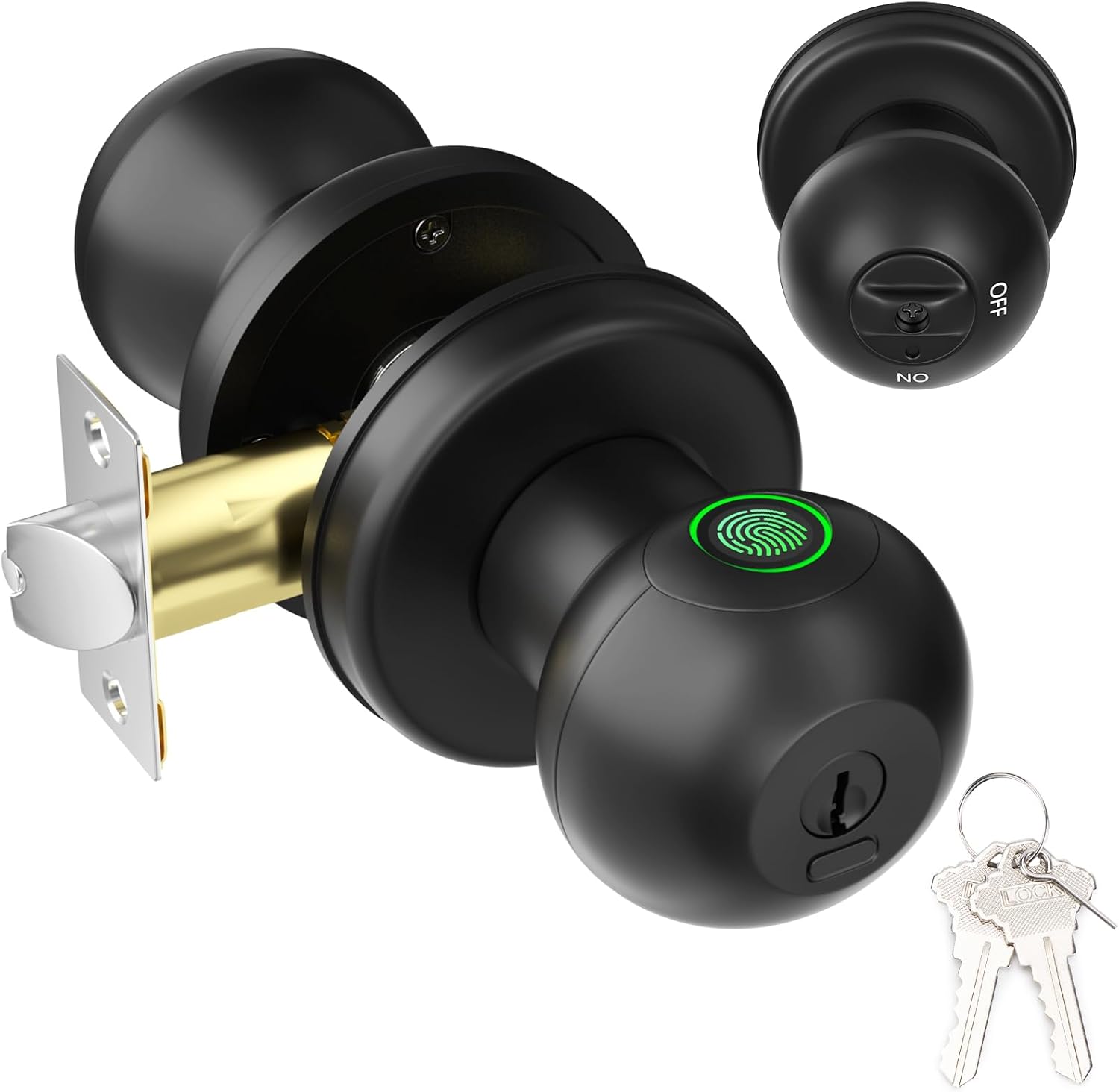
Figure 1: FITNATE Fingerprint Door Lock
2. Вміст упаковки
Будь ласка, переконайтеся, що всі компоненти є в наявності та знаходяться у належному стані, перш ніж продовжувати встановлення.
- Fingerprint Door Knob (Exterior and Interior parts)
- Механізм засувки
- Ударна пластина
- Strike Box
- Mechanical Keys (x2)
- Монтажні гвинти
- Шаблон установки
- Посібник користувача (цей документ)
- Small Pin (for settings button)
3. Продукт закінчивсяview
Familiarize yourself with the main components of your FITNATE Fingerprint Door Lock.

Малюнок 2: Розібраний view of the door lock components.
- Зовнішня ручка: Features the fingerprint collector, keyhole, and USB-C emergency charging port.
- Внутрішня ручка: Contains the battery compartment, settings button, and privacy/passage mode switch.
- Засувка: The mechanism that extends into the door frame to secure the door.
4. Посібник із встановлення
This section provides step-by-step instructions for installing your new fingerprint door lock. A screwdriver is the only tool required for most installations.
4.1 Перевірки перед інсталяцією
Перш ніж розпочати встановлення, переконайтеся, що ваші двері відповідають наступним вимогам:
- Товщина дверей: від 1-3/8 дюйма до 2-1/8 дюйма (від 35 мм до 54 мм)
- Діаметр дверного отвору: 2-1/8 дюйма (54 мм)
- Назад: Adjustable for 2-3/8" (60mm) or 2-3/4" (70mm)
- Діаметр отвору засувки: 1 дюйм (25 мм)

Figure 3: Door Measurement Guide. Not suitable for glass doors or doors with special designs.
4.2 Покрокове встановлення
Follow these steps carefully for a successful installation:
- Підготуйте замок: Before installing, remove the battery cover and the interior knob from the main assembly. Then, remove the latch mechanism.
- Встановіть засув: Insert the latch into the door hole, ensuring it is oriented correctly. Secure it with the provided screws.
- Встановлення зовнішньої ручки: With the fingerprint collector facing up, insert the exterior knob into the lock cylinder, aligning the internal components with the latch.
- Встановлення внутрішньої ручки: Pass the power cord through the rear door handle. Secure the interior knob to the exterior knob using the long screws.
- Install Battery Slot: Attach the battery slot cover.
- Вставте батареї: Install 4 x LR3/AAA/1.5V alkaline batteries, strictly observing the positive (+) and negative (-) poles. Batteries are not included.
- Прикріпіть верхню кришку: Align the protruding notch on the door lock cover with the recessed notch on the handle and secure it.

Рисунок 4: Візуальний посібник для легкого встановлення.
4.3 Відео з встановлення
For a visual step-by-step guide, please refer to the official installation video below:
Video 1: FITNATE Fingerprint Door Knob - Installation Video. This video demonstrates the complete installation process from unboxing to final assembly.
5. Інструкція з експлуатації
5.1 Setting Up Administrator Fingerprint
The first fingerprint registered will be the administrator. The administrator has full control over the lock's settings and can add or remove other users.
- Turn the interior knob to the ВИМКНЕНО position (Privacy Mode).
- Press the settings button (small hole on the interior knob) once with the provided pin.
- Place your finger on the fingerprint collector. The indicator light will illuminate.
- Collect six fingerprints from different directions with the same finger. The light will change color or beep to indicate successful registration.
5.2 Adding User Fingerprints
After an administrator is set up, other users can be added. The lock can store up to 50 fingerprints (2 administrators, 48 users).
- Turn the interior knob to the ВИМКНЕНО position (Privacy Mode).
- Press the settings button once with the provided pin.
- The administrator must first verify their fingerprint once.
- Then, the new user should place their finger on the fingerprint collector and collect six fingerprints from different directions with the same finger.
5.3 Методи розблокування

Figure 5: Fingerprint Unlock - Fast identification in less than 0.1 seconds.
- Розблокування відбитком пальця: Place a registered finger on the fingerprint collector. The lock will unlock instantly.
- Механічне розблокування ключем: In case of battery depletion or malfunction, insert the mechanical key into the keyhole and turn it clockwise to open the lock. Each lock comes with 2 backup keys.

Figure 6: Mechanical Key Unlocking for emergency access.
5.4 Privacy Mode (Back Locking Function)
When Privacy Mode is activated, only administrators can unlock the door from the outside. Ordinary users cannot unlock it, increasing security performance.
- To activate: Rotate the thumb turn on the interior knob to the ВИМКНЕНО положення.
- To deactivate: An administrator's fingerprint can unlock it, or rotate the thumb turn to the ON положення.

Figure 7: Privacy Mode (OFF) ensures only administrators can unlock from outside.
5.5 Режим проходу
In Passage Mode, the door remains unlocked, allowing free entry and exit without fingerprint verification. Use with caution.
- To activate: The administrator's fingerprint does not move on the collector. The indicator light of the fingerprint collector lights up pink and emits 10 beeps, indicating the passage mode is turned on.
- To deactivate: Administrators and users can close the passage mode by pressing the collector with their fingerprints and hearing 10 beeps. The door lock will then return to its normal state.

Figure 8: Passage Mode (ON) allows free access.
5.6 Тихий режим
To enable or disable sound feedback from the lock:
- Rotate the interior knob 5 times continuously to activate the silent mode.
- Rotate it 5 times again to turn the sound back on.
5.7 Функція автоматичного блокування
The lock features a 5-second auto-lock function to ensure your home's security after entry or exit.
5.8 Аварійне живлення
In case the batteries run out, the lock is equipped with a USB-C port for emergency charging. Connect a power bank to temporarily power the lock and gain access.

Figure 9: USB-C port for emergency power.
5.9 Відновлення заводських налаштувань
To reset the lock to its factory default settings (erasing all registered fingerprints):
- Turn the interior knob to the ВИМКНЕНО положення.
- Press and hold the settings button with a toothpick or the provided pin for 10 seconds. The lock will indicate a successful reset.
5.10 Функціїview відео
Перегляньте це відео для швидкого ознайомленняview of the lock's key features and modes:
Video 2: FITNATE Smart Door Knob. This video highlights the fingerprint unlock, mechanical key unlock, privacy mode, passage mode, silent mode, and USB emergency charging features.
6. Технічне обслуговування
To ensure the longevity and proper functioning of your FITNATE Fingerprint Door Lock, follow these maintenance tips:
- Заміна батареї: Replace all four AAA batteries when the low battery alert is indicated. Always use new, high-quality alkaline batteries.
- Прибирання: Wipe the lock surface and fingerprint collector with a soft, dry cloth. Avoid using abrasive cleaners or solvents that could damage the finish or electronic components.
- Умови навколишнього середовища: This lock is designed for indoor use. While it can be used on interior doors leading to garages or other protected areas, it is not recommended for direct outdoor exposure to harsh weather conditions. Operating temperature range is 23°F to 131°F (-5°C to 55°C).
7. Вирішення проблем
If you encounter issues with your FITNATE Fingerprint Door Lock, please refer to the following common troubleshooting steps:
- Замок не відповідає: Check battery levels. Replace batteries if low. Use the mechanical key for emergency access.
- Відбиток пальця не розпізнано: Ensure your finger is clean and dry. Try different angles or re-register your fingerprint if issues persist. Ensure you are using a registered fingerprint.
- Lock does not auto-lock: Verify that the auto-lock function is enabled (it is by default). Check for any obstructions in the door frame or latch mechanism.
- Cannot enter Passage Mode: Ensure you are following the correct procedure for activating Passage Mode (administrator fingerprint held until 10 beeps).
- Lock is making unexpected sounds: Check if Silent Mode is active. If not, and the sound is persistent or unusual, contact customer support.
For more detailed troubleshooting, please refer to the dedicated troubleshooting guide that came with your product.
8. Технічні характеристики
| Особливість | Деталь |
|---|---|
| Бренд | ФІТНИЙ |
| Назва моделі | Fingerprint Door Knob (HS0436-MX) |
| Тип замка | Біометричний |
| Методи розблокування | Fingerprint, Mechanical Key |
| Ємність відбитків пальців | Up to 50 (2 Admin, 48 Users) |
| Швидкість розпізнавання відбитків пальців | < 0.1 секунди |
| Джерело живлення | 4 x LR3/AAA/1.5V Alkaline Batteries (not included) |
| Аварійне живлення | USB-C порт |
| матеріал | метал |
| Колір | чорний |
| Розміри предмета (Д x Ш x В) | 6.2 x 2.5 x 2.5 дюймів |
| Вага товару | 1.98 фунта (900 грам) |
| Робоча температура | від -5°C до 55°C (від -23°F до 131°F) |
| Рекомендоване використання | Residential and commercial use, suitable for securing interior and exterior doors in bedrooms, apartments, hotels, offices, and garages. |
9. Гарантія та підтримка
Specific warranty information and detailed customer support contacts are typically provided with your product packaging or on the manufacturer's official website. Please refer to the "After-Sales Card" or "Troubleshooting Guide" included in your package for direct support channels.
For further assistance, you may visit the official FITNATE Store on Amazon: FITNATE Store.


