1. Вступ
This manual provides detailed instructions for the setup, operation, maintenance, and troubleshooting of your Koiiko Wireless Gaming Controller Z01. This versatile controller is designed for compatibility across multiple platforms, including iOS, Android, PC, Nintendo Switch, PlayStation 3, and PlayStation 4, offering an enhanced gaming experience with its advanced features.

Зображення 1.1: спереду view of the Koiiko Wireless Gaming Controller Z01, showcasinйого дизайн та освітлені елементи.
2. Controller Components
Familiarize yourself with the various buttons and features of your Koiiko Z01 controller:
- Left/Right Analog Sticks (Hall Effect): For precise 3D movement and input, featuring Hall Effect sensors to prevent drift.
- D-Pad: Directional pad for digital input.
- Кнопки дій (A, B, X, Y): Standard gaming input buttons, with interchangeable key values.
- Shoulder Buttons (LB, RB) & Triggers (Hall Effect Linear): For additional actions and responsive input, featuring Hall Effect linear triggers.
- Кнопка "Додому: For system menu access and power control.
- Select/Share Button: For various in-game or system functions.
- Start/Options Button: For various in-game or system functions.
- Кнопки M1/M2: Programmable back buttons for custom actions.
- Турбо кнопка: Activates continuous input for other buttons.
- Light Adjustment Button: Controls the 7-color RGB breathing light modes.
- Порт USB-C: Для зарядки контролера.

Зображення 2.1: Детальний оглядview of the Koiiko Wireless Gaming Controller Z01, highlighting its main features.
3. Ключові характеристики
- Широка сумісність: Supports iOS (iPhone, iPad), Android (phones, tablets), PC, Nintendo Switch/Switch OLED/Switch Lite, PlayStation 3, and PlayStation 4. Compatible with Steam, Xbox Game Pass, Nvidia GeForce Now, Amazon Luna, Google Stadia, and other cloud gaming services.
- Технологія ефекту Холла: Equipped with Hall Effect joysticks and linear triggers for enhanced precision, durability, and prevention of stick drift.
- Настроюване освітлення RGB: Features a 7-color RGB breathing light with 5 distinct lighting modes on the joysticks, adjustable via a dedicated button.
- Програмовані кнопки: Includes two programmable back buttons (M1, M2) and highly customizable LB, RB buttons, supporting up to 30 action keys.
- Six-Axis Gyro: Built-in 6-axis gyroscope for motion control, supported on PC, PS3, PS4, and Switch.
- Турбофункція: Allows for continuous input with a single press, enhancing gameplay for rapid actions.
- Довговічний акумулятор: Integrated 600mAh lithium battery provides approximately 10-15 hours of continuous use on a single charge.
- Портативний дизайн: Small and lightweight, making it easy to carry and store.
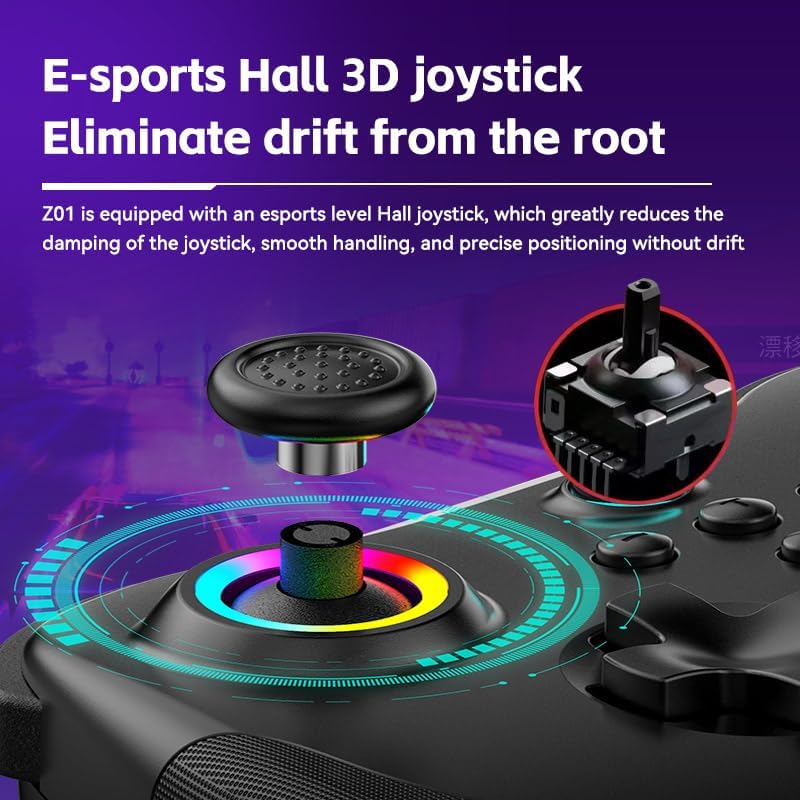
Image 3.1: Illustration of the Hall Effect 3D joystick, highlighting its drift-prevention design.
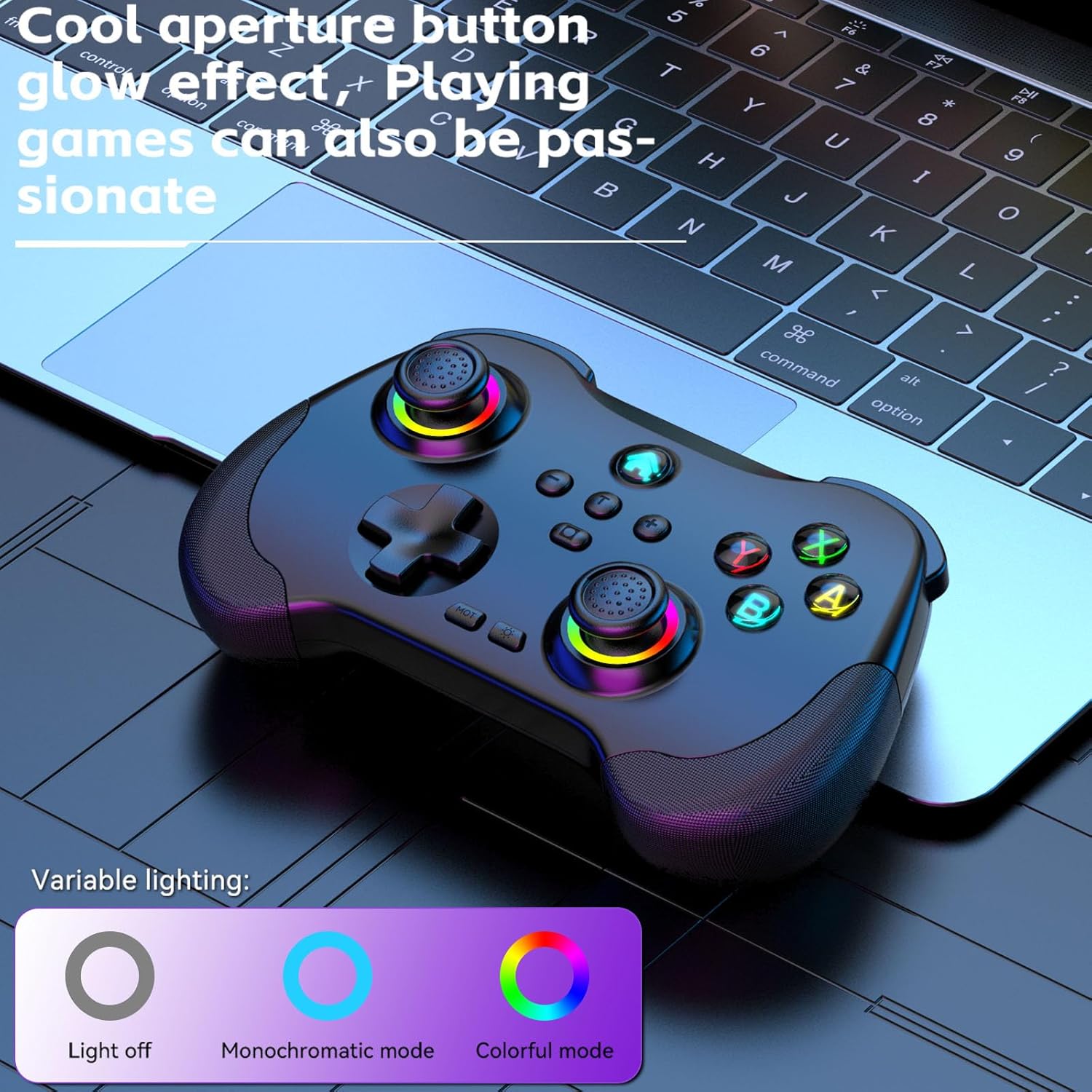
Image 3.2: The controller displaying its customizable RGB lighting on joysticks and buttons.
4. Налаштування та зарядка
4.1. Заряджання контролера
Before first use, fully charge the controller. Connect the included USB-C cable to the controller's charging port and the other end to a USB power source (e.g., computer, wall adapter). The LED indicators will show charging status and turn off or change color when fully charged.
- Ємність батареї: 600 мАг
- Час зарядки: Приблизно 2 годин
- Витривалість: Приблизно 10-15 годин
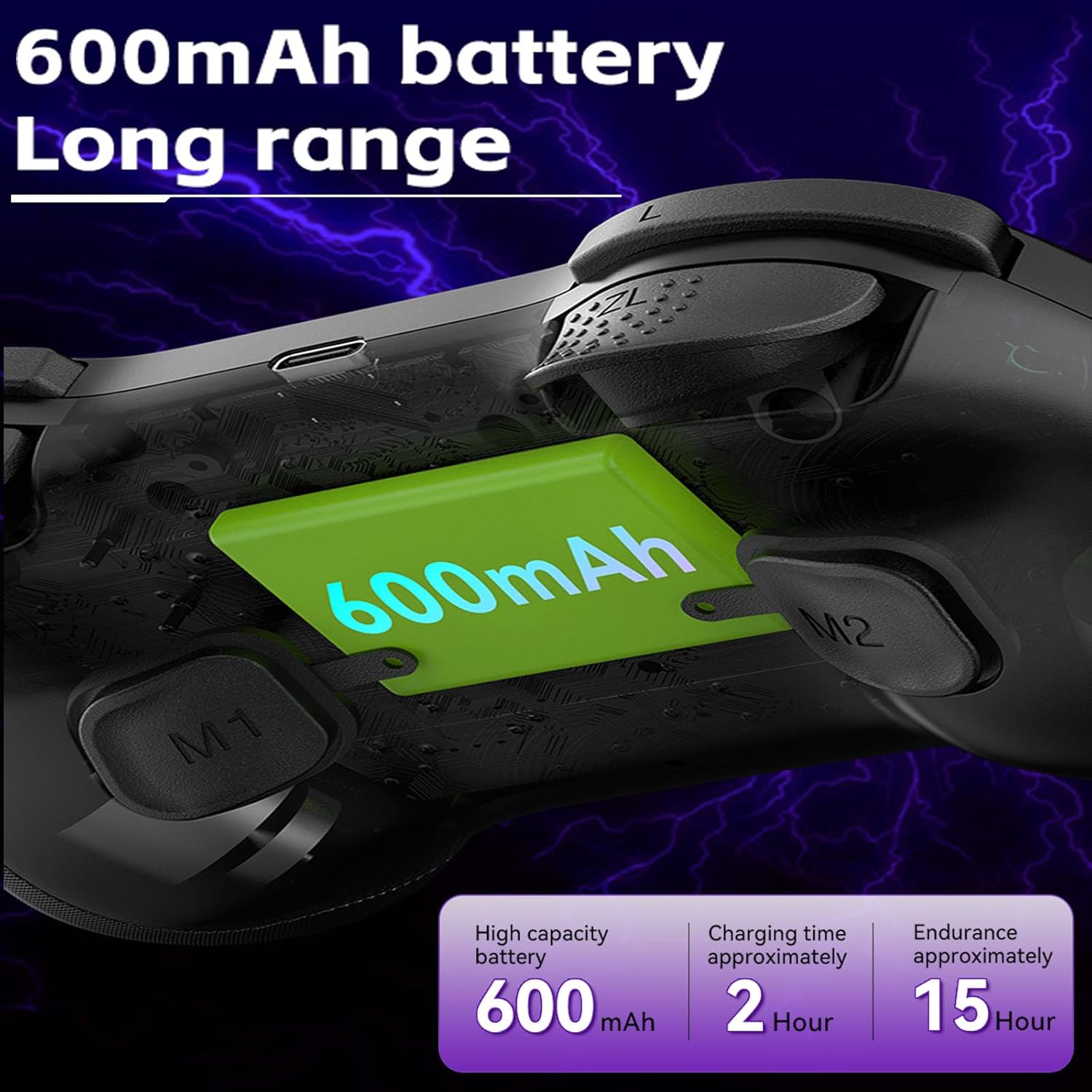
Image 4.1: Diagram illustrating the 600mAh battery capacity and charging specifications.
4.2. Увімкнення/вимкнення живлення
- Щоб увімкнути: Press and hold the Home button for 1-2 seconds.
- Щоб вимкнути: Press and hold the Home button for 3-5 seconds until the indicator lights turn off.
5. Інструкція з експлуатації
5.1. Підключення до пристроїв
The Koiiko Z01 controller supports various connection modes. The specific button combination to enter pairing mode may vary by platform. Please refer to the included physical user manual for exact button combinations for each mode. Below are general guidelines:
- General Bluetooth Pairing: Typically involves holding a combination of buttons (e.g., Home + X, Home + A, Home + B) until the indicator lights flash rapidly, indicating pairing mode. Then, search for "Koiiko Z01" or similar on your device's Bluetooth settings and connect.
- Nintendo Switch: Navigate to the 'Controllers' menu on your Switch, then 'Change Grip/Order'. Hold the specific pairing button combination on the controller until it connects.
- ПК (Windows): Ensure your PC has Bluetooth enabled. Hold the specific pairing button combination, then go to 'Bluetooth & other devices' in Windows settings and add a new Bluetooth device. The controller will typically connect as an X-Input device.
- iOS/Android: Enable Bluetooth on your mobile device. Hold the specific pairing button combination, then select the controller from the list of available Bluetooth devices.
- PlayStation 3/4: Connect the controller via USB cable first to register it, then it may be used wirelessly. Specific pairing methods may vary; consult your console's instructions.

Image 5.1: Connection guideline for PC.

Image 5.2: Connection guideline for Nintendo Switch.
5.2. ABXY Key Value Interchange
The controller allows you to switch the ABXY button layout between Nintendo Switch and Xbox settings without physically removing the buttons.
- To Interchange: Натисніть і утримуйте X + B + HOME keys simultaneously. The controller will switch its ABXY key value. Repeat the combination to revert to the previous setting.

Image 5.3: ABXY key value interchange function.
5.3. Регулювання RGB-підсвічування
The controller features customizable RGB lighting around the joysticks and on the buttons.
- Щоб змінити режими: Press the dedicated Light Adjustment button (refer to the controller diagram in your physical manual for location) to cycle through the 5 available RGB light modes, including a mode to turn the lights off.
5.4. Програмовані кнопки «Назад» (M1/M2)
The M1 and M2 buttons on the back of the controller can be programmed to perform specific actions or sequences.
- Етапи програмування: Refer to your physical user manual for detailed instructions on how to program the M1 and M2 buttons, as the process typically involves entering a programming mode and then inputting the desired button sequence.
5.5. Функція Турбо
The Turbo function allows a button to register continuous presses when held down.
- Щоб активувати: Натисніть ТУРБО button simultaneously with the desired action button (e.g., TURBO + A).
- Щоб деактивувати: Repeat the activation step (TURBO + A) for the same button.

Зображення 5.4: закінченоview of advanced functions including macro programming and Turbo mode.
6. Технічне обслуговування
Правильний догляд подовжить термін служби вашого контролера.
- Прибирання: Використовуйте м’яку суху тканину для протирання контролера. Для стійкого бруду злегкаampпрополощіть тканину водою. Уникайте агресивних хімікатів або абразивних засобів для чищення.
- Зберігання: Зберігайте контролер у прохолодному, сухому місці, подалі від прямих сонячних променів та екстремальних температур.
- Догляд за акумулятором: To maintain battery health, avoid fully discharging the controller frequently. If storing for an extended period, charge it to about 50% every few months.
- Уникайте фізичного впливу: Не кидайте та не піддавайте контролер сильним ударам, оскільки це може пошкодити внутрішні компоненти.
7. Вирішення проблем
If you encounter issues with your Koiiko Z01 controller, try the following solutions:
| проблема | Можливе рішення |
|---|---|
| Контролер не включається. | Переконайтеся, що контролер заряджений. Підключіть його до джерела живлення за допомогою кабелю USB-C. |
| Не вдається підключитися через Bluetooth. |
|
| Buttons or joysticks are unresponsive or drifting. |
|
| RGB-підсвічування не працює. | Press the Light Adjustment button to cycle through modes or turn them on. Ensure the controller is powered on. |
| Контролер часто відключається. |
|
8. Технічні характеристики
| Особливість | Деталь |
|---|---|
| Модель | Z01 |
| Розміри продукту | 2.44 x 6.85 x 4.84 дюйми (6.2 x 17.4 x 12.3 см) |
| Вага товару | 12.6 унцій (357.2 грам) |
| Акумулятор | Потрібна 1 батарейка типу АА (в комплекті) - Note: Product features mention 600mAh Lithium, please refer to product packaging for exact battery type. |
| Ємність акумулятора | 600mAh (Lithium, built-in) |
| Час зарядки | Приблизно 2 годин |
| Тривалість використання | Приблизно 10-15 годин |
| Відстань передачі Bluetooth | ≤ 8 метрів |
| Робочий випtage | DC3.7V |
| Робочий струм | < 35 мА |
| Виробник | Шеньчжень ШаньВань Технологічна Компанія, Лтд. |
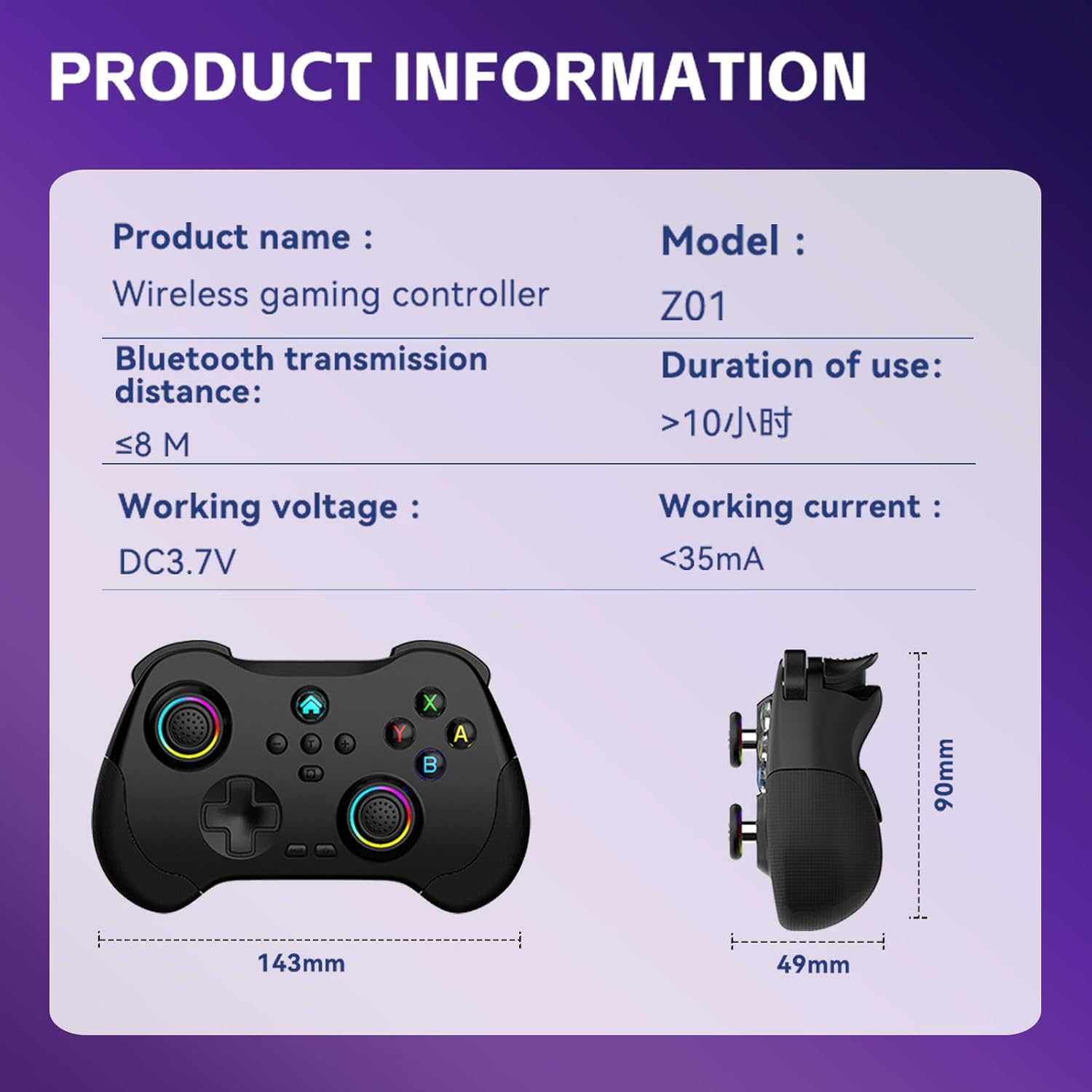
Image 8.1: Product information table with key specifications.
9. Гарантія та підтримка
Koiiko provides technical support for its products. If you have any questions, encounter issues, or require assistance with your Koiiko Wireless Gaming Controller Z01, please contact our customer support team.
- Контактна інформація: Please refer to the contact details provided on your product packaging or the official Koiiko webсайт із найактуальнішими каналами підтримки.
- Гарантія: Information regarding product warranty periods and terms can be found on the official Koiiko webсайті або в упаковці вашого продукту.


