1. Вступ
The AUTOOL SVB302 Two-Way Articulating Borescope is a professional inspection camera designed for detailed visual inspection in hard-to-reach areas. It features a highly flexible probe with a two-way articulating lens, adjustable LED lighting, and compatibility with both Android and iOS devices for real-time viewing and recording. This manual provides essential information for the safe and effective use of your borescope.

The AUTOOL SVB302 borescope is widely used for auto inspection, mechanical maintenance, construction industry, power facilities, chemical pipelines, and security monitoring.
2. Ключові характеристики
- Two-Way Articulating Lens: The camera probe offers 210° two-way articulation, allowing for comprehensive inspection of complex internal structures.
- Зображення високої чіткості: Captures clear images and videos with 1280*720 resolution and a 70° angle of view.
- Регульоване світлодіодне підсвічування: Equipped with 6 super bright LEDs with 3 adjustable brightness levels to ensure clear visibility in dark environments.
- Водонепроникний зонд IP67: The 1-meter flexible metal cable and camera are IP67 rated, making them suitable for use in wet or submerged conditions.
- Широка сумісність: Supports both Android and iOS systems, connecting via USB 2.0 to your smartphone for real-time display.
- Температурний захист: Features smart protection that cuts video signals in extreme heat to prevent damage to the device.
- Тривалий термін служби батареї: Integrated 2000mAh rechargeable Lithium-ion battery provides 2-3 hours of continuous operating time.
- Багатомовна підтримка: User interface supports English, French, German, Italian, Spanish, Chinese, and Japanese.

Детальний view of the 210° articulating camera, showing its 0.25-inch diameter, 1.18-3.94 inch depth of field, 70° angle of view, and 1.38-inch bending radius.

Illustration of the 6 high-intensity illumination lights and their three adjustable brightness levels (Level 1, Level 2, Level 3).
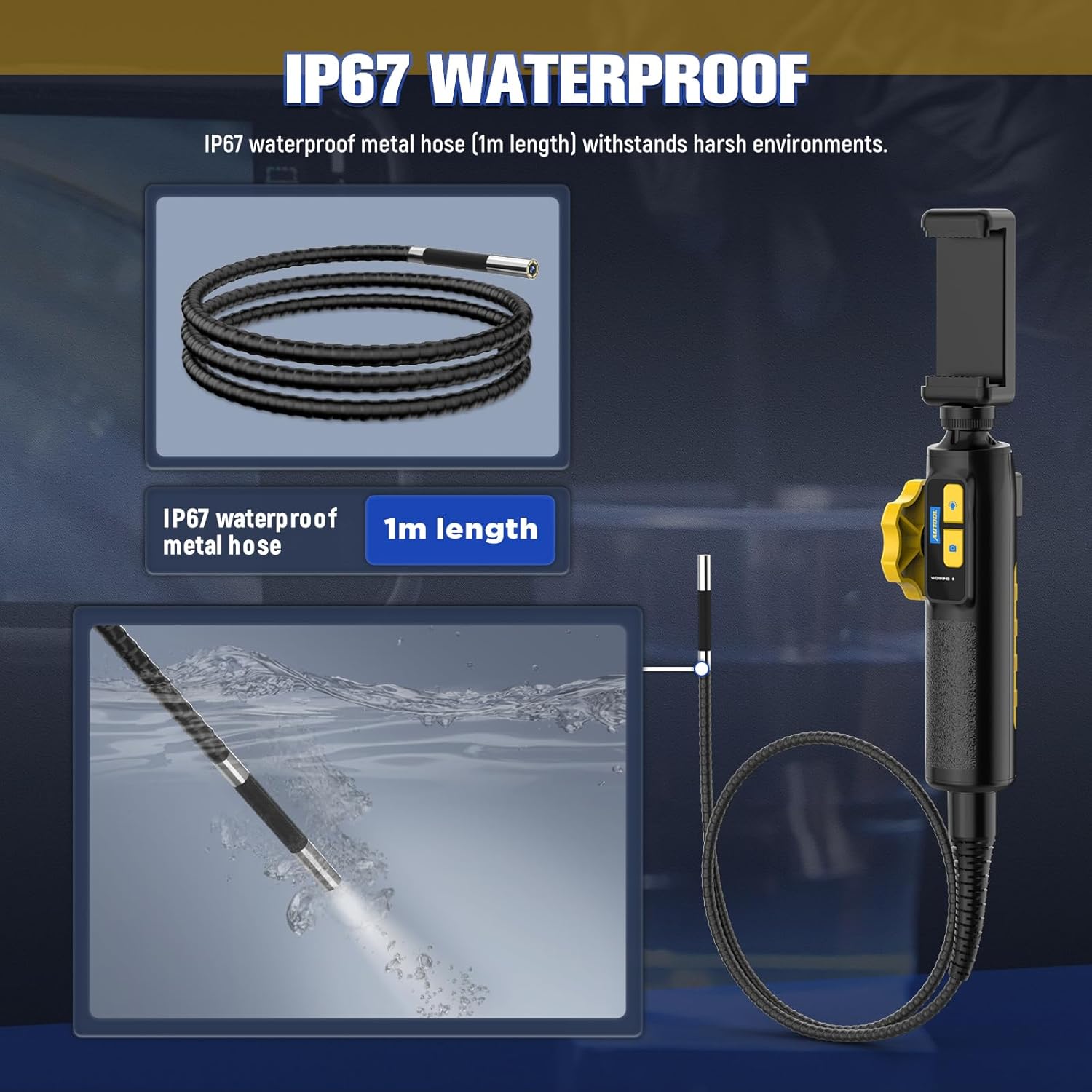
The IP67 waterproof metal hose (1m length) is designed to withstand harsh environments, as demonstrated by its submersion capability.

The borescope features a high-temperature alert system that protects the device by cutting video signals. It is powered by a 2000mAh rechargeable battery.

The device supports multilingual settings, including English, French, German, Italian, Spanish, Chinese, and Japanese.
3. Що в коробці
Після відкриття упаковки, будь ласка, перевірте наявність усіх наступних компонентів:
- AUTOOL SVB302 Borescope Unit (Handle with integrated camera cable)
- Захисний футляр для транспортування
- USB-кабель для зарядки
- Посібник користувача (цей документ)

The AUTOOL SVB302 borescope, its protective carrying case, and included cables.
4. Посібник із налаштування
- Завантажте додаток: Scan the QR code on the device or search for "JCAM Pro" or "JCAM" in your device's app store (iOS App Store for Apple, Google Play Store for Android) and install the application.
- Встановіть свій телефон: Securely place your smartphone into the adjustable phone holder on the borescope handle. The holder is designed to fit screens from 3.5 to 6.3 inches (5.5-10.5 cm / 2.1-4.1 inches).
- Підключитися до телефону: Connect the borescope to your smartphone using the appropriate USB cable (Lightning for iOS, USB-C for Android).
- Увімкнення: Long press the power button on the borescope handle to turn on the device.
- Відкрийте додаток: Launch the JCAM app on your smartphone. The live video feed from the borescope camera should appear automatically.

Instructions for downloading the JCAM app from the respective app stores for iOS and Android devices.

The phone holder's adjustable range, accommodating phones from 5.5cm (2.1 inches) to 10.5cm (4.1 inches).
Official product video demonstrating the setup process, including app download, phone installation, connection, power-on, and initial use of the borescope's articulating lens and features.
5. Інструкція з експлуатації
5.1 Articulating the Camera
Use the rotation wheel on the handle to control the two-way articulation of the camera lens. This allows you to navigate bends and view the narrowed interior in all directions without needing to reposition the entire probe.
5.2 Регулювання світлодіодних ламп
Press the light control button on the handle to cycle through the three brightness levels of the LED lights. Select the appropriate brightness for optimal visibility in different inspection areas.
5.3 Зйомка фотографій та відео
Press the photo/video button on the handle to capture still images or start/stop video recording directly through the app. Captured media will be saved to your connected smartphone.
5.4 ViewЗахоплення медіафайлів
Access the gallery or playback section within the JCAM app to review ваші зняті фотографії та відео.
6. Технічне обслуговування
- Прибирання: Після кожного використання, особливо в брудному або вологому середовищі, обережно протирайте зонд камери та кабель м’якою губкою.amp cloth. For stubborn dirt, a mild, non-abrasive cleaner can be used. Ensure the probe is dry before storage.
- Зберігання: Store the borescope and its accessories in the provided protective carrying case in a cool, dry place, away from direct sunlight and extreme temperatures.
- Догляд за акумулятором: Щоб продовжити термін служби акумулятора, регулярно заряджайте пристрій, навіть якщо ви не використовуєте його часто. Уникайте повного розряджання акумулятора протягом тривалого часу.
- Температурний захист: The device is equipped with a high-temperature alert system. If the operating temperature exceeds 80°C (176°F), the video signal may be cut to prevent damage. Allow the device to cool down before resuming operation.
7. Вирішення проблем
- Немає зображення на екрані:
- Ensure the borescope is properly connected to your smartphone.
- Verify the borescope is powered on (long press the power button).
- Check if the JCAM app is open and has necessary permissions.
- Try restarting both the borescope and the app. - Погана якість зображення:
- Adjust the LED brightness using the light control button.
- Clean the camera lens if it appears smudged or dirty.
- Ensure the camera is within the optimal depth of field (1.18-3.94 inches). - Перегрів пристрою:
- If the high-temperature alert activates, immediately cease operation and allow the device to cool down in a well-ventilated area. Do not use until it has returned to a safe operating temperature. - Акумулятор не заряджається:
- Ensure the USB charging cable is securely connected to both the borescope and a power source.
- Спробуйте інший USB-порт або адаптер живлення.
8. Технічні характеристики продукту
| Особливість | Специфікація |
|---|---|
| Номер моделі | СВБ302 |
| Діаметр камери | 0.25 дюйми (6.45 мм) |
| роздільна здатність | 1280*720 (720p HD) |
| Глибина різкості | 1.18 - 3.94 дюйма (30-100 мм) |
| Кут View | 70° |
| Кут повороту | Max. 210° (Two-way) |
| Радіус вигину | 1.38 дюйми (35 мм) |
| Довжина кабелю | 1 метр |
| Водонепроникний рівень | IP67 |
| Джерело світла | 6 Highlight LEDs (3-stage adjustable brightness) |
| Ємність акумулятора | Полімер літію 2000mAh |
| Час роботи | 2-3 годин |
| Інтерфейс USB | USB 2.0 |
| Операційне середовище | -10°C до 80°C |
| Вологість | 15-90% |
| Захист від високої температури | Intelligent protection, automatic shutdown |
9. Гарантія та підтримка
9.1 Інформація про гарантію
The AUTOOL SVB302 Borescope comes with a Гарантія 3 рік з дати покупки, що покриває виробничі дефекти та несправності за умов нормального використання. Будь ласка, збережіть чек про покупку для пред'явлення гарантійних претензій.
9.2 Підтримка клієнтів
For technical assistance, troubleshooting, or warranty inquiries, please contact AUTOOL customer support through their official webсайт або контактну інформацію, надану на упаковці вашого продукту. Ви також можете відвідати Магазин AUTOOL на Amazon для отримання додаткової інформації.


