1. Вступ
This manual provides essential instructions for the safe and effective operation, assembly, and maintenance of your LASER TREE K1 Pro 30W Laser Engraver. This high-precision machine is designed for engraving and cutting various materials including wood, metal, paper, acrylic, glass, and leather. Please read this manual thoroughly before initial use to ensure optimal performance and safety.

Image 1.1: The LASER TREE K1 Pro 30W Laser Engraver with examples of its engraving capabilities on different materials.
2. Інформація про безпеку
The LASER TREE K1 Pro 30W is a Class 4 laser product. Improper use can result in serious injury, including eye damage, skin burns, and fire. Adhere to all safety guidelines.
- Захист очей: Always wear appropriate laser safety goggles (OD6+) when operating the machine. Never look directly into the laser beam or its reflection.
- Вентиляція: Operate the engraver in a well-ventilated area to dissipate fumes and smoke produced during engraving and cutting.
- Аварійна зупинка: Familiarize yourself with the emergency stop button and its location. In case of any malfunction or emergency, press it immediately.
- Нагляд: Ніколи не залишайте машину без нагляду під час роботи.
- Безпека матеріалу: Ensure materials being processed are safe for laser engraving/cutting and do not produce toxic fumes or ignite easily.
- Physical Protections: The machine is equipped with limit switches, temperature alerts, position movement protection (15° tilt detection), and beam detection for enhanced safety. For additional safety resources and product information, you may visit це посилання.
- Діти та домашні тварини: Тримайте дітей і домашніх тварин подалі від робочої зони.

Зображення 2.1: закінченоview of the K1 Pro's safety features, including limit switches, temperature alert, position movement protection, and the emergency stop switch.

Image 2.2: Further details on safety mechanisms such as tilt detection, eye protection, beam detection, and the emergency stop.
3. Вміст упаковки
Після відкриття упаковки переконайтеся, що всі компоненти є в наявності та не пошкоджені. Якщо будь-які елементи відсутні або пошкоджені, зверніться до служби підтримки клієнтів.

Image 3.1: Complete packing list for the LT-K1 Pro 30W kit.
| Пункт | Кількість |
|---|---|
| Збірка осі X | 1 |
| Y-Axis Frame | 2 |
| Передня рама | 1 |
| Задня рама | 1 |
| Опорні стопи | 3 |
| Головний блок управління | 1 |
| Y-Axis Timing Belt | 2 |
| USB кабель | 1 |
| Повітряна трубка | 1 |
| Лазерний модуль | 1 |
| Картка TF | 1 |
| Spare Laser Protective Lens | 2 |
| Кабель Clamp | 1 |
| Зчитувач карток | 1 |
| Адаптер живлення | 1 |
| Кабель змінного струму | 1 |
| Cables (Main, Motor, Laser) | 3 |
| Круглий гвинт M5*20 | 16 |
| Круглий гвинт M5*10 | 3 |
| M5*20 Flat Screw | 1 |
| Limiting Column Sleeve | 1 |
| T-образна гайка | 4 |
| M4*5 Fasten Screw | 4 |
| L-Allen Wrench (2mm, 2.5mm, 3mm, 4mm) | 4 |
| Кабельні стяжки | 1 |
| Чиста щітка | 1 |
4. Збірка та налаштування
The LASER TREE K1 Pro 30W requires assembly before use. Refer to the included instructions and the official installation video for detailed guidance. Ensure all connections are secure and components are correctly aligned.
- Розпакування: Обережно вийміть усі компоненти з упаковки та перевірте їх за списком вмісту упаковки.
- Збірка рами: Assemble the X-axis and Y-axis frames according to the provided diagrams.
- Встановлення модуля: Install the laser module onto the X-axis assembly.
- Електропроводка: Connect all necessary cables (power, USB, motor, laser) to the main control box and respective components.
- Air Assist Pump Connection: Connect the air assist pump to the laser module using the air tube.
- Регулювання фокусної відстані: Utilize the Z-shaped lifting device to adjust the height of the laser module and quickly set the focal length.
- Встановлення програмного забезпечення: Install the recommended software (LightBurn or LaserGRBL) on your computer (Mac OS/Windows).
- Початковий тест: Perform a small test engraving on a scrap piece of material to confirm proper functionality and calibration.
For visual assistance, please refer to the official installation video provided by LASER TREE (if available).
5. Інструкція з експлуатації
5.1 Основна операція
- Увімкнення: Connect the power adapter and press the power button on the main control box.
- Гравіювання офлайн: The machine supports offline engraving using a TF card. Load your G-code files onto the TF card and insert it into the designated slot.
- Y-axis Locking Switch: Use the Y-axis locking switch to secure the Y-axis during setup or when moving the machine.
- Laser Head Temperature Display: Monitor the temperature display on the laser head to ensure it operates within safe limits.
5.2 Сумісність програмного забезпечення
The LASER TREE K1 Pro 30W is compatible with popular laser control software:
- LightBurn: A powerful, paid laser control software known for its extensive features and intuitive interface.
- LaserGRBL: A free, open-source software suitable for basic engraving tasks.
Both software options are compatible with Mac OS and Windows operating systems. Refer to the respective software documentation for detailed usage instructions.

Image 5.1: Software compatibility with LightBurn and LaserGRBL on Windows and Mac OS.
5.3 Система повітряної допомоги
The integrated electromagnetic air assist pump significantly improves cutting and engraving quality by clearing smoke and debris from the laser's path, reducing charring, and preventing material discoloration.
- Ручне налаштування: The air assist can be manually adjusted steplessly via a knob on the pump.
- Автоматичний контроль: The system supports automatic air assist control through LightBurn, allowing the software to manage airflow based on the operation (engraving vs. cutting).
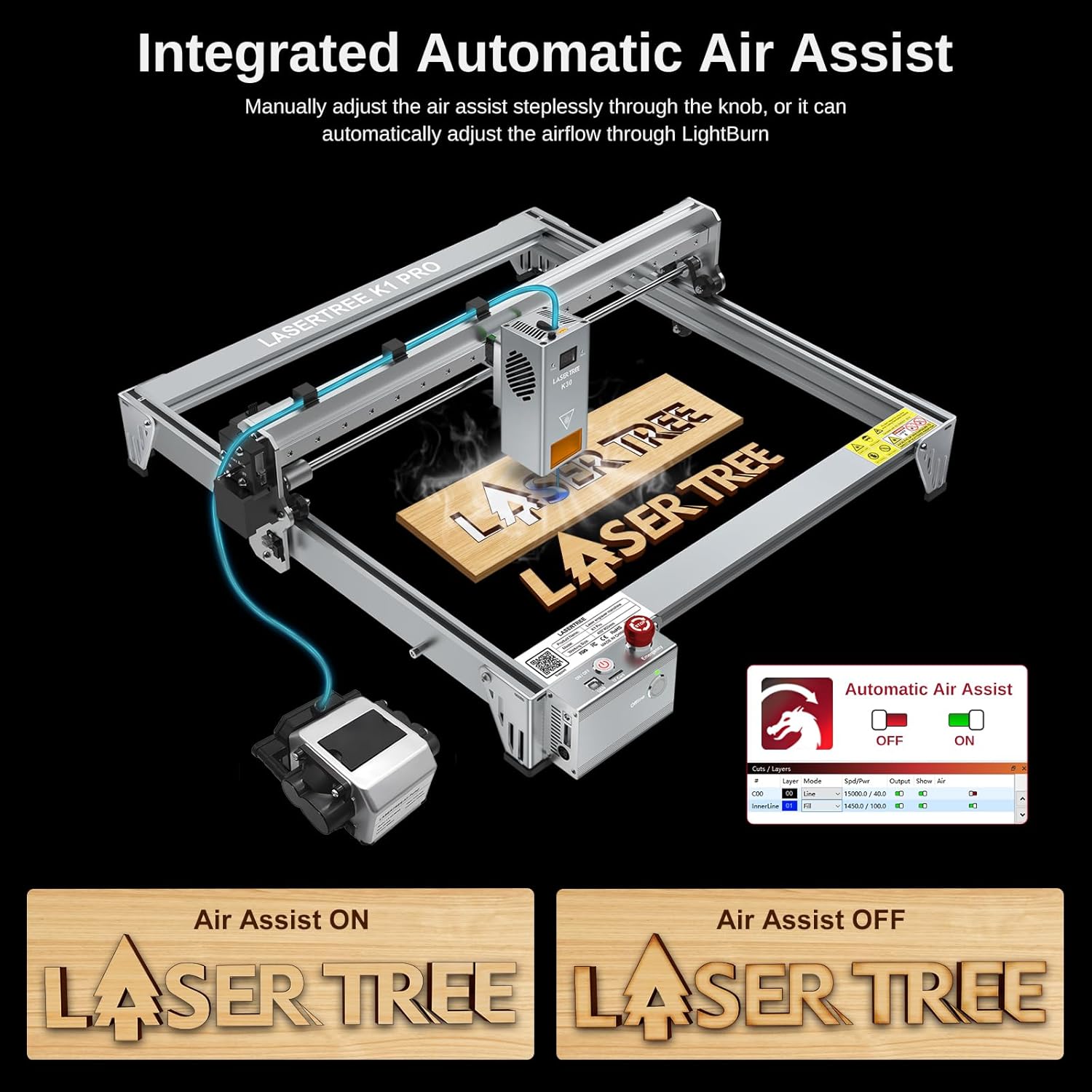
Image 5.2: The integrated air assist system and its control interface.
5.4 Material Compatibility and Cutting/Engraving Parameters
The K1 Pro 30W laser engraver offers powerful cutting capabilities across various materials. Optimal parameters may vary based on material density and desired outcome.

Зображення 5.3: Наприкладamples of one-pass cutting capabilities with recommended speeds.
| матеріал | Товщина | швидкість |
|---|---|---|
| Фанера з липи | 15 мм | 100 мм/хв |
| Сосновий ліс | 20 мм | 95 мм/хв |
| Чорний акрил | 15 мм | 25 мм/хв |
| МДФ | 9 мм | Не вказано |
Примітка: These parameters are starting points. Always perform test cuts on scrap material to determine the best settings for your specific material and desired outcome.
6. Технічне обслуговування
Регулярне технічне обслуговування забезпечує довговічність та оптимальну продуктивність вашого лазерного граверу.
- Очистіть лінзу: Periodically clean the laser lens with a specialized lens cleaning solution and cloth to maintain beam quality.
- Clean the Machine: Use the provided clean brush to remove dust and debris from the machine's frame, rails, and moving parts.
- Змастіть рухомі частини: Apply a small amount of appropriate lubricant to the linear guides and screws as needed to ensure smooth movement.
- Огляньте кабелі: Regularly check all cables for wear or damage. Replace any damaged cables immediately.
7. Вирішення проблем
У цьому розділі розглядаються поширені проблеми, з якими ви можете зіткнутися. У разі складніших проблем зверніться до служби підтримки клієнтів.
| проблема | Можлива причина | Рішення |
|---|---|---|
| Лазер не працює або слабкий вихідний сигнал | Dirty lens, incorrect focus, low power setting, damaged laser module. | Clean the laser lens. Adjust focal length. Increase power setting in software. Inspect laser module for damage. |
| Машина не підключається до комп'ютера | Проблема з USB-кабелем, драйвер не встановлено, вибрано неправильний COM-порт, конфлікт програмного забезпечення. | Try a different USB cable. Install necessary drivers. Select the correct COM port in LightBurn/LaserGRBL. Restart software and machine. |
| Engraving/cutting quality is poor (burnt edges, uneven lines) | Incorrect speed/power settings, no air assist, dirty lens, material issues. | Adjust speed and power settings. Ensure air assist is active and properly configured. Clean the laser lens. Test on different material. |
| Machine movement is jerky or inaccurate | Loose belts, dirty linear guides, motor issues, incorrect software settings. | Check and tighten Y-axis timing belts. Clean and lubricate linear guides. Verify software settings for speed and acceleration. |
| Emergency Stop activated unexpectedly | Safety sensor triggered (e.g., tilt, limit switch), electrical issue. | Check for any obstructions or machine tilt. Inspect limit switches. Power cycle the machine. |
If you encounter issues not listed here or require further assistance, please contact LASER TREE technical support.
8. Технічні характеристики
| Особливість | Деталь |
|---|---|
| Модель | K1 Pro 30W Kit |
| Вихідна потужність лазера | 30000 мВт (30 Вт) |
| Точність гравіювання | 0.01 мм |
| Швидкість гравіювання | До 20,000 мм/хв |
| Робоча зона | 400 мм х 400 мм |
| Розміри продукту | 17.5 x 17.5 x 7.5 дюймів |
| Вага товару | 25.8 фунта |
| Air Assist System | Integrated Electromagnetic Pump, LightBurn control compatible |
| Офлайн гравіювання | Supported via TF Card |
| Сумісність програмного забезпечення | LightBurn, LaserGRBL |
| Операційна система | Mac OS, Windows |
| Функції безпеки | Limit Switches, Temperature Alert, Position Movement Protection (15°), Beam Detection, Emergency Stop Switch, Eye Protection |
| Матеріал рами | All Aluminum Frame with Industrial Grade Linear Guide |

Image 8.1: Industrial-grade linear bearings for enhanced precision and speed.
9. Гарантія та підтримка
LASER TREE is committed to providing excellent customer service and support for your K1 Pro 30W Laser Engraver.
- Політика повернення: Enjoy a 30-day return guarantee for any reason.
- Гарантія: The product is backed by a 1-year warranty from the date of purchase.
- Технічна підтримка: Lifetime technical support is available. A dedicated technical and support team is ready to assist with any questions or issues you may encounter.
For support, please visit the official LASER TREE website or contact their customer service directly. You can also find more information and resources on the Магазин LASER TREE на Amazon.
10. Офіційні відео про продукт
У даних про продукт для цього посібника не було надано офіційних відео продавців.


