1. Вступ
This manual provides detailed instructions for the assembly, operation, maintenance, and troubleshooting of the Genmitsu 3030-PROVer MAX CNC Router Machine and its accompanying 4th Axis Rotary Module Kit. Please read this manual thoroughly before operating the machine to ensure safe and efficient use.

Banner image showcasing the Genmitsu 3030-PROVer MAX as an all-aluminum benchtop CNC router, emphasizing precision and versatility.
2. Техніка безпеки
Operating CNC machinery requires adherence to strict safety protocols to prevent injury and damage. Always follow these guidelines:
- Wear appropriate personal protective equipment (PPE), including safety glasses, hearing protection, and dust masks.
- Переконайтеся, що робоча зона чиста, добре освітлена та вільна від перешкод.
- Ніколи не використовуйте машину під впливом наркотиків або алкоголю.
- Keep hands and loose clothing away from moving parts and cutting tools.
- Always disconnect power before performing maintenance, adjustments, or tool changes.
- Ознайомтеся з розташуванням та функціями кнопки аварійної зупинки.
- Secure workpieces firmly to prevent movement during operation.
- Не залишайте машину без нагляду під час її роботи.
3. Вміст упаковки
Verify that all components are present and undamaged upon unpacking. The package should include:
- Genmitsu 3030-PROVer MAX CNC Router Machine
- Комплект поворотного модуля 4-ї осі
- 4-кулачковий патрон
- 10:1 Speed Reducer
- Автономний контролер
- Джерело живлення та кабелі
- Assembly Tools and Fasteners
- Посібник користувача (цей документ)
4. Збірка та початкове налаштування
The Genmitsu 3030-PROVer MAX is designed for straightforward assembly. Follow these steps for initial setup:
4.1. CNC Router Assembly
- Unpack all components and lay them out on a clean, stable surface.
- Assemble the main frame of the CNC machine. The Y-axis notch design facilitates alignment for quick assembly.
- Install the X, Y, and Z axis components, ensuring the ball screws and dual linear guides are properly seated. These components contribute to the machine's 0.05mm precision.
- Mount the spindle assembly.
- Connect all necessary cables, including power and data cables to the offline controller.

Image illustrating the Y-axis notch design that facilitates quick and easy assembly of the Genmitsu 3030-PROVer MAX, allowing for setup in approximately 10 minutes.

Детальний view of the ball screws and dual linear guides on the X, Y, and Z axes, highlighting the precision components of the Genmitsu 3030-PROVer MAX.
4.2. 4th Axis Rotary Module Installation
The 4th Axis Rotary Module is an upgrade that expands the machine's capabilities for rotational carving.
- Ensure the CNC machine is powered off and disconnected.
- Mount the 4th Axis Rotary Module onto the CNC machine's workbed using the provided fasteners.
- Connect the NEMA17 planetary geared stepper motor cable from the rotary module to the designated port on the CNC controller.
- Attach the 4-jaw chuck to the rotary module. The chuck supports both forward (2-22mm) and reverse (18-50mm) mounting for various material diameters.

The Genmitsu 3030-PROVer MAX CNC machine demonstrating support for the 4th Axis Rotary Module, enabling complex rotational carving.

Dimensions of the Genmitsu 4th Axis Rotary Module, including base plate length, height, and width.

Diagram illustrating the clamped material diameter range (2-50mm) and central height (50mm) for the 4th Axis Rotary Module.

Demonstration of forward (2-22mm) and reverse (18-50mm) mounting configurations for the 4-jaw chuck on the rotary module.
5. Інструкція з експлуатації
5.1. Basic CNC Operation
- Power on the machine and the offline controller.
- Завантажте свій G-код file onto the offline controller.
- Secure your workpiece to the workbed.
- Install the appropriate cutting tool or attachment (e.g., laser, 65mm/69mm trimmer).
- Use the Z-probe to set the Z-axis zero point accurately.
- Initiate the carving process via the offline controller. Monitor the operation closely.

Демонстрація зображеньasing the new offline controller for the 3030-PROVer MAX, highlighting its emergency stop button and operating knob for precise control.

Illustration of various spindle options compatible with the Genmitsu 3030-PROVer MAX, including laser, 65mm trimmer, and 69mm trimmer attachments.

Collage of features including the new air-cooling pipe, Z-probe, spindle holder options (52mm, 65mm), and wire snap for the Genmitsu 3030-PROVer MAX.
5.2. Using the 4th Axis Rotary Module
For rotary carving, specific G-code designed for 4-axis operation is required. This G-code must be sent using the offline controller.
- Prepare your 4-axis G-code using compatible software.
- Mount and secure your cylindrical or irregularly shaped workpiece in the 4-jaw chuck.
- Load the G-code file onto the offline controller.
- Set the appropriate zero points for all axes, including the rotational axis.
- Begin the carving process. The NEMA17 planetary geared stepper motor provides high torque for precise rotation.
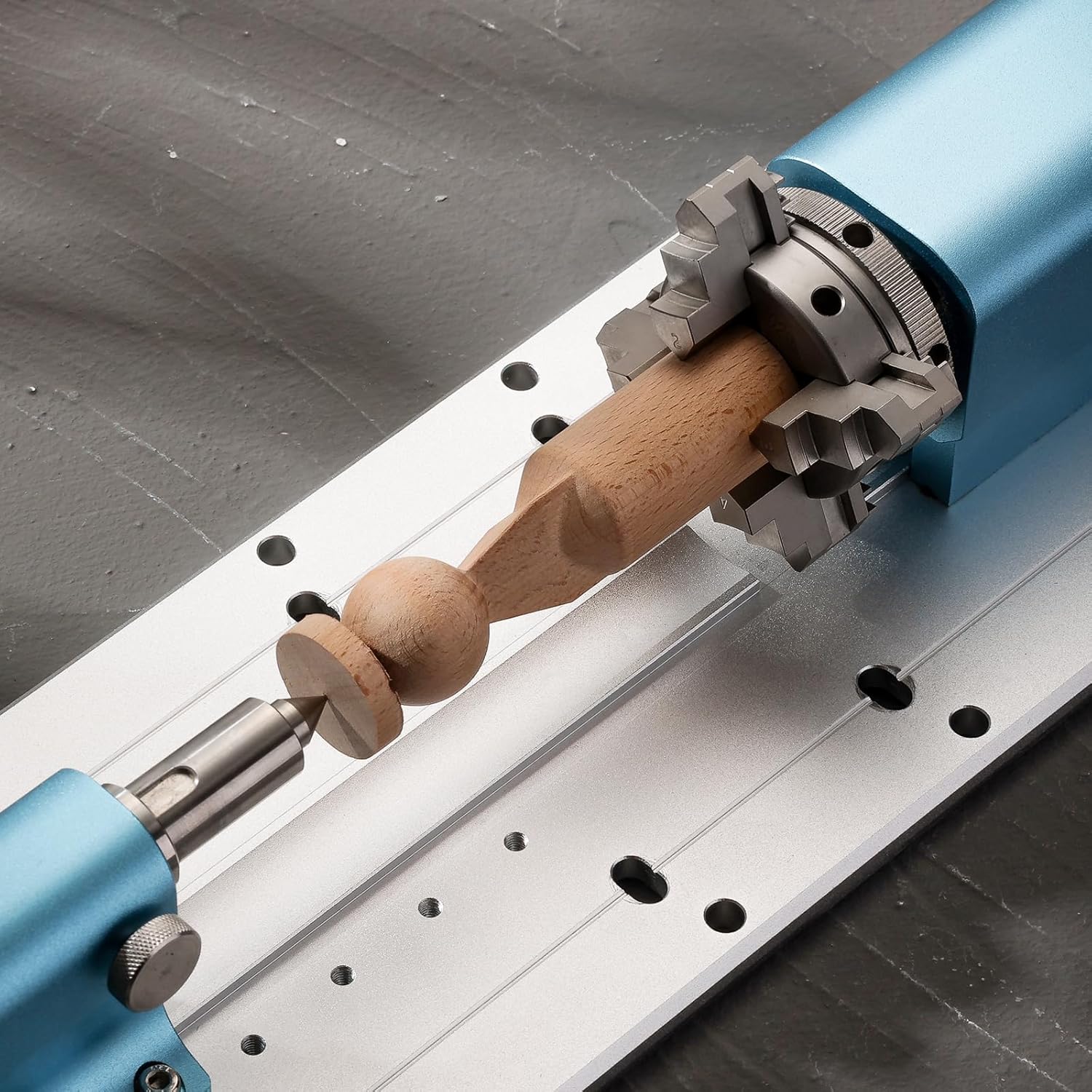
The 4th Axis Rotary Module actively holding and rotating a wooden workpiece for carving.
5.3. Сумісність матеріалів
The 3030-PROVer MAX supports engraving and cutting a wide range of materials:
- Метали: Capable of cutting 2mm thick aluminum and other soft metals.
- Дерево: Various types of solid wood.
- Акрил: For clear and colored plastic projects.
- Вуглецеве волокно: For lightweight and strong components.
- PCB: For circuit board prototyping.
- Пластмаси: General plastic materials.

Image demonstrating the versatility of the 3030-PROVer MAX in engraving various materials such as metal, wood, acrylic, and carbon fiber.

Examples of materials that can be processed by the CNC machine, including wood carvings, PCB etching, metal engraving, plastic, and carbon fiber.

Comparison image demonstrating the 3030-PROVer MAX's ability to achieve a clean 2mm depth cut in metal, contrasting with less precise results from other CNC machines.
6. Технічне обслуговування
Regular maintenance ensures the longevity and optimal performance of your Genmitsu 3030-PROVer MAX.
- Прибирання: After each use, clean the machine thoroughly to remove dust, chips, and debris. The sealed dust-proof design helps protect internal components, but external cleaning is still essential.
- Змащення: Periodically lubricate the ball screws and linear guides according to manufacturer recommendations to ensure smooth movement.
- Огляд: Regularly inspect all cables, connections, and moving parts for wear or damage. Replace any worn components promptly.
- Догляд за інструментами: Keep cutting tools sharp and clean. Dull tools can lead to poor cut quality and increased strain on the machine.

Visual representation of the sealed dust-proof design protecting the slide and screw assembly of the CNC machine, enhancing durability and reducing maintenance.
7. Вирішення проблем
У цьому розділі розглядаються поширені проблеми, з якими ви можете зіткнутися. У разі складніших проблем зверніться до служби підтримки клієнтів.
| проблема | Можлива причина | Рішення |
|---|---|---|
| Машина не вмикається. | Power cable disconnected; faulty power supply. | Check all power connections; test power outlet. |
| Мотори не рухаються. | Emergency stop engaged; loose motor cables; incorrect G-code. | Release emergency stop; check motor connections; verify G-code. |
| Poor carving quality. | Dull cutting tool; incorrect feed rates/spindle speed; loose workpiece. | Replace/sharpen tool; adjust settings in G-code; secure workpiece. |
| 4th Axis not rotating. | Incorrect connection; G-code not configured for 4th axis. | Verify motor connection; ensure G-code includes A-axis commands. |
8. Технічні характеристики
Key technical specifications for the Genmitsu 3030-PROVer MAX CNC Router Machine:
- Номер моделі: 3030-PROVer MAX
- матеріал: Алюміній
- Джерело живлення: Провідний електричний
- Точність: До 0.05 мм
- Axis System: X, Y, Z axes with Ball Screws and Dual Linear Guides
- Автономний контролер: Single knob with emergency stop
- 4th Axis Rotary Module: NEMA17 Planetary Geared Stepper Motor, 4-Jaw Chuck, 10:1 Speed Reducer
- 4th Axis Clamped Material Diameter: 2-50mm (forward/reverse mounting)
- 4th Axis Central Height: 50 мм
- Work Area (approximate): 300 мм x 300 мм x 78 мм (11.81 дюйма x 11.81 дюйма x 3.07 дюйма)
- Overall Dimensions (approximate): 559mm (22.01in) L x 523mm (20.59in) W x 412mm (16.22in) H

Вимірний понадview of the Genmitsu 3030-PROVer MAX CNC Router Machine, showing its compact footprint and working area.

Image detailing the high-quality construction of the 3030-PROVer MAX, featuring ball screws, dual linear guides, and overall dimensions, highlighting its precision and durability.
9. Гарантія та підтримка
For warranty information, technical support, or service inquiries, please refer to the official Genmitsu webсайт або зверніться до їхнього відділу обслуговування клієнтів. Зберігайте чек про покупку як підтвердження покупки.


