1. Вступ
Thank you for choosing the LIORQUE Wireless Weather Station, Model YGH6208. This device is designed to provide accurate indoor and outdoor temperature and humidity readings, atmospheric pressure, and weather forecasts. It also includes a digital clock with alarm and snooze functions, and a calendar with day display in 7 languages. This manual will guide you through the setup, operation, and maintenance of your new weather station to ensure optimal performance.
2. Що в коробці
Будь ласка, перевірте вміст упаковки, щоб переконатися, що всі елементи присутні:
- 1 x LIORQUE Wireless Weather Station (Main Unit)
- 1 х зовнішній датчик
- 1 х посібник користувача
- 5 батареї AAA

малюнок 2.1: Package Contents. The image displays the main weather station unit, the outdoor sensor, the user manual, and five AAA batteries.
3. Продукт закінчивсяview
The LIORQUE Wireless Weather Station consists of a main display unit and a wireless outdoor sensor. The main unit features a large LCD screen that displays various environmental data and time information.
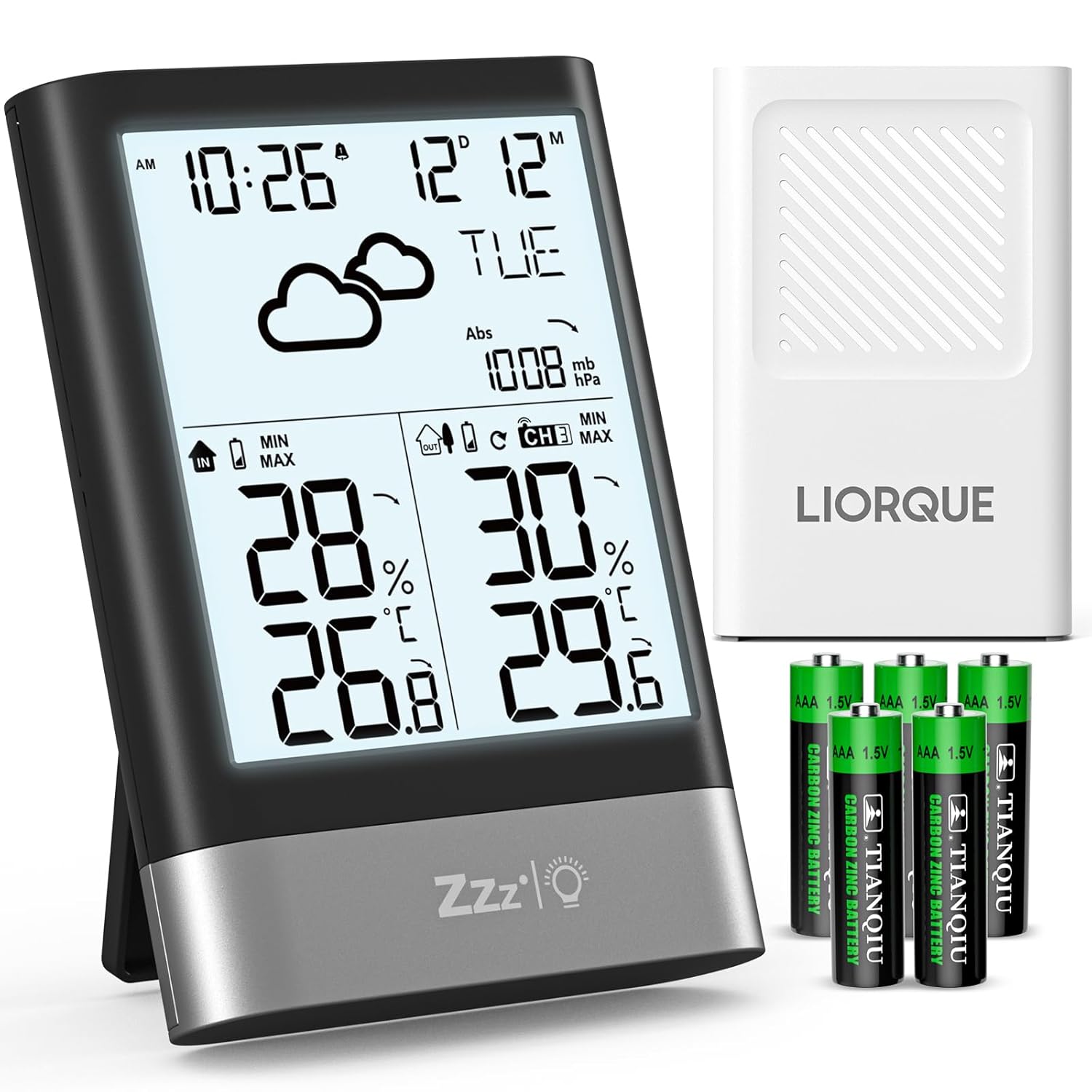
малюнок 3.1: LIORQUE Wireless Weather Station. This image shows the main weather station unit with its display, the white outdoor sensor, and a set of AAA batteries.
3.1 Характеристики основного блоку
- Large 4.3-inch LCD display with backlight
- Дисплей температури та вологості в приміщенні
- Outdoor temperature and humidity display (from sensor)
- Atmospheric pressure display
- Значки прогнозу погоди
- Time (12/24h format) and Date display
- Day of the week in 7 languages
- Будильник з функцією повтору
- Max/Min temperature and humidity records
- Індикатори тренду температури та вологості
3.2 Outdoor Sensor Features
- Вимірює температуру та вологість на вулиці
- Wireless transmission up to 100 meters (open air)
- Supports up to 3 sensors (one included)
- Рейтинг водонепроникності IPX4
4. Налаштування
4.1 Встановлення батареї
Both the main unit and the outdoor sensor require AAA batteries for operation. Please follow these steps:
- Основний блок: Open the battery compartment cover on the back of the main unit. Insert 3 AAA batteries, observing the correct polarity (+/-). Close the cover.
- Зовнішній датчик: Відкрийте кришку батарейного відсіку на задній панелі зовнішнього датчика. Вставте 2 батарейки типу AAA, дотримуючись правильної полярності (+/-). Закрийте кришку.
The main unit will power on automatically once batteries are inserted. The outdoor sensor will begin transmitting data.

малюнок 4.1: Battery Installation. This diagram illustrates where to insert the AAA batteries into both the main unit and the outdoor sensor, indicating the number of batteries required for each.
4.2 Розміщення датчика
For accurate readings and optimal wireless transmission, consider the following guidelines for placing your outdoor sensor:
- захист: Place the sensor in a shaded area, away from direct sunlight and rain, to ensure accurate temperature and humidity readings and prolong its lifespan.
- Висота: Mount the sensor approximately 2.5 meters (8.2 feet) above the ground.
- Розташування: Choose a location that allows for good air circulation and is within the 100-meter wireless range of the main unit. Avoid placing it near large metal objects or electrical appliances that could interfere with the signal.

малюнок 4.2: Sensor Installation Suggestions. This image provides visual guidance on where to place the outdoor sensor, emphasizing protection from rain and direct sunlight, and recommending a specific mounting height.
4.3 Початкове налаштування та сполучення
After battery installation, the main unit will automatically search for the outdoor sensor. This process may take a few minutes. Once connected, the outdoor temperature and humidity will appear on the display. If the sensor does not connect, try the following:
- Переконайтеся, що обидва пристрої мають свіжі батарейки.
- Bring the sensor closer to the main unit.
- Press the 'CH' button on the main unit to cycle through channels (if you have multiple sensors).
- Press the 'RESET' button on both units (usually a small hole requiring a pin) to restart the pairing process.
The weather station supports up to three outdoor sensors. If you purchase additional sensors, ensure they are set to different channels (CH1, CH2, CH3) before pairing.

малюнок 4.3: Multi-Sensor Support. This illustration demonstrates how the weather station can connect to and display data from up to three separate outdoor sensors, allowing monitoring of different areas.
5. Інструкція з експлуатації
5.1 Дисплей закінчивсяview
The LCD screen provides a comprehensive overview of current weather conditions and time information. Key display areas include:
- Час і дата: Top left, showing current time and date.
- Прогноз погоди: Icons indicating predicted weather conditions.
- Атмосферний тиск: Displayed in mb/hPa.
- Температура та вологість у приміщенні: Bottom left section.
- Температура та вологість на вулиці: Bottom right section.
- Індикатори тенденцій: Arrows next to temperature/humidity/pressure indicating rising, stable, or falling trends.

малюнок 5.1: Multifunction Display. This image illustrates the various data points shown on the weather station's LCD screen, including temperature, humidity, time, date, and weather forecast icons.
5.2 Встановлення часу та дати
The time and date must be set manually. Use the buttons located on the top of the unit to navigate and adjust settings:
- Press and hold the 'MODE' button (or similar button, refer to specific button labels on your device) to enter time setting mode.
- Використовуйте кнопки «+» або «-», щоб налаштувати миготливе значення (наприклад, година, хвилина, рік, місяць, день).
- Press 'MODE' again to confirm the setting and move to the next parameter.
- Continue until all settings (12/24h format, date format, day language) are configured.
- The day of the week can be displayed in 7 languages.
5.3 Функції будильника та повтору
The weather station includes an alarm clock with a snooze feature:
- Налаштування будильника: Натисніть кнопку «ТРИВОГА», щоб view the alarm time. Press and hold 'ALARM' to enter alarm setting mode. Use '+' or '-' to adjust the hour and minute. Press 'ALARM' to confirm.
- Активація сигналізації: Press 'ALARM' repeatedly to toggle the alarm on/off. An alarm icon will appear when active.
- Відкладення: When the alarm sounds, press the 'SNOOZE/LIGHT' button on the front to activate the snooze function. The alarm will sound again after a few minutes (typically 5-10 minutes).
- Зупинка сигналізації: To stop the alarm completely, press any other button on the top of the unit.

малюнок 5.2: Alarm and Snooze. This image shows the weather station functioning as an alarm clock, with a person using the snooze feature.
5.4 Робота підсвічування
The LCD screen features an energy-saving backlight:
- Press the 'SNOOZE/LIGHT' button on the front of the unit to activate the backlight.
- The backlight will automatically turn off after approximately 10 seconds to conserve battery power.

малюнок 5.3: Backlit Display. This image demonstrates the weather station's LCD screen with its backlight on, enhancing readability in low-light conditions.
5.5 Прогноз погоди
The weather station analyzes atmospheric pressure changes to predict upcoming weather conditions. The display shows one of six weather icons:
- Сонячно
- Мінлива хмарність
- Хмарно
- Легкий дощ
- Сильний дощ
- Сніжно
These forecasts are based on atmospheric pressure trends and may not always perfectly match local weather conditions, especially in rapidly changing environments.

малюнок 5.4: Weather Forecast Icons. This image displays the six different weather icons used by the station to indicate predicted weather conditions.
5.6 Max/Min Records and Trends
The station records maximum and minimum temperature and humidity values for both indoor and outdoor environments. It also displays trend indicators:
- Макс/хв: Press the 'MAX/MIN' button to view the recorded maximum and minimum values. Press again to cycle through indoor max, indoor min, outdoor max, outdoor min.
- Індикатори тенденцій: Small arrows next to temperature, humidity, and pressure readings indicate if the value is rising (up arrow), stable (horizontal line), or falling (down arrow).
6. Технічне обслуговування
6.1 Заміна батареї
When the battery indicator appears on the display, it's time to replace the batteries. Use fresh AAA batteries for both the main unit and the outdoor sensor. Always replace all batteries in a unit at the same time to ensure consistent power.
6.2 Очищення
To clean the weather station and sensor, use a soft, damp cloth. Do not use abrasive cleaners, alcohol, or corrosive chemicals, as these can damage the display or casing. Переконайтеся, що всередину пристрою не потрапила рідина.
6.3 Догляд за датчиком
Periodically check the outdoor sensor for any debris or blockages that might affect its readings. Ensure its placement continues to protect it from direct weather elements as described in Section 4.2.
7. Вирішення проблем
If you encounter issues with your LIORQUE Wireless Weather Station, please refer to the following common problems and solutions:
| проблема | Можлива причина | Рішення |
|---|---|---|
| Немає відображення зовнішньої температури/вологості | Датчик не сполучений або поза зоною дії; низький заряд батареї датчика. | Ensure sensor batteries are fresh. Bring sensor closer to main unit. Press 'CH' button on main unit. Reset both units. |
| Неточні показники температури/вологості | Sensor exposed to direct sunlight/rain; interference from other devices. | Relocate the outdoor sensor to a shaded, protected area. Ensure proper ventilation. Avoid placing near heat sources or electronics. |
| Дисплей тьмяний або порожній | Низький заряд батарейок у головному блоці. | Replace all 3 AAA batteries in the main unit with fresh ones. |
| Час/дата неправильні | Manual setting error. | Refer to Section 5.2 to manually set the time and date correctly. |
8. Технічні характеристики
Here are the technical specifications for the LIORQUE Wireless Weather Station, Model YGH6208:
- Номер моделі: YGH6208
- Бренд: ЛІОРК
- Розміри продукту (Д x Ш x В): 8.7 х 2.3 х 12.4 см
- вага: 300 грами
- Потужність основного блоку: 3 батареї AAA (входять в комплект)
- Потужність зовнішнього датчика: 2 батареї AAA (входять в комплект)
- Технологія підключення: RF (радіочастота)
- Бездротовий діапазон: До 100 метрів (на відкритому повітрі)
- матеріал: Акрилонітрилбутадієнстирол (АБС)
- колір: чорний
- Особливості: Large LCD display, alarm clock, adjustable brightness, weather forecast, temperature, humidity, adjustable day language.
- Рекомендоване використання: додому
- Конкретне використання: Контроль температури
9. Гарантія та підтримка
LIORQUE is committed to providing high-quality products and excellent customer service. While specific warranty details are not provided in this manual, we strive to offer a friendly and responsive service to our customers worldwide. If you encounter any issues or have questions regarding your LIORQUE Wireless Weather Station, please contact our customer support team through the retailer where you purchased the product or visit the official LIORQUE brand store for assistance.
Для отримання додаткової інформації та підтримки ви можете відвідати LIORQUE Brand Store.


