1. Вступ
Thank you for choosing the ATTACK SHARK X85 Gasket Mechanical Keyboard. This manual provides detailed instructions on how to set up, operate, and maintain your new keyboard. Please read this manual thoroughly before use to ensure optimal performance and longevity of your device.

The ATTACK SHARK X85 Gasket Mechanical Keyboard, featuring a compact 75% layout with a multi-function knob.
2. Вміст упаковки
Будь ласка, перевірте, чи всі перелічені нижче предмети входять до вашої упаковки:
- ATTACK SHARK X85 Gasket Mechanical Keyboard
- Кабель USB-C – USB-A
- Бездротовий приймач 2.4 ГГц
- Keycap and Switch Puller Tool
- Additional Keycaps (Purple accent keycaps)
- Посібник користувача (цей документ)
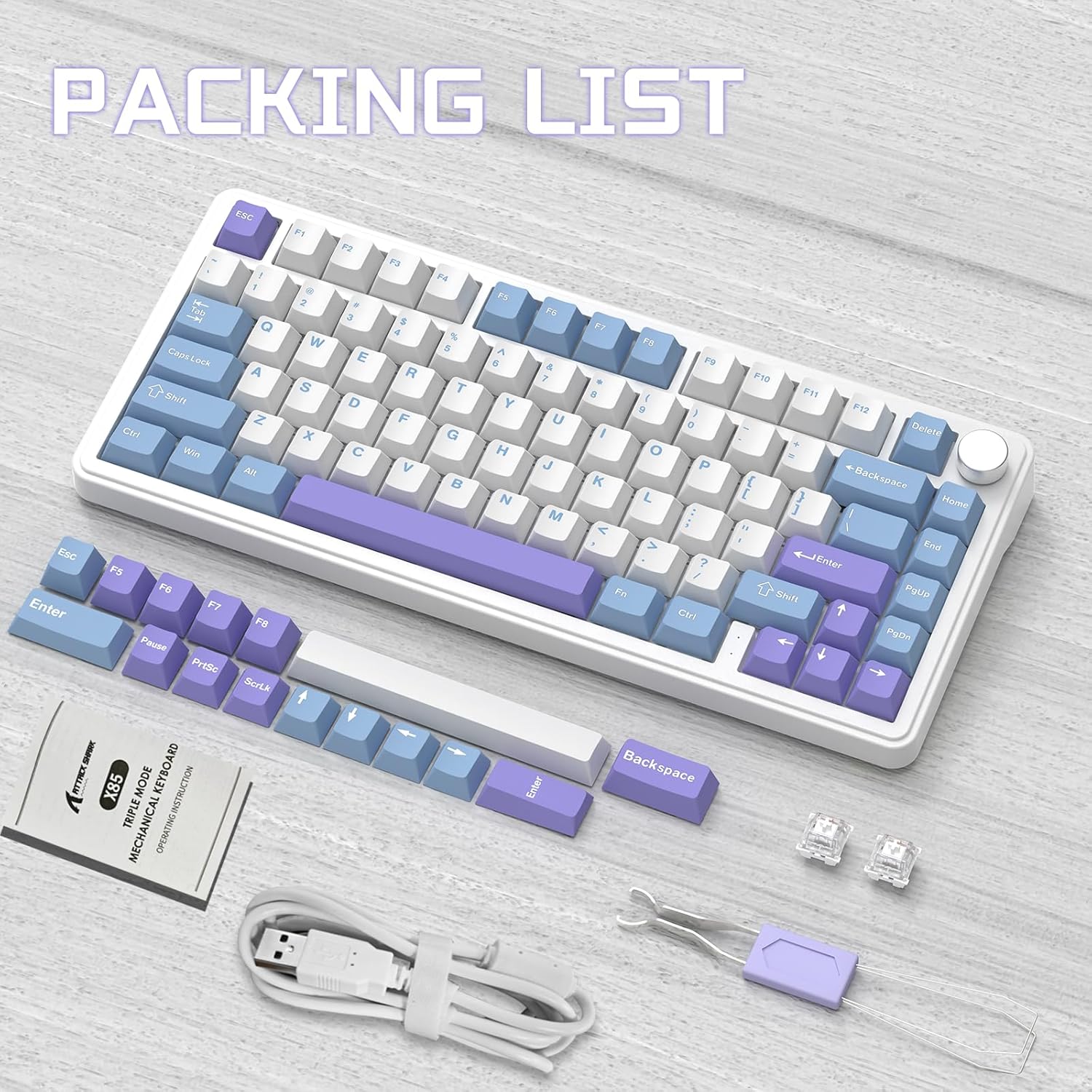
Contents of the ATTACK SHARK X85 keyboard package, including the keyboard, cables, tools, and extra keycaps.
3. Продукт закінчивсяview
3.1 Основні характеристики
- Компактний макет на 75%: 81-key design maximizing desk space.
- Трирежимне підключення: Supports Bluetooth 5.0, 2.4 GHz wireless, and USB-C wired connections.
- Конструкція кріплення прокладки: Five-layer sound and shock-absorbing internal padding (PORON foam, IXPE switch pad, PET sound enhancement pad, bottom silicone pad) for a soft, flexible typing feel.
- Комутатори з можливістю гарячої заміни: Compatible with most 3-pin mechanical switches for easy customization.
- Багатофункціональна ручка: Controls computer volume and keyboard backlight settings.
- Ковпачки клавіш PBT: Durable, wear-resistant keycaps with thick walls.
- RGB-підсвічування: 19 RGB modes, 7 monochrome modes, and full-color backlight with adjustable speed and intensity. Customizable via software.
- Акумулятор 5000 мАг: High-capacity battery for extended wireless use with auto-sleep power saving.
- 100% захист від ореолів: Ensures all key presses are registered accurately during fast typing or gaming.
- Широка сумісність: Fully compatible with Windows and Mac operating systems.
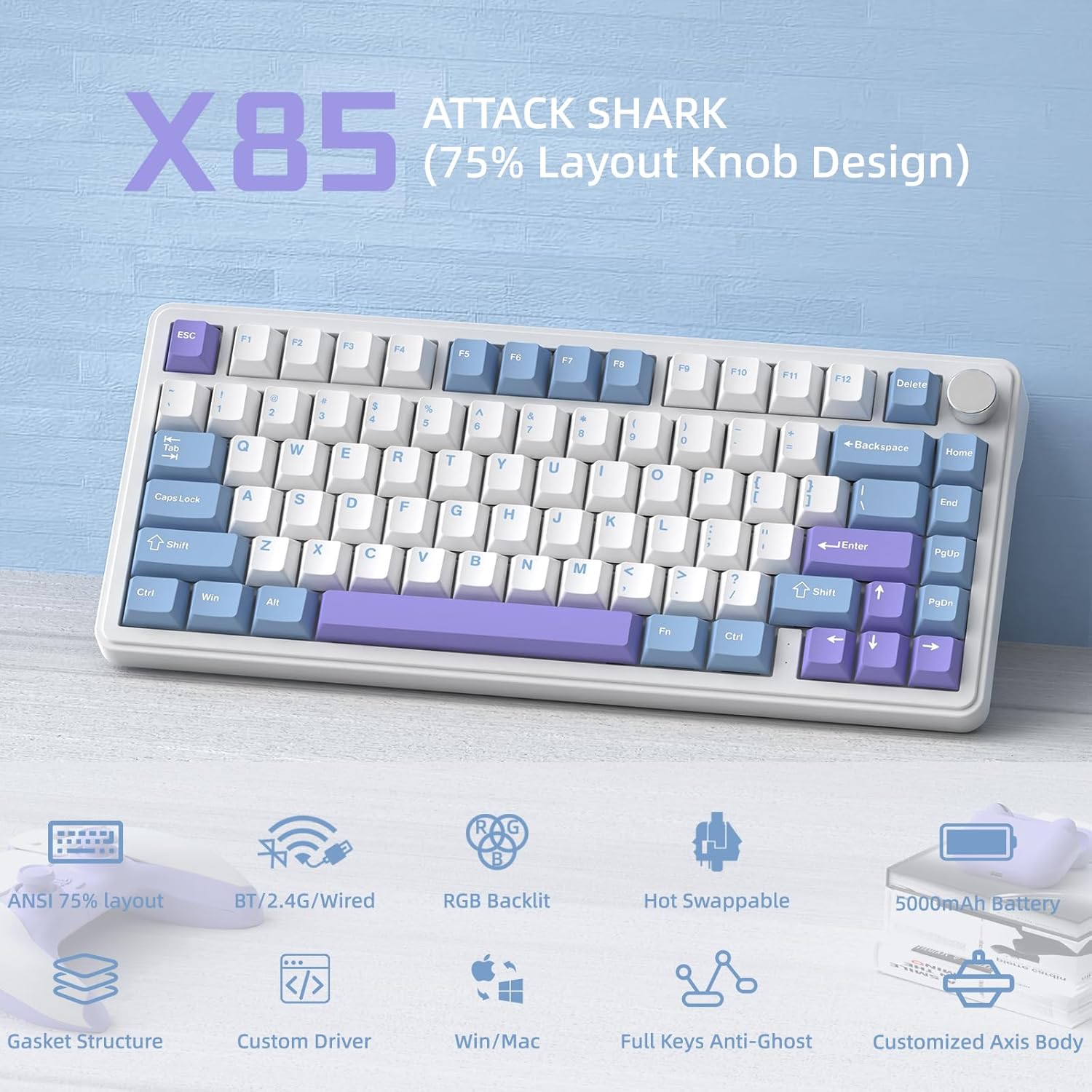
Оверview of the ATTACK SHARK X85's key features, including its 75% layout, tri-mode connectivity, RGB lighting, and hot-swappable design.
3.2 Internal Structure (Gasket Mount)
The X85 features an advanced gasket mount design with multiple layers for enhanced acoustics and typing feel:
- ручка
- Клавіатури PBT
- Верхня кришка
- Перемикач
- PC Horizontal Slotted Positioning Plate
- PORON Quilted Cotton
- Колодка перемикача IXPE
- ПЕТ-підкладка для покращення звуку
- Single Key Slotted PCB
- Switch Seat Silencer Bottom Cotton
- Силіконові накладки
- Нижній корпус

Diagram illustrating the five-layer padding and gasket mount structure of the X85 keyboard, showing its various internal components.
4. Налаштування
4.1 Тримодове з'єднання
The ATTACK SHARK X85 keyboard supports three connection modes: Bluetooth, 2.4 GHz wireless, and USB-C wired. The connection mode can be easily switched using the toggle switch on the back of the keyboard.

Visual guide for connecting the ATTACK SHARK X85 keyboard via Bluetooth, 2.4G wireless, and USB-C wired modes.
4.1.1 Підключення Bluetooth
- Toggle the switch on the back of the keyboard to the "BT" position.
- Тривале натискання Fn + Q, Fn + W, або Fn + E for more than three seconds until the corresponding key's backlight flashes rapidly. This indicates pairing mode.
- On your device (computer, tablet, or smartphone), enable Bluetooth and search for "ATTACK SHARK X85".
- Select the keyboard to connect. Once connected, the key's backlight will stop flashing and remain solid.
- Ви можете підключити до трьох пристроїв Bluetooth і перемикатися між ними, натискаючи Fn + Q, Fn + W, або Fn + E.
Бездротове з'єднання 4.1.2 2.4 ГГц
- Locate the 2.4 GHz wireless receiver (dongle) in the package.
- Toggle the switch on the back of the keyboard to the "2.4G" position.
- Plug the 2.4 GHz wireless receiver into an available USB port on your computer.
- The keyboard should automatically connect. If not, ensure the receiver is properly inserted and the keyboard is in 2.4G mode.
4.1.3 Дротове підключення USB-C
- Toggle the switch on the back of the keyboard to the "Line" (wired) position.
- Підключіть один кінець наданого кабелю USB-C до порту USB-C клавіатури.
- Підключіть інший кінець кабелю USB-A до вільного USB-порту на вашому комп’ютері.
- The keyboard will be recognized as a standard USB keyboard and is ready for use.
4.2 Сумісність з операційними системами
The ATTACK SHARK X85 keyboard is fully compatible with both Windows and Mac operating systems. Use the toggle switch on the back of the keyboard to select between "Win" and "Mac" modes for optimal key mapping.
5. Інструкція з експлуатації
5.1 Multi-Function Rotary Knob
The knob on the top right of the keyboard serves multiple functions, controlling both volume and backlight settings.

Instructions for using the multi-function rotary knob to control lighting and sound settings on the X85 keyboard.
- Перемикання режимів: Press and hold the knob for more than three seconds to switch between Light Mode and Sound Mode.
- Світловий режим:
- Press once to cycle through different backlight modes.
- Turn left to decrease backlight brightness.
- Turn right to increase backlight brightness.
- Режим звуку:
- Press once to play/mute audio.
- Turn left to decrease volume.
- Turn right to increase volume.
5.2 Налаштування RGB-підсвічування
The X85 keyboard offers extensive RGB lighting options. You can adjust settings directly on the keyboard or through the dedicated software.
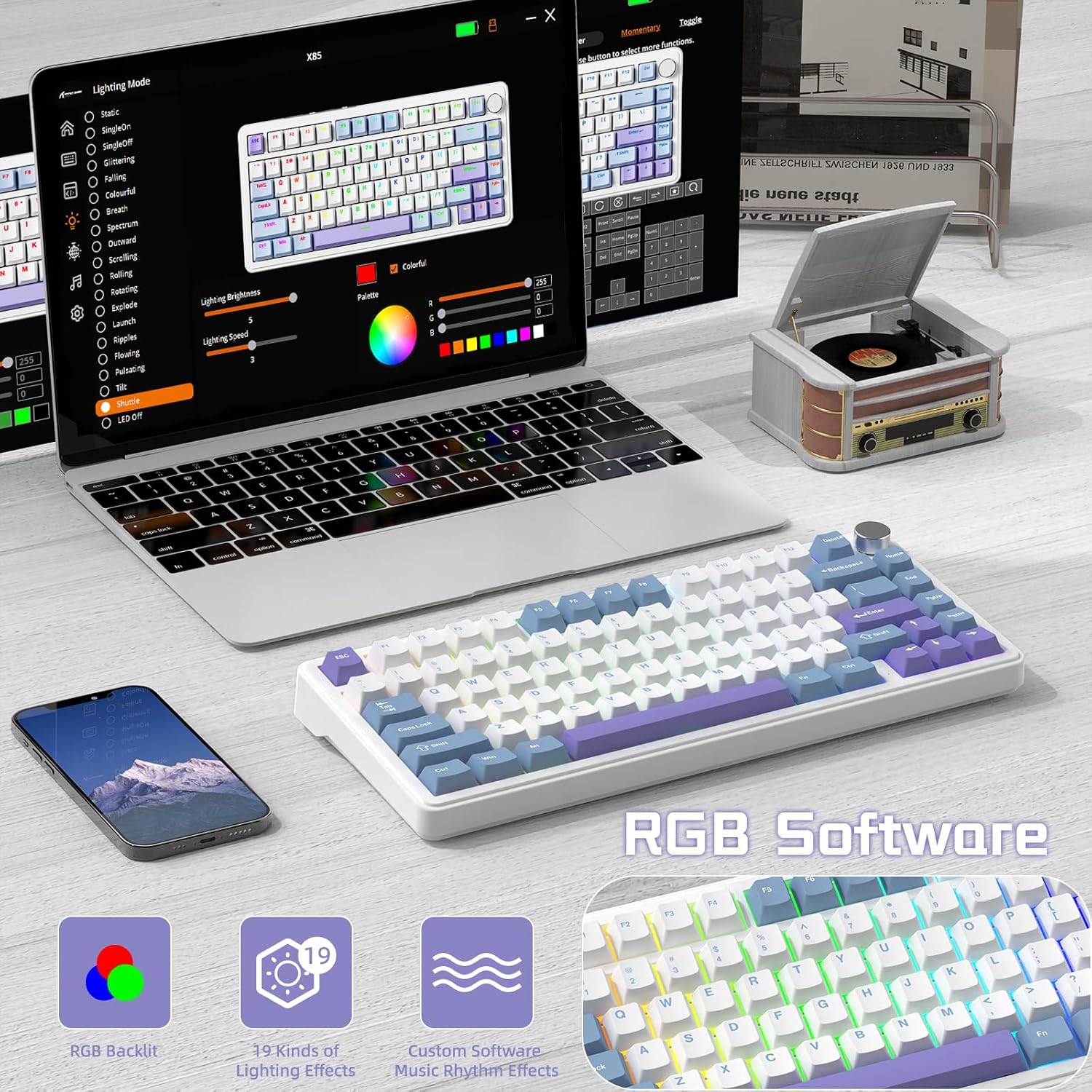
The software interface for customizing RGB lighting and other settings on the ATTACK SHARK X85 keyboard.
- On-Keyboard Controls:
- Use the knob in Light Mode to cycle modes and adjust brightness.
- Refer to the keyboard's quick function keys (usually Fn combinations) for additional lighting effects and speed adjustments.
- Налаштування програмного забезпечення:
- Download the official ATTACK SHARK software from the manufacturer's webсайт.
- The software allows for advanced customization of RGB effects, colors, speed, and brightness. It may also offer key remapping and macro creation.
- Note: The software may default to Chinese. Please navigate to settings within the software to change the language to English if needed.
5.3 Комутатори з можливістю гарячої заміни
The X85 features a hot-swappable PCB, allowing you to easily change mechanical switches without soldering. This enables customization of your typing experience.

Demonstration of the hot-swappable feature of the X85 keyboard, showing how switches can be easily removed and replaced.
- Зняти ковпачок клавіші: Використовуйте інструмент для зняття ковпачків клавіш, щоб обережно зняти потрібний ковпачок клавіші.
- Видалити перемикач: Use the switch puller tool to grasp the top and bottom clips of the switch and gently pull it straight up.
- Вставити новий перемикач: Align the pins of the new 3-pin mechanical switch with the holes on the PCB. Gently push the switch straight down until it clicks into place. Ensure the pins are not bent.
- Заміна ковпачка клавіші: Встановіть ковпачок клавіші назад на новий шток перемикача.
The X85 supports 3-pin mechanical switches. Ensure the replacement switches are compatible to avoid damage.
5.4 100% Anti-Ghosting
The keyboard features 100% anti-ghosting, meaning all simultaneous key presses are registered accurately, which is crucial for fast-paced gaming and typing.
6. Технічне обслуговування
6.1 Очищення клавіатури
- Від’єднайте клавіатуру від комп’ютера перед чищенням.
- Використовуйте балончик зі стисненим повітрям, щоб здути пил та сміття між клавішами.
- For surface cleaning, gently wipe the keycaps and chassis with a soft, slightly damp, тканина без ворсу. Уникайте надмірної вологості.
- Не використовуйте агресивні хімікати, абразивні засоби для чищення або розчинники.
6.2 Догляд за акумулятором
The X85 keyboard is equipped with a 5000mAh high-capacity battery. To maximize battery life and performance:

Battery life estimates for the ATTACK SHARK X85 keyboard: 35 hours with backlight on, 75 hours with backlight off.
- Повністю зарядіть клавіатуру перед першим використанням.
- When the battery is low, connect the USB-C cable to charge.
- The keyboard features an auto-sleep power saving technology to conserve battery when idle.
- Уникайте впливу на клавіатуру екстремальних температур.
7. Вирішення проблем
| проблема | Можливе рішення |
|---|---|
| Клавіатура не підключається через Bluetooth. |
|
| 2.4 GHz wireless connection is unstable or not working. |
|
| Клавіші не реагують або натискаються неправильно. |
|
| RGB backlighting is not working or behaving unexpectedly. |
|
| Multi-function knob is not responding. |
|
8. Технічні характеристики
| Особливість | Деталь |
|---|---|
| Бренд | АТАКА АКУЛИ |
| Модель | X85 |
| Макет | 75% (81 клавіша) |
| Підключення | Bluetooth 5.0, бездротовий 2.4 ГГц, дротовий USB-C |
| Ємність акумулятора | 5000 мАг |
| Матеріал кепки | PBT (полібутилентерефталат) |
| Тип перемикача | Hot-swappable (supports 3-pin mechanical switches) |
| Підсвічування | RGB (19 modes, 7 monochrome, full color) |
| Anti-Ghosting | 100% захист від фантомних ідей |
| Сумісність | Windows, Mac |
| Вага товару | 1.03 кг |
| Розміри упаковки | 35.6 х 18.6 х 4.9 см |
9. Гарантія та підтримка
The ATTACK SHARK X85 Gasket Mechanical Keyboard comes with a standard manufacturer's warranty. Please refer to the warranty card included in your package or visit the official ATTACK SHARK webсайт для отримання детальних гарантійних умов.
For technical support, troubleshooting assistance, or any inquiries regarding your product, please contact ATTACK SHARK customer service through their official webабо контактну інформацію, надану під час покупки.


