1. Вступ
The TOPTECH AL-212 is a powerful and versatile wireless Bluetooth speaker designed to deliver high-fidelity sound with dynamic LED lighting. Featuring dual 12-inch woofers, it provides robust audio for various occasions, from home entertainment to outdoor parties. This manual provides detailed instructions for setting up, operating, and maintaining your speaker to ensure optimal performance.

Зображення: спереду view of the AL-212 speaker, showcasing its dual 12-inch woofers and vibrant LED lighting.
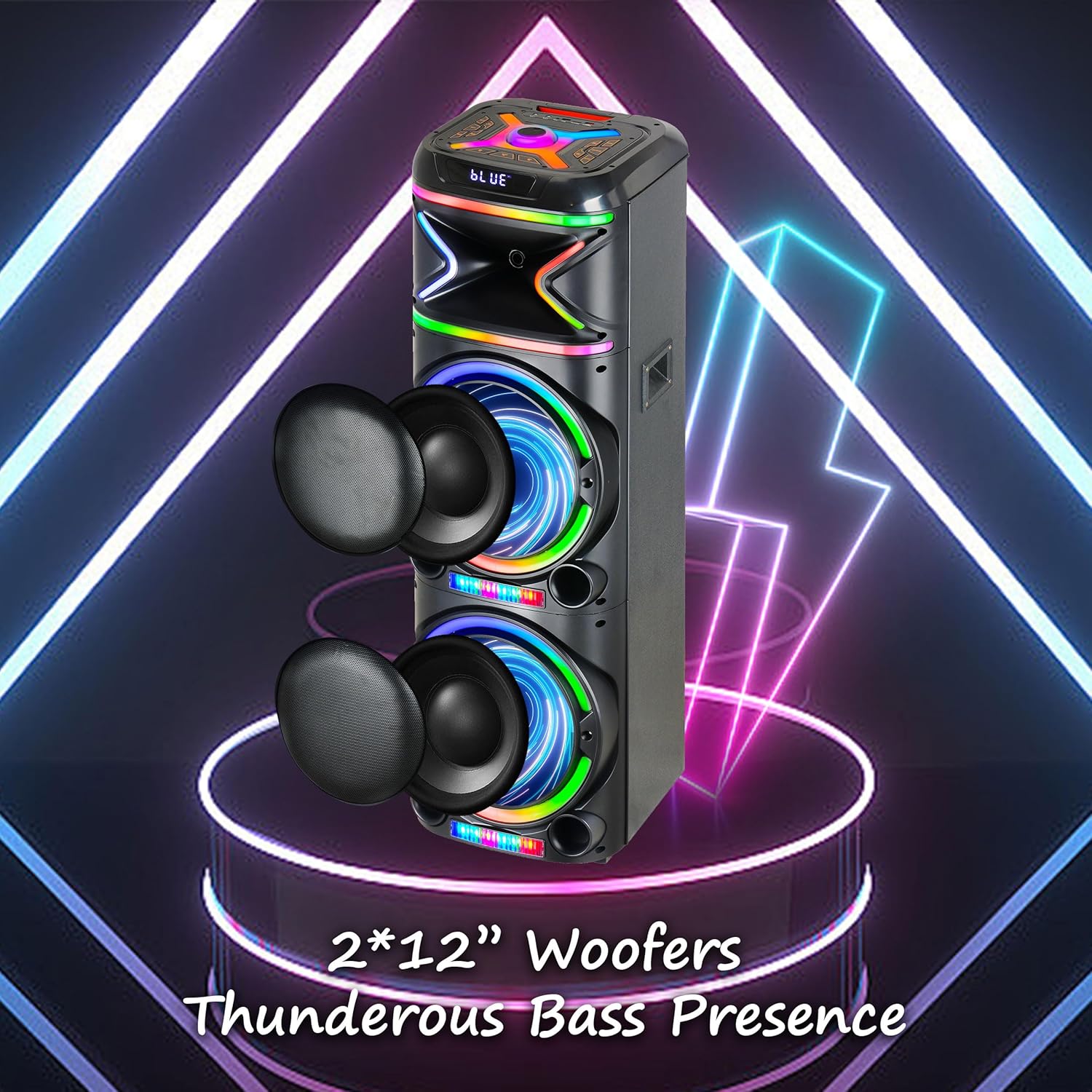
Зображення: Крупний план view emphasizing the two 12-inch woofers, responsible for the speaker's powerful bass and clear audio output.
2. Що входить до комплекту
Будь ласка, перевірте вміст упаковки, щоб переконатися, що всі елементи присутні:
- AL-212 Wireless Bluetooth Speaker
- Пульт дистанційного керування
- Дротовий мікрофон
- Адаптер живлення
- Посібник користувача (цей документ)
- Гарантійний талон

Image: Visual representation of the speaker's dimensions and the accessories included in the package: wireless microphone, remote control, and portable wheels.
3. Елементи керування та порти
Familiarize yourself with the control panel and various input/output ports located on the top and rear of the speaker.
Елементи керування верхньої панелі:

Зображення: Детальне view of the speaker's top control panel, showing buttons for various functions and input ports.

Image: A simplified diagram highlighting the key control buttons and their functions on the speaker's interface.
- Кнопка живлення: Вмикає або вимикає динамік.
- Кнопка режиму: Switches between Bluetooth, FM Radio, AUX, USB, and TF Card modes.
- Регулятор гучності: Регулює основну гучність.
- Ручка регулювання гучності мікрофона: Регулює гучність мікрофона.
- Ручка відлуння: Adjusts the microphone echo effect.
- Кнопка світлодіодного режиму: Changes the LED light patterns.
- Кнопка відтворення/паузи: Відтворює або призупиняє відтворення аудіо.
- Кнопки попереднього/наступного треку: Перехід до попереднього або наступного треку.
- Кнопка запису: Records microphone input to USB/TF card.
- Кнопка TWS: Ініціює справжнє бездротове стереосполучення.
Порти вводу / виводу:
- Порт USB: For USB drive playback and charging external devices.
- Слот для картки TF: Для відтворення з карт TF (MicroSD).
- Вхід AUX (3.5 мм): Connect external audio devices via an audio cable.
- Вхід для мікрофона (6.35 мм): Підключіть дротовий мікрофон.
- Guitar Input (6.35mm): Connect a guitar or other instrument.

Image: The AL-212 speaker displayed with icons representing its versatile connectivity options, including Bluetooth, USB, TF card, AUX, microphone, and remote control.
4. Налаштування
4.1 Заряджання динаміка
The AL-212 speaker is battery-powered. Before first use, fully charge the speaker using the provided power adapter. The charging indicator light will show the charging status and turn off when fully charged.
4.2 Початкове ввімкнення
Press and hold the Power button on the top panel to turn on the speaker. You will hear a power-on prompt, and the LED lights will illuminate.
5. Інструкція з експлуатації
5.1 Створення пари Bluetooth
- Turn on the speaker. It will automatically enter Bluetooth pairing mode, indicated by a flashing 'BLUE' on the display and an audible prompt.
- Увімкніть Bluetooth на своєму смартфоні, планшеті або іншому пристрої з підтримкою Bluetooth.
- шукати "AL-212" in the list of available devices and select it to connect.
- Once connected, you will hear a confirmation sound, and the 'BLUE' indicator will stop flashing.

Image: A smartphone screen showing the Bluetooth pairing menu, with the AL-212 speaker and a Bluetooth icon, illustrating the connection process.
5.2 Сполучення справжнього бездротового стерео (TWS)
To achieve a stereo sound experience, you can pair two AL-212 speakers together using the TWS function.
- Ensure both AL-212 speakers are powered on and not connected to any Bluetooth device.
- Press the 'TWS' button on one of the speakers. It will emit a sound indicating it's searching for another speaker.
- Два динаміки автоматично підключаться один до одного. Після підключення ви почуєте звуковий сигнал підтвердження.
- Now, connect your Bluetooth device to one of the paired speakers (the master speaker) as described in Section 5.1. Audio will play in stereo through both speakers.

Image: Two AL-212 speakers positioned outdoors, demonstrating the True Wireless Stereo (TWS) feature with a dotted line indicating the wireless connection between them.

Image: A simplified diagram showing two AL-212 speakers with a dotted line and 'TWS' label, illustrating the True Wireless Stereo connection.
5.3 Відтворення з USB/TF-картки
Insert a USB flash drive or TF (MicroSD) card into the respective port. The speaker will automatically switch to USB/TF mode and begin playing audio files. Use the Play/Pause and Previous/Next Track buttons to control playback.
5.4 Вхід AUX
Підключіть зовнішній аудіопристрій (наприклад, MP3-плеєр, ноутбук) до вхідного порту AUX за допомогою аудіокабелю 3.5 мм. Динамік автоматично перемкнеться в режим AUX. Керуйте відтворенням з підключеного пристрою.
5.5 Використання мікрофона
Connect the provided wired microphone to the Microphone Input port. Adjust the microphone volume using the 'Mic Vol' knob and add echo effects with the 'Echo' knob. You can sing along with music playing from any source.
5.6 FM-радіо
Press the 'Mode' button until you hear the FM radio prompt. Press the 'Play/Pause' button to auto-scan and save available FM stations. Use the Previous/Next Track buttons to switch between saved stations.
5.7 світлодіодних режимів освітлення
Press the 'LED Mode' button to cycle through different LED light patterns and effects. Press it repeatedly to find your preferred lighting display.

Image: The AL-212 speaker illuminated with its vibrant, multi-color LED lights, showcasing the dynamic light show feature.
5.8 Функції дистанційного керування
The included remote control provides convenient access to all speaker functions from a distance. Refer to the remote control diagram in the package for specific button layouts and functions.
6. Технічне обслуговування
- Прибирання: Використовуйте м’яку суху тканину для очищення зовнішньої поверхні динаміка. Не використовуйте абразивні засоби для чищення, віск або розчинники.
- Зберігання: Якщо динамік не використовується протягом тривалого часу, зберігайте його в прохолодному, сухому місці, подалі від прямих сонячних променів та екстремальних температур.
- Догляд за акумулятором: To prolong battery life, avoid fully discharging the speaker frequently. Charge it regularly, even if not in use.
- Вплив води: Цей динамік не є водонепроникним. Уникайте потрапляння на нього води або надмірної вологи.
7. Вирішення проблем
If you encounter issues with your AL-212 speaker, please refer to the following common problems and solutions:
| проблема | Можлива причина | Рішення |
|---|---|---|
| Динамік не вмикається. | Батарея низького заряду або розряджена. | Connect the speaker to the power adapter and charge it fully. |
| Немає звуку. | Volume is too low; Incorrect mode selected; Device not connected properly. | Increase the speaker volume. Ensure the correct input mode (Bluetooth, AUX, USB/TF) is selected. Reconnect your device. |
| Збій підключення Bluetooth. | Гучномовець не в режимі сполучення; Пристрій знаходиться занадто далеко; Перешкоди. | Ensure the speaker is in Bluetooth pairing mode. Move your device closer to the speaker. Avoid obstacles and other wireless devices. |
| Мікрофон не працює. | Microphone not plugged in correctly; Mic volume is low. | Ensure the microphone is securely plugged into the correct input. Increase the 'Mic Vol' knob. |
| Не вдалося підключити TWS. | Speakers are already connected to another device; Speakers are too far apart. | Disconnect both speakers from any Bluetooth devices. Ensure they are within close proximity (within 10 meters) during pairing. |
8. Технічні характеристики
| Особливість | Деталь |
|---|---|
| Назва моделі | AL-212-BK |
| Тип динаміка | НЧ динамік |
| Розмір динаміка | Подвійний 12 дюймів |
| Технологія підключення | Bluetooth, допоміжний, USB |
| Технологія бездротового зв'язку | Bluetooth |
| Діапазон Bluetooth | 33 футів (10 метр) |
| Режим аудіовиходу | Стерео (конфігурація каналів об'ємного звуку 2.0) |
| Особливості | LED Light, Built-In Microphone, USB Port, Display, FM Radio, Remote Control |
| Джерело живлення | Працює від батареї |
| Розміри продукту | 14.96" Г x 7.48" Ш x 14.96" В |
| Колір | чорний |
| Тип монтажу | Окремо стоячий, кріплення до розетки |
| Виробник | Top Tech Audio |
| UPC | 755824425927 |
9. Гарантія та підтримка
The TOPTECH AL-212 speaker comes with a Limited Warranty. Please refer to the included Warranty Card for detailed terms and conditions, including coverage period and claim procedures.
For technical support, troubleshooting assistance beyond this manual, or warranty inquiries, please contact TOPTECH customer service. Contact information can typically be found on the warranty card or the official TOPTECH webсайт.
Note: No official product videos from the seller were found to be embedded based on the provided criteria.


