1. Вступ
The MASTECH MS8236 is a versatile 2-in-1 digital multimeter and network cable track tester designed for electrical and network diagnostics. This device combines the functions of a digital multimeter for measuring electrical parameters with a network cable tester for verifying cable integrity and a tone generator for tracing wires. It is suitable for professional and DIY use in various applications.
2. Інформація про безпеку
Always adhere to basic safety precautions when using this device to prevent personal injury or damage to the meter or equipment under test. Read all instructions carefully before use.
- Не перевищуйте максимальні вхідні значення, зазначені для кожної функції.
- Будьте гранично обережні під час роботи з електричними колами під напругою.
- Перед вимірюваннями переконайтеся, що перемикач функцій знаходиться в правильному положенні.
- Не використовуйте глюкометр, якщо він виглядає пошкодженим або якщо вимірювальні дроти пошкоджені.
- Негайно замінюйте батарейки, коли з'являється індикатор низького заряду батарейок, щоб забезпечити точність показань.
- Avoid using the device in environments with high humidity, extreme temperatures, or explosive gases.
- Always disconnect power to the circuit before testing continuity or resistance.
3. Продукт закінчивсяview
The MASTECH MS8236 integrates a digital multimeter with a detachable cable tracker/tone generator. The main unit features a clear digital display, function selector dial, and input jacks. The cable tracker assists in identifying and tracing network and telephone lines.
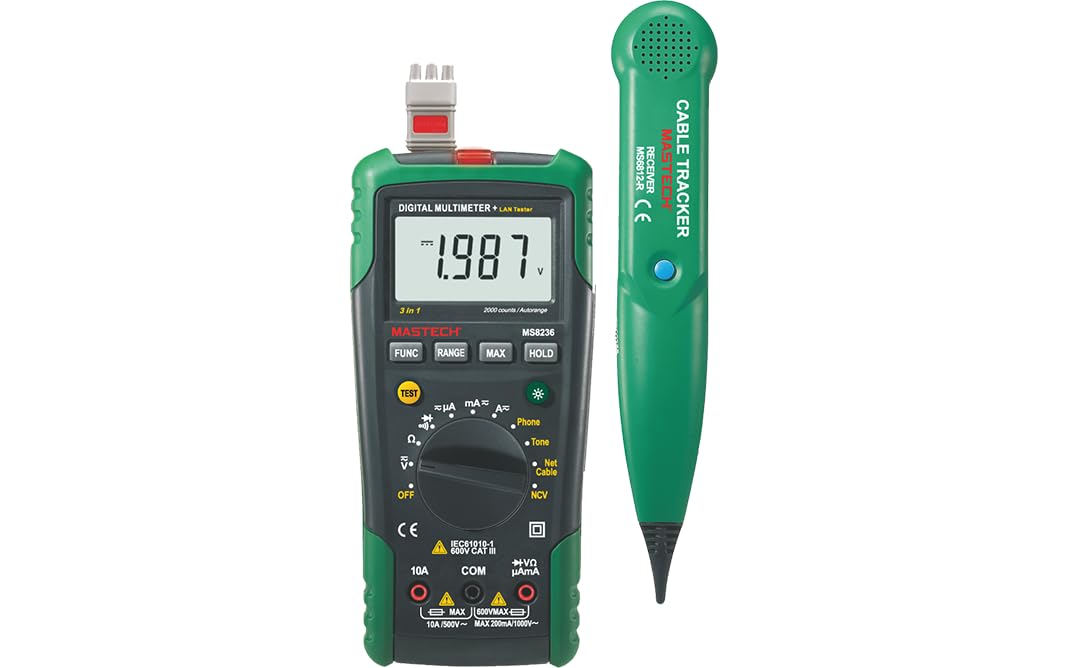
Figure 3.1: MASTECH MS8236 Digital Multimeter and Cable Tracker. The image shows the main multimeter unit on the left and the separate cable tracker unit on the right. Both are green and black.
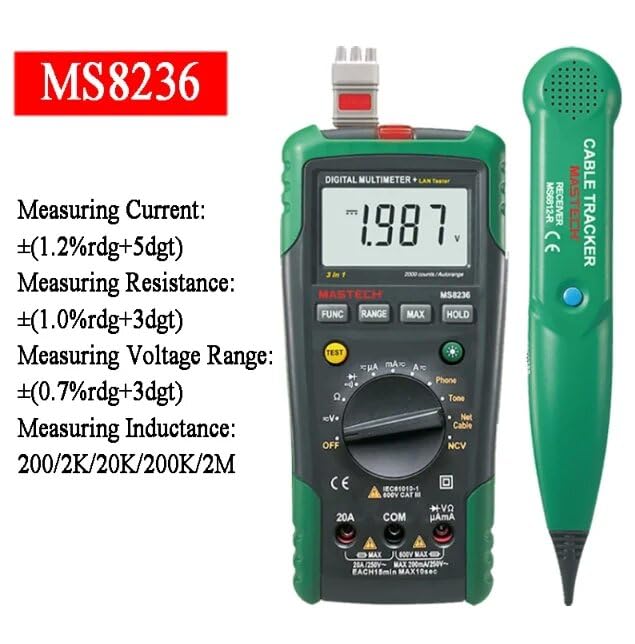
Figure 3.2: Close-up of the MASTECH MS8236 Multimeter Display and Controls. The display shows '1.987 V' and the function dial indicates various measurement modes including V, A, Ohm, Diode, Continuity, Phone, Net Cable, and NCV.
Ключові характеристики:
- Дисплей: 2000 лічильників
- Ranging: Auto & Manual
- Безконтактний випtage (NCV) детектор
- Діод відкритого об'ємуtage: 1.7 В.
- Continuity Buzzer: Activates below 70Ω
- Функція утримання даних
- Дисплей з низьким рівнем заряду акумулятора
- Підсвічування дисплея
- Автоматичне вимкнення
- Network Cable Check: Tests for open circuits, shorts, miss-wires, reversals, split pairs, and shield detection. Supports T568A, T568B, 10Base-T.
- Telephone Line Check: Identifies line states (Busy, Ringing, Clear) and continuity.
- Tone Function: For tracking cables and diagnosing break points.
4. Налаштування
4.1. Розпакування та перевірка
Carefully unpack the MS8236 and all accessories. Inspect the device for any signs of damage. If any damage is found, contact your supplier immediately.
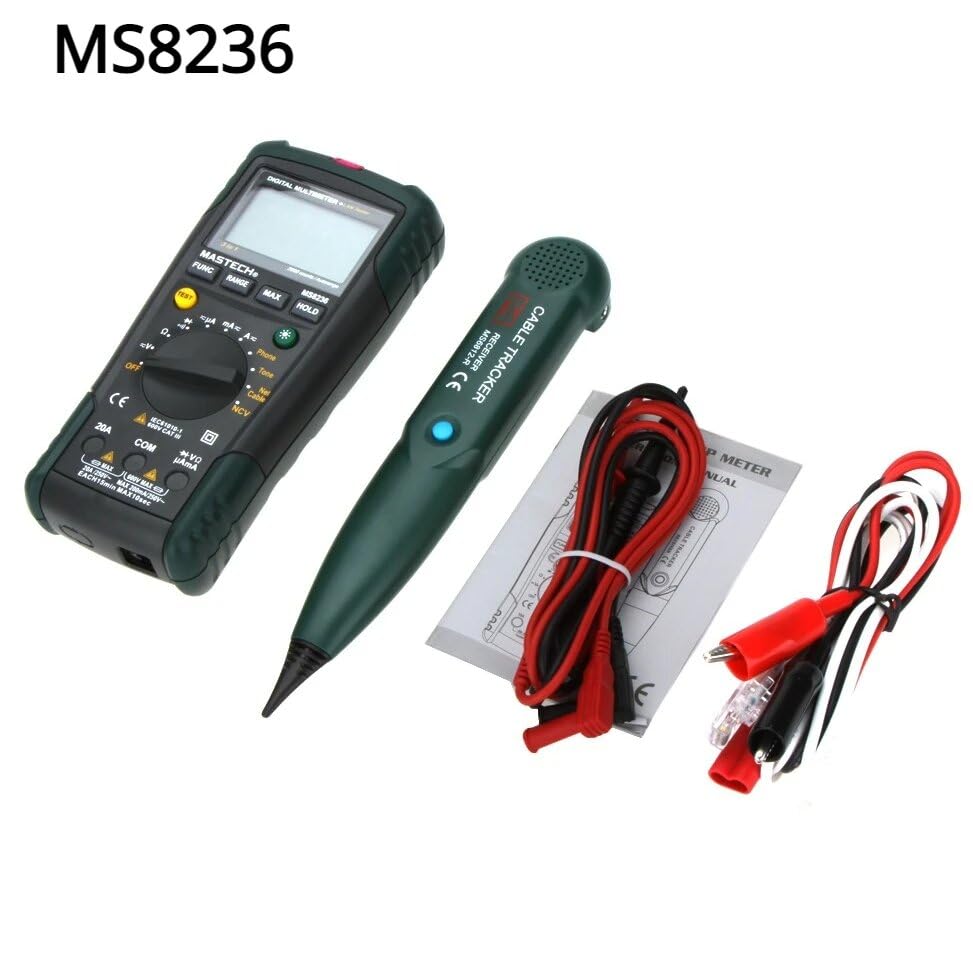
Figure 4.1: MASTECH MS8236 Kit Contents. The image displays the multimeter, cable tracker, red and black test leads, a network cable adapter, and a small instruction manual.
4.2. Встановлення батареї
The MS8236 requires 2 LR44 batteries, which are included. To install or replace batteries:
- Locate the battery compartment cover on the back of the multimeter unit.
- Використовуйте викрутку, щоб відкрити батарейний відсік.
- Insert the 2 LR44 batteries, observing the correct polarity (+/-).
- Надійно закрийте кришку відсіку для акумулятора.
5. Інструкція з експлуатації
5.1. Basic Multimeter Functions
Connect the test leads to the appropriate input jacks (COM for black lead, VΩmA for red lead for most measurements, or 20A for high current). Select the desired function using the rotary switch.
- томtage Measurement (DCV/ACV): Turn the rotary switch to the 'V' position. Select DC or AC voltage if applicable. Connect test leads in parallel to the circuit.
- Current Measurement (DCA/ACA): Turn the rotary switch to the 'A' position. Select DC or AC current. Connect test leads in series with the circuit. Ensure the correct input jack (mA or 20A) is used.
- Вимірювання опору (Ом): Turn the rotary switch to the 'Ω' position. Ensure the circuit is de-energized. Connect test leads across the component.
- Перевірка діодів (→|): Turn the rotary switch to the diode symbol. Connect the red lead to the anode and the black lead to the cathode of the diode.
- Тест безперервності ()))): Turn the rotary switch to the continuity symbol. The buzzer will sound if the resistance is below approximately 70Ω.
5.2. Network Cable Check
This function tests the integrity of network cables (RJ45). It can detect open circuits, shorts, miss-wires, reversals, split pairs, and shield detection for T568A, T568B, and 10Base-T standards.
- Turn the rotary switch to the 'Net Cable' position.
- Connect one end of the network cable to the RJ45 port on the main multimeter unit.
- Connect the other end of the network cable to the RJ45 port on the remote cable tracker unit.
- Observe the display for test results, which will indicate the cable status. The device also features a debug mode for detailed fault identification.
5.3. Telephone Line Check
This function allows for checking the state of a working telephone line and its continuity.
- Turn the rotary switch to the 'Phone' position.
- Connect the telephone line to the appropriate port on the main unit.
- The device will identify the state of the line as Busy, Ringing, or Clear. It can also judge the continuity of the telephone cables or wires.
5.4. Tone Function
The tone function is used with the cable tracker to trace cables and wires and diagnose break points.
- Turn the rotary switch to the 'Tone' position.
- Connect the test leads or RJ11/RJ45 plug to the cable you wish to trace.
- Use the remote cable tracker unit to follow the cable. The tracker will emit an audible tone when it detects the signal from the main unit, helping to locate the cable and identify breaks.
5.5. Безконтактний Voltage (NCV) Виявлення
Функція NCV дозволяє виявляти об'єм змінного струмуtage without direct contact with the conductor.
- Поверніть поворотний перемикач у положення «NCV».
- Move the top part of the multimeter near a live AC voltagе джерело.
- Пристрій сигналізуватиме про наявність змінного струмуtage through an audible alarm and/or visual indicator.
5.6. Додаткові функції
- Утримання даних: Натисніть кнопку «HOLD», щоб зафіксувати поточне значення на дисплеї. Натисніть ще раз, щоб відпустити.
- Підсвічування: Press the backlight button (often labeled with a light bulb symbol) to illuminate the display for better visibility in low-light conditions.
- Автоматичне вимкнення: Пристрій автоматично вимкнеться після певного періоду бездіяльності, щоб заощадити заряд батареї.
6. Технічне обслуговування
6.1. прибирання
Протріть корпус рекламоюamp тканиною та м’яким миючим засобом. Не використовуйте абразивні засоби або розчинники. Перед використанням переконайтеся, що пристрій повністю сухий.
6.2. Заміна батареї
When the low battery indicator appears on the display, replace the batteries as described in Section 4.2. Remove batteries if the device will not be used for an extended period.
7. Вирішення проблем
- Немає дисплея або тьмяне зображення: Перевірте встановлення батарейок та рівень заряду. За потреби замініть батарейки.
- Неправильні показники: Ensure test leads are properly connected and the correct function is selected. Verify the circuit is de-energized for resistance/continuity tests.
- Network cable test failure: Ensure both ends of the cable are securely connected to the main unit and remote. Check for physical damage to the cable or connectors.
- No tone from cable tracker: Verify the main unit is in 'Tone' mode and properly connected to the cable. Check the cable tracker's battery.
8. Технічні характеристики
The following table outlines the general and electrical specifications for the MASTECH MS8236.

Figure 8.1: MASTECH MS8236 Features and Specifications Table. This image provides detailed electrical specifications for DC Voltage, AC Voltage, DC Current, AC Current, and Resistance, including ranges, resolutions, and accuracies.
| Параметр | Діапазон | роздільна здатність | Точність |
|---|---|---|---|
| DC Voltage | 200mV/2V/20V/200V/600V | 0.1mV/1mV/10mV/100mV/1V | ±(0.5%+5) |
| AC Voltage | 200mV/2V/20V/200V/600V | 0.1mV/1mV/10mV/100mV/1V | ±(0.8%+5) |
| Постійний струм | 200µA/2000µA/20mA/200mA/2A/10A | 0.1µA/1µA/10µA/0.1mA/1mA/10mA | ±(1.2%+5) ±(2.0%+10) for 10A |
| Змінного струму | 200µA/2000µA/20mA/200mA/2A/10A | 0.1µA/1µA/10µA/0.1mA/1mA/10mA | ±(1.5%+5) ±(3.0%+10) for 10A |
| опір | 200Ω/2kΩ/20kΩ/200kΩ/2MΩ/20MΩ | 0.1Ω/1Ω/10Ω/100Ω/1kΩ/10kΩ | ±(1.0%+5) ±(1.5%+5) for 20MΩ |
| Діод відкритого об'ємуtage | 1.7 В | ||
| Звінок безперервності | <70Ω | ||
| Дисплей | 2000 відліків | ||
| Діапазон | Автоматичний і ручний | ||
| Безконтактний випtage Детектор | так | ||
| Автоматичне вимкнення | так | ||
| Утримання даних | так | ||
| Дисплей з низьким рівнем заряду акумулятора | так | ||
| Підсвічування дисплея | так | ||
| Джерело живлення | 2 батареї LR44 (у комплекті) | ||
| Розміри продукту | 16 х 9 х 5 см | ||
| Вага товару | 500 г | ||
| матеріал | Акрилонітрилбутадієнстирол (АБС) | ||
| Сертифікати | CE, RoHS | ||
9. Гарантія та підтримка
For warranty information and technical support, please refer to the documentation provided with your purchase or contact the seller or manufacturer directly. Specific warranty terms may vary by region and retailer.


