вступ
Thank you for choosing the Mastech MS8233D Digital Multimeter. This manual provides essential information for the safe and effective operation, maintenance, and troubleshooting of your device. Please read this manual thoroughly before use and keep it for future reference.
Інформація про безпеку
ПОПЕРЕДЖЕННЯ: Щоб уникнути ураження електричним струмом або травм, перед використанням цього виробу прочитайте та зрозумійте всю інформацію з техніки безпеки.
- Завжди переконайтеся, що мультиметр працює у правильному режимі та діапазоні, перш ніж проводити вимірювання.
- Не застосовуйте більше номінального об’ємуtage, as marked on the meter, between terminals or between any terminal and earth ground. The MS8233D has a Safety Rating of CATII 600V.
- Будьте обережні при роботі з обtagвище 30 В змінного струму RMS, 42 В пікового значення або 60 В постійного струму. Такий об'ємtagце небезпека ураження електричним струмом.
- Keep your fingers behind the probe barriers during measurements.
- Do not use the meter if it is damaged or if the case is open. Inspect the meter and test leads before use.
- Негайно замініть батарейку, коли з'явиться індикатор низького заряду батареї, щоб забезпечити точність показань.
- Не використовуйте лічильник у вибухонебезпечному середовищі з газами, парами або пилом.
Ключові характеристики
The Mastech MS8233D Digital Multimeter offers a range of functionalities for various electrical measurements:
- Дисплей: 2000 counts for precise readings.
- Діапазон: Auto and Manual Ranging capabilities.
- Випробування діодів: Features a Diode Open Voltage 1.5 В.
- Тест безперервності: Audible buzzer for resistance less than 60Ω.
- Утримання даних: Freezes the displayed reading for convenience.
- Автоматичне вимкнення: Зберігає час роботи батареї.
- Безконтактний Voltage Виявлення (NCV): Для ідентифікації проводів під напругою без прямого контакту.
- Максимальний розмір: Records the highest value measured.
- Підсвічування дисплея: Для видимості в умовах слабкого освітлення.
- Індикація низького рівня батареї: Показує, коли потрібна заміна батареї.
- Джерело живлення: Operates on 1x 9V 6F22 Battery.
- Сертифікати: Відповідає RoHS.
- Рейтинг безпеки: CATII 600 В.
Малюнок 1: Спереду view of the Mastech MS8233D Digital Multimeter, highlighting the display, rotary function switch, and input terminals.
Продукт закінченийview і компоненти
The MS8233D multimeter is designed for ease of use and durability. Familiarize yourself with its main parts:

Малюнок 2: Закінченоview of the MS8233D Digital Multimeter, illustrating its physical dimensions, power supply, and typical applications in domestic, industrial, and electronics settings.
- РК-дисплей: Відображає показники вимірювань, одиниці вимірювання та індикатори функцій.
- Функція поворотного перемикача: Used to select the desired measurement function (e.g., ACV, DCV, Resistance, Diode, Continuity, Temperature, NCV).
- Вхідні гнізда: Terminals for connecting test leads.
- COM роз'єм: Загальний (негативний) вхідний термінал для всіх вимірювань.
- Роз'єм VΩmA: Позитивна вхідна клема для обtage, resistance, diode, continuity, and small current measurements.
- Роз'єм 10A: Позитивний вхідний клемм для вимірювань високого струму (до 10 А).
- Функціональні кнопки: For features like Data Hold, Backlight, and Range selection.
Налаштування
Установка батареї
The MS8233D requires one 9V 6F22 battery for operation. To install or replace the battery:
- Ensure the multimeter is turned off and disconnect all test leads from the input terminals.
- Знайдіть кришку відсіку для батарейок на задній панелі глюкометра.
- Use a screwdriver to loosen the screw(s) on the battery cover and remove the cover.
- Connect the new 9V battery to the battery clips, observing the correct polarity.
- Вставте батарейку у відсік та закрийте кришку, закріпивши її гвинтом(ами).
Примітка: The meter includes a low battery indicator. Replace the battery promptly when this indicator appears to maintain measurement accuracy.
Інструкція з експлуатації
Before making any measurement, ensure the test leads are properly connected and the function switch is set to the desired range.
Вимірювання DC Voltagе (DCV)
- Insert the red test lead into the VΩmA jack and the black test lead into the COM jack.
- Set the rotary switch to the desired DCV range (e.g., 200mV, 2V, 20V, 200V, 600V). If unsure, start with the highest range or use auto-ranging if available.
- Підключіть вимірювальні щупи до компонента або кола, що вимірюватиметься, дотримуючись полярності.
- Прочитайте томtagзначення e на РК-дисплеї.
Вимірювання AC Voltagе (ACV)
- Insert the red test lead into the VΩmA jack and the black test lead into the COM jack.
- Set the rotary switch to the desired ACV range (e.g., 2V, 20V, 200V, 600V).
- Підключіть вимірювальні щупи до компонента або кола, що підлягає вимірюванню.
- Прочитайте томtagзначення e на РК-дисплеї.
Measuring DC/AC Current (DCA/ACA)
CAUTION: Never connect the meter in parallel to a voltagджерело струму під час вимірювання струму. Це може пошкодити вимірювач та коло.
- For currents up to 200mA, insert the red test lead into the VΩmA jack. For currents up to 10A, insert the red test lead into the 10A jack. Insert the black test lead into the COM jack.
- Set the rotary switch to the desired DC or AC current range (e.g., 200µA, 2000µA, 20mA, 200mA, 10A).
- Розімкнути коло, де потрібно виміряти струм, і з'єднати вимірювач послідовно з навантаженням.
- Прочитайте поточне значення на РК-дисплеї.
Вимірювання опору (Ом)
- Insert the red test lead into the VΩmA jack and the black test lead into the COM jack.
- Set the rotary switch to the desired Resistance range (e.g., 200Ω, 2kΩ, 20kΩ, 200kΩ, 2MΩ, 20MΩ).
- Перед вимірюванням опору переконайтеся, що коло або компонент знеструмлені.
- Підключіть вимірювальні щупи до компонента.
- Зчитайте значення опору на РК-дисплеї.
Діодний тест
- Insert the red test lead into the VΩmA jack and the black test lead into the COM jack.
- Set the rotary switch to the Diode symbol (usually shared with Continuity).
- Підключіть червоний щуп до анода, а чорний щуп до катода діода.
- На дисплеї відобразиться гучність у прямому напрямкуtagПадіння напруги. Поміняйте місцями щупи; на дисплеї має відображатися «OL» (розімкнутий контур), якщо діод справний.
Тест безперервності
- Insert the red test lead into the VΩmA jack and the black test lead into the COM jack.
- Set the rotary switch to the Continuity symbol (usually shared with Diode).
- Підключіть випробувальні щупи до кола або компонента.
- If the resistance is below approximately 60Ω, the buzzer will sound, indicating continuity. The display will also show the resistance value.
Безконтактний випtage (NCV) Виявлення
- Set the rotary switch to the NCV function.
- Move the top part of the meter (NCV sensor area) close to the conductor suspected of having AC voltage.
- The meter will emit an audible beep and the NCV indicator will light up if AC voltage виявлено.
Функція зберігання даних
Натисніть кнопку «HOLD», щоб зафіксувати поточне значення на дисплеї. Натисніть її ще раз, щоб зняти блокування та відновити вимірювання в реальному часі.
Функція підсвічування
Press the 'LIGHT' button to turn on the display backlight. Press it again to turn it off. The backlight may automatically turn off after a short period to conserve battery.
Технічне обслуговування
прибирання
Протріть корпус лічильника рекламоюamp тканиною та м’яким миючим засобом. Не використовуйте абразивні засоби або розчинники. Перед використанням переконайтеся, що глюкометр повністю сухий.
Заміна батареї
Refer to the 'Battery Installation' section under 'Setup' for instructions on replacing the 9V battery. Always replace the battery when the low battery indicator is displayed to ensure accurate readings and proper operation.
Заміна запобіжника
The MS8233D is equipped with internal fuses to protect against overcurrent. If the current measurement function stops working, the fuse may need replacement. Fuse replacement should only be performed by qualified personnel. Use only fuses of the specified type and rating (e.g., F200mA/250V for mA range, F10A/250V for 10A range).
Усунення несправностей
| проблема | Можлива причина | Рішення |
|---|---|---|
| Немає дисплея або дисплей тьмяний | Батарея розряджена або розряджена | Замініть акумулятор 9 В. |
| Неправильні показання | Неправильно вибрана функція/діапазон; погане підключення вимірювального дроту; низький заряд батареї | Verify function and range; check test lead connections; replace battery. |
| Вимірювання струму не працює | Перегорів запобіжник | Replace the appropriate fuse (refer to Maintenance section). |
| Відображається «OL» (перевантаження) | Вимірювання перевищує вибраний діапазон; розрив кола (на предмет цілісності/опору) | Виберіть вищий діапазон; перевірте наявність розриву ланцюга. |
| Немає звукового сигналу про безперервність | Resistance too high; open circuit | Check for continuity; ensure resistance is below 60Ω. |
Технічні характеристики
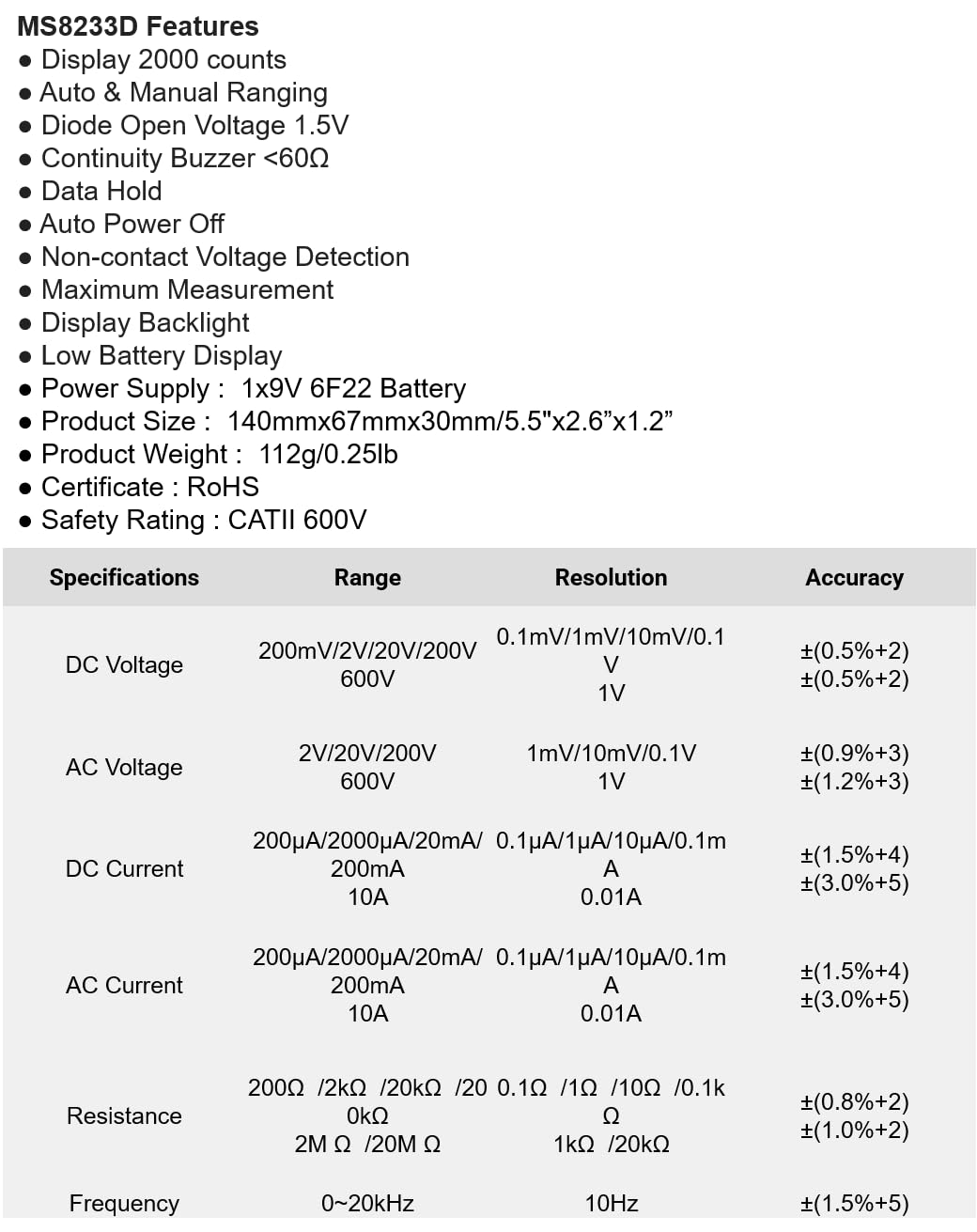
The following table details the measurement ranges, resolutions, and accuracies for the Mastech MS8233D Digital Multimeter:

Figure 3: Comprehensive specifications for the MS8233D, outlining measurement capabilities and precision.
| Особливість | Специфікація |
|---|---|
| Дисплей | 2000 відліків |
| DC Voltage | 200 мВ / 2 В / 20 В / 200 В / 600 В |
| AC Voltage | 2В / 20В / 200В / 600В |
| Постійний струм | 200µA / 2000µA / 20mA / 200mA / 10A |
| Змінного струму | 200µA / 2000µA / 20mA / 200mA / 10A |
| опір | 200 Ом / 2 кОм / 20 кОм / 200 кОм / 2 МОм / 20 МОм |
| Частота | 0-20 кГц |
| Діод відкритого об'ємуtage | 1.5 В |
| Звінок безперервності | <60Ω |
| Джерело живлення | 1x 9V 6F22 Battery |
| Розміри продукту | 140 мм x 67 мм x 30 мм (5.5 дюйма x 2.6 дюйма x 1.2 дюйма) |
| Вага продукту | 112 г (0.25 фунта) |
| Рейтинг безпеки | CATII 600V |
| Сертифікати | CE, RoHS |
Гарантія та підтримка
Щоб отримати інформацію про гарантію та технічну підтримку, зверніться до документації, що надається разом із покупкою, або зверніться безпосередньо до продавця/виробника. Зберігайте чек про покупку як підтвердження покупки для будь-яких гарантійних претензій.


