вступ
Thank you for choosing the VTech ES2051 Digital Cordless Phone. This manual provides comprehensive instructions for setting up, operating, and maintaining your new phone system. The ES2051 is designed for ease of use, featuring a digital answering machine, call blocking capabilities, volume amplification, and an antibacterial plastic construction for enhanced hygiene.
Please read this manual thoroughly before using your phone to ensure proper operation and to take full advantagе його особливостей.
Інформація про безпеку
Завжди дотримуйтесь основних запобіжних заходів під час використання цього виробу, щоб зменшити ризик пожежі, ураження електричним струмом та травмування людей.
- Не використовуйте цей виріб поблизу води або коли ви вологі.
- Avoid using the phone during a thunderstorm. There may be a remote risk of electric shock from lightning.
- Не використовуйте цей виріб для повідомлення про витоки газу поблизу місця витоку.
- Use only the power adapter and batteries provided with this product.
- Do not dispose of batteries in a fire. They may explode. Check with local codes for special disposal instructions.
- Перед чищенням від’єднайте виріб від розетки. Не використовуйте рідкі або аерозольні очисники. Використовуйте рекламуamp серветка для чищення.
Вміст упаковки
Переконайтеся, що всі предмети присутні у вашій упаковці:
- Main Base Unit with Digital Answering Machine
- Cordless Handset(s) (typically two for this model)
- Handset Charger(s) (for additional handsets)
- Адаптер(и) живлення
- Шнур телефонної лінії
- NiMH AAA Rechargeable Batteries (4 included)
- Посібник користувача (цей документ)
Налаштування
1. Підключення базового блоку
- Plug the small end of the power adapter into the power jack on the back of the base unit.
- Підключіть більший штекер адаптера живлення до розетки, яка не керується вимикачем.
- Підключіть один кінець телефонного шнура до телефонного роз'єму на задній панелі базового блоку.
- Підключіть інший кінець телефонного шнура до телефонної розетки.
2. Installing and Charging Batteries
- Відкрийте кришку батарейного відсіку на задній панелі слухавки.
- Insert the supplied NiMH AAA batteries, observing the correct polarity (+ and -).
- Закрийте кришку батарейного відсіку.
- Place the handset in the base unit or charger to charge. The handset will beep, indicating it is charging.
- Allow the handset to charge for at least 16 hours before initial use. For optimal battery performance, keep the handset in the charger when not in use.

Image: The VTech ES2051 Digital Cordless Phone system, showing the main base with one handset and a charging cradle for the second handset, ready for setup.
Інструкція з експлуатації
Здійснення та отримання дзвінків
- Щоб зателефонувати: Прес ТАЛК / ФЛЕШ or СПІКЕР, а потім наберіть номер телефону.
- Щоб відповісти на дзвінок: Прес ТАЛК / ФЛЕШ or СПІКЕР коли дзвонить телефон.
- Щоб завершити дзвінок: Прес ВИМК./ОЧИСТИТИ або помістіть трубку назад у базу/зарядний пристрій.
Цифровий автовідповідач
The integrated digital answering machine can record up to 30 minutes of messages. It automatically answers calls when you are unavailable.
- Відтворення повідомлень: Прес ГРАТИ/СТОП на базовому блоці.
- Видалення повідомлень: Прес ВИДАЛИТИ під час відтворення повідомлення.
- Recording an Announcement: Follow the instructions in the full manual for custom outgoing message recording.

Image: A woman interacting with the VTech ES2051 phone, highlighting the digital message counter on the base unit, which indicates the number of new messages.
Блокувальник викликів
The selective call blocking feature allows you to block up to 100 unwanted numbers, preventing them from ringing your phone.
- Щоб заблокувати номер: During a call or from the Caller ID log, press the БЛОК Дзвонення button (often represented by a specific icon) and follow the on-screen prompts to add the number to the blacklist.
- Керування заблокованими номерами: Access the call block list through the handset menu to review or remove blocked numbers.

Image: A visual representation of the call blocker feature, showing a family in a kitchen setting with an icon indicating unwanted calls are being blocked.
Обсяг Ampлібератор
Обсяг amplification feature enhances incoming sounds and voices, improving clarity and volume in the handset earpiece. This is particularly useful for users with hearing impairments or those who prefer a louder audio experience.
- Activating/Adjusting: Під час дзвінка натисніть відповідну кнопку ЗБІЛЬШЕННЯ ОБ'ЄМУ button (often indicated by a speaker icon with a plus sign) or use the volume up/down keys to increase the earpiece volume.
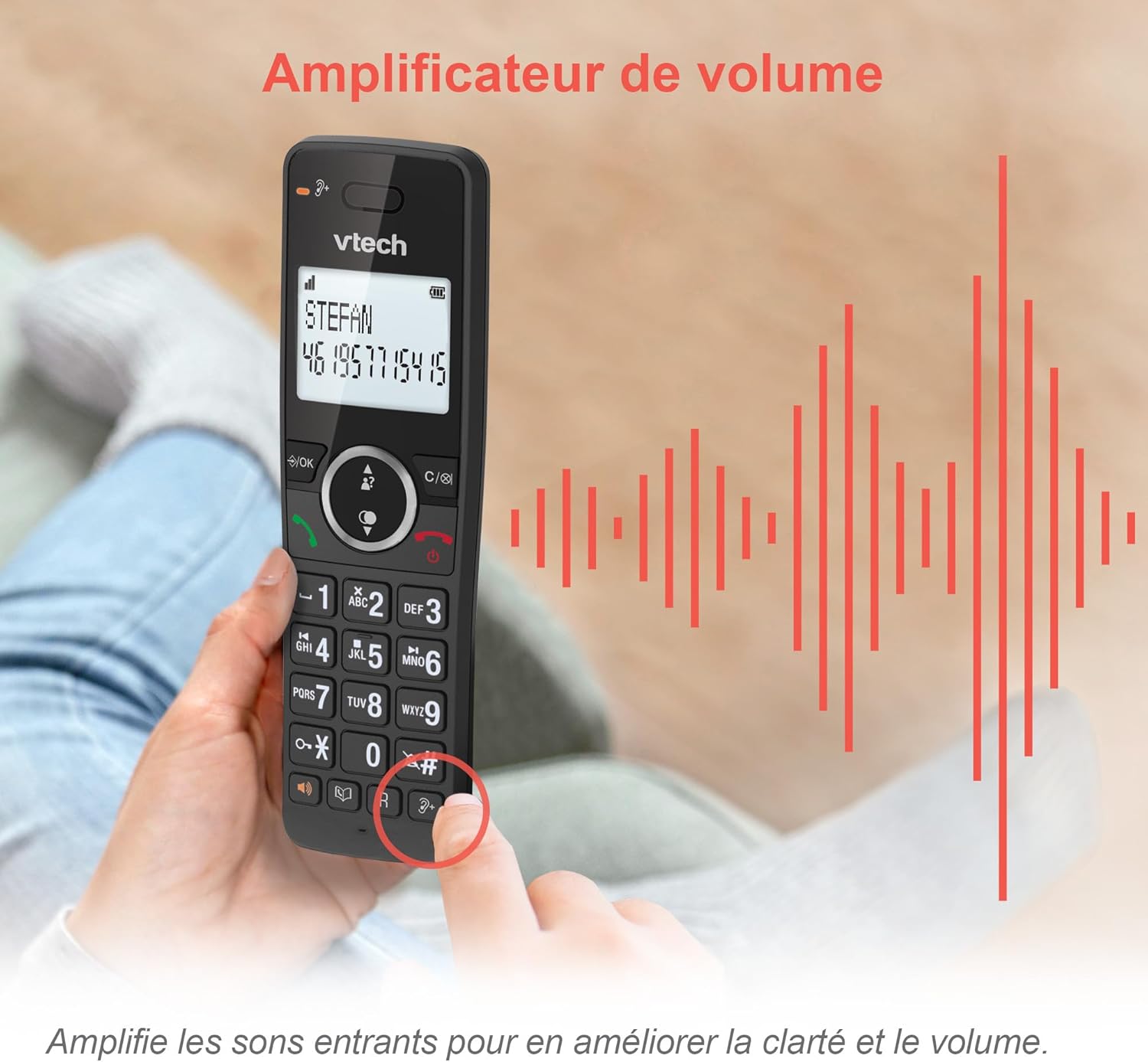
Image: A hand holding the VTech ES2051 handset, with graphic sound waves emanating from the earpiece, illustrating the volume ampфункція ліфізації.
Conference Function
The conference function allows multiple users to participate in a single conversation. You can set up a three-way conference call with two internal callers (handsets) and one external caller.
- Ініціювання конференц-дзвінка: Refer to the detailed instructions in the full manual for specific steps on how to add a third party to an ongoing call.

Image: Three people engaged in a conversation, visually representing the three-way conference call capability of the VTech ES2051 phone system.
Функція домофона
The intercom feature allows you to communicate between handsets within your home without using the landline. This is useful for calling family members in different rooms.
- Використання інтеркому: Натисніть ІНТЕРКОМ button (if available) or access the intercom function through the handset menu, then select the desired handset to call.
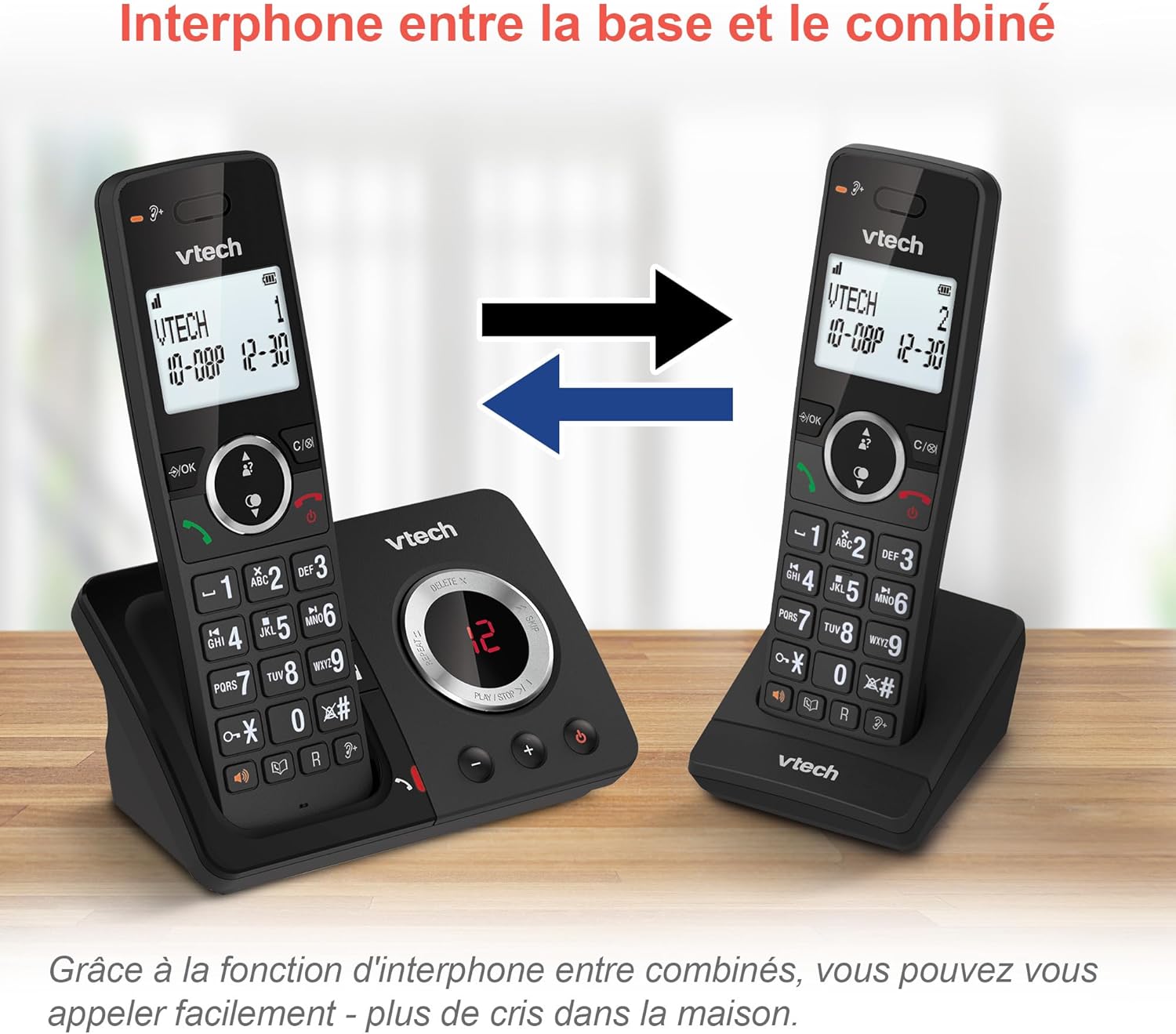
Image: A diagram showing two VTech ES2051 handsets with arrows indicating communication between them, illustrating the intercom feature.
Phonebook and Call Features
The phone includes a 100-name and number phonebook, 8 speed dial keys, and a backlit screen and keypad for easy visibility.
- Зберігання контактів: Navigate to the phonebook menu to add, edit, or delete contacts.
- Швидкий набір: Assign frequently called numbers to the 8 speed dial keys for quick access.
- Журнал ідентифікації абонента: Review the last 20 incoming calls with Caller ID information.
- Повторний набір: Access the list of the last 10 dialed numbers for quick redialing.

Зображення: Колаж із зображеньasing various VTech ES2051 phone features, including the 100-entry phonebook, call display, redial function, and an 18-hour talk time battery life indicator.
Режим ECO
The ECO mode automatically adjusts and minimizes the radio frequency power based on the distance between the handset and the base unit. This feature helps conserve energy and reduce power consumption.
Технічне обслуговування
Чищення телефону
The VTech ES2051 is made with antibacterial plastic and features a seamless, easy-to-clean design. To clean your phone:
- Unplug the base unit from the wall outlet and telephone line.
- Протирайте поверхні телефону м’якою тканиноюamp тканина. Не використовуйте рідкі чи аерозольні миючі засоби.
- Ensure the phone is completely dry before plugging it back in.
Догляд за акумулятором
- Use only the supplied rechargeable NiMH AAA batteries.
- Не кидайте батареї у вогонь.
- Якщо телефон не використовуватиметься протягом тривалого часу, вийміть батарейки, щоб запобігти витіканню.
Усунення несправностей
If you experience any issues with your VTech ES2051 phone, try the following troubleshooting steps:
| проблема | Рішення |
|---|---|
| Немає гудка | Ensure the telephone line cord is securely plugged into both the base unit and the wall jack. Check if other phones on the same line are working. |
| Не вдається здійснювати або приймати дзвінки | Check the power connection to the base unit. Ensure the handset batteries are charged. If using a DSL service, you may need a DSL filter. |
| Handset displays "Out of Range" or "No Power at Base" | Move the handset closer to the base unit. Ensure the base unit's power adapter is securely plugged in. |
| Автовідповідач не записує повідомлення | Check if the answering machine is turned ON. Ensure there is enough recording time available (max 30 minutes). |
| Погана якість звуку або шум | Перемістіть трубку ближче до бази. Уникайте розміщення бази поблизу інших електронних пристроїв (наприклад, мікрохвильових печей, Wi-Fi маршрутизаторів), які можуть спричиняти перешкоди. |
If the problem persists after trying these steps, please refer to the VTech support webсайт або зверніться до служби підтримки клієнтів для отримання додаткової допомоги.
Технічні характеристики
| Особливість | Деталь |
|---|---|
| Бренд | VTech |
| Номер моделі | ES2051 |
| Колір | чорний |
| Тип телефону | Бездротові |
| Тип автовідповідача | цифровий |
| Час запису автовідповідача | До 30 хвилин |
| Сумісні пристрої | Landlines, Answering Machine |
| Акумулятори | 4 AAA - included |
| Склад батареї | NiMH |
| Джерело живлення | Працює від батареї |
| матеріал | Plastic (Antibacterial) |
| Тип дозвону | Проста клавіатура |
| Розміри предмета (Д x Ш x В) | 18.3 х 13.5 х 11 сантиметрів |
| Країна походження | Китай |
Гарантія та підтримка
VTech products are manufactured to high-quality standards. For information regarding warranty coverage, please refer to the warranty card included with your product or visit the official VTech webсайт для вашого регіону.
For technical support, frequently asked questions, or to download the full user manual, please visit the VTech support section online or contact their customer service helpline. Contact details can typically be found on the VTech webсайті або на упаковці продукту.


