1. Вступ
Welcome to the user manual for your Natec FURY SHOBO SH4F RGB MIDI TOWER PC Case. This guide provides essential information for the proper assembly, installation, operation, and maintenance of your new computer chassis. Please read this manual thoroughly before beginning installation to ensure optimal performance and longevity of your components.
2. Правила безпеки
- Always disconnect the power supply from the wall outlet before installing or removing any components inside the PC case.
- Обережно поводьтеся з компонентами, щоб уникнути пошкодження від електростатичного розряду (ESD). Рекомендується використовувати антистатичний браслет.
- Keep small parts, such as screws, away from children.
- Забезпечте належну вентиляцію навколо корпусу ПК, щоб запобігти перегріву.
- Do not expose the case to extreme temperatures, humidity, or direct sunlight.
- Уникайте розміщення важких предметів зверху корпусу.
3. Вміст упаковки
Будь ласка, перевірте наявність усіх предметів у вашій упаковці:
- Natec FURY SHOBO SH4F RGB MIDI TOWER PC Case
- Коробка з аксесуарами (містить гвинти, кабельні стяжки та інші дрібні деталі)
- Посібник користувача (цей документ)
4. Продукт закінчивсяview
The Natec FURY SHOBO SH4F is a MIDI TOWER PC case designed for gaming and general-purpose computing, offering ample space for components and efficient cooling. It features a modern design with RGB lighting.
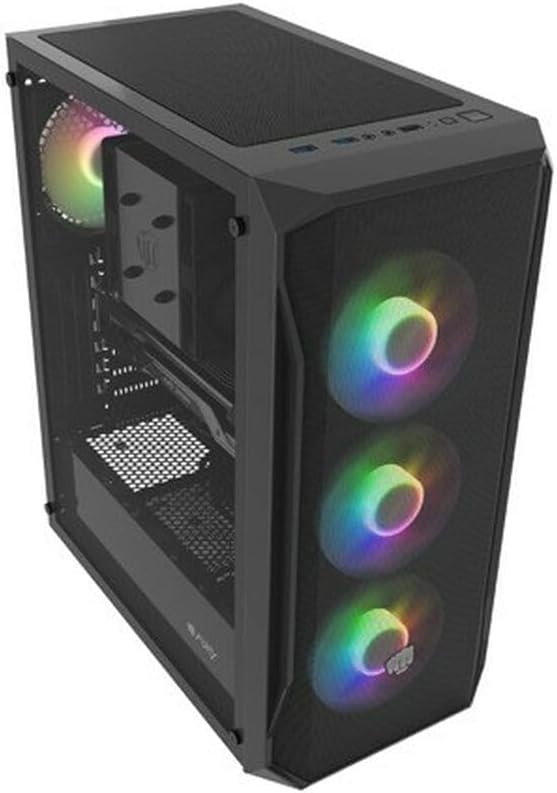
Рисунок 4.1: Кутовий view of the Natec FURY SHOBO SH4F RGB MIDI TOWER PC Case, showcasing its black metal and tempered glass construction. The front panel features a mesh design with three illuminated RGB fans, and a single RGB fan is visible at the rear exhaust. The top panel includes I/O ports and a mesh filter.
4.1 Передня панель вводу/виводу
- Кнопка живлення
- Кнопка скидання
- Порт USB 2.0 (x1)
- Аудіороз'єми (навушники/мікрофон)
- RGB Control Button (if applicable)
4.2 Внутрішнє планування
The case supports Micro ATX and Mini ATX motherboards and features a bottom-mounted power supply bay. It includes dedicated areas for storage drives and efficient cable management.
5. Налаштування та встановлення компонентів
Follow these steps to install your PC components into the FURY SHOBO SH4F case.
5.1 Підготовка справи
- Поставте корпус на рівну, стійку поверхню.
- Remove the side panels. Typically, the tempered glass side panel is secured with thumbscrews.
5.2 Встановлення материнської плати
- Встановіть панель вводу/виводу (якщо вона не встановлена попередньо на материнській платі) у задній отвір корпусу.
- Ensure the motherboard standoffs are correctly aligned for your Micro ATX or Mini ATX motherboard. Adjust or install additional standoffs if necessary.
- Обережно встановіть материнську плату на опори, суміщаючи отвори для гвинтів.
- Закріпіть материнську плату за допомогою наданих гвинтів. Не перетягуйте.
5.3 Встановлення блоку живлення
- Locate the power supply bay at the bottom rear of the case.
- Slide your power supply unit (PSU) into the bay from the rear of the case, ensuring the fan faces downwards (if the case has a bottom vent) or upwards.
- Закріпіть блок живлення гвинтами ззаду корпусу.
5.4 Встановлення накопичувача
Refer to your case's specific drive bay design for 2.5" SSDs and 3.5" HDDs. Typically, these involve trays or direct screw mounting.
5.5 Встановлення плати розширення (наприклад, відеокарти)
- Зніміть необхідні кришки слотів PCI-E із задньої панелі корпусу.
- Вставте карту розширення у відповідний слот PCI-E на материнській платі.
- Secure the card with a screw or the case's retention mechanism.
5.6 Організація кабелів
Використовуйте вирізи та точки кріплення за лотком материнської плати для прокладання та закріплення кабелів. Це покращує потік повітря та естетику.
5.7 Connecting RGB Fans
The pre-installed RGB fans typically connect to a central RGB controller or directly to your motherboard's RGB headers. Consult your motherboard manual for specific RGB header locations and software control. Ensure all fan power cables are connected to appropriate fan headers on the motherboard or a fan hub.
6. Експлуатація корпусу ПК
6.1 Увімкнення/вимкнення
After all components are installed and cables connected, plug your power supply into a wall outlet. Press the power button on the front I/O panel to turn on your system. To turn off, use the operating system's shutdown function or press and hold the power button for several seconds.
6.2 Керування RGB-підсвічуванням
If your case features an RGB control button on the front I/O panel, press it to cycle through various lighting modes and colors. For advanced customization, use your motherboard's RGB software (e.g., ASUS Aura Sync, MSI Mystic Light, Gigabyte RGB Fusion) if the fans are connected to compatible headers.
7. Технічне обслуговування
Регулярне технічне обслуговування допомагає забезпечити оптимальну продуктивність і подовжує термін служби компонентів вашого ПК.
7.1 Очищення пилового фільтра
The FURY SHOBO SH4F case includes dust filters (e.g., on the top and bottom). Periodically remove and clean these filters by rinsing them with water and allowing them to dry completely before re-installing. This prevents dust buildup and maintains airflow.
7.2 Зовнішнє очищення
Протріть зовнішню частину корпусу м’якою тканиноюamp cloth. Avoid abrasive cleaners or solvents that could damage the finish or tempered glass.
8. Вирішення проблем
Якщо у вас виникли проблеми, зверніться до наступних поширених кроків усунення несправностей:
- Немає живлення: Ensure the power supply is properly connected to the wall outlet and the motherboard. Check all internal power cables (24-pin ATX, 8-pin CPU, GPU power). Verify the power button cable is correctly connected to the motherboard's front panel header.
- Вентилятори не обертаються: Check if fan power cables are securely connected to the motherboard or fan hub. Ensure the power supply is functioning.
- RGB-освітлення не працює: Verify RGB cables are correctly connected to the RGB controller or motherboard header. If using a button, try cycling through modes. If using software, ensure it's installed and configured correctly.
- Перегрів: Ensure all fans are spinning correctly and oriented for proper airflow (intake/exhaust). Clean dust filters and internal components. Verify CPU cooler and GPU cooler are properly installed.
9. Технічні характеристики
| Бренд | Natec |
| Серія | SH4F |
| Номер моделі | NFO-2154 |
| Тип корпусу | Міді Тауер |
| Сумісність материнської плати | Micro ATX, Mini ATX |
| Колір | чорний |
| матеріал | метал |
| Розміри продукту (ДxШxВ) | 19.69 x 16.93 x 9.84 дюйми (50 x 43 x 25 см) |
| Вага товару | 9.46 фунта (4.3 кілограма) |
| Тип кріплення блоку живлення | Нижнє кріплення |
| Спосіб охолодження | повітря |
| Кількість портів USB 2.0 | 1 |
10. Гарантія та підтримка
Natec products are manufactured to high-quality standards. For information regarding warranty terms and conditions, please refer to the warranty card included with your product or visit the official Natec website. If you encounter any issues not covered in this manual or require further assistance, please contact Natec customer support through their official channels.
Виробник: Natec


