1. Вступ
The BRINKS Keyless Entry Electronic Deadbolt Lock provides enhanced security and convenient keyless access for your home or office. This deadbolt features a programmable keypad, allowing for multiple user codes, and includes traditional key access as a backup. Designed for durability and ease of use, it integrates advanced security features to protect against common entry methods.

Ключові особливості:
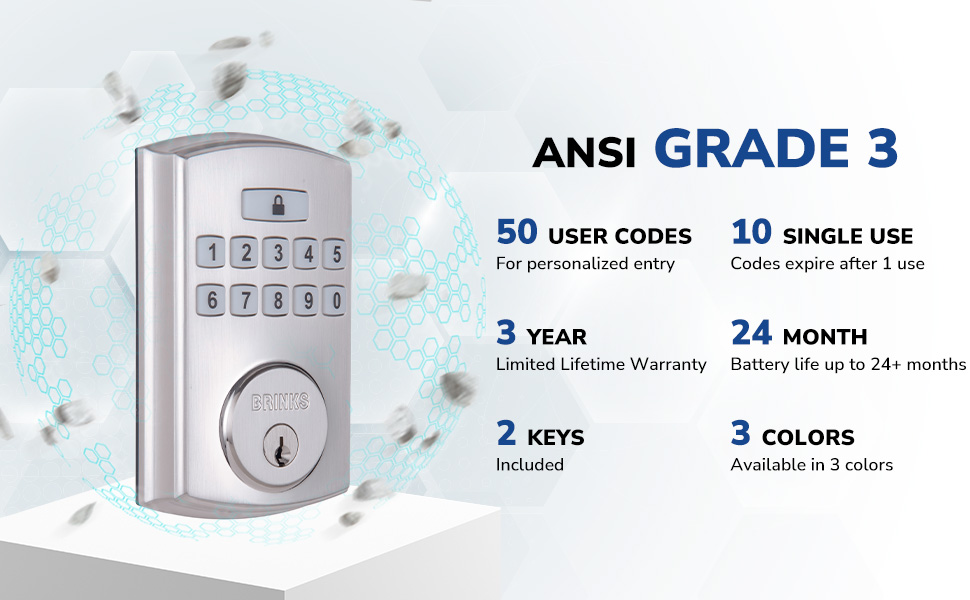
- До 50 настроюваних кодів користувачів.
- Optional auto-locking functionality.
- One-touch locking for quick security.
- PRO-GUARD security features: anti-tamper alarm, anti-pry shield, pick/bump/drill resistant keyway.
- Hardened steel anti-saw pin in the deadbolt latch.

2. Інформація про безпеку
Please read and understand all instructions before installing and using this product. Failure to follow these instructions may result in product malfunction, property damage, or injury.
- Не намагайтеся розбирати або модифікувати замок поза межами наданих інструкцій.
- Використовуйте лише батарейки зазначеного типу (4 лужні батарейки типу АА). Не змішуйте старі та нові батарейки або батарейки різних типів.
- Зберігайте ключі в безпечному місці подалі від замка.
- Ensure all components are securely fastened during installation.
- Avoid exposing the lock to excessive moisture or extreme temperatures.
3. Вміст упаковки
Verify that all parts are present before beginning installation. If any parts are missing or damaged, contact BRINKS customer support.
- Зовнішня клавіатура в зборі
- Внутрішня збірка
- Засувний засув
- Монтажна пластина
- Ударна пластина
- Арматурна плита
- Монтажні гвинти
- 2 Traditional Keys
- Інсталяційне обладнання

4. Монтаж
Installation of the BRINKS Electronic Deadbolt Lock is designed to be straightforward, requiring only a Phillips head screwdriver. No additional wiring is necessary.
4.1 Перевірки перед інсталяцією
- Товщина дверей: Переконайтеся, що товщина ваших дверей становить від 35 мм (1.375 дюйма) до 44 мм (1.75 дюйма).
- Назад: The deadbolt is compatible with both 2-3/8 inches (60mm) and 2-3/4 inches (70mm) backsets. Adjust the latch as needed.
- Вручення дверей: The lock is universally compatible with both right-handed and left-handed doors.

4.2 Етапи встановлення
- Встановити засув: Insert the deadbolt latch into the door edge. Ensure the 'UP' arrow on the latch is pointing upwards. Secure with screws.
- Встановлення зовнішньої клавіатури: Feed the cable from the exterior keypad through the hole in the door. Position the keypad flush against the door.
- Встановити монтажну пластину: Route the cable through the mounting plate. Secure the mounting plate to the door using the provided screws, ensuring it is aligned correctly.
- Підключіть кабелі: Підключіть кабель від зовнішньої клавіатури до внутрішнього блоку.
- Монтаж внутрішньої збірки: Mount the interior assembly onto the mounting plate, ensuring the thumb turn operates smoothly. Secure with screws.
- Встановлення запірної пластини: Install the strike plate and reinforcement plate on the door frame, aligning them with the deadbolt latch.
- Вставте батареї: Open the battery cover on the interior assembly and insert 4 AA alkaline batteries. Close the cover.

5. Налаштування та програмування
After installation, you will need to program your lock with a Master Code and user codes.
5.1 Встановлення головного коду
The Master Code is used to program the lock and should be kept confidential. It cannot be used to unlock the door.
- Press the 'Program' button on the interior assembly.
- Введіть новий 4-8-значний головний код.
- Press the 'Lock' button.
- Re-enter the new Master Code.
- Press the 'Lock' button to confirm.
5.2 Adding User Codes
You can program up to 50 unique user codes for regular entry.
- Натисніть кнопку «Програма».
- Введіть свій головний код.
- Press the 'Lock' button.
- Введіть новий 4-8-значний код користувача.
- Press the 'Lock' button to confirm.
5.3 Adding Single-Use Codes
Up to 10 single-use codes can be created, which expire after one use.
- Натисніть кнопку «Програма».
- Введіть свій головний код.
- Press the 'Lock' button twice.
- Enter a new 4-8 digit Single-Use Code.
- Press the 'Lock' button to confirm.
5.4 Setting Auto-Locking Feature
The auto-locking feature automatically locks the deadbolt after a set period (1-99 seconds) once unlocked.
- Натисніть кнопку «Програма».
- Введіть свій головний код.
- Press the 'Lock' button three times.
- Enter the desired auto-lock delay in seconds (e.g., '10' for 10 seconds).
- Press the 'Lock' button to confirm.

6. Інструкція з експлуатації
6.1 Розблокування дверей
- Використання коду користувача: Enter your 4-8 digit user code on the keypad. The deadbolt will retract, and the door can be opened.
- Використання ключа: Insert the traditional key into the keyway and turn to unlock.
6.2 Блокування дверей
- Блокування одним дотиком: Press the 'Lock' button on the keypad. The deadbolt will extend.
- Автоматичне блокування: If enabled, the deadbolt will automatically extend after the set delay once the door is closed and unlocked.
- Використання ключа: Insert the traditional key into the keyway and turn to lock.
The keypad is illuminated for visibility in low-light conditions.
7. Технічне обслуговування
7.1 Заміна батареї
The lock is powered by 4 AA alkaline batteries. A low battery indicator will alert you when batteries need replacement. Battery life is approximately 24 months or longer.
- Зніміть кришку батарейного відсіку на внутрішньому блоці.
- Вийміть старі батареї.
- Вставте 4 нові лужні батарейки типу АА, дотримуючись правильної полярності.
- Замініть кришку акумулятора.
7.2 Очищення
Очистіть зовнішню частину замка м’якою губкоюamp тканиною. Уникайте використання абразивних засобів для чищення або розчинників, оскільки вони можуть пошкодити покриття або електронні компоненти.
8. Вирішення проблем
- Замок не відповідає: Check battery levels. Replace batteries if necessary. Ensure the cable connection between the exterior and interior assemblies is secure.
- Коди, що не працюють: Verify that the correct Master Code is being used for programming. Re-enter user codes carefully. Ensure the lock is not in programming mode when attempting to unlock.
- Засув не висувається/не втягується повністю: Check for obstructions in the door frame or latch area. Ensure the deadbolt latch is installed correctly and aligned with the strike plate.
- Keypad not illuminating: Перевірте рівень заряду батареї.
9. Технічні характеристики
| Особливість | Специфікація |
|---|---|
| Назва моделі | 4390-122 |
| Тип замка | Дедлайт |
| матеріал | Нікель |
| Колір | Satin Nickel (other finishes available) |
| Розміри (Д x Ш x В) | 7.87 x 3.54 x 5.51 дюймів |
| Вага товару | 2.94 фунта |
| Коди користувачів | До 50 |
| Single-Use Codes | До 10 |
| Auto-Locking Delay | 1-99 seconds (customizable) |
| Джерело живлення | 4 лужних батарей AA (не входять в комплект) |
| Термін служби батареї | 24+ місяці |
| Рейтинг безпеки | ANSI клас 3 |
| Особливості | Anti-Bump, Anti-Tamper Alarm, Anti-Pry Shield, Illuminated Keypad |
10. Гарантія та підтримка
10.1 Інформація про гарантію
This BRINKS Electronic Deadbolt Lock comes with a 3-річна обмежена довічна гарантія. Please refer to the warranty card included with your product for full terms and conditions. The warranty covers defects in material and workmanship under normal use.
10.2 Підтримка клієнтів
For technical assistance, troubleshooting, or warranty claims, please contact BRINKS customer support. Contact information can typically be found on the BRINKS official webсайті або на упаковці продукту.


