вступ
Дякуємо за покупкуasing the SHARP XL-B530 Micro Component System. This system is designed to provide high-quality audio playback from various sources, including Bluetooth wireless streaming, CD, USB, AM/FM radio, and auxiliary input. This manual provides detailed instructions for setting up, operating, and maintaining your new audio system to ensure optimal performance and longevity.
Важлива інформація з безпеки
- Перед використанням уважно прочитайте всі інструкції.
- Збережіть цей посібник для подальшого використання.
- Не піддавайте пристрій впливу дощу або вологи.
- Забезпечте належну вентиляцію навколо пристрою. Не блокуйте вентиляційні отвори.
- Не розміщуйте пристрій поблизу джерел тепла, таких як радіатори, обігрівачі, печі чи інші прилади (включаючи ampліфікатори), які виробляють тепло.
- Захищайте шнур живлення від наступання або защемлення.
- Використовуйте лише насадки/аксесуари, зазначені виробником.
- Відключайте цей пристрій від мережі під час грози або якщо він не використовується протягом тривалого часу.
- Звертайтеся до кваліфікованого сервісного персоналу.
Вміст упаковки
Будь ласка, перевірте, чи всі наступні предмети входять до вашої упаковки:
- Main Unit (Micro Component System)
- Speaker Units (x2)
- Пульт дистанційного керування
- Шнур живлення
- FM антена
- AM Рамкова антена
- Посібник користувача (цей документ)
Продукт закінченийview
Familiarize yourself with the components and controls of your SHARP XL-B530 system.
Main Unit and Speakers

Загалом view of the SHARP XL-B530 Micro Component System, including the main unit, two speakers, and the remote control.
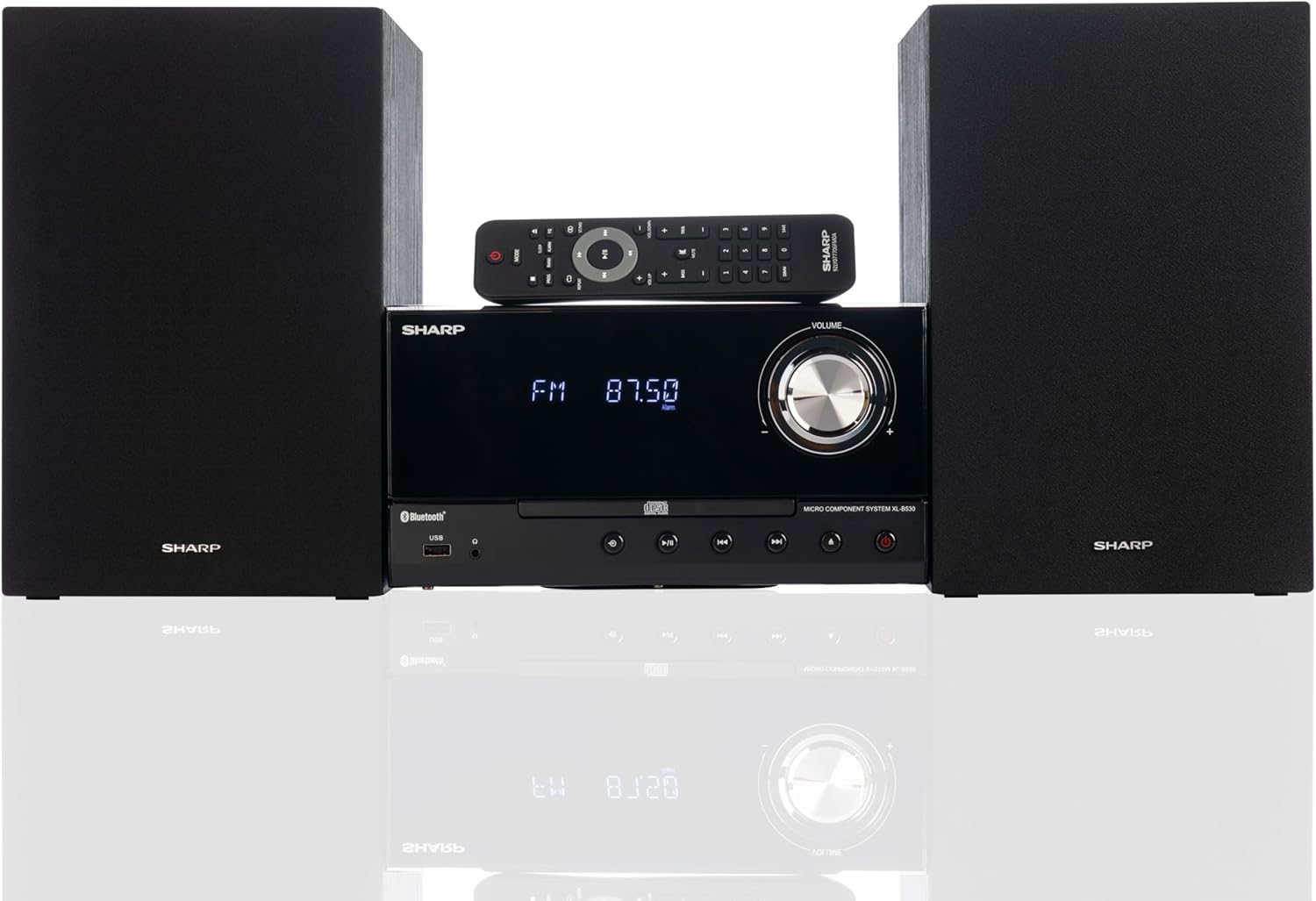
Front panel of the main unit, showing the LCD display, volume knob, CD tray, and control buttons.
Підключення задньої панелі

The rear panel of the main unit, featuring speaker terminals, FM antenna input, AM antenna input, and auxiliary input ports.
Пульт дистанційного керування
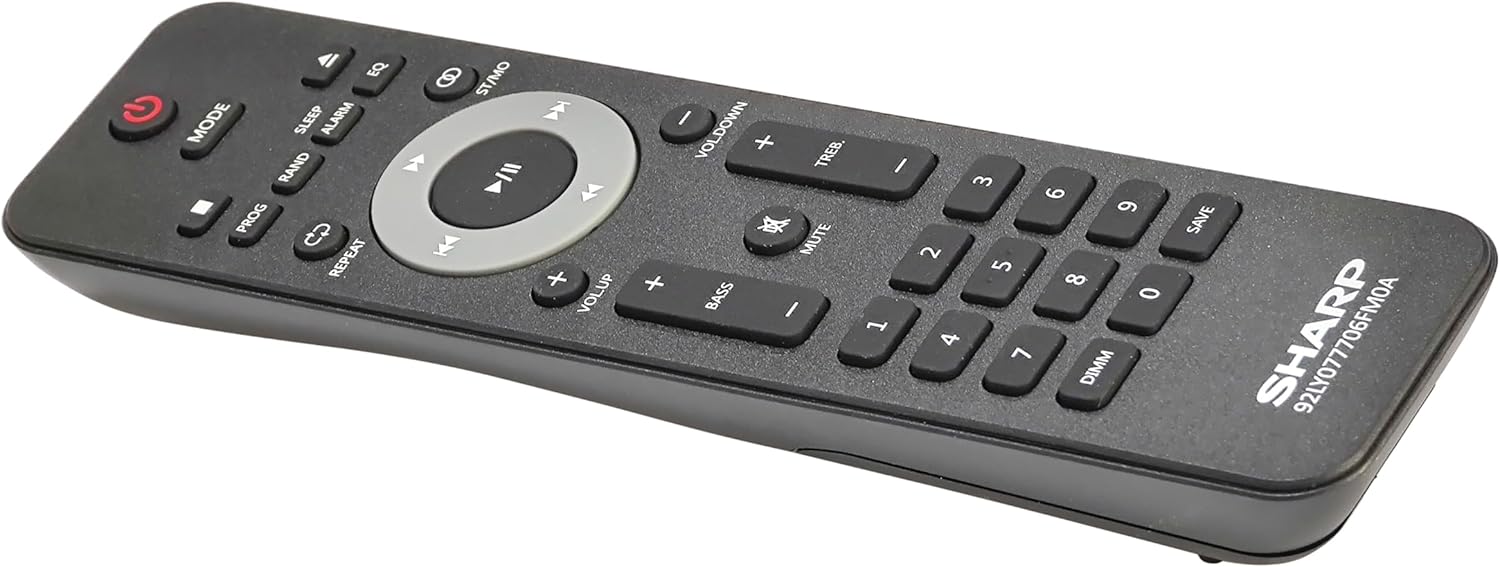
Детальний view of the remote control, showing various function buttons for power, mode, playback, volume, and sound adjustments.
Налаштування
Follow these steps to set up your micro component system.
1. Підключення динаміка
- Identify the left and right speaker cables.
- Connect the red (+) wire from each speaker to the red (+) terminal on the main unit's rear panel.
- Connect the black (-) wire from each speaker to the black (-) terminal on the main unit's rear panel.
- Ensure a secure connection for both speakers.
2. Підключення антени
- FM антена: Connect the supplied FM wire antenna to the FM antenna jack on the rear panel. Extend the wire fully for best reception.
- AM антена: Assemble the AM loop antenna and connect its wires to the AM antenna terminals on the rear panel. Rotate the antenna for optimal AM reception.
3. Підключення живлення
- Ensure all other connections are made.
- Підключіть шнур живлення до роз'єму AC IN на задній панелі головного пристрою.
- Insert the other end of the power cord into a wall outlet.
Інструкція з експлуатації
This section details how to use the various functions of your SHARP XL-B530 system.
Увімкнення/вимкнення живлення
- Натисніть ПОТУЖНІСТЬ кнопку на головному пристрої або пульті дистанційного керування, щоб увімкнути або вимкнути систему.
Вибір джерела
- Натисніть РЕЖИМ button on the main unit or remote control repeatedly to cycle through available sources: CD, Bluetooth, USB, FM, AM, AUX.
Відтворення компакт-дисків
- Натисніть РЕЖИМ кнопку, щоб вибрати режим «CD».
- Натисніть ВІДКРИТИ/ЗАКРИТИ кнопку, щоб відкрити лоток для компакт-дисків.
- Place a CD (CD/MP3/WMA/CD-R/CD-RW) with the label side up into the tray.
- Натисніть ВІДКРИТИ/ЗАКРИТИ знову натисніть кнопку, щоб закрити лоток. Відтворення розпочнеться автоматично.
- використання ВІДТВОРЕННЯ/ПАУЗА, СТІЙ, ПРОПУСТИТИ (вперед/назад), та ПОШУК кнопки для керування.
Bluetooth-парування
- Натисніть РЕЖИМ button to select 'Bluetooth' mode. The display will show 'BT' and flash, indicating it's ready for pairing.
- На вашому пристрої Bluetooth (смартфоні, планшеті тощо) увімкніть Bluetooth та виконайте пошук доступних пристроїв.
- Select 'SHARP XL-B530' from the list.
- Once paired, the display will stop flashing and show 'BT CONNECTED'. You can now stream audio from your device.
Відтворення через USB
- Вставте USB-флеш-накопичувач у USB-порт на передній панелі.
- Натисніть РЕЖИМ кнопку, щоб вибрати режим «USB».
- Система автоматично виявить і почне відтворювати сумісний аудіозапис files (MP3/WMA).
- Use playback controls similar to CD mode.
AM/FM радіо

The SHARP XL-B530 system displaying an FM radio frequency, highlighting its digital tuner capabilities.
- Натисніть РЕЖИМ button to select 'FM' or 'AM' mode.
- Авто сканування: Натисніть і утримуйте ВІДТВОРЕННЯ/ПАУЗА кнопку для автоматичного сканування та збереження доступних станцій.
- Ручна настройка: Використовуйте ПРОПУСТИТИ buttons to manually tune to desired frequencies.
- Попередньо встановлені станції: Use the number buttons on the remote to directly select saved preset stations.
Volume and Sound Adjustment

A close-up of one of the SHARP XL-B530 speakers, illustrating the adjustable bass and treble sound output.
- обсяг: Обертайте ОБ'ЄМ ручку на головному пристрої або скористайтеся VOL + / VOL- кнопки на пульті дистанційного керування.
- НЧ/ВЧ: Використовуйте BASS+ / BASS- і TREB+ / TREB- buttons on the remote control to adjust sound characteristics.
- Гучність: Натисніть ГРУЧНІСТЬ button on the remote to enhance bass and treble at low volumes.
- EQ: Натисніть EQ кнопку на пульті дистанційного керування для перемикання між попередньо встановленими режимами еквалайзера.
Технічне обслуговування
Proper care will ensure the longevity of your system.
- Прибирання: Use a soft, dry cloth to clean the exterior of the unit. For stubborn stains, dampЗлегка протріть тканину водою. Не використовуйте абразивні засоби для чищення або розчинники.
- Догляд за CD: Тримайте компакт-диски за краї. Протирайте брудні компакт-диски м’якою тканиною без ворсу, рухаючись від центру до країв.
- Вентиляція: Переконайтеся, що вентиляційні отвори не заблоковані пилом або сміттям.
- Зберігання: Якщо пристрій зберігатиметься протягом тривалого часу, від’єднайте його від розетки та зберігайте у прохолодному сухому місці.
Усунення несправностей
If you encounter issues with your system, refer to the following common problems and solutions.
| проблема | Можлива причина | Рішення |
|---|---|---|
| Немає живлення | Шнур живлення не підключено; розетка неактивна | Переконайтеся, що шнур живлення надійно підключений; спробуйте іншу розетку |
| Ні звуку | Занадто низька гучність; Динаміки не підключені; Вибрано неправильне джерело | Збільште гучність; Перевірте підключення динаміків; Виберіть правильне джерело вхідного сигналу |
| Компакт-диск не відтворюється | CD inserted incorrectly; CD is dirty or scratched; Incorrect mode | Insert CD correctly (label side up); Clean or replace CD; Select CD mode |
| Bluetooth не з’єднується | Bluetooth mode not selected; Device too far; Device already paired to another unit | Виберіть режим Bluetooth; перемістіть пристрій ближче; від’єднайтеся від інших пристроїв і спробуйте ще раз |
| Поганий радіоприйом | Antenna not connected or positioned poorly; Interference | Connect and adjust antenna position; Move unit away from other electronic devices |
| Пульт не працює | Batteries are dead or inserted incorrectly; Obstruction between remote and unit | Replace batteries, check polarity; Remove any obstructions; Ensure remote is pointed at the unit's sensor |
Технічні характеристики
| Особливість | Специфікація |
|---|---|
| Номер моделі | XL-B530(BK) |
| Вихідна потужність | 200 Вт Макс. (100 Вт RMS) |
| Підключення | Bluetooth, USB, Aux Input |
| Сумісність дисків | CD, CD-R/RW, MP3, WMA |
| тюнер | AM/FM Stereo Digital Tuner (50 station presets) |
| Тип динаміка | Стерео |
| Розміри продукту (Д x Ш x В) | 25 x 11 x 9.6 дюймів |
| Вага товару | 18 фунта |
| Колір | Чорний дуб |
Гарантія та підтримка
For warranty information and technical support, please refer to the warranty card included with your product or visit the official SHARP webсайт. Зберігайте чек про покупку як підтвердження покупки для будь-яких гарантійних претензій.
For further assistance, you may contact SHARP customer service through their official channels.


