1. Вступ
Thank you for choosing the VIMTAG Light Bulb Security Camera Model 847. This device is designed to provide reliable surveillance for your home, offering 2.5K/4MP high-definition video, pan/tilt functionality, night vision, two-way audio, and smart detection features. This manual will guide you through the setup, operation, and maintenance of your camera to ensure optimal performance.
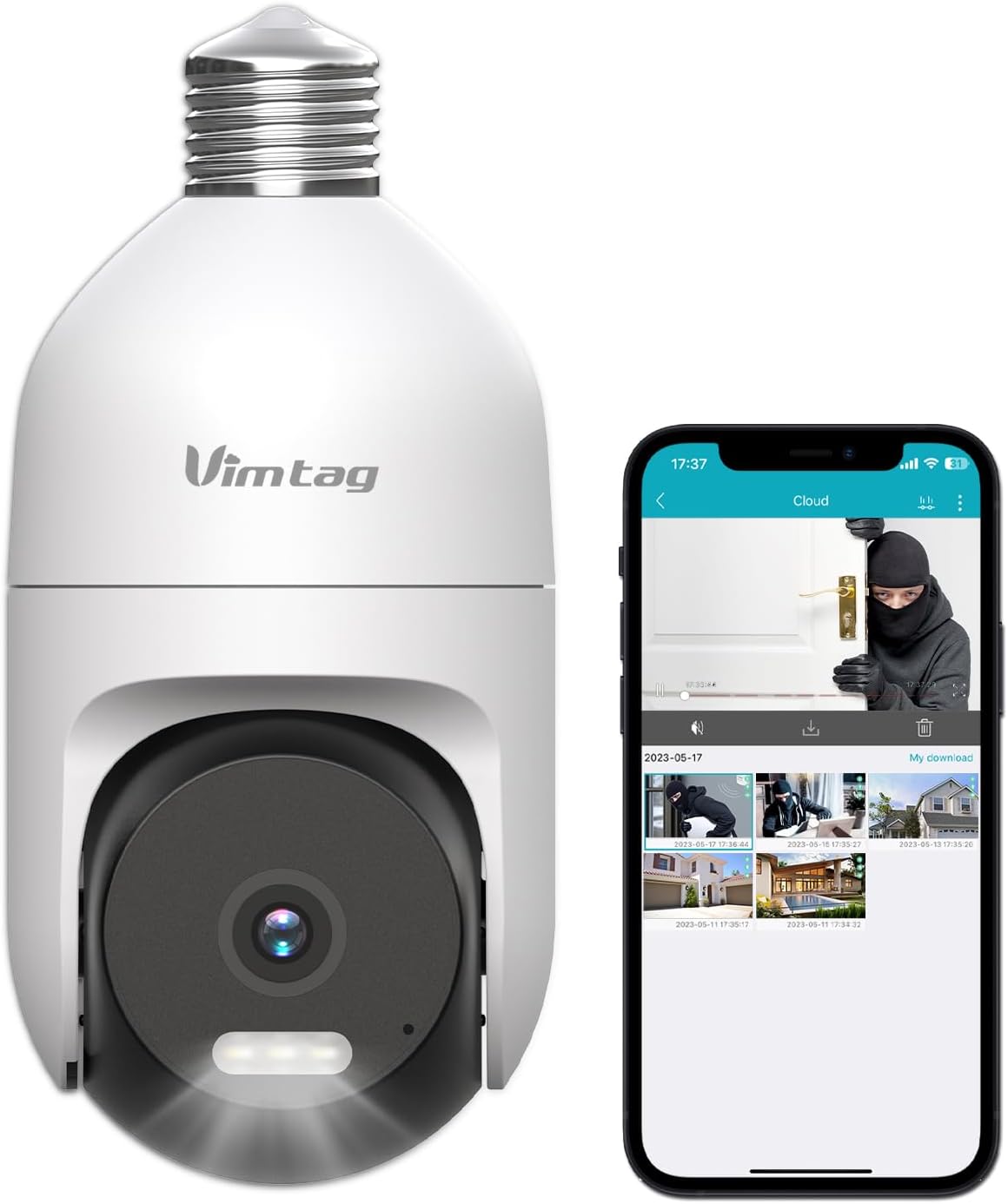
Image: The VIMTAG Light Bulb Security Camera Model 847, shown alongside a smartphone displaying its live feed.
2. Інформація про безпеку
- Ensure the power is off before installing or removing the camera from a light socket.
- Install the camera in a standard E27/E26 light bulb socket.
- Не піддавайте камеру впливу екстремальних температур або вологості, що перевищують її робочий діапазон.
- Тримайте камеру подалі від сильних магнітних полів.
- Не намагайтеся розбирати або ремонтувати камеру самостійно. Зверніться до служби підтримки клієнтів за допомогою.
- This camera is rated IP66 for weather resistance, suitable for outdoor use, but avoid submerging it in water.
3. Вміст упаковки
The VIMTAG Light Bulb Security Camera package includes:
- VIMTAG Light Bulb Security Camera (Model 847)
- Інструкція з експлуатації (цей документ)
Note: An SD card for local storage is not included and must be purchased separately if desired.
4. Продукт закінчивсяview
The VIMTAG Light Bulb Security Camera features a compact design that fits into a standard light bulb socket. Key components include:
- Об'єктив камери: Captures 2.5K/4MP video.
- Інфрачервоні (ІЧ) світлодіоди: Для чорно-білого нічного бачення.
- У центрі уваги: Provides color night vision and acts as a deterrent.
- Мікрофон: Для аудіовходу під час двосторонньої розмови та виявлення звуку.
- Доповідач: For audio output during two-way talk and siren alarms.
- Слот для карти Micro SD: For local video storage (supports up to 512GB).
- Кнопка скидання: Used for factory reset (usually a small pinhole).
- E27/E26 Base: Standard light bulb screw-in base for power and mounting.
5. Налаштування
5.1 Фізичне встановлення
- Вимкнення живлення: Ensure the power to the light socket is turned off at the circuit breaker before installation.
- Вкручування: Carefully screw the VIMTAG Light Bulb Camera into a standard E27/E26 light bulb socket. Ensure it is securely fastened.
- Увімкнення: Відновіть живлення розетки освітлювача. Камера увімкнеться та розпочне послідовність запуску.

Image: Illustration of screwing the camera into a light bulb socket.
5.2 Завантаження програми та створення облікового запису
- Завантажити додаток: шукати "Vimtag" in your smartphone's app store (iOS App Store or Google Play Store) and download the official VIMTAG додаток
- Реєстрація облікового запису: Open the app and follow the on-screen instructions to register a new account using your email address or phone number.

Image: A smartphone screen showing the VIMTAG app icon, indicating the app download step.
5.3 Сполучення камери та підключення Wi-Fi
- Додати пристрій: In the VIMTAG app, tap the "+" icon (usually in the top right or center) to add a new device.
- Виберіть тип камери: Choose "Light Bulb Camera" from the list of device types.
- Дотримуйтесь підказок у додатку: The app will guide you through connecting the camera to your 2.4GHz Wi-Fi network. This typically involves scanning a QR code generated by the app with the camera lens or listening for an audio prompt.
- Підтвердження підключення: Once connected, the camera will indicate successful pairing (e.g., a voice prompt or LED indicator change), and its live feed will appear in the app.

Image: A smartphone screen showing the process of adding a new device, specifically selecting the light bulb camera.

Image: A smartphone displaying the live video feed from the VIMTAG camera after successful setup.
6. Робота з камерою
6.1 Живий View та керування панорамуванням/нахилом
Once connected, open the VIMTAG app and select your camera to view the live feed. Use the on-screen controls to pan (horizontal 355°) and tilt (vertical 100°) the camera lens to adjust the viewing angle. The camera offers 8x digital zoom for closer inspection.

Image: Multiple devices (phone, tablet, laptop, desktop) displaying the live feed from the VIMTAG camera, illustrating multi-terminal viewінж.
6.2 Двосторонній аудіозв'язок
The camera features a built-in microphone and speaker. Tap the microphone icon in the app to speak through the camera, and listen to audio from the camera's location. This allows for real-time communication with visitors or to deter intruders.

Image: A person speaking into a phone to communicate with a delivery person at the door via the VIMTAG camera's two-way audio.
6.3 Режими нічного бачення
The camera supports two night vision modes:
- ІЧ-нічне бачення: Defaults to black and white infrared vision in low light conditions.
- Color Night Vision with Spotlight: When the spotlight mode is activated (manually or via motion detection settings), the camera will switch to full-color night vision.
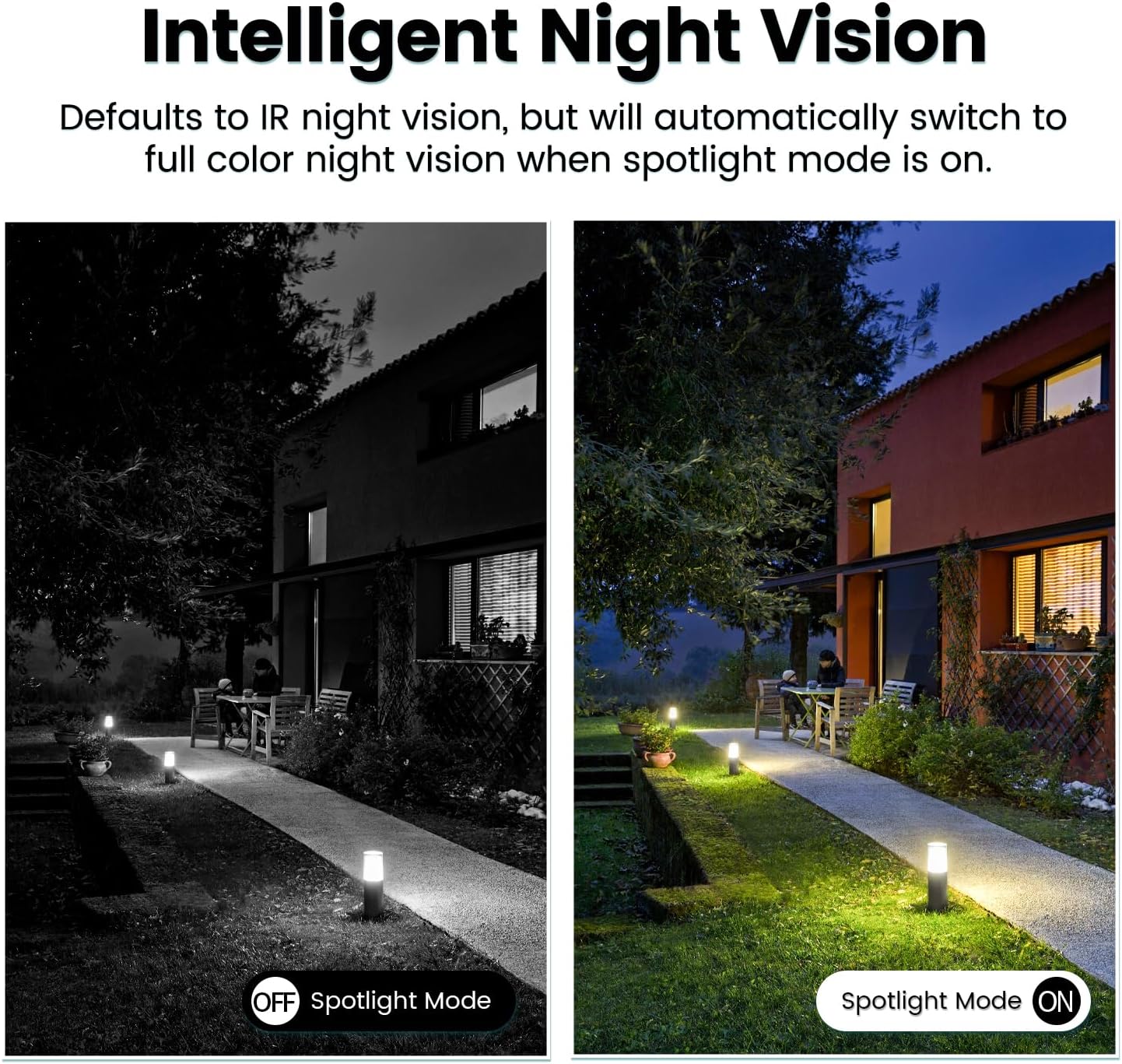
Image: Comparison of IR night vision (black and white, spotlight off) and color night vision (full color, spotlight on) from the VIMTAG камера.
6.4 AI Human/Motion/Sound Detection and Alarms
Configure detection settings in the VIMTAG app. The camera can detect human shapes, general motion, and sounds. Upon detection, you will receive notifications on your phone, and the camera can trigger a siren alarm or activate its spotlight to deter unwanted activity.

Image: An illustration of the VIMTAG camera detecting an intruder, triggering a spotlight and sending an alert to a smartphone.

Image: A smartphone displaying a "Motion Detection Alert" notification from the VIMTAG додаток
6.5 Запис та зберігання відео
Камера підтримує два варіанти зберігання даних:
- Локальна пам'ять: Insert a Micro SD card (up to 512GB, not included) into the camera's SD card slot for continuous 24/7 recording. Recorded footage can be accessed and managed through the VIMTAG додаток
- Хмарне сховище: An optional cloud storage service is available through the VIMTAG app for secure, encrypted video storage. Subscription details can be found within the app.
6.6 Інтеграція з Alexa
The VIMTAG camera is compatible with Amazon Alexa. To integrate:
- Enable the VIMTAG skill in the Alexa app.
- Link your VIMTAG рахунок.
- Відкрийте для себе пристрої.
You can then use voice commands such as, "Alexa, show me the [camera name]" to view the live feed on compatible Alexa-enabled devices with screens (e.g., Echo Show).

Image: A person interacting with an Amazon Echo Show to view the VIMTAG camera feed using voice commands.
7. Технічне обслуговування
- Прибирання: Обережно протріть об’єктив та корпус камери м’якою сухою тканиною. Не використовуйте агресивні хімікати або абразивні засоби для чищення.
- Оновлення прошивки: Regularly check the VIMTAG app for available firmware updates. Keeping your camera's firmware updated ensures optimal performance, security, and access to new features.
- Управління SD-карткою: Якщо ви використовуєте SD-карту, періодично їїview і створіть резервні копії важливих продуктівtage. Format the SD card through the app if you experience recording issues or to clear old data.
8. Вирішення проблем
| проблема | Можлива причина | Рішення |
|---|---|---|
| Camera fails to power on. | No power to the light socket; camera not screwed in properly. | Check the light socket's power supply; ensure the camera is securely screwed in. |
| Неможливо підключитися до Wi-Fi. | Incorrect Wi-Fi password; camera too far from router; 5GHz Wi-Fi network used. | Verify Wi-Fi password; move camera closer to router; ensure you are connecting to a 2.4GHz Wi-Fi network. |
| Погана якість відео. | Слабкий сигнал Wi-Fi; брудний об'єктив. | Improve Wi-Fi signal strength; clean the camera lens. |
| Виявлення руху не працює. | Detection settings disabled or sensitivity too low; camera positioned incorrectly. | Check and adjust motion detection settings in the app; ensure camera has a clear view площі. |
| SD-карта не записує. | SD card full or corrupted; incorrect recording settings. | Format the SD card via the app; check recording schedule and settings. Replace SD card if necessary. |
9. Технічні характеристики
| Особливість | Деталь |
|---|---|
| Назва моделі | 847 |
| Роздільна здатність відео | 2.5K / 4MP (1440p) |
| Діапазон повороту/нахилу | 355° по горизонталі, 100° по вертикалі |
| Цифровий зум | 8x |
| Нічне бачення | IR Night Vision & Color Night Vision with LED Spotlight |
| Двостороннє аудіо | Yes (Built-in Microphone & Speaker) |
| виявлення | AI Human, Motion, Sound Detection |
| Підключення | 2.4 ГГц Wi-Fi (IEEE 802.11b/g/n) |
| Параметри зберігання | Micro SD Card (up to 512GB), Cloud Storage (optional subscription) |
| Джерело живлення | Corded Electric (E27/E26 Light Bulb Socket) |
| Використання в приміщенні/на вулиці | Yes (IP66 Weatherproof) |
| Сумісні пристрої | iOS, Android, Mac, iPad, Windows, Amazon Alexa |
| Розміри (Д x Ш x В) | 3.07 x 3.07 x 5.31 дюймів |
| Вага товару | 9.1 унції |
| Частота кадрів | 25 кадрів в секунду |
| Кодування відео | H.264/H.265 |
10. Гарантія та підтримка
VIMTAG products come with a standard manufacturer's warranty. For specific warranty terms and conditions, please refer to the warranty card included with your product or visit the official VIMTAG website. For technical support, troubleshooting assistance, or any product-related inquiries, please contact VIMTAG customer service through the VIMTAG app or their official webсайт.
Інтернет-ресурси:
- VIMTAG Офіційний Webсайт: Visit the VIMTAG Магазин на Amazon
- In-App Support: Access support features directly within the VIMTAG мобільний додаток.


