1. Вступ
This manual provides detailed instructions for the installation, operation, and maintenance of your G.SKILL MD1 Mid-Tower ATX PC Case. Please read this manual thoroughly before beginning assembly to ensure proper setup and to maximize the lifespan of your components.
The G.SKILL MD1 is designed for compatibility with ATX, mATX, and mini-ITX motherboards, offering a versatile foundation for various PC builds. It features a 4mm tempered glass side panel and front/top mesh panels for optimal airflow and component visibility.
2. Особливості продукту
- ATX PC Case: Compatible with ATX, mATX, and mini-ITX motherboard sizes.
- Бічна панель із загартованого скла: 4mm thick tempered glass for clear internal component visibility.
- Front/Top Mesh Design: Engineered for enhanced airflow and cooling performance.
- Підтримка радіатора: Supports up to a 360mm AIO radiator for advanced cooling solutions.
- GPU Length Support: Підходить для відеокарт довжиною до 404 мм.
- Відсіки для накопичувачів: Includes 2x 2.5" bays and 2x 3.5" bays for ampле сховище.
- Tool-less Side Panel: Hinge design for easy access and maintenance.
- Введення/виведення на передній панелі: 2x USB 3.0, 1x USB Type-C, 1x Audio-Out, 1x Mic-In for convenient connectivity.
3. Вміст упаковки
Будь ласка, перевірте, чи всі перелічені нижче компоненти присутні у вашій упаковці:
- G.SKILL MD1 Mid-Tower ATX PC Case
- Коробка з аксесуарами (гвинти, кабельні стяжки, стійки)
- Посібник користувача (цей документ)
4. Налаштування та встановлення
4.1. Підготовка справи
Before installing components, ensure the case is placed on a stable, flat surface. Remove the tempered glass side panel by gently pulling it open from the rear hinge, then lifting it off. The opposite side panel can be removed by unscrewing the thumb screws at the rear and sliding the panel backward.

Малюнок 1: Розібраний view showing the removal of the front panel, top panel, and side panels.
4.2. Встановлення материнської плати
Install the appropriate standoffs for your motherboard size (ATX, mATX, or mini-ITX). Carefully place your motherboard into the case, aligning it with the standoffs, and secure it with screws. Ensure the I/O shield is properly seated before installing the motherboard.
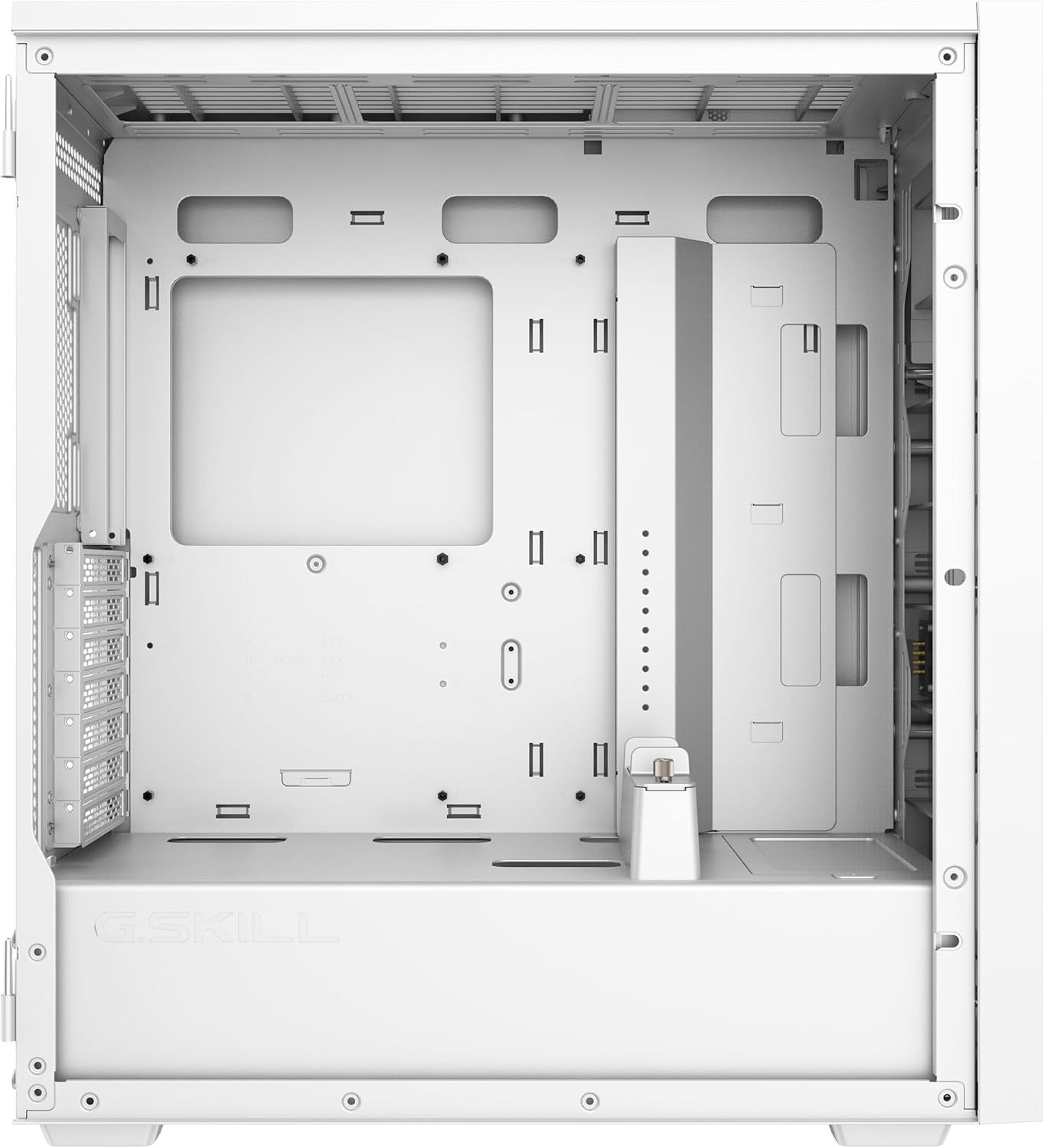
Figure 2: Main internal compartment of the G.SKILL MD1 case, illustrating the motherboard mounting area.
4.3. Встановлення накопичувача
The case supports 2x 2.5" drives and 2x 3.5" drives. Locate the drive bays and secure your SSDs or HDDs using the provided screws. Ensure proper cable management for power and data connections.

Рисунок 3: Задня внутрішня view of the G.SKILL MD1 case, highlighting the 2.5" and 3.5" drive bays behind the motherboard tray.
4.4. Встановлення відеокарти (GPU)
Install your graphics card into the appropriate PCIe slot on your motherboard. The case supports GPUs up to 404mm in length. Secure the GPU with the retention clip and any necessary screws. An included GPU support bracket can be used to prevent sag for longer cards.

Малюнок 4: Внутрішній view of the G.SKILL MD1 case with a graphics card installed, demonstrating the use of the GPU support bracket.
4.5. З’єднання вводу/виводу на передній панелі
Connect the front panel cables (USB 3.0, USB Type-C, Audio-Out, Mic-In, Power, Reset) to their corresponding headers on your motherboard. Refer to your motherboard manual for exact header locations.

Figure 5: Close-up of the G.SKILL MD1 case's front panel I/O, showing USB 3.0, USB Type-C, Audio-Out, Mic-In, Power, and Reset buttons.
5. Інструкція з експлуатації
Once all components are securely installed and connected, replace the side panels. Connect your power supply to a wall outlet and press the power button on the front panel to start your system.

Малюнок 6: Спереду view of the G.SKILL MD1 case, showcasing the mesh panel and G.SKILL branding.
6. Технічне обслуговування
Regular maintenance helps ensure optimal performance and longevity of your PC components. The G.SKILL MD1 case features mesh panels that act as dust filters.
6.1. Очищення пилового фільтра
Periodically clean the front and top mesh panels to prevent dust buildup, which can restrict airflow and lead to overheating. These panels can be removed for easy cleaning with compressed air or a soft brush.
6.2. Внутрішнє очищення
With the side panels removed, use compressed air to clear dust from internal components such as CPU coolers, GPU fans, and power supply vents. Ensure the system is powered off and unplugged before performing any interior cleaning.
7. Вирішення проблем
If you encounter issues with your PC build within the G.SKILL MD1 case, consider the following common troubleshooting steps:
- Система не вмикається:
- Перевірте всі з'єднання живлення, включаючи 24-контактний ATX, 8-контактний кабелі живлення процесора та графічного процесора.
- Переконайтеся, що вимикач живлення знаходиться в положенні «УВІМК.».
- Перевірте підключення кнопки живлення на передній панелі до материнської плати.
- Перегрів компонентів:
- Очистіть пилові фільтри та внутрішні компоненти.
- Ensure case fans are properly installed and functioning, directing airflow efficiently.
- Verify CPU cooler and GPU cooler are correctly seated and making good contact.
- Немає виводу на дисплей:
- Ensure the monitor cable is connected to the graphics card, not the motherboard (if a dedicated GPU is installed).
- Перевстановіть відеокарту та модулі оперативної пам'яті.
8. Технічні характеристики
| Особливість | Деталь |
|---|---|
| Бренд | Г. МАЙСТЕРНІСТЬ |
| Номер моделі | GC-AWGW1-MD1 |
| Тип корпусу | Середній вежі |
| Сумісність материнської плати | ATX, mATX, mini-ITX |
| Бічна панель | 4mm Tempered Glass (Hinged) |
| Передня панель | Дизайн сітки |
| Верхня панель | Дизайн сітки |
| Максимальна довжина GPU | 404 мм |
| Опора радіатора | Up to 360mm (AIO) |
| Відсіки для накопичувачів 2.5 дюйма | 2 |
| Відсіки для накопичувачів 3.5 дюйма | 2 |
| Передні порти вводу-виводу | 2x USB 3.0, 1x USB Type-C, 1x Audio-Out, 1x Mic-In |
| Розміри (ДxШxВ) | 19.84 x 8.7 x 17.7 дюймів |
| Вага товару | 19.91 фунта (9.05 кг) |

Figure 7: Diagram illustrating the dimensions of the G.SKILL MD1 Mid-Tower ATX PC Case.
9. Гарантія та підтримка
For warranty information and technical support, please refer to the official G.SKILL webсайт або зверніться безпосередньо до служби підтримки клієнтів. Зберігайте чек про покупку для гарантійних випадків.
G.SKILL Official Webсайт: www.gskill.com


