вступ
This manual provides comprehensive instructions for the PowerA Enhanced Wireless Controller, designed for use with Nintendo Switch, Nintendo Switch Lite, Nintendo Switch – OLED Model, and Nintendo Switch 2. Please read this manual thoroughly before use to ensure proper setup and operation.
Вміст упаковки
- PowerA Enhanced Wireless Controller (Pikachu Vibrant)
- Зарядний кабель USB-C довжиною 10 футів (3 м).
- Посібник користувача (цей документ)
Особливості контролера
The PowerA Enhanced Wireless Controller offers a range of features for an optimized gaming experience:
- Бездротове підключення: Utilizes Bluetooth 5.0 technology for seamless connection.
- Акумуляторна батарея: Internal lithium-ion battery provides up to 30 hours of gameplay per charge.
- Advanced Gaming Buttons: Two mappable buttons for custom control configurations.
- Елементи управління рухом: Integrated motion sensors for intuitive gameplay.
- Ергономічний дизайн: Superior ergonomics for extended comfortable gaming sessions.
- Smooth Thumbsticks: Embedded anti-friction rings ensure precise thumbstick control.
Примітка: This controller does not support HD rumble, IR camera, or Amiibo NFC functionality.
Макет контролера
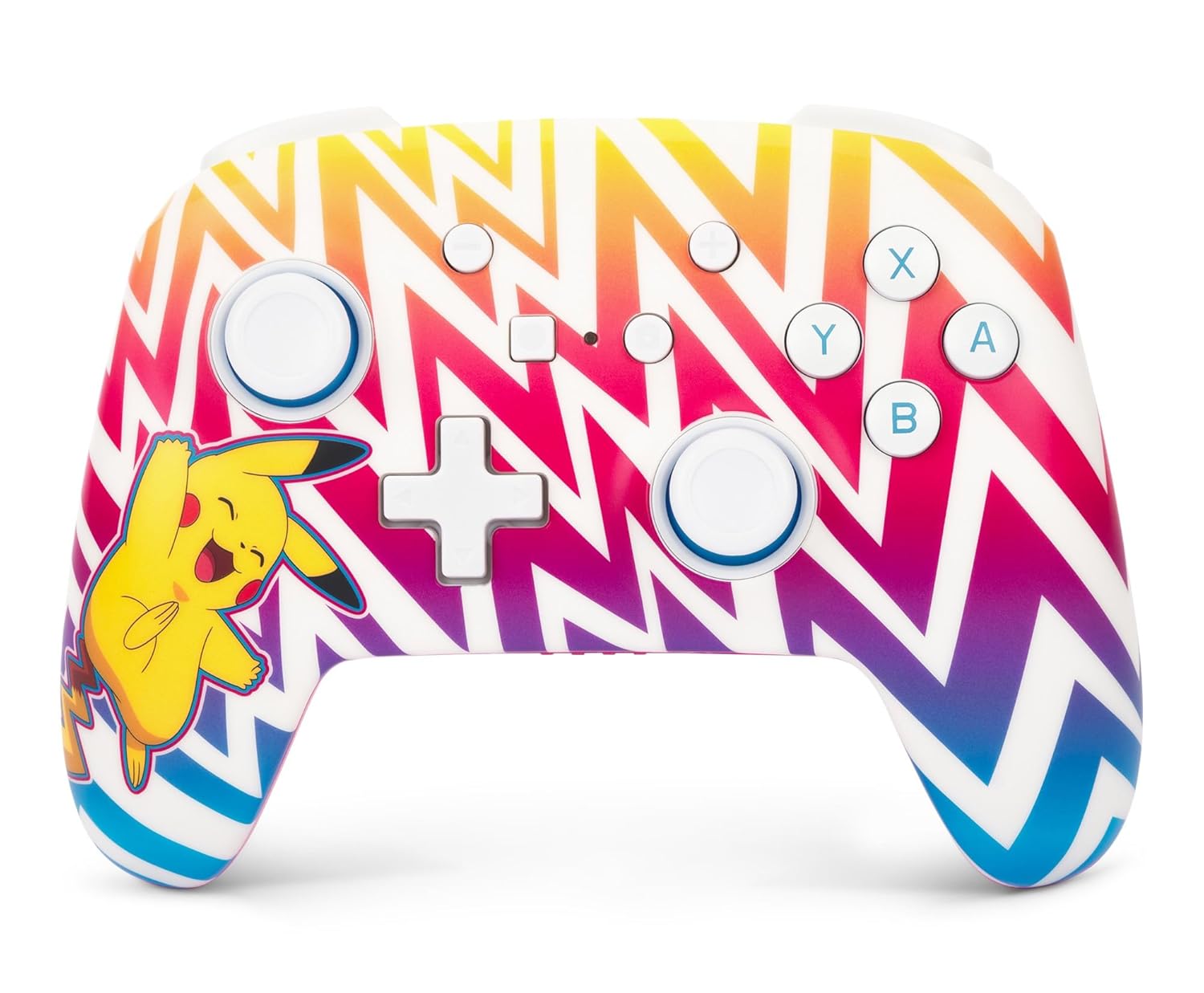
Зображення 1: Фронт view of the PowerA Enhanced Wireless Controller, featuring a vibrant Pikachu design on a zigzag pattern. Shows the left and right analog sticks, D-pad, A/B/X/Y buttons, Home button, Capture button, Plus and Minus buttons, and indicator lights.

Зображення 2: Назад view of the PowerA Enhanced Wireless Controller. This image highlights the two mappable Advanced Gaming Buttons (AGB) located on the grips, and the program button in the center.

Зображення 3: Топ view of the PowerA Enhanced Wireless Controller. This perspective shows the L, R, ZL, and ZR shoulder buttons, along with the USB-C charging port located between the ZL and ZR buttons.
Налаштування
Зарядка контролера
- Connect the small end of the included USB-C cable to the USB-C port on the top of the controller.
- Connect the large end of the USB-C cable to a USB power source (e.g., Nintendo Switch dock, USB wall adapter, computer USB port).
- The LED indicator lights on the front of the controller will illuminate to show charging status. All four LEDs will be solid when fully charged.
- A full charge provides up to 30 hours of gameplay. Actual battery life may vary based on usage.

Зображення 4: сторона view of the controller with the USB-C charging cable connected to the port on the top edge.
Сполучення з Nintendo Switch
Follow these steps to pair your PowerA Enhanced Wireless Controller with your Nintendo Switch console:
- Переконайтеся, що ваша консоль Nintendo Switch увімкнена та оновлена до останнього версії системного програмного забезпечення.
- У меню HOME виберіть "Контролери", тоді "Змінити хватку/порядок".
- On the PowerA controller, press and hold the Кнопка SYNC (small button next to the USB-C port) for at least three seconds. The LED indicator lights will begin to flash.
- Once the controller is successfully paired, the player LED(s) corresponding to the controller number will remain solid.
- Натисніть кнопка додому on the controller to return to the HOME Menu and begin playing.
The controller can be used whether the Nintendo Switch is docked or in handheld mode.
Інструкція з експлуатації
Programming Advanced Gaming Buttons (AGB)
The controller features two mappable Advanced Gaming Buttons (AGB) on the back. These can be programmed on-the-fly:
- Натисніть Кнопка програми (small white button on the back, between the AGBs). The Program LED will flash, indicating the controller is in programming mode.
- Press the button you wish to map (e.g., A, B, X, Y, L, R, ZL, ZR, D-pad directions, Left Stick Click, Right Stick Click).
- Натисніть Advanced Gaming Button (AGB L or AGB R) you want to assign the function to. The Program LED will stop flashing, indicating the AGB has been successfully programmed.
- To clear an AGB assignment, repeat steps 1-2, but instead of pressing a button to map, press the Program Button again to exit programming mode without assigning a new function.
Елементи керування рухом
This controller supports motion controls in compatible Nintendo Switch games. No special setup is required; motion controls will function automatically when supported by the game.
Технічне обслуговування
- Прибирання: Використовуйте м’яку суху тканину для очищення контролера. Уникайте використання агресивних хімікатів або абразивних матеріалів.
- Зберігання: Зберігайте контролер у прохолодному, сухому місці, подалі від прямих сонячних променів та екстремальних температур.
- Догляд за акумулятором: Щоб продовжити термін служби батареї, уникайте частого повного розряджання контролера. Регулярно заряджайте його, навіть якщо він не використовується постійно.
Усунення несправностей
- Контролер не підключається:
- Переконайтеся, що контролер повністю заряджений.
- Verify the Nintendo Switch console is powered on and within range.
- Повторіть процес сполучення, як описано в розділі «Сполучення з Nintendo Switch».
- If issues persist, try restarting both the controller and the Nintendo Switch console.
- Кнопки або джойстики не реагують:
- Check if the controller is properly connected to the console.
- Переконайтеся, що кнопки або джойстики не заблоковані сміттям.
- Test the controller in another game or on the Switch's controller test menu to isolate the issue.
- Короткий час автономної роботи:
- Перед використанням переконайтеся, що контролер повністю заряджений.
- Battery life can be affected by game intensity and environmental factors.
- Якщо з часом термін служби батареї значно знижується, зверніться до служби підтримки клієнтів.
Технічні характеристики
| Номер моделі | NSGP0262-01 |
| Підключення | Bluetooth 5.0 |
| Тип батареї | Акумуляторна літій-іонна |
| Термін служби батареї | До 30 годин на одному заряді (приблизно) |
| Розміри | 6.02 x 4.41 x 2.48 дюймів |
| вага | 8 унції (приблизно 227 грамів) |
| Сумісність | Nintendo Switch, Switch Lite, Switch – OLED Model, Switch 2 |
| Кабель в комплекті | Зарядний кабель USB-C довжиною 10 футів (3 м). |
Інформація про гарантію
PowerA backs all products with a 2 рік обмеженої гарантії. For detailed warranty terms and conditions, please refer to the official PowerA webсайту або зв’яжіться зі службою підтримки клієнтів.
Підтримка
For further assistance, technical support, or warranty claims, please visit the official PowerA support website or contact their customer service department. Contact information can typically be found on the PowerA webсайт або упаковка продукту.
Інтернет-ресурси: www.powera.com/support


