1. Вступ
The ATTACK SHARK X3PRO is a high-performance lightweight wireless gaming mouse designed for precision and responsiveness. Featuring tri-mode connectivity, a flagship optical sensor, and durable switches, it offers an exceptional gaming experience for PC and Mac users.

Figure 1: ATTACK SHARK X3PRO Wireless Gaming Mouse (Red)
2. Особливості продукту
- 4K/8K Wireless Gaming Mouse: Equipped with wireless 4K polling and wired 8K polling, the X3PRO sends signals to the computer 4 to 8 times faster than standard gaming mice, ensuring best-in-class precision and responsiveness.
- Pixart PAW3395 Flagship Sensor: Utilizes a Pixart 3395 optical sensor, offering 6 adjustable DPI levels (800/1600/2400/3200/5000/26000), 650 IPS tracking speed, 4000/8000Hz response speed, and 50G acceleration limit for precise positioning.
- Тримодове з'єднання: Supports USB-C wired mode, 2.4G wireless mode, and Bluetooth 5.2 mode for versatile use across different scenarios and up to 4 devices simultaneously.
- Kailh GM8.0 Switch & TTC Encoder: Features high-end Kailh Black Mamba GM8.0 Micro switches for crisp clicks, fast rebound, and quick trigger, with an 80 million click lifespan. The TTC scroll wheel encoder provides precise positioning.
- 60g Ultralight & Ergonomic Design: Weighing only 49g, the X3PRO's ergonomic design ensures a natural grip, reducing fatigue during extended gaming sessions and providing agility.
- 5 програмованих кнопок: Total of 5 programmable buttons allow customization of DPI, polling rate, LOD, shortcuts, and macros via the dedicated driver software.
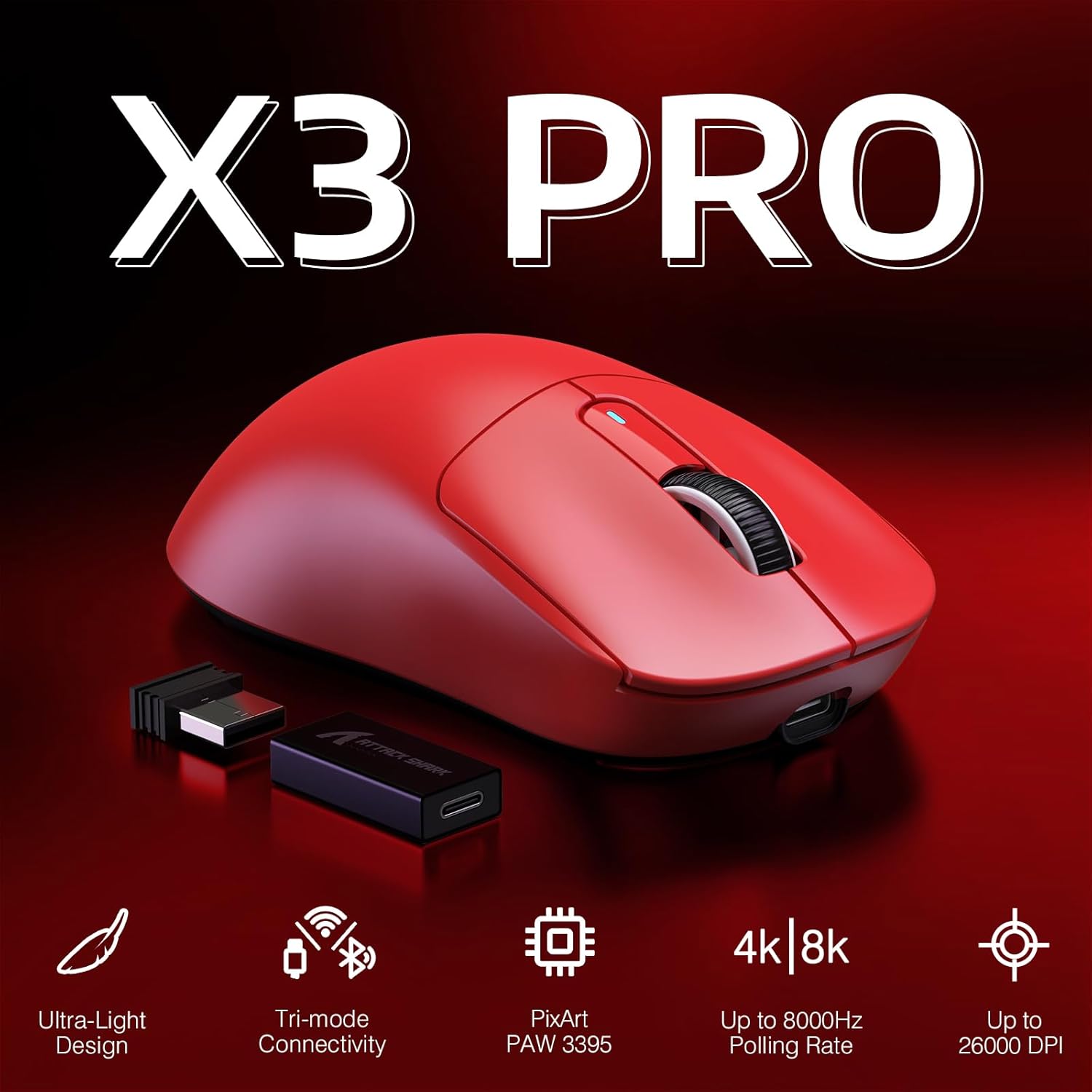
Figure 2: Key Features of the X3PRO Mouse

Figure 3: Ultra-Light Design for Effortless Action
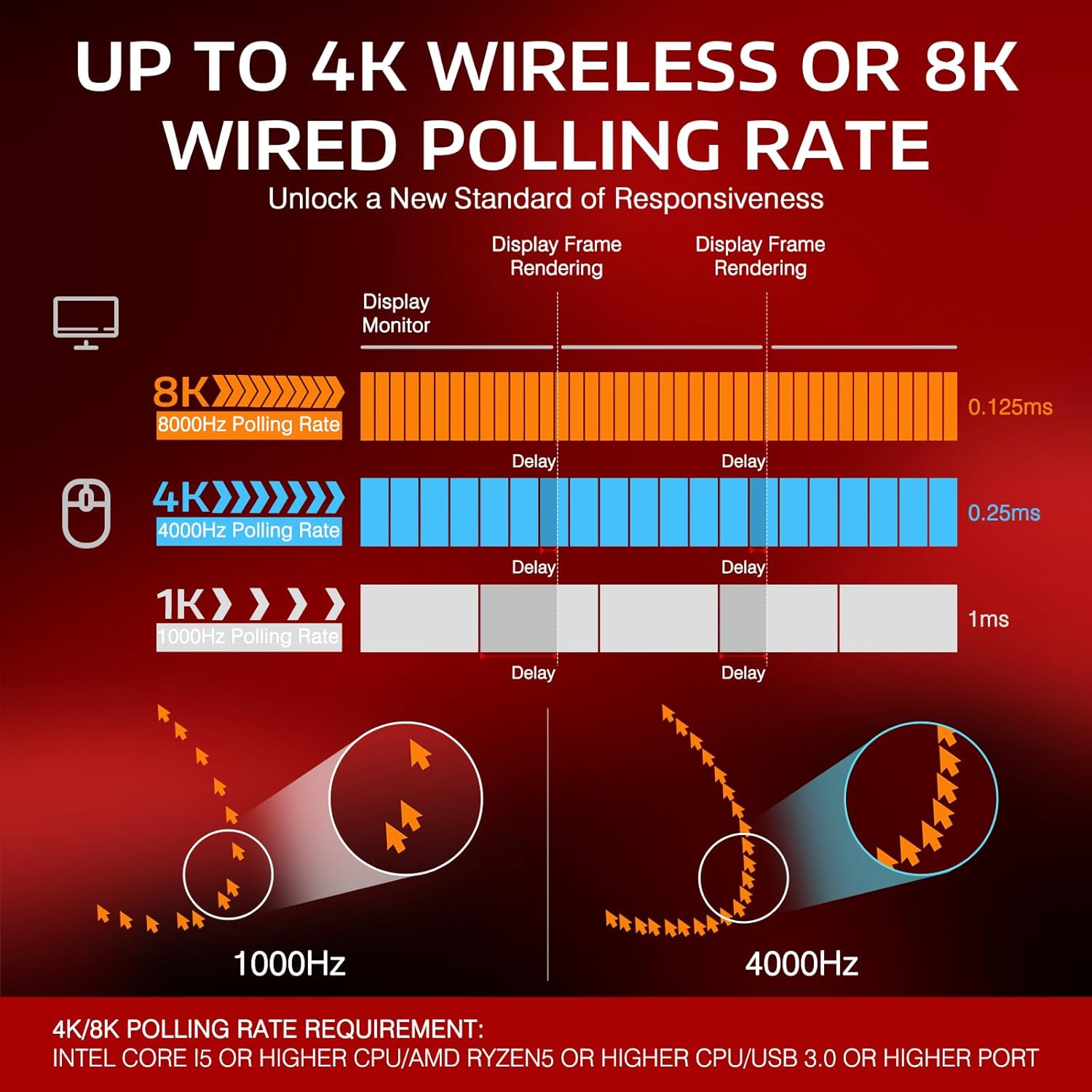
Figure 4: Polling Rate Comparison (1K, 4K, 8K)

Figure 5: Pixart PAW3395 Flagship Sensor

Figure 6: Kailh GM8.0 Switches & TTC Encoder
Продукт закінченийview відео
Це відео містить вичерпний оглядview of the ATTACK SHARK X3PRO 4K/8K Lightweight Wireless Gaming Mouse, highlighting its key features and benefits.
3. Вміст упаковки
Будь ласка, переконайтеся, що всі предмети присутні в упаковці:
- ATTACK SHARK X3PRO Wireless Gaming Mouse
- USB-приймач (розташований у нижній частині миші)
- USB-C Charging Cable (Flexible Paracord Cable)
- Type-C to USB A Adapter

Figure 7: Product Parameters and Components
4. Налаштування
4.1. Підключення миші
The X3PRO mouse offers three connection modes:
- Бездротовий режим 2.4G:
- Locate the USB receiver on the bottom of the mouse. Open the cover and take out the receiver.
- Plug the USB receiver into an available USB port on your computer. For optimal performance, use a USB 3.0 or higher port.
- Switch the mode selector on the bottom of the mouse to '2.4G'. The mouse will automatically connect.
- Режим Bluetooth 5.2:
- Switch the mode selector on the bottom of the mouse to 'BT'.
- На комп’ютері перейдіть до налаштувань Bluetooth та знайдіть нові пристрої.
- Select 'ATTACK SHARK X3PRO' from the list of available devices to pair.
- Дротовий режим USB-C:
- Підключіть наданий кабель USB-C до переднього порту миші.
- Connect the other end of the USB-C cable (or use the Type-C to USB A adapter if needed) to an available USB port on your computer.
- Switch the mode selector on the bottom of the mouse to 'OFF' or leave it in '2.4G'/'BT' mode; the mouse will function as a wired device and charge simultaneously.

Figure 8: Flashspeed Connectivity Modes
4.2. Driver/Software Installation
To unlock the full potential of your X3PRO mouse, including programmable buttons, DPI settings, polling rate adjustments, and macro functions, please download and install the official ATTACK SHARK driver software from the manufacturer's website. The software is compatible with Windows XP / VISTA / 7 / 8 / 10 / MAC.
5. Інструкція з експлуатації
5.1. Налаштування роздільної здатності
The mouse features 6 adjustable DPI levels. You can cycle through these levels using the dedicated DPI button on the bottom of the mouse or customize them via the driver software. The default DPI levels are 800/1600/2400/3200/5000/26000.
5.2. Коригування частоти опитування
The polling rate can be adjusted to 4000Hz (wireless) or 8000Hz (wired) for maximum responsiveness. This setting is typically adjusted within the driver software.
5.3. Налаштування кнопок
The X3PRO has 5 programmable buttons. Use the ATTACK SHARK driver software to assign custom functions, macros, or shortcuts to these buttons according to your preferences and gaming needs.
5.4. Заряджання миші
The mouse is equipped with a long-lasting lithium battery. To charge, connect the USB-C charging cable to the mouse and a USB power source (e.g., computer USB port, wall adapter). The mouse can be used while charging in wired mode.

Рисунок 9: Збільшений термін служби батареї
6. Технічне обслуговування
To ensure the longevity and optimal performance of your ATTACK SHARK X3PRO mouse, follow these maintenance guidelines:
- Прибирання: Regularly wipe the mouse surface with a soft, dry cloth. For stubborn dirt, slightly dampпромийте тканину водою. Уникайте використання агресивних хімікатів або абразивних матеріалів.
- Догляд за датчиком: Тримайте оптичний датчик на нижній частині миші чистим та без пилу чи сміття. За потреби використовуйте ватний тампон або стиснене повітря.
- PTFE ніжки: The mouse features 100% virgin grade PTFE feet for consistent glide. Avoid scratching or damaging them. Replacement feet may be available from the manufacturer if worn.
- Зберігання: Якщо миша не використовується протягом тривалого часу, зберігайте її в прохолодному, сухому місці, подалі від прямих сонячних променів та екстремальних температур.

Figure 10: 100% Virgin Grade PTFE Feet
7. Вирішення проблем
If you encounter issues with your ATTACK SHARK X3PRO mouse, please refer to the following common troubleshooting steps:
- Миша не реагує:
- Ensure the mouse is charged. Connect it via USB-C cable to charge and test in wired mode.
- Check the mode switch on the bottom of the mouse (2.4G, BT, OFF) and ensure it's set to the desired connection type.
- Для бездротового з’єднання 2.4G переконайтеся, що USB-приймач надійно підключено до робочого USB-порту. Спробуйте інший USB-порт.
- For Bluetooth, ensure Bluetooth is enabled on your computer and the mouse is paired correctly. Try unpairing and re-pairing the device.
- Перезавантажте комп'ютер.
- Intermittent Disconnections (2.4G/Bluetooth):
- Ensure the mouse is within range of the receiver/Bluetooth adapter and there are no significant obstructions.
- Уникайте сильних електромагнітних перешкод від інших бездротових пристроїв.
- Переконайтеся, що заряд батареї миші не критично низький.
- Update your computer's USB or Bluetooth drivers.
- If using 2.4G, try connecting the USB receiver to a different USB port, preferably a USB 3.0 or higher port.
- DPI/Polling Rate Issues:
- Ensure the ATTACK SHARK driver software is installed and up to date.
- Verify settings within the software.
- Кнопки не працюють:
- Перевірте призначення кнопок у програмному забезпеченні драйвера.
- Переконайтеся, що жодне інше програмне забезпечення не конфліктує з функціями кнопок миші.
If the issue persists after trying these steps, please contact ATTACK SHARK customer support for further assistance.
8. Технічні характеристики
| Особливість | Специфікація |
|---|---|
| Бренд | АТАКА АКУЛИ |
| Модель | X3PRO |
| Технологія підключення | Bluetooth, USB (Wired, 2.4G Wireless, BT 5.2) |
| Технологія виявлення руху | Оптичний (датчик PAW3395) |
| Рівні DPI | 800/1600/2400/3200/5000/26000 (Adjustable) |
| Швидкість опитування | Up to 4000Hz (Wireless), Up to 8000Hz (Wired) |
| Перемикачі | Kailh GM8.0 Micro Switches (80 Million Clicks) |
| Кодувальник | TTC Scroll Wheel Encoder |
| Програмовані кнопки | 5 |
| Вага товару | 1.73 унцій (приблизно 49 г) |
| Розміри упаковки | 6.5 x 4.53 x 1.77 дюймів |
| Сумісність | Windows XP / VISTA / 7 / 8 / 10 / MAC |
9. Гарантія та підтримка
For warranty information and technical support regarding your ATTACK SHARK X3PRO gaming mouse, please refer to the official ATTACK SHARK webсайт або зверніться безпосередньо до служби підтримки клієнтів. Зберігайте чек про покупку як підтвердження покупки для будь-яких гарантійних претензій.
ATTACK SHARK US Store: Відвідати магазин


