1. Вступ
This manual provides detailed instructions for the setup, operation, and maintenance of your KTC 32-Inch 2K QHD IPS Monitor, model H32T13. Please read this manual thoroughly before using the monitor to ensure proper functionality and to prevent damage.
The KTC H32T13 monitor features a 32-inch IPS panel with 2K QHD (2560x1440) resolution, a 100Hz refresh rate, and support for FreeSync/G-Sync technologies. It is designed for both office productivity and gaming, offering vibrant colors, wide viewing angles, and eye-care features.
2. Що в коробці
Перевірте наявність усіх компонентів в упаковці:
- KTC 32-Inch 2K QHD IPS Monitor (H32T13)
- Підставка для монітора (основа та шия)
- Кабель HDMI
- Шнур живлення
- Адаптер живлення
- Викрутка
- Посібник користувача (цей документ)

Image: Contents of the KTC H32T13 monitor package.
3. Продукт закінчивсяview
The KTC H32T13 monitor is designed for a superior visual experience. Key features include:
- 32-inch QHD (2560x1440) IPS Panel: Delivers crisp, detailed images with accurate colors and wide viewкути.
- Частота оновлення 100 Гц: Provides smoother motion for gaming and fast-paced content.
- FreeSync/G-Sync Compatibility: Зменшує розриви та заїкання екрана для плавного ігрового процесу.
- Підтримка HDR: Enhances contrast and color for more realistic visuals.
- Технологія догляду за очима: Features Flicker-Free and Low Blue Light modes to reduce eye strain during prolonged use.
- Універсальний підключення: Equipped with multiple HDMI 2.0 and DisplayPort 1.4 inputs.
- Ергономічний дизайн: Offers tilt adjustment and VESA mount compatibility for flexible positioning.
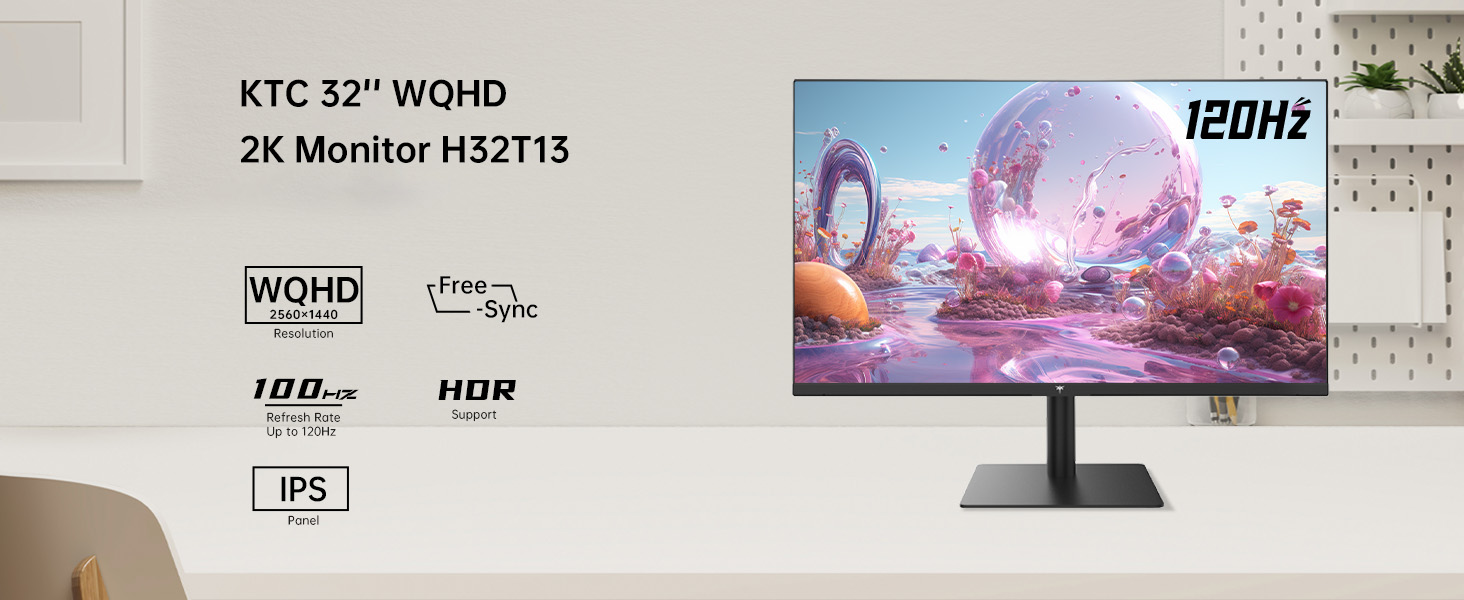
Image: KTC H32T13 monitor showcasing its key display technologies.

Image: The 32-inch screen size of the KTC H32T13 monitor.
4. Налаштування
4.1 Збірка підставки
- Обережно вийміть компоненти монітора та підставки з упаковки.
- Attach the stand neck to the monitor panel using the provided screws and screwdriver.
- Закріпіть основу підставки на шийці підставки.
- Помістіть зібраний монітор на стійку, рівну поверхню.
4.2 Кріплення VESA (додатково)
The monitor supports VESA 100mm x 100mm mounting. If you wish to use a VESA-compatible arm or wall mount (not included), remove the stand and attach the VESA mount according to its instructions.

Зображення: Задня частина view of the monitor with VESA 100x100mm mounting points.
4.3 Підключення до комп’ютера
- Переконайтеся, що і монітор, і комп'ютер вимкнені.
- Connect one end of the provided HDMI cable to an HDMI port on your computer's graphics card.
- Connect the other end of the HDMI cable to one of the HDMI 2.0 ports on the monitor. Alternatively, use a DisplayPort cable to connect to a DP 1.4 port for higher refresh rates and FreeSync/G-Sync functionality.
- Підключіть адаптер живлення до входу постійного струму монітора, а потім підключіть шнур живлення до розетки.
- Power on your computer, then power on the monitor.

Image: Monitor connectivity ports (DC, HDMI 1, HDMI 2, DP 1).
5. Інструкція з експлуатації
5.1 Увімкнення/вимкнення живлення
Натисніть кнопку живлення, розташовану на моніторі, щоб увімкнути або вимкнути його. Індикатор живлення світитиметься, коли монітор увімкнено.
5.2 Вибір джерела вхідного сигналу
Use the OSD (On-Screen Display) menu buttons to navigate and select your desired input source (HDMI 1, HDMI 2, or DisplayPort).
5.3 Налаштування параметрів дисплея (екранне меню)
The OSD menu allows you to customize various display settings. Typically, buttons are located on the back or bottom of the monitor. Refer to the quick start guide for specific button functions.
- Яскравість/Контрастність: Налаштуйте загальну яскравість та коефіцієнт контрастності.
- Параметри кольору: Modify color temperature, gamma, and individual RGB levels. The monitor supports 1.07 billion colors and 103% sRGB.
- Режим зображення: Select from preset modes optimized for different content (e.g., Standard, Game, Movie, Text).
- Частота оновлення: The monitor supports up to 100Hz. Ensure your graphics card settings are configured to match.
- FreeSync/G-Sync: Enable this feature in the OSD menu and your graphics card control panel for adaptive synchronization.
- Eye Care Modes: Activate Flicker-Free and Low Blue Light modes to reduce eye strain.
- HDR: Enable HDR for compatible content and devices.

Image: Monitor displaying enhanced colors and brightness with HDR enabled.

Image: Visual comparison of FreeSync/G-Sync enabled and disabled, demonstrating smoother gameplay.

Image: IPS panel advantages in brightness and color over VA panels.
5.4 Фізичні налаштування
The monitor stand allows for tilt adjustment from -5° to 15° to optimize your viewкут.

Image: Monitor tilt adjustment range and eye care features.
Відео: Кінецьview of the KTC 2K IPS Office Monitor, highlighting its features and suitability for office use. This video demonstrates the monitor's visual quality and design.
6. Технічне обслуговування
6.1 Очищення монітора
- Завжди вимикайте монітор та від’єднуйте шнур живлення від мережі перед чищенням.
- Злегка протріть м’якою тканиною без ворсу dampводою або м’яким, неабразивним засобом для чищення екранів.
- Wipe the screen gently to remove dust and smudges. Avoid applying direct pressure to the screen.
- Не використовуйте спирт, засоби для чищення на основі аміаку або абразивні матеріали, оскільки вони можуть пошкодити поверхню екрана.
- Очистіть монітор casing м’якою сухою тканиною.
6.2 Зберігання
If storing the monitor for an extended period, ensure it is powered off, unplugged, and stored in a cool, dry place away from direct sunlight and extreme temperatures. Use the original packaging if available for best protection.
7. Вирішення проблем
| проблема | Можлива причина | Рішення |
|---|---|---|
| На екрані немає зображення | Monitor not powered on; Incorrect input source; Loose video cable; Computer in sleep mode. | Ensure power is connected and monitor is on. Select correct input source. Check video cable connections. Wake up computer. |
| Зображення розмите або спотворене | Incorrect resolution; Faulty video cable; Graphics driver issues. | Set display resolution to 2560x1440. Try a different video cable. Update graphics drivers. |
| Мерехтіння або розриви екрана | Refresh rate mismatch; FreeSync/G-Sync not enabled or incompatible. | Ensure refresh rate is set to 100Hz. Enable FreeSync/G-Sync in monitor OSD and graphics card settings. Use DisplayPort for FreeSync/G-Sync. |
| Немає звуку з навушників | Headphones not connected properly; Audio output not set to monitor. | Check headphone connection. Set monitor as default audio output in your computer's sound settings. |
| Кнопки не реагують | Блокування екранного меню ввімкнено; Тимчасовий програмний збій. | Check if OSD lock is active (refer to quick start guide). Power cycle the monitor. |
8. Технічні характеристики
| Особливість | Деталь |
|---|---|
| Номер моделі | H32T13 |
| Розмір екрана | 32 дюймів |
| Тип панелі | IPS |
| роздільна здатність | 2560 x 1440 (QHD ширококутний 1440p) |
| Співвідношення сторін | 16:9 |
| Частота оновлення | 100 Гц |
| Яскравість | 350 Candela (typ.) |
| Колірна гамма | 103% sRGB |
| Глибина кольору | 1.07 мільярда кольорів |
| Підтримка HDR | так |
| Адаптивна синхронізація | FreeSync/G-Sync Compatible |
| Підключення | 2x HDMI 2.0, 1x DisplayPort 1.4 |
| Регулювання нахилу | від -5° до 15° |
| Гора VESA | 100 мм х 100 мм |
| Функції догляду за очима | Flicker-Free, Eye Protection Mode (Low Blue Light) |
| Розміри продукту | 5.31 x 32.48 x 21.2 дюймів |
| Вага товару | 18.81 фунта |
9. Гарантія та підтримка
9.1 Інформація про гарантію
KTC products are covered by a limited warranty. Please refer to the warranty card included in your product packaging or visit the official KTC webДетальні умови гарантії див. на сайті. Зберігайте чек про покупку для гарантійних випадків.
9.2 Підтримка клієнтів
For technical assistance, troubleshooting not covered in this manual, or warranty inquiries, please contact KTC customer support through the following channels:
- Інтернет-підтримка: Visit the KTC official webсайт із поширеними запитаннями, завантаженням драйверів та формами зв’язку зі службою підтримки.
- Підтримка електронною поштою: Зверніться до гарантійного талона або до KTC webсайт для отримання відповідної адреси електронної пошти служби підтримки.
- Підтримка Amazon: If purchased via Amazon, you can contact the seller directly through your Amazon order history for assistance.
Image: Steps to contact KTC customer support via Amazon.


