1. Важлива інформація з безпеки
Please read all safety instructions carefully before using the Makeid E1 Label Printer. Failure to follow these instructions may result in product damage or personal injury.
- This label printer is designed to be used exclusively with official Makeid labels. Using labels from other brands may cause damage to the device and void the warranty.
- Avoid touching the print head with your fingers. If the print head becomes dirty, gently wipe it with a soft, lint-free cloth.
- Do not place foreign objects into the label slot or any other opening of the machine to prevent damage.
- Do not expose the label printer to direct sunlight, rain, high humidity, or excessive dust.
- Keep the device away from heat sources such as radiators, heaters, or the dashboard/tail of a car, and avoid environments with extremely high or low temperatures.
- The standard operating temperature range for this device is 5 °C to 35 °C (41 °F to 95 °F).
2. Продукт закінчивсяview
Familiarize yourself with the components of your Makeid E1 Label Printer.

Зображення 1: спереду view of the Makeid E1 Label Printer, showing the label output slot and control buttons.
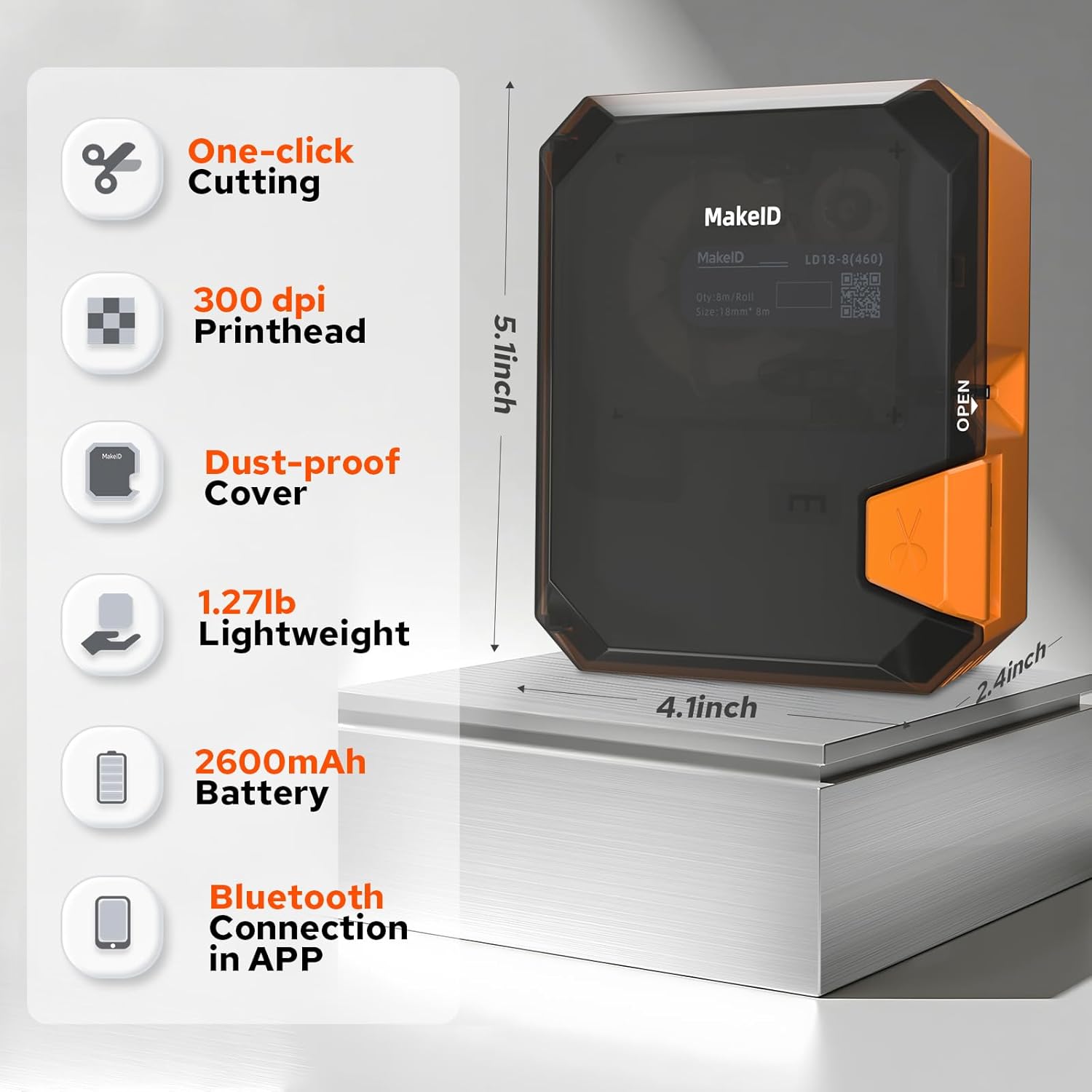
Image 2: Diagram illustrating key features and dimensions of the Makeid E1 Label Printer. Features include one-click cutting, 300 dpi printhead, dust-proof cover, lightweight design (1.27 lbs), 2600mAh battery, and Bluetooth connectivity via app. Dimensions are approximately 5.1 inches (height), 4.1 inches (width), and 2.4 inches (depth).
3. Налаштування
3.1 Зарядка пристрою
The Makeid E1 Label Printer is equipped with a rechargeable Lithium-ion battery (1000 mAh). Before first use, fully charge the device using the provided USB cable.
- Connect the USB cable to the printer's charging port and to a standard USB power adapter (not included) or a computer's USB port.
- The charging indicator light will show the charging status. Refer to the device's display or indicator for full charge notification.
- A full charge cycle can last over 500 times, ensuring long-term use.
3.2 Завантаження етикеток
Ensure you use official Makeid labels for optimal performance.
- Locate the label compartment on the printer.
- Відкрийте кришку відділення.
- Insert the label roll with the printing surface facing the correct direction, as indicated by a diagram inside the compartment.
- Pull a small portion of the label out past the print head.
- Надійно закрийте кришку відділення.
The printer supports label widths of 9 mm, 12 mm, and 16 mm.
3.3 Connecting via Bluetooth (for App Use)
To utilize advanced features and design options, connect your printer to a smartphone via the Makeid app.
- Download the official Makeid app from your device's app store (compatible with Android and iOS).
- Переконайтеся, що Bluetooth увімкнено на вашому смартфоні.
- Turn on the Makeid E1 printer.
- Open the Makeid app and follow the on-screen instructions to search for and pair with your printer.
4. Інструкція з експлуатації
The Makeid E1 offers two primary modes of operation: direct input via the QWERTY keyboard and advanced design via the mobile application.
4.1 Using the QWERTY Keyboard
The integrated QWERTY keyboard allows for quick and convenient label creation without a smartphone.
- Увімкніть пристрій.
- Use the QWERTY keys to type your desired text. The 3.4-inch LCD screen will display your input.
- Utilize the dedicated keys for various functions, including prototypes, squares, and clear instructions. The device features over 40 keys for ease of use.
- Access a variety of fonts and symbols directly from the keyboard interface.
- The printer supports up to 4 lines of text printing.
- Press the 'Print' button to print your label. The manual cutting blade allows for precise label separation.
4.2 Використання мобільного застосунку
The Makeid app provides extensive customization options and advanced printing features.

Image 3: Screenshot of the Makeid app interface, highlighting versatile templates, over 200 stickers, more than 40 fonts, and additional features like text, barcode, QR code, date, picture, sticker, shape, and scan options.
- After connecting the printer via Bluetooth (Section 3.3), open the Makeid app.
- Введення тексту: Type your text directly into the app.
- Багаторядковий друк: The app supports printing up to 4 lines of text.
- Special Content: Generate timestamps, QR codes, and barcodes with a single click.
- Налаштування: Access a rich library of materials, including 16 types of frames, 600 stickers and symbols, and over 54 templates.
- DIY & Images: Support for DIY designs and uploading images/icons to personalize your labels.
- Saving Templates: Store up to 9 customized label templates for future use.
- Пакетний друк: Print up to 9 copies of a label in a single batch.
- Once your design is complete, tap the 'Print' button in the app to send it to the printer.
5. Технічне обслуговування
5.1 Очищення друкуючої головки
Regular cleaning of the print head ensures optimal print quality and extends the life of your printer.
- Ensure the printer is turned off before cleaning.
- Gently open the label compartment to access the print head.
- Використовуючи м’яку тканину без ворсу, злегка протрітьampened with isopropyl alcohol, carefully wipe the print head. Do not use abrasive materials or excessive force.
- Allow the print head to dry completely before closing the compartment and resuming use.
5.2 Догляд за акумулятором
Щоб максимально збільшити термін служби та продуктивність акумулятора:
- Уникайте частого повного розряджання акумулятора.
- Store the printer in a cool, dry place if not used for extended periods.
- Періодично заряджайте акумулятор, якщо він зберігався протягом тривалого часу, щоб запобігти глибокому розряду.
6. Вирішення проблем
If you encounter issues with your Makeid E1 Label Printer, refer to the following common problems and solutions.
- Немає живлення: Переконайтеся, що пристрій заряджений. Підключіть його до джерела живлення за допомогою USB-кабелю.
- Погана якість друку: Check if the print head is clean (refer to Section 5.1). Ensure you are using official Makeid labels. Verify the label roll is inserted correctly.
- Проблеми з підключенням Bluetooth: Make sure Bluetooth is enabled on your smartphone and the printer is turned on. Restart both the printer and your smartphone, then try pairing again. Ensure the Makeid app is up to date.
- Застрягання етикетки: Turn off the printer, open the label compartment, and carefully remove any jammed labels. Ensure the label roll is properly seated and not creased.
- Принтер не відповідає: Try resetting the device by turning it off and on again. If the issue persists, contact customer support.
7. Технічні характеристики
| Особливість | Специфікація |
|---|---|
| Бренд | Makeid |
| Назва моделі | E1 |
| Номер моделі | P31S |
| Технологія друку | Теплові |
| Технологія підключення | Bluetooth, USB |
| Сумісні пристрої | Смартфон (Android, iOS) |
| Максимальна роздільна здатність друку (чорно-білий режим) | 203 dpi |
| Максимальна роздільна здатність друку (кольоровий) | 203 dpi (Monochrome output) |
| Максимальна швидкість монохромного друку | 24 (units unspecified, typical for label printers) |
| Максимальний розмір носія | 110 х 50 мм |
| Підтримувана ширина етикеток | 9 мм, 12 мм, 16 мм |
| Максимальна місткість аркушів | 100 |
| Двосторонній друк | немає |
| Максимальна кількість копій на серію | 9 |
| потужність | 1000 mAh (Lithium-ion battery) |
| Розміри продукту | 10 Г x 20 Ш x 8 В см (приблизно) |
| Особливості | Portable, QWERTY Keyboard, App Control |
| Включені компоненти | Labels (typically one roll) |
8. Гарантія та підтримка
For warranty information and technical support, please refer to the documentation included with your purchase or visit the official Makeid webсайт. Зберігайте чек про покупку для гарантійних претензій.
If you require further assistance or have questions not covered in this manual, please contact Makeid customer service.


