1. Вступ
The Mastfuyi FY12DMM is a versatile 2-in-1 device combining a high-resolution thermal imager with a comprehensive digital multimeter. This instrument is designed for professionals and enthusiasts requiring precise measurements and visual thermal analysis in various fields, including electrical, mechanical, construction, and automotive diagnostics. This manual provides essential information for safe and effective operation.
2. Інформація про безпеку
Always adhere to the following safety precautions to prevent personal injury or damage to the device.
- Перед використанням прочитайте та зрозумійте всі інструкції.
- Do not operate the device if it appears damaged or is not functioning correctly.
- Ensure proper test lead connection before taking any measurements.
- Не перевищуйте максимальні вхідні значення для будь-якої функції.
- Use caution when working with live electrical circuits.
- Тримайте пристрій сухим і чистим.
- Використовуйте лише аксесуари та запасні частини, зазначені виробником.
3. Вміст упаковки
Перевірте наявність усіх елементів в упаковці:
- 1 x Mastfuyi FY12DMM Thermal Imager Multimeter
- 1 x зарядний кабель (USB типу C)
- 1 х футляр для транспортування
- 1 x Посібник користувача (цей документ)
- Вимірювальні дроти (червоний та чорний)
Примітка: The flexible AC current clamp is not included in the standard package.

4. Пристрій закінчивсяview
The Mastfuyi FY12DMM integrates thermal imaging and digital multimeter functionalities into a single, portable unit. Its design focuses on ease of use and comprehensive diagnostic capabilities.

Ключові компоненти включають:
- 3.98-inch TFT LCD Touch Screen: A full-view display for clear visualization of thermal images, multimeter readings, and intuitive menu navigation.
- Thermal Imager Lens: The optical component responsible for capturing infrared radiation.
- Multimeter Input Jacks: Standard ports for connecting test leads for electrical measurements.
- Кнопка живлення: Controls the device's power state.
- Навігаційне колесо/кнопки: Provides alternative control for menu selection and parameter adjustments.
- Порт USB Type-C: Used for charging the internal battery and transferring data to a computer.

5. Налаштування
5.1 Початкове заряджання
Перед першим використанням повністю зарядіть пристрій.
- Connect the supplied USB Type-C charging cable to the device's charging port.
- Підключіть інший кінець кабелю до стандартного USB-адаптера живлення (не входить до комплекту) або USB-порту комп’ютера.
- The charging indicator will illuminate. Allow the device to charge until the indicator shows a full charge.

5.2 Увімкнення/вимкнення живлення
- To power on: Press and hold the power button until the screen illuminates.
- Щоб вимкнути живлення: натисніть і утримуйте кнопку живлення, доки не з’явиться запит на вимкнення, потім підтвердіть.
6. Operating the Thermal Imager
6.1 Базове тепловізійне зображення
Upon powering on, the device typically defaults to thermal imaging mode, displaying a real-time thermal image with temperature readings.
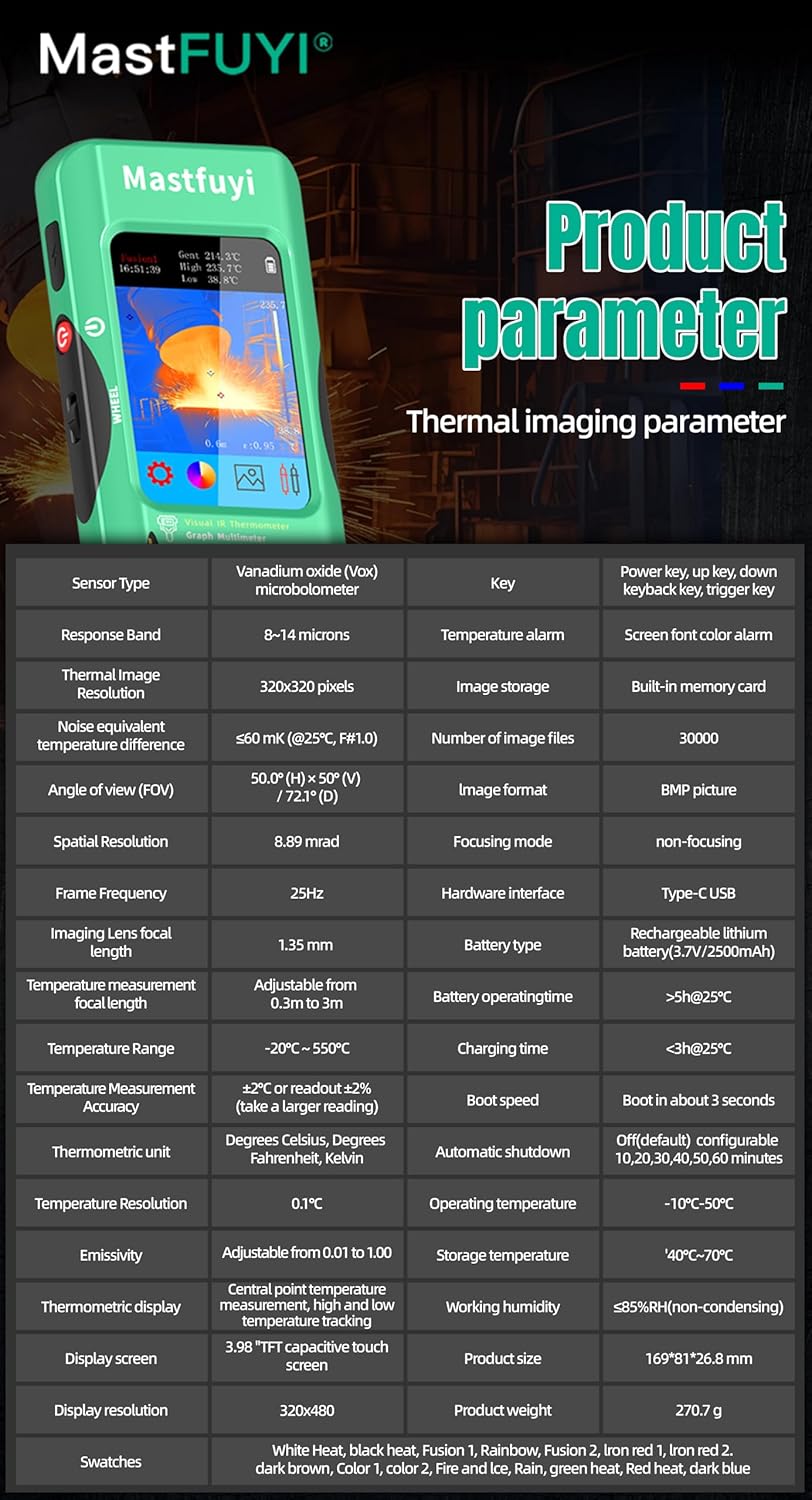
- Діапазон температур: Вимірює температури від -20℃ до 550℃ (від -4℉ до 1022℉).
- ІЧ-роздільна здатність: Features a 320 x 320 pixel infrared resolution for clear and detailed thermal images.
- Частота оновлення: Operates at 25Hz, providing a smooth, real-time thermal video feed.
- Теплова чутливість (NETD): With a sensitivity of less than 60mk, the device can detect subtle temperature differences.
The device can perform microscopic detection at a component level, though a macro lens is not included as a standard accessory. If detailed close-up thermal imaging is required, a corresponding macro lens package would need to be acquired separately.

6.2 Thermal Palettes
The device offers 15 distinct thermal palettes to enhance the visualization of temperature differences. Selecting the appropriate palette can significantly improve the clarity of thermal patterns for specific applications.
- Access palette options via the touchscreen menu or navigation controls.
- Experiment with palettes like Iron Red, Rainbow, White Hot, and Black Hot to find the most suitable display for your inspection.
6.3 Регулювання випромінювальної здатності
Accurate temperature measurements depend on correct emissivity settings. The emissivity value (adjustable from 0.01 to 1.0) should match the material surface being measured.
- Locate the emissivity setting in the thermal imaging menu.
- Consult standard emissivity tables for common materials or adjust the value to achieve the most accurate readings for your specific target.
6.4 Сигналізація високої та низької температури
The intelligent alarm function allows you to set custom temperature thresholds. The device will trigger immediate audible and visual alerts if temperatures exceed or fall below these predefined safety ranges.
- Access the alarm settings through the thermal imaging interface.
- Configure the upper and lower temperature limits to suit your monitoring requirements.
7. Operating the Multimeter
The FY12DMM includes a 20,000-count digital multimeter for precise electrical measurements.
7.1 Підключення вимірювальних щупів
- Insert the red test lead into the "VΩmA" input jack.
- Вставте чорний вимірювальний дріт у вхідне гніздо "COM" (загальний).
- For AC current measurements with an optional clamp, refer to the clamp's instructions.
7.2 Функції вимірювання
Use the touchscreen or navigation to select the desired measurement function. The device supports auto-ranging for most functions.
- DC Voltage: До 1000 В.
- AC Voltage: До 750 В.
- Опір: До 200 МОм.
- Ємність: Up to 99.999mF.
- Випробування діодів: Checks diode functionality.
- Тест безперервності: Audible indication for continuity.
- Flexible AC Current: Up to 2000A (requires optional clamp).
- температура: -20℃ to 1300℃ (-4℉ to 2372℉) using a K-type thermocouple (not included).
Пристрій має Тримайте function to freeze the current reading and Діапазон measurement modes for manual range selection if desired.
8. Управління даними
8.1 Зберігання зображень
The FY12DMM has a built-in memory card capable of storing up to 30,000 images in BMP format.
- To save a thermal image, press the designated capture button on the screen.
- Images are automatically saved to the internal memory.

8.2 Експорт даних
Stored images and recorded waveform data can be exported to a computer for further analysis.
- Підключіть пристрій до комп’ютера за допомогою кабелю USB Type-C.
- Пристрій має відображатися як знімний носій інформації.
- Copy the desired BMP image files or data logs to your computer.
9. Технічне обслуговування
9.1 Очищення
- Протріть зовнішню частину пристрою м’якою тканиноюamp тканина. Не використовуйте абразивні засоби чи розчинники.
- Gently clean the thermal imager lens with a lens cleaning cloth.
- Перед чищенням переконайтеся, що пристрій вимкнено та від’єднано від будь-якого джерела живлення.
9.2 Догляд за акумулятором
- Регулярно заряджайте акумулятор, навіть якщо пристрій не використовується часто, щоб підтримувати його справність.
- Avoid storing the device in extreme temperatures.
10. Вирішення проблем
| проблема | Можлива причина | Рішення |
|---|---|---|
| Пристрій не включається. | Низький або розряджений акумулятор. | Charge the device fully using the supplied USB Type-C cable. |
| Неточні показання температури. | Incorrect emissivity setting; dirty lens. | Adjust emissivity for the target material; clean the thermal imager lens. |
| Multimeter readings are unstable or incorrect. | Poor test lead connection; incorrect function selected. | Ensure test leads are securely connected; verify the correct measurement function is selected. |
| Cannot transfer data to computer. | Faulty USB cable; incorrect connection mode. | Try a different USB Type-C cable; ensure the device is properly connected and recognized by the computer. |
11. Технічні характеристики
11.1 Infrared Camera Specifications
| Особливість | Специфікація |
|---|---|
| Розмір дисплея | 3.98-дюймовий TFT LCD |
| Дозвіл ІК | 320 x 320 пікселів |
| Роздільна здатність екрана | 320 x 480 пікселів |
| Кут View (FOV) | 50.0°(H) x 50.0°(V) / 72.1°(D) |
| Просторова роздільна здатність (IFOV) | 8.89 мрад |
| Діапазон температур | Від -20 до 550 ℃ (-4 -1022 до XNUMX ℉) |
| Теплова чутливість/NETD | Less than 60mk |
| Частота оновлення | 25 Гц |
| Налаштування відстані | 0.3 - 3 метрів |
| Емісійність | 0.01 - 1.0 (регульовано) |
| Thermal Palettes | 15 |
| Number of Storage Images | 19,000 (internal memory) |
11.2 Digital Multimeter Specifications
| Особливість | Діапазон | роздільна здатність | Точність |
|---|---|---|---|
| MAX Display | 20000 відліків | ||
| DC Voltage | 20mV/200mV/2V/20V/200V/1000V | 0.001 мВ до 0.1 В | від ±(0.05%+3) до ±(0.5%+3) |
| AC Voltage | 20mV/200mV/2V/20V/200V/750V | 0.001 мВ до 0.1 В | від ±(0.1%+3) до ±(0.5%+3) |
| Flexible AC Current | 200А/2000А | 0.1А/1А | ±(1.0%+5) |
| опір | від 200 Ом до 200 МОм | від 0.01 Ом до 0.01 МОм | від ±(0.2%+3) до ±(5%+5) |
| Ємність | від 999.99 нФ до 99.999 мФ | від 0.01 нФ до 0.001 мФ | від ±(2%+5) до ±(5%+20) |
| температура | -20℃~1300℃/-4℉-2372℉ | 1 ℃/1 ℉ | ±(2%+5) |
| діод | так | ||
| Безперервність | так | ||

11.3 Загальні технічні характеристики
- Потужність: 2500mAh rechargeable battery (built-in)
- розмір: 169 x 81 x 26.8 мм
- вага: 270г
- Operating System Languages: English, Spanish, German, French, Italian, Japanese, Chinese (selectable)

12. Гарантія та підтримка
For warranty information and technical support, please refer to the warranty card included with your product or visit the official Mastfuyi webсайт.
Visit the Mastfuyi Store on Amazon щоб отримати більше продуктів та ресурсів підтримки.


