1. Вступ
This manual provides detailed instructions for the safe and efficient operation of your Xprinter XP-P323B Portable Thermal Printer. Please read this manual thoroughly before using the device to ensure proper functionality and to prevent damage. The XP-P323B is designed for printing receipts and labels, offering portability and high-speed capabilities for various business needs.
2. Інформація про безпеку
- Не піддавайте принтер впливу води або надмірної вологи.
- Avoid dropping the printer or subjecting it to strong impacts.
- Використовуйте лише зазначений адаптер живлення та аксесуари.
- Keep the printer away from heat sources and direct sunlight.
- Не намагайтеся розбирати або ремонтувати принтер самостійно. Зверніться до кваліфікованого сервісного персоналу.
- Забезпечте належну вентиляцію під час роботи.
3. Вміст упаковки
Перевірте наявність усіх елементів в упаковці:
- Xprinter XP-P323B Portable Thermal Printer
- Power Adapter (not explicitly listed but standard)
- USB Cable (not explicitly listed but standard)
- Sample Thermal Paper Roll (not explicitly listed but standard)
- Посібник користувача (цей документ)
4. Продукт закінчивсяview
The Xprinter XP-P323B is a compact and efficient thermal printer designed for various printing tasks. It supports NV logo download and picture printing (BMP format), along with concentration adjustment for print quality.
4.1. Компоненти принтера

малюнок 1: Фронт view of the Xprinter XP-P323B Portable Thermal Printer, showing the power button, display, and a sample label being printed.
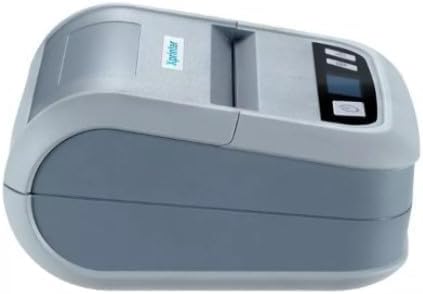
малюнок 2: сторона view of the Xprinter XP-P323B, highlighting its compact design and the Xprinter logo.
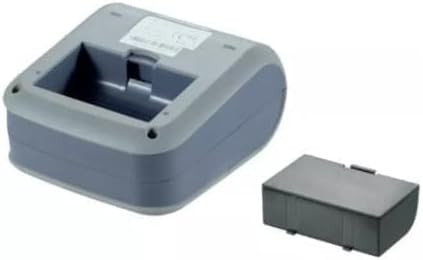
малюнок 3: Нижня сторона view of the Xprinter XP-P323B, showing the base and the removable battery compartment.
5. Налаштування
5.1. Зарядка батареї
- Connect the power adapter to the printer's charging port.
- Підключіть адаптер живлення до настінної розетки.
- The charging indicator light will illuminate. Allow the printer to charge fully before first use.
5.2. Loading Thermal Paper/Labels
- Open the paper compartment cover by gently pushing the release latch.
- Insert the thermal paper roll with the printing surface facing the print head. Ensure the roll is seated correctly.
- Витягніть невеликий шматок паперу повз друкуючу головку.
- Close the paper compartment cover firmly until it clicks into place.
5.3. Підключення до пристрою
The XP-P323B supports USB and Bluetooth connectivity.
5.3.1. USB-з'єднання
- Підключіть принтер до комп’ютера за допомогою USB-кабелю, що входить до комплекту.
- Install the necessary printer drivers (available from the Xprinter website or included software).
5.3.2. Bluetooth Connection (for Smartphones/iOS)
- Переконайтеся, що принтер увімкнено.
- On your smartphone or iOS device, go to Bluetooth settings and enable Bluetooth.
- шукати available devices and select 'XP-P323B' (or similar name).
- Enter the pairing PIN if prompted (refer to printer documentation for default PIN, often '0000' or '1234').
- Once paired, you can use a compatible printing application to send print jobs.
6. Експлуатація принтера
6.1. Базовий друк
- Ensure the printer is connected to your device and has paper loaded.
- Відкрийте документ або зображення, яке потрібно роздрукувати, на підключеному пристрої.
- Виберіть опцію друку у вашій програмі.
- Choose 'XP-P323B' as the printer.
- Adjust print settings as needed (e.g., paper size, print quality).
- Розпочніть завдання друку.
6.2. NV Logo and Picture Printing
The printer supports downloading and printing NV (Non-Volatile) logos and BMP format pictures. This functionality typically requires specific software or commands. Refer to the advanced programming guide or software documentation for detailed instructions on how to upload and print custom logos or images.
6.3. Adjusting Print Concentration
Print concentration can be adjusted to optimize print quality. This setting is usually accessible through the printer driver software on a computer or within the settings of a compatible mobile printing application. Consult your software's help section for specific steps.
7. Технічне обслуговування
7.1. Очищення принтера
- Зовні: Протріть зовнішню частину принтера м’якою,amp тканина. Не використовуйте агресивні хімікати або абразивні засоби для чищення.
- Друкувальна головка: The thermal print head should be cleaned periodically to ensure optimal print quality. Use a cotton swab lightly dampened with isopropyl alcohol. Gently wipe the print head surface. Allow it to dry completely before closing the cover and resuming operation.
- Шлях паперу: Видаліть паперовий пил або сміття зі шляху проходження паперу за допомогою м’якої щітки або стисненого повітря.
7.2. Зберігання
When not in use for extended periods, store the printer in a cool, dry place, away from direct sunlight and extreme temperatures. Remove the paper roll if storing for a very long time to prevent dust accumulation.
8. Вирішення проблем
| проблема | Можлива причина | Рішення |
|---|---|---|
| Принтер не вмикається | Low battery; Power adapter not connected; Faulty power adapter | Charge the battery; Ensure power adapter is securely connected; Try a different power outlet or adapter |
| Немає виводу на друк | No paper; Paper loaded incorrectly; Printer not connected; Driver issue | Load paper correctly; Re-establish connection; Reinstall printer drivers |
| Погана якість друку | Dirty print head; Low print concentration; Low battery | Clean the print head; Adjust print concentration in software; Charge the battery |
| Збій підключення Bluetooth | Bluetooth off on device; Incorrect pairing PIN; Printer out of range | Enable Bluetooth; Re-enter correct PIN; Move device closer to printer |
9. Технічні характеристики
| Бренд | Xprinter |
| Номер моделі | XP-P323B |
| Розміри предмета (Д x Ш x В) | 15 Г x 7 Ш x 10 В сантиметрів |
| Технологія підключення | USB |
| Технологія принтера | Теплові |
| Особливості | Портативний |
| Колір | Сірий |
| Сумісні пристрої | Смартфони |
| Тип контролера | iOS |
| Максимальний розмір носія | 4 x 6 дюймів |
| Друковані ЗМІ | етикетки |
| Розмір паперу | 4 x 6 дюймів |
| Вихід на принтер | Монохромний |
| Максимальна швидкість друку (чорно-білий) | 40 mm/s (estimated from context) |
| Вага товару | 300 грамів |
10. Гарантія та підтримка
For warranty information and technical support, please refer to the warranty card included with your product or visit the official Xprinter webсайт. Зберігайте чек про покупку як підтвердження покупки для гарантійних претензій.


