1. Вступ та сумісність
This manual provides detailed instructions for the installation, operation, and maintenance of your autoabc Wireless CarPlay/Android Auto 8.9-inch Linux Touchscreen Multimedia Radio Receiver. This device is designed to upgrade your vehicle's infotainment system while retaining original car functionalities.
1.1. Сумісність з транспортними засобами
This product is specifically designed for the following BMW models with a CCC-System:
- BMW 3 Series: E90, E91, E92, E93 (2005-2010)
- BMW 5 Series: E60, E63, E64 (2005-2010)
Важливо: Please verify your vehicle's system is a CCC-System before purchase and installation. If you are unsure, consult a professional or contact autoabc customer support.

Image 1.1: Compatibility chart for BMW E-series models and CCC system.
2. Ключові характеристики
The autoabc Multimedia Radio Receiver offers a range of advanced features to enhance your driving experience:
- Wireless and Wired CarPlay/Android Auto: Seamlessly integrate your smartphone for navigation, music, calls, and more using intelligent voice assistants.
- High-Definition 8.9-inch Touchscreen: A 1920 x 720 resolution LED display provides a clear and vibrant visual experience.
- Original Feature Retention: Maintains all original car functions, including radio, ampрятувальний пітчер, керування джойстиком, заднійview camera, and vehicle information display (speed, fuel, oil pressure, safety warnings).
- Кілька методів контролю: Supports control via the original car knob, steering wheel buttons, and the new touchscreen interface.
- Відображення екрана: Features Airplay and Autolink for mirroring your phone's screen, and supports USB media playback.
- Підтримка камери: Compatible with factory original reverse cameras, parking radar, and aftermarket front view DVR (AHD/CVBS).

Image 2.1: Control methods supported by the system, including original car knob, steering wheel buttons, and the new touchscreen. Also highlights camera support.

Image 2.2: Visual representation of screen mirroring capabilities (Airplay, Autolink) and USB media playback.
3. Налаштування та встановлення
3.1. Pre-Installation Notice: AUX Function Activation
Due to the age of some compatible car models, the AUX function may not be active by default. It is crucial to activate the AUX function in your car before using this product to ensure audio output. You can activate the AUX function using a dedicated activator tool or by seeking assistance from a car dealership or a qualified car repair shop.
3.2. Установка завершенаview
Installation involves replacing the original display screen and connecting the new unit with the provided cables. While the installation is designed to be straightforward, professional installation is recommended if you are not familiar with car electronics. An installation video may be available; please check the product page or contact customer support for guidance.
Включені компоненти:
- Основний дисплейний блок
- Кабель живлення
- USB кабель
- Кабель AUX
- Посібник користувача
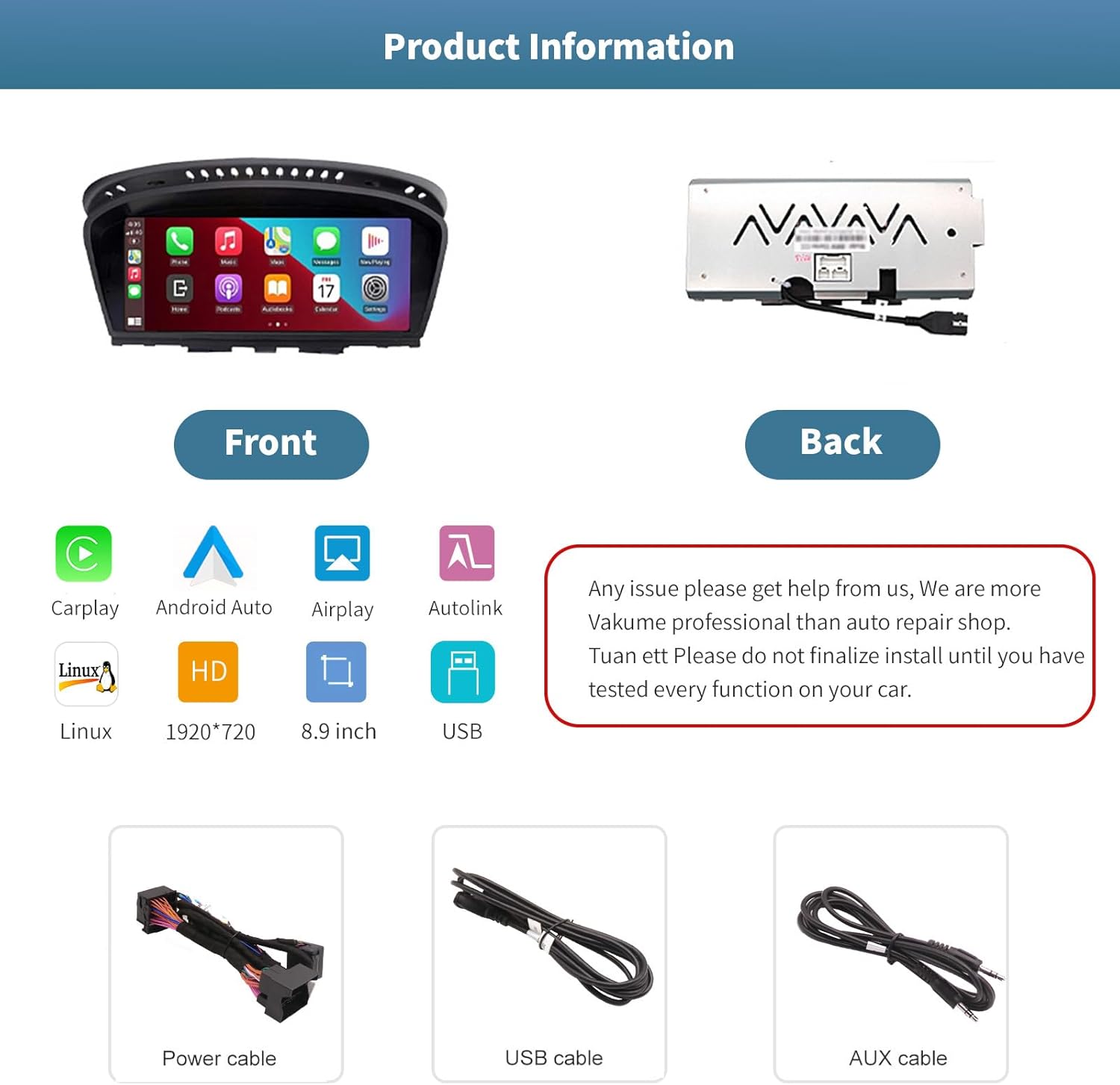
Зображення 3.1: Передня та задня частини views of the autoabc multimedia receiver, along with the included power, USB, and AUX cables.
Примітка: Do not finalize the installation until you have tested every function on your car. For any installation issues, please contact autoabc support.
4. Операція
4.1. Перемикання між системами
The unit allows for one-button switching between your original BMW iDrive system and the new Linux-based multimedia system. This ensures you can access all original car functions while enjoying the new features.

Image 4.1: Interface showing the option to switch between the original car system and the new Linux system.
4.2. Using CarPlay and Android Auto
Once connected wirelessly or via USB, CarPlay or Android Auto will launch, providing access to your phone's navigation, communication, and entertainment apps directly on the 8.9-inch touchscreen. Use voice commands or the touchscreen for safe operation while driving.

Image 4.2: The autoabc multimedia receiver installed in a BMW, showcasing the CarPlay/Android Auto interface.
4.3. Screen Mirroring (Airplay/Autolink)
Utilize Airplay for iOS devices or Autolink for Android devices to mirror your smartphone's screen onto the unit's display. This allows you to view photos, videos, and other content directly from your phone.
4.4. Customizing the Startup Screen
You can personalize the startup logo of your unit. Follow these steps:
- Create a PNG image with a resolution of 1920 x 720 pixels.
- Перейменуйте зображення file to 'updatelogo.png'.
- Place the 'updatelogo.png' file in the root directory of a USB drive.
- Insert the USB drive into the reserved USB port on the unit. A prompt will confirm the logo change is successful.
- Restart the car to apply the new startup logo.

Image 4.3: Step-by-step guide for customizing the unit's startup logo.
5. Технічне обслуговування
To ensure the longevity and optimal performance of your autoabc multimedia receiver, follow these general maintenance guidelines:
- Очищення екрану: Використовуйте м’яку тканину без ворсу, щоб обережно протерти сенсорний екран. Для стійких плям злегкаampПротріть тканину водою або засобом для чищення екранів. Уникайте агресивних хімікатів або абразивних матеріалів.
- Уникайте екстремальних температур: Не піддавайте пристрій впливу надмірного тепла або холоду протягом тривалого часу, оскільки це може вплинути на його електронні компоненти.
- Управління кабелем: Ensure all cables are securely connected and not pinched or strained, which could lead to damage or intermittent connectivity.
6. Вирішення проблем
If you encounter issues with your autoabc multimedia receiver, refer to the following common problems and solutions:
- Немає аудіовиходу:
- Ensure the AUX function in your car's original system is activated. This is a common requirement for audio output.
- Check all audio cable connections, especially the AUX cable.
- Проблеми з підключенням CarPlay/Android Auto:
- Verify your phone's Bluetooth and Wi-Fi are enabled and correctly paired with the unit.
- Перезавантажте телефон та інформаційно-розважальну систему автомобіля.
- Переконайтеся, що операційна система вашого телефону оновлена.
- Microphone Echo or Poor Call Quality:
- Перевірте наявність будь-яких перешкод поблизу мікрофона.
- Adjust the microphone sensitivity settings if available in the unit's menu.
- Ensure your phone's volume is not excessively high, which can cause feedback.
- Екран не реагує на дотик:
- Перезапустіть пристрій.
- Переконайтеся, що екран чистий і не містить сміття.
- AirPlay/Autolink Connection Failure:
- Ensure both the unit and your phone are connected to the same Wi-Fi network (if applicable for the mirroring method).
- Follow the specific connection steps for AirPlay or Autolink as detailed in the unit's on-screen instructions or a supplementary guide.
If these steps do not resolve the issue, please contact autoabc customer support for further assistance.
7. Технічні характеристики
| Особливість | Специфікація |
|---|---|
| Розмір дисплея | 8.9 дюймів |
| Роздільна здатність дисплея | 1920 х 720 |
| Операційна система | Linux (supports Android Auto, CarPlay) |
| Технологія підключення | Bluetooth, Wireless (for CarPlay/Android Auto) |
| Особливість | Сенсорний екран |
| Спосіб контролю | Touchscreen, Voice Command, Original Car Knob, Steering Wheel Buttons |
| Тип монтажу | Панельне кріплення |
| Вага товару | 3.12 фунта (1.42 кілограма) |
| Розміри упаковки | 11.81 x 7.24 x 6.73 дюймів |
8. Гарантія та підтримка
autoabc is committed to providing excellent customer service and support for your product.
8.1. Інформація про гарантію
- One-Year Global Warranty: Your product is covered by a one-year global warranty from the date of purchase.
- 12 Months Replacement: Replacement is available within 12 months for eligible issues.
- 60 Days No Worry Return: Скористайтеся 60-денною політикою повернення для вашого спокою.
8.2. Технічна підтримка
- LIFETIME Technical Service Support: autoabc provides lifetime technical support for your product.
- Швидка відповідь протягом 24 годин: Expect a quick response to your inquiries within 24 hours.
- Зв'яжіться з нами: For any questions, issues, or technical assistance, please contact us via Amazon Email. Our team is ready to provide reliable online technical support.

Зображення 8.1: закінченоview of autoabc's customer support and warranty commitments.


