1. Вступ
Thank you for choosing the Klarstein Aqualine 6L Reverse Osmosis Water Filtration System. This advanced system is designed to provide clean, purified, and hydrogen-enriched drinking water for your home. It features a 5-stage filtration process, 3 integrated filters, and a hydrogen ionizer for enhanced hydration. The intuitive HD touchscreen allows for easy control over 6 temperature settings and provides essential information such as filter change alerts and TDS levels.
This manual contains important information regarding the installation, operation, maintenance, and troubleshooting of your new water filtration system. Please read it thoroughly before use and keep it for future reference.

Figure 1: Klarstein Aqualine 6L Water Filtration System Overview
2. Інформація про безпеку
- Перед використанням приладу прочитайте всі інструкції.
- Переконайтеся, що джерело живлення відповідає характеристикам, зазначеним на приладі.
- Не занурюйте прилад, шнур живлення або вилку у воду чи інші рідини.
- Тримайте прилад у недоступному для дітей місці.
- Do not operate the appliance if the power cord or plug is damaged. Contact customer support for assistance.
- Розмістіть прилад на стійкій, рівній та сухій поверхні.
- Не перекривайте вентиляційні отвори.
- Only use original Klarstein replacement filters.
- Від’єднайте прилад від мережі перед чищенням або будь-яким технічним обслуговуванням.
3. Компоненти продукту
The Klarstein Aqualine 6L system includes the following main components:
- Головний фільтрувальний блок
- PAC (Pre-Activated Carbon) Filter
- Мембранний фільтр RO (зворотного осмосу).
- CF (Carbon Block) Post-Filter
- 6-Liter Pure Water Tank (removable)
- 2-Liter Wastewater Tank (removable)
- Кабель живлення
- Посібник користувача (цей документ)

Малюнок 2: Верх view showing the three filter cartridges

Рисунок 3: 5-Stage Процес фільтрації
The filtration system consists of three main filters:
- PAC (Pre-Activated Carbon) Filter: A 2-in-1 pre-filter that removes larger particles like sand and rust, as well as chlorine and odors.
- RO (Reverse Osmosis) Membrane Filter: Contains ultra-fine pores to retain the smallest contaminants in the water.
- CF (Carbon Block) Post-Filter: A 2-in-1 post-filter that refines the water with valuable minerals (calcium, magnesium, sodium, potassium) and balances the pH value for a fresh taste.
4. Налаштування та перше використання
4.1 Розпакування
- Акуратно вийміть усі компоненти з упаковки.
- Перевірте наявність пошкоджень під час транспортування. У разі пошкодження не використовуйте пристрій та зверніться до служби підтримки клієнтів.
- Зніміть усі захисні плівки та пакувальні матеріали.
4.2 Встановлення фільтра
The filters are typically pre-installed but may require activation or removal of protective caps. Refer to the labels on the filter slots for correct placement (CF, RO, PAC).
- Переконайтеся, що прилад від’єднано від мережі.
- Align each filter with its corresponding slot.
- Insert the filter and rotate it clockwise until it clicks into place and is securely fastened.
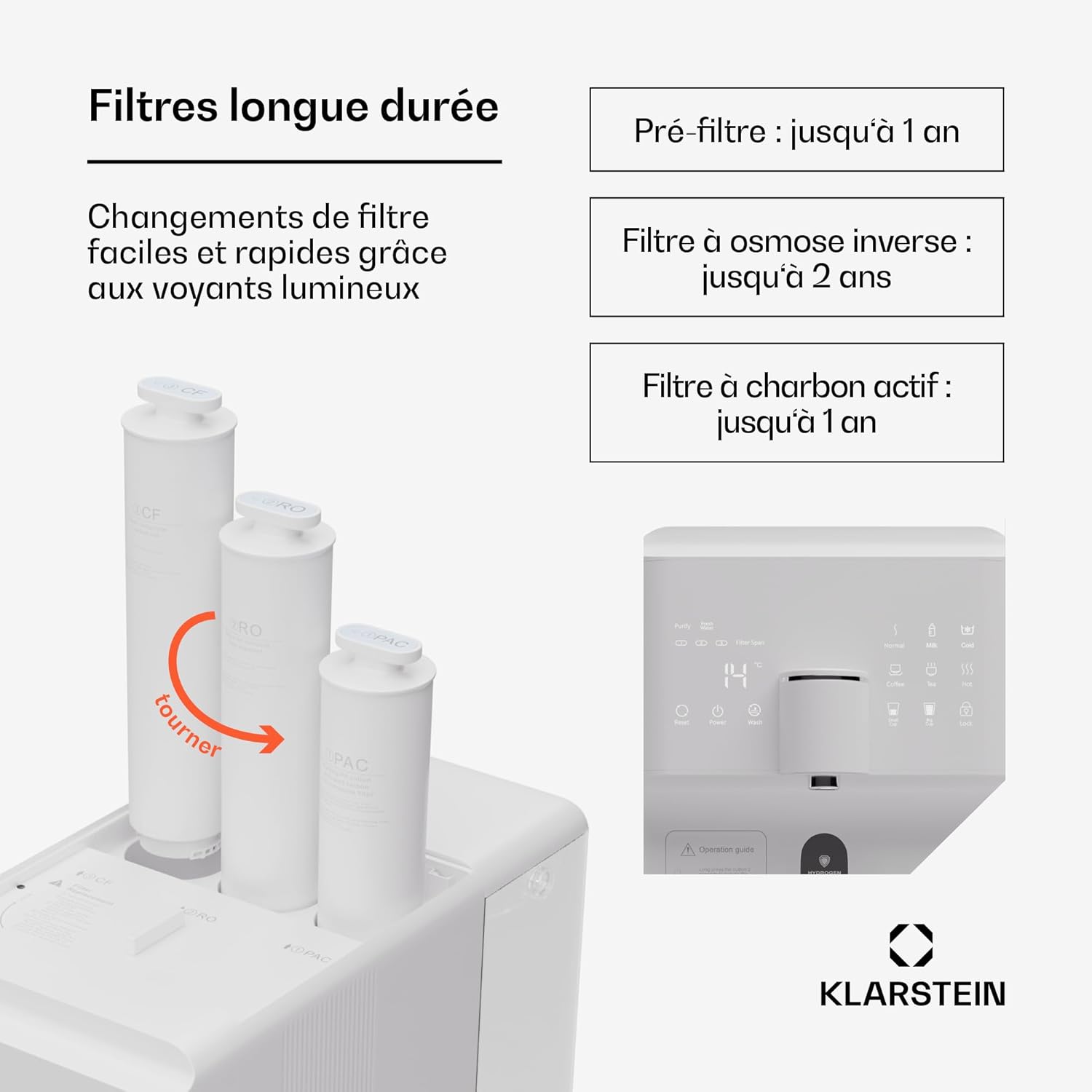
Figure 4: Filter Installation/Replacement
4.3 Наповнення резервуарів для води
The system features a 6-liter pure water tank and a separate 2-liter wastewater tank.

Figure 5: Water Tank Capacity
- Remove the 6-liter pure water tank from the appliance.
- Fill the tank with tap water. Do not exceed the maximum fill line.
- Place the filled tank back into the appliance, ensuring it is properly seated.
4.4 Initial Flushing
Before first use, the system must be flushed to remove any manufacturing residues and prepare the filters.
- Увімкніть прилад в розетку.
- Turn on the appliance using the power button on the touchscreen.
- Follow the on-screen instructions for initial flushing. This process typically involves dispensing several full tanks of water to waste.
- Empty the wastewater tank as needed during the flushing process.
- Once flushing is complete, the system is ready for use.
5. Інструкція з експлуатації
5.1 Touchscreen Functions
The HD touchscreen provides access to all system functions and information.

Figure 6: HD Touchscreen Interface
- Увімкнення/вимкнення живлення: Touch the power icon to turn the appliance on or off.
- Filter Change Alerts: Indicators will light up when a filter needs replacement.
- Перевірка TDS: Displays the Total Dissolved Solids level of the water.
- Вибір температури: Choose from 6 preset temperatures.
- Роздача води: Dispense predefined quantities (e.g., 150ml/300ml) or continuous flow.
5.2 Налаштування температури
The system offers the following temperature options:
- Chilled Water: For refreshing cold drinks.
- Вода кімнатної температури: For general drinking.
- 45°C (теплий): Ideal for baby formula.
- 80°C: Підходить для зеленого чаю.
- 90°C: Suitable for coffee.
- 100°C (Boiling): For black tea or instant noodles.
Select your desired temperature by touching the corresponding icon on the display.
5.3 Подача води
- Поставте чашку або ємність під носик дозатора.
- Виберіть потрібну температуру.
- Choose a predefined volume (e.g., 150ml, 300ml) or press the dispense button for continuous flow. Press again to stop.
5.4 Hydrogen Ionizer Function
The integrated hydrogen ionizer enriches the water with hydrogen gas. This hydrogen-rich water is believed to improve hydration and provide antioxidant benefits. Activate this function via the touchscreen if available, or it may be an automatic part of the filtration process.
6. Технічне обслуговування
6.1 Заміна фільтра
Regular filter replacement is crucial for maintaining water quality and system performance. The touchscreen will indicate when a filter needs changing.

Figure 7: Recommended Filter Lifespan
| Тип фільтра | Recommended Lifespan |
|---|---|
| PAC (Pre-Activated Carbon) Filter | До 1 року |
| Мембранний фільтр RO (зворотного осмосу). | До 2 років |
| CF (Carbon Block) Post-Filter | До 1 року |
Щоб замінити фільтр:
- Від’єднайте прилад від мережі.
- Rotate the old filter counter-clockwise to unlock and remove it.
- Insert the new filter into the correct slot and rotate clockwise until it locks into place.
- After replacing filters, perform a short flush cycle as indicated in the operating instructions or on the touchscreen.
6.2 Очищення резервуарів для води
The pure water and wastewater tanks are removable for easy cleaning.
- Від’єднайте прилад від мережі.
- Remove both the pure water tank and the wastewater tank.
- Wash the tanks with mild soap and warm water. Rinse thoroughly to remove all soap residue.
- Dry the tanks completely before reinserting them into the appliance.
6.3 Зовнішнє очищення
Протріть зовнішню частину приладу м’якою, damp тканина. Не використовуйте абразивні засоби чи розчинники.
7. Вирішення проблем
| проблема | Можлива причина | Рішення |
|---|---|---|
| Вода не подається | Pure water tank empty; wastewater tank full; power off; filters clogged. | Refill pure water tank; empty wastewater tank; check power connection; replace filters. |
| Poor water taste/odor | Filters need replacement; initial flushing not completed. | Replace PAC or CF filter; perform initial flushing cycle. |
| Низька швидкість течії води | Filters clogged; air in system. | Replace filters; run a flush cycle to remove air. |
| Повідомлення про помилку на дисплеї | System malfunction; sensor error. | Refer to the specific error code in the full manual (if available) or contact customer support. Try restarting the appliance. |
| Витік води | Filters not properly installed; tank not seated correctly. | Ensure filters are securely locked; re-seat water tanks. |
Якщо проблема не зникає після спроби цих рішень, зверніться до служби підтримки клієнтів Klarstein.
8. Технічні характеристики
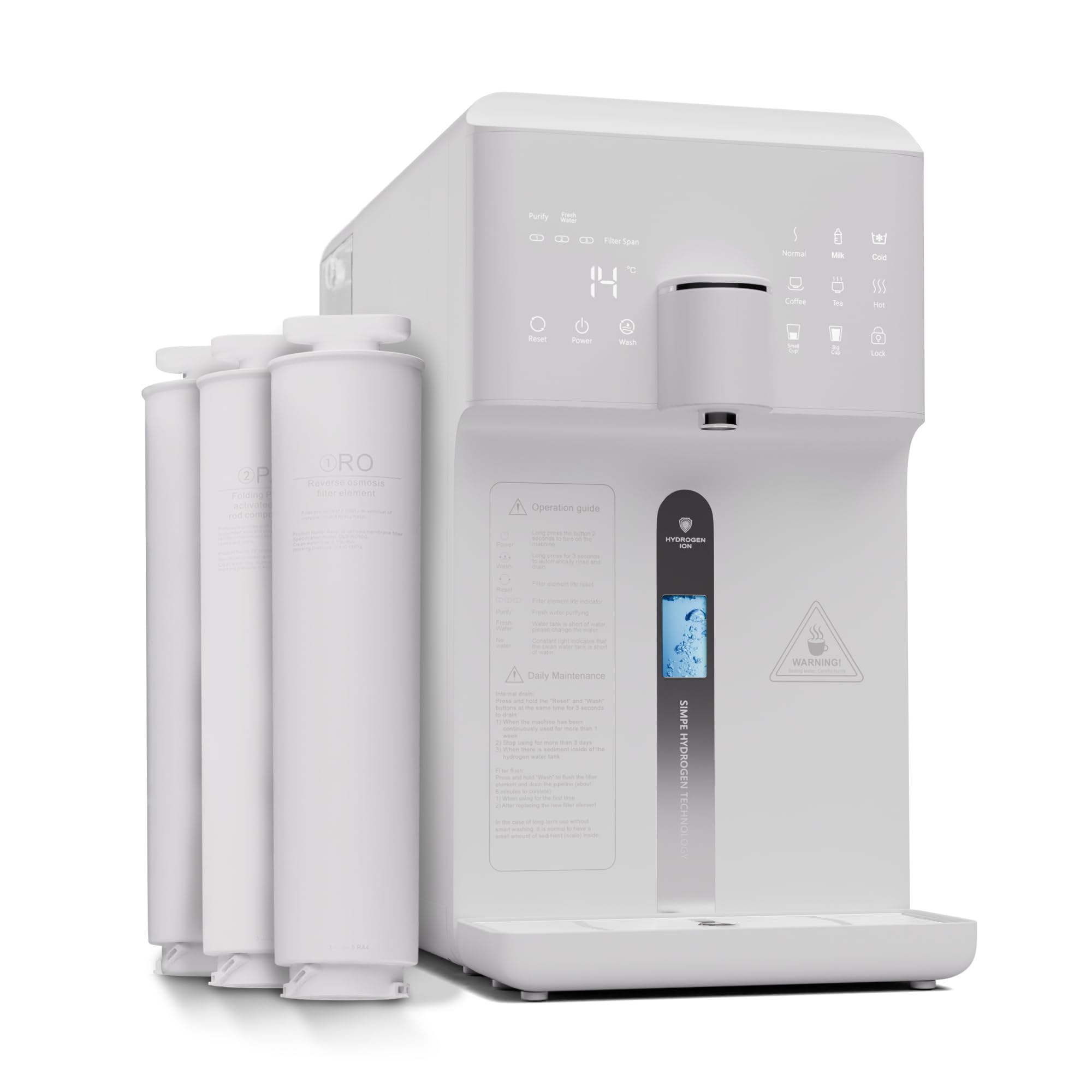
Рисунок 8: Розміри виробу
| Особливість | Деталь |
|---|---|
| Номер моделі | WFT2-AquaFina6LWhite |
| Бренд | Klarstein |
| Розміри (Д x Ш x В) | 43 х 24 х 47 см |
| вага | 14.3 кг |
| Ємність резервуара для чистої води | 6 літра |
| Wastewater Tank Capacity | 2 літра |
| Фільтрація Stages | 5 Stages (3 Filters: PAC, RO, CF) |
| Метод очищення | Зворотній осмос |
| Особливість | Hydrogen Ionizer |
| матеріал | Plastic, RO membrane, PAC and CF filters |
| Джерело живлення | Електричний кабель |
| Тип установки | Under Sink (Note: Product description states 'Sous évier' but images and other descriptions suggest countertop. User should verify.) |
| Швидкість потоку води | 30 літрів/год |
| Drain Ratio (Wastewater:Pure Water) | 1.2:1 |
9. Гарантія та підтримка
Klarstein products are manufactured with care and undergo strict quality control. In the unlikely event of a defect, please refer to your purchase documentation for warranty terms and conditions. For technical support, replacement parts, or any questions regarding your Klarstein Aqualine 6L system, please contact Klarstein customer service through their official webсайт або магазин, де ви придбали товар.
Please have your model number (WFT2-AquaFina6LWhite) and purchase date ready when contacting support.


