вступ
The ADYSS A21S is a versatile 67-inch metal phone tripod and selfie stick designed for enhanced mobile photography and videography. It features a robust metal construction, integrated RGB and fill lights, a 360° rotating balance handle, and a wireless remote control. This manual provides detailed instructions for setup, operation, and maintenance to ensure optimal performance.
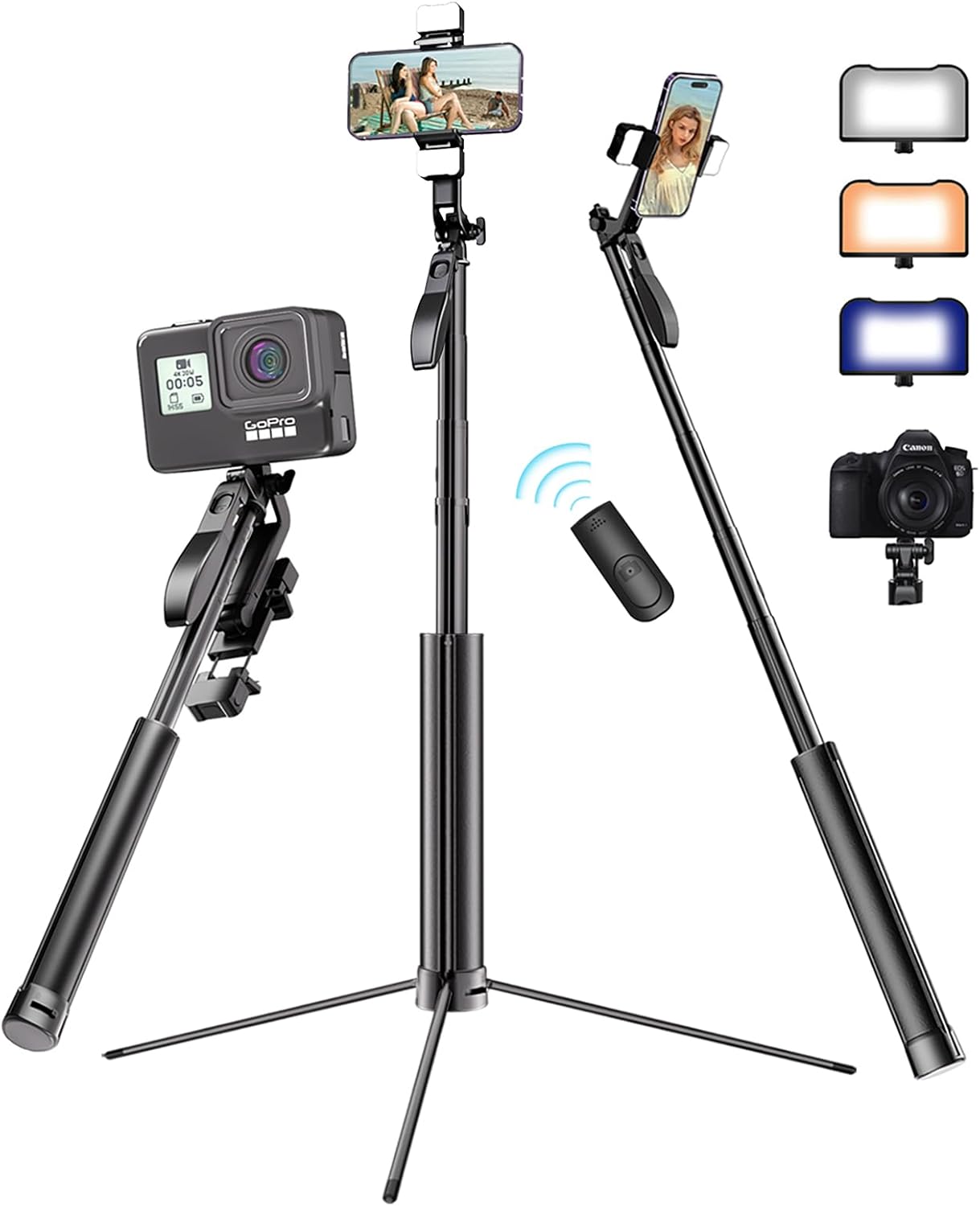
The ADYSS A21S tripod and selfie stick in various configurations, highlighting its versatility with different devices and lighting.
Що в коробці
- ADYSS A21S Phone Tripod Selfie Stick
- Бездротовий пульт дистанційного керування Bluetooth
- USB Charging Cable (for lights and remote)
- Посібник користувача (цей документ)
Інструкції з налаштування
1. Unfolding the Tripod Legs
- Hold the main body of the tripod firmly.
- Gently pull down the bottom section to release the integrated legs. The legs will extend outwards.
- Locate the locking switch at the base of the tripod. Slide the switch to the 'lock' position to secure the legs in place, ensuring stability.

The robust iron base and body of the tripod, with a clear view of the locking switch for the legs.
2. Extending the Pole
- Once the legs are stable, grasp the top section of the pole.
- Pull upwards to extend the pole to your desired height. The pole can extend from 11 inches to 67 inches.

The tripod fully extended, demonstrating its adjustable length for various shooting needs.
3. Підключення телефону
- Locate the phone clip at the top of the pole.
- Gently stretch the phone clip to insert your smartphone. The clip supports phones with widths between 2 to 4 inches.
- Ensure your phone is securely held by the clip.

The phone clip demonstrating its wide compatibility for various phone sizes.
4. Сполучення бездротового пульта дистанційного керування
- Remove the wireless remote control from its slot on the handle.
- Turn on the remote control (usually by pressing and holding the button).
- На своєму смартфоні перейдіть до налаштувань Bluetooth та знайдіть доступні пристрої.
- Select "ADYSS" or a similar name to pair. The remote is compatible with both iOS and Android devices.

The wireless remote control, demonstrating its 40ft/12m range and compatibility with Android and iOS devices.
5. Charging the Lights and Remote
The integrated lights and the wireless remote control each have their own charging ports. Use the provided USB cable to charge them individually when needed.
Інструкція з експлуатації
1. Налаштування кутів зйомки
- Phone Clip Rotation: The phone clip supports 360° left and right rotation for switching between portrait and landscape modes.
- Phone Clip Tilt: The phone clip can be tilted 180° up and down to find the perfect vertical angle.
- Fill Light Rotation: The fill lights can be rotated 360° independently to direct light as needed.

Illustrations of the phone clip's 360° rotation and 180° tilt capabilities.
2. Using the 360° Rotating Balance Handle (Gimbal Function)
The tripod is equipped with a 360° rotating balance handle. To use this feature:
- Ensure the phone is securely mounted.
- Unlock the handle by sliding the small lever near the handle.
- Use the handle to smoothly rotate your phone 360° for panoramic shots or stable video tracking.
- Lock the handle back into place when finished to maintain a fixed position.

The stable 360° rotating handle in action, enabling smooth panoramic shots.
3. Operating the RGB and Fill Lights
The tripod features both RGB and fill lights for various lighting needs.
- Увімкнення/вимкнення: Double-click the dedicated button on the side of each light to turn it on or off.
- Changing Modes/Colors: Once the light is on, continue to single-click the button to cycle through different light colors and modes (e.g., 3-color fill light temperatures, various RGB colors, and flashing modes).

The 3-color fill light and RGB light in operation, demonstrating color changes.
4. Attaching Other Devices
The ADYSS A21S is equipped with a standard 1/4-inch international screw, allowing compatibility with various devices:
- Фотоапарати
- GoPro cameras (adapter may be required)
- Ring fill lights

The tripod demonstrating its wide compatibility with various devices using the 1/4-inch standard screw.
Official product video demonstrating the setup, features, and usage of the ADYSS 67" Phone Tripod Selfie Stick, including its retractable stand, one-click lock, adjustable height, two-way stretch phone holder, 360° rotating holder, ergonomic balance handle, steady cushioning, adjustable multi-color fill light, and embedded Bluetooth remote control.
Технічне обслуговування
- Прибирання: Wipe the tripod with a soft, dry cloth. Avoid using harsh chemicals or abrasive materials.
- Зберігання: When not in use, collapse the tripod to its minimum length and fold the legs. Store in a cool, dry place away from direct sunlight.
- Зарядка: Regularly charge the integrated lights and wireless remote to ensure they are ready for use.
Усунення несправностей
- Не вмикаються фари: Ensure the lights are fully charged. Double-click the power button firmly.
- Пульт не підключається: Ensure the remote is charged and turned on. Check your phone's Bluetooth settings to ensure it's paired. If issues persist, try unpairing and re-pairing.
- Нестабільність штатива: Ensure the tripod legs are fully extended and the locking switch at the base is engaged. Avoid placing the tripod on uneven surfaces.
- Phone not fitting in clip: The phone clip has a stretching range of 2-4 inches. Ensure your phone's width falls within this range.
Технічні характеристики
| Особливість | Специфікація |
|---|---|
| Бренд | ADYSS |
| Назва моделі | A21S |
| матеріал | Залізо |
| Максимальна висота | 67 дюймів |
| Мінімальна висота | 11 дюймів |
| Вага товару | 1.25 фунта |
| Phone Clip Stretch Range | 2-4 дюймів |
| Сумісні пристрої | iPhone 15/14/13 Pro Max/Android/GoPro, etc. |
| Особливість | All-in-One Selfie Stick Tripod for Phone, Camera, GoPro with Light |
Гарантія та підтримка
- Підтримка клієнтів: 24-Hour Customer Support is available for any inquiries or assistance.
- Гарантія: The product comes with a 365-Day Replacement and Lifetime Service.


