AquilaPro Laser Measuring Tool
Посібник користувача
Модель: KL02060
1. Вступ
This manual provides comprehensive instructions for the safe and effective use of your AquilaPro Laser Measuring Tool. Designed for precision and ease of use, this compact device offers various measurement modes for both professional and home applications. Please read this manual thoroughly before operation and retain it for future reference.

Figure 1: AquilaPro Laser Measuring Tool
2. Інформація про безпеку
ПОПЕРЕДЖЕННЯ: Лазерне випромінювання
- Не дивіться прямо на лазерний промінь.
- Уникайте прямого впливу лазерного променя на очі.
- Не направляйте лазер на людей або тварин.
- Використовуйте лише так, як описано в цьому посібнику.
- Зберігати в недоступному для дітей місці.
- Не намагайтеся розібрати чи модифікувати пристрій.
This device emits Class 2 laser radiation. Maximum output power is less than 1mW at 635nm.
3. Продукт закінчивсяview
The AquilaPro Laser Measuring Tool features a compact metal fuselage with an HD display for clear readings. Familiarize yourself with the device's components and controls:

Figure 2: Device Components and Controls
- екран: Displays measurements, modes, and battery status.
- UNIT/Laser Button: Activates laser for measurement, short press for single measurement, long press to switch units.
- Кнопка +/-: For addition and subtraction measurements.
- PRESET/History Button: Accesses measurement history and preset values.
- FUNC/Reference Button: Cycles through measurement functions (Area, Volume, Pythagorean, etc.) and switches front/rear reference point.
- Power/Backlight Button: Long press to power on/off, short press to toggle backlight.
4. Налаштування
4.1 Зарядка пристрою
The device is equipped with a rechargeable lithium-ion battery. Before first use, fully charge the device using the provided USB-C cable.
- Підключіть кабель USB-C до порту зарядки в нижній частині пристрою.
- Підключіть інший кінець кабелю до USB-адаптера живлення (не входить до комплекту) або USB-порту комп’ютера.
- Індикатор заряду батареї на екрані показуватиме стан заряджання.
- A full charge provides approximately 10,000 single measurements.

Рисунок 3: Порт заряджання USB-C
4.2 Увімкнення/вимкнення живлення
- Увімкнення: Тривале натискання потужність кнопка () протягом 2 секунд.
- Вимкнення живлення: Тривале натискання потужність button for 2 seconds. The device will also automatically power off after 45 seconds of inactivity to conserve battery.
5. Основна операція
5.1 Одноразове вимірювання
- Увімкніть пристрій.
- Направте лазерний промінь на цільову поверхню.
- Коротко натисніть кнопку UNIT/Laser кнопку. Вимірювання відобразиться на екрані.

Figure 4: Taking a Field Measurement
5.2 Перемикання блоків
The device supports switching between meters (m), inches (in), and feet (ft).
- Тривале натискання UNIT/Laser button to cycle through the units.
- Release the button when your desired unit is displayed.

Figure 5: Unit Conversion Display
5.3 Reference Point Switching (Datum)
You can set the measurement reference point to either the front or rear of the device.
- Коротко натисніть кнопку FUNC/Reference button to toggle between front and rear datum.
- The display will indicate the active reference point.

Figure 6: Front or Rear Measuring Reference
6. Розширені режими вимірювання
The AquilaPro Laser Measuring Tool offers several advanced modes for complex measurements:

Figure 7: Multiple Measurement Modes
- Безперервне вимірювання: Provides real-time distance updates as you move the device. Useful for scanning and finding minimum/maximum distances.
- Вимірювання площі: Measures length and width to calculate the area of a surface.
- Вимірювання об'єму: Measures length, width, and height to calculate the volume of a space.
- Вимірювання за Піфагором: Calculates indirect distances using the Pythagorean theorem (e.g., height of a building).
- Додавання/Віднімання: Allows you to add or subtract measurements.
To select an advanced mode, short press the FUNC/Reference button repeatedly until the desired mode icon appears on the display. Follow the on-screen prompts to perform the measurements for each mode.
6.1 Addition/Subtraction Function
This function allows you to add or subtract consecutive measurements.
- Після вимірювання натисніть кнопку +/- кнопку, щоб увійти в режим додавання або віднімання.
- Take the next measurement. The device will automatically add or subtract it from the previous value.
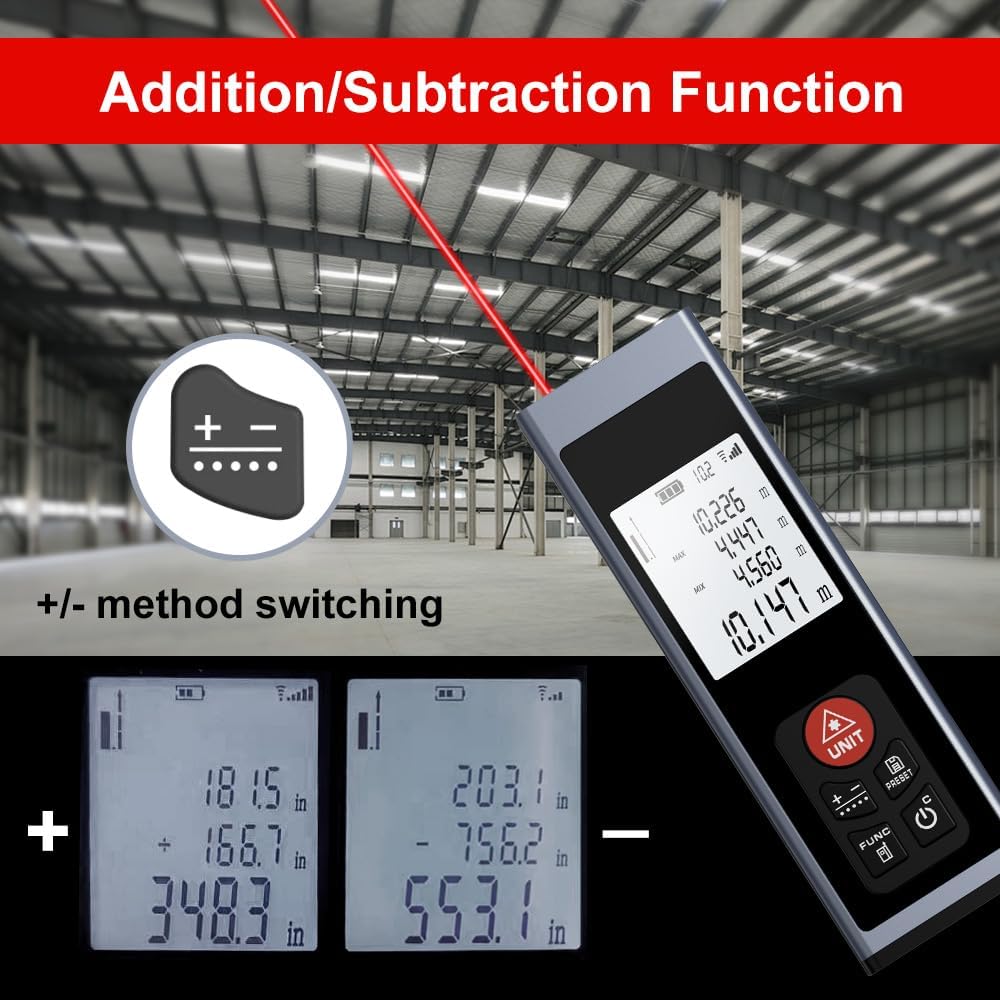
Figure 8: Addition/Subtraction Function
6.2 Функція збереження в пам'яті
Пристрій може зберігати до 28 наборів даних вимірювань.
- до view stored data, short press the PRESET/History кнопку.
- Use the arrow buttons (if available, or cycle through with PRESET) to navigate through the stored measurements.

Figure 9: Memory Storage Display
7. Офіційне відео продукту
Watch this official video from the seller for a quick introduction to the AquilaPro Laser Measuring Tool.
Video 1: AquilaPro Laser Measuring Tool Introduction (Source: AQUILA OPTICS)
8. Технічне обслуговування
- Прибирання: Використовуйте м'який, damp тканиною для очищення пристрою. Не використовуйте абразивні засоби для чищення або розчинники.
- Зберігання: Зберігайте пристрій у прохолодному, сухому місці, подалі від прямих сонячних променів та екстремальних температур.
- Догляд за акумулятором: If storing for extended periods, charge the battery every 3 months to prolong its lifespan.
- Водонепроникність: The device is rated IP54, meaning it is protected against dust and splashing water. Do not immerse in water.
9. Вирішення проблем
| проблема | Можлива причина | Рішення |
|---|---|---|
| Пристрій не вмикається. | Low battery; Device is off. | Charge the battery; Long press the Power button. |
| Неточні показання. | Unstable surface; Obstruction in laser path; Incorrect reference point. | Ensure stable surface; Clear laser path; Check and adjust reference point (front/rear datum). |
| Дисплей тьмяний або нечитабельний. | Підсвічування вимкнено; низький заряд батареї. | Short press Power button to toggle backlight; Charge the battery. |
| Лазер не видно. | Bright ambient light; Laser not activated. | Use in lower light conditions; Short press UNIT/Laser button. |
10. Технічні характеристики
| Особливість | Деталь |
|---|---|
| Бренд | AquilaPro |
| Назва моделі | KL02060 |
| Діапазон вимірювання | 197 фути (60 м) |
| Точність | ±0.078 inch (2mm) |
| матеріал | Алюміній |
| Колір | чорний |
| Розміри продукту (ДxШxВ) | 1.1 см (Д) x 0.6 см (Ш) x 3.4 см (В) |
| Тип батареї | Акумуляторна літій-іонна |
| Міжнародний захист рейтингу | IP54 (захист від пилу та бризок) |
| Включені компоненти | Шнурок |
11. Гарантія та підтримка
This AquilaPro Laser Measuring Tool comes with a Гарантія від виробника 1 рік з дати покупки. Будь ласка, збережіть чек про покупку для гарантійного обслуговування.
For technical support or warranty inquiries, please contact AquilaPro customer service through the retailer's platform or visit the official AquilaPro store on Amazon: AquilaPro Amazon Store.